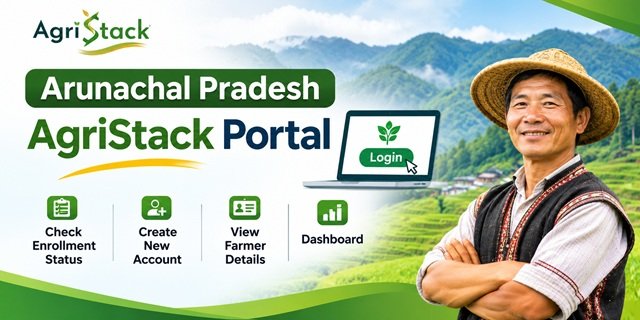
The Arunachal Pradesh AgriStack Portal provides an online platform for farmers, Common Service Centre (CSC) operators and authorised officials to access Farmer Registry-related services. The portal allows users to check enrollment status, view farmer details, access the dashboard and use the available login facilities.
The Government of Arunachal Pradesh has included AgriStack among the ongoing initiatives of its Agriculture Department. The state is implementing this digital initiative to organise farmer-related information and support better access to agricultural services.
Farmers who have already completed their enrollment through a CSC or an official camp can also create an account on the portal to activate their self-login facility. This is a separate step from the initial Farmer Registry enrollment.
Farmers can visit the official Arunachal Pradesh AgriStack Portal to access the available services.
Important: This guide explains the portal’s online facilities and their use. For detailed information about Farmer ID, enrollment, eligibility, land records and registration requirements, read our separate guide on Arunachal Pradesh Farmer Registry.
Overview of Arunachal Pradesh AgriStack Portal
The Arunachal Pradesh Farmer Registry portal works as an online access point for different Farmer Registry services. It provides separate options for farmers, CSC operators and authorised officials.
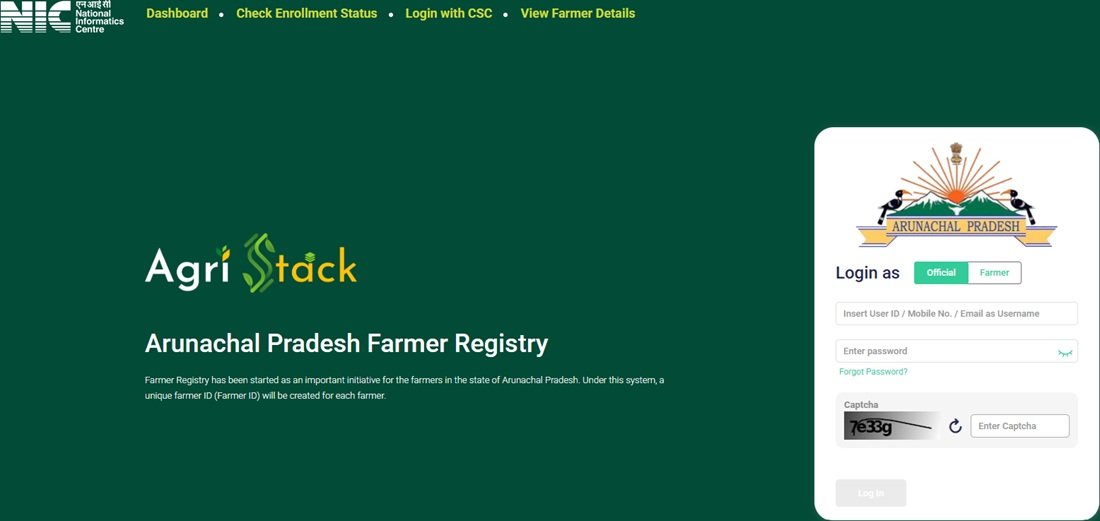
Users can access the main portal without first opening the login section. The homepage displays important service options, including the dashboard, enrollment status checking, CSC login and farmer details.
Arunachal Pradesh AgriStack Portal: Overview | |
|---|---|
| Portal Name | Arunachal Pradesh Farmer Registry Portal |
| Implementing Initiative | AgriStack |
| Primary Purpose | Access to Farmer Registry-related online services |
| Login Categories | Farmer and Official |
| Key Services | Dashboard, enrollment status, CSC login and farmer details |
| Application Mode | Online portal, along with CSC and camp-based enrollment facilities |
| Official Website | arfr.agristack.gov.in |
The portal follows a state-specific implementation of the wider AgriStack framework. The Government of India allows states to customise their Farmer Registry applications according to their implementation requirements. Therefore, the available options and procedures may differ between states.
Key Services Available on Arunachal Pradesh AgriStack Portal
The portal provides several facilities through its homepage. Each option serves a different purpose, so users should select the service that matches their requirement.
- Dashboard: Displays Farmer Registry enrollment information and provides access to the dashboard-related facilities, including Grievance Redressal.
- Check Enrollment Status: Allows farmers to check the progress of their Farmer Registry enrollment using their Aadhaar number or Farmer ID.
- Login with CSC: Provides a separate login option for Common Service Centre users.
- View Farmer Details: Allows users to retrieve farmer-related details through Aadhaar-based verification.
- Farmer Login: Allows registered farmers with an activated portal account to access the available farmer login facility.
- Official Login: Provides a separate login facility for authorised officials.
- Create New User Account: Allows eligible users, including farmers enrolled through CSC or camp mode, to create a portal account for self-login access.
These facilities help users access different parts of the Farmer Registry system without treating every service as a new registration process.
Dashboard of Arunachal Pradesh AgriStack Portal
The dashboard provides an overview of Farmer Registry enrollment activities in Arunachal Pradesh. It displays important figures that help users understand the progress of enrollment across the state.
Depending on the information available at the time of access, the dashboard may display the following details:
- PM-Kisan Beneficiaries: The number of PM-Kisan beneficiaries considered in the dashboard’s reference data.
- Total Enrollment Till Yesterday: The total number of farmer enrollments recorded up to the previous day.
- Enrollment as a Percentage of PM-Kisan Beneficiaries: The proportion of recorded enrollments against the displayed PM-Kisan beneficiary count.
- Approved Farmer IDs: The number of Farmer IDs approved in the system.
- Pending Enrollment: The number of cases awaiting Farmer ID generation or approval.
- Today’s Enrollment: The number of enrollments recorded on the current day.
- Enrollment Mode: Information about the available enrollment channels.
- District-wise Performance: The dashboard may show the top five and bottom five districts based on the displayed enrollment data.
The portal dashboard also indicates that its data refreshes periodically. Therefore, the figures may change as the system receives new enrollment information.
Note: Dashboard figures represent a particular point in time. Do not treat an old screenshot or previously published number as the current enrollment count. Visit the official dashboard to view the latest figures.
How to Create a New Account on Arunachal Pradesh AgriStack Portal
Farmers who have completed their initial Farmer Registry enrollment through a Common Service Centre or camp mode may need to create a separate portal account before using the self-login facility.
The portal displays a Create New User Account option for this purpose. This account creation step activates the farmer’s access to the online login facility. It does not mean that the farmer must repeat the entire initial enrollment process.
Follow these steps to create an account:
- Open the Arunachal Pradesh AgriStack Portal.
- Locate the login section on the homepage.
- Select the Farmer login option, if required by the portal interface.
- Click on Create New User Account.
- Read the instructions displayed on the account creation page.
- Enter the information requested in the registration form.
- Complete any verification step displayed by the portal.
- Submit the form and follow the instructions shown after submission.
Once the portal accepts the account creation request, the farmer can use the available login facility according to the account instructions.
Important points to remember:
- Farmers enrolled through CSC or camp mode should complete the one-time account creation process to activate self-login access.
- Creating a portal account and completing initial Farmer Registry enrollment are two different activities.
- Use accurate information and follow the instructions shown on the official portal.
- Do not create another account unnecessarily if the portal already recognises your registration.
The exact form fields and verification requirements may change. Therefore, follow the instructions currently displayed on the official account creation page rather than relying on an old screenshot.
Arunachal Pradesh AgriStack Portal Login Process
The portal provides separate login options for farmers and officials. Users should select the correct category before entering their login credentials.
Follow these steps to access the portal:
- Visit the official Arunachal Pradesh Farmer Registry Portal.
- Find the login section on the homepage.
- Select Farmer if you want to access the farmer login facility.
- Select Official if you have authorised official login credentials.
- Enter your registered login details in the username field.
- Enter your password.
- Complete the CAPTCHA displayed on the screen.
- Click on Log In to proceed.
After successful verification, the portal will provide access according to the selected login category and the permissions assigned to the account.
Forgot Password Facility
If a registered user cannot remember the account password, the login page provides a Forgot Password option. Select this option and follow the instructions displayed by the portal to proceed with password recovery.
Do not share your password, OTP or other login credentials with an unauthorised person. Always use the official portal for account access and recovery.
How to Check Farmer Enrollment Status Online
Farmers who have submitted their details for Farmer Registry enrollment can use the online status checking facility to track the progress of their application.
The Arunachal Pradesh portal provides two search options:
- Aadhaar Number
- Farmer ID
Follow these steps to check your enrollment status:
- Visit the Check Enrollment Status page.
- Select the available search method, Aadhaar Number or Farmer ID.
- Enter the required number in the relevant field.
- Proceed with the verification process displayed on the screen.
- If you select Aadhaar-based verification, enter the OTP sent to the mobile number linked with your Aadhaar.
- Complete the verification and submit the request.
- Check the enrollment information displayed by the portal.
The status page helps farmers find out the progress of their enrollment without visiting the portal’s login dashboard.
Important: Keep your Aadhaar-linked mobile number active if you use Aadhaar-based OTP verification. Never share the OTP with anyone claiming to provide registration assistance.
How to View Farmer Details on the Portal
The Arunachal Pradesh AgriStack Portal also provides a separate View Farmer Details facility. Farmers can use this option to retrieve their available Farmer Registry details through Aadhaar-based verification.
Follow these steps:
- Open the official portal homepage.
- Click on View Farmer Details.
- Enter the farmer’s Aadhaar number in the required field.
- Proceed with the OTP verification process.
- Enter the OTP received on the mobile number linked with Aadhaar.
- Submit the verification request.
- View the farmer information made available by the portal.
This service is different from the enrollment status facility. The status page helps users track the progress of an enrollment, while the View Farmer Details option provides access to the available farmer information after verification.
Use this facility only for an authorised purpose. Aadhaar details and OTPs are sensitive information and should not be shared with unknown persons.
Login Access for CSC Operators and Officials
The Arunachal Pradesh AgriStack Portal provides separate access options for CSC users and authorised government officials. These options support the different roles involved in the Farmer Registry process.
CSC Login
Common Service Centres help farmers access several digital government services. The Arunachal Pradesh portal displays a separate Login with CSC option for CSC users.
CSC operators can open this option from the portal homepage and follow the authentication instructions displayed on the screen. They should use their authorised CSC credentials and avoid using a farmer’s personal login details for operator access.
The CSC login facility is separate from the Farmer login option available on the main login panel.
Official Login
The portal also provides an Official login category. This facility is intended for authorised officials who have received the required login credentials and access permissions.
Officials can select this option, enter their assigned credentials and complete the CAPTCHA verification to access the system.
Farmers should not select the Official login category unless they have been authorised to use it.
Grievance Redressal Facility on Arunachal Pradesh AgriStack Portal
The portal homepage includes a Dashboard (Grievance Redressal) option. It provides access to the dashboard area associated with the Farmer Registry system.
Users can open the dashboard to view the available information and facilities. However, the exact grievance submission process, complaint categories and tracking options should be confirmed from the live portal interface.
If a farmer faces a problem with enrollment, Aadhaar verification, account access or displayed information, the farmer should first identify the nature of the issue and contact the appropriate CSC or concerned Agriculture Department office for guidance.
Do not assume that every dashboard option automatically provides a public complaint submission facility. Follow only the grievance instructions actually displayed on the official portal.
Open Arunachal Pradesh AgriStack Dashboard
Important Links for Arunachal Pradesh AgriStack Portal
Farmers and other users can access the important portal facilities through the direct links given below.
| Service | Direct Link |
|---|---|
| Official AgriStack Portal | Click Here |
| Dashboard and Grievance Redressal | Click Here |
| Check Enrollment Status | Click Here |
| View Farmer Details | Click Here |
| Arunachal Pradesh Agriculture Department | Click Here |
| Arunachal Pradesh Farmer Registry Guide | Read More |
Contact Details for Portal-Related Assistance
Farmers who face difficulties while using the Arunachal Pradesh AgriStack Portal should seek assistance through an authorised CSC or the concerned Agriculture Department office.
For portal-related issues, users should keep the following information ready before approaching the concerned authority:
- Farmer’s name and registered mobile number.
- Farmer ID, if already generated.
- Enrollment reference or application details, if available.
- A brief description of the issue.
- A screenshot of the error message, if the portal displays one.
For department-level information, visit the official website of the Department of Agriculture, Government of Arunachal Pradesh.
The portal information reviewed for this guide does not provide a separately verified AgriStack helpdesk phone number or email address. Therefore, users should not rely on unverified contact details published on other websites.
Frequently Asked Questions (FAQs)
Ans. The Arunachal Pradesh AgriStack Portal is an online platform that provides access to Farmer Registry services, including enrollment status checking, farmer details, dashboard information and login facilities.
Ans. The official portal is available at https://arfr.agristack.gov.in/farmer-registry-ar/.
Ans. Farmers, authorised CSC operators and government officials can use the relevant facilities available on the portal according to their login category and access permissions.
Ans. Open the official portal, select Farmer or Official in the login section, enter the required credentials, complete the CAPTCHA and click on Log In.
Ans. Yes. Open the Check Enrollment Status page and search using your Aadhaar number or Farmer ID. Complete the verification process displayed by the portal.
Ans. Yes. The portal provides an Aadhaar Number option. Aadhaar-based verification requires an OTP sent to the mobile number linked with Aadhaar.
Ans. Open the View Farmer Details option, enter the Aadhaar number and complete OTP verification to access the information made available by the portal.
Ans. Yes. The portal notice asks farmers whose enrollment was completed through CSC or camp mode to create a one-time portal account through the Create New User Account option to activate Self-Login access.
Ans. No. Initial enrollment records the farmer in the Farmer Registry system. Creating a portal account activates the farmer’s self-login access. These are separate processes.
Ans. Select the Forgot Password option on the login page and follow the account recovery instructions displayed by the official portal.
Ans. Yes. The homepage displays a Login with CSC option for authorised Common Service Centre users.
Ans. The dashboard may display enrollment figures, approved Farmer IDs, pending cases, daily enrollment information and district-wise enrollment performance. The figures can change as the system updates.
Ans. Yes. Users can access the portal through its official website. Some activities may still require assistance from an authorised CSC or concerned government office.
Ans. Farmers can approach an authorised CSC or the concerned Agriculture Department office. They can also visit the official Agriculture Department website for government-level information.
Ans. No. Accessing the portal or creating a login account does not guarantee Farmer ID approval. The concerned system must process and approve the enrollment according to the applicable verification requirements.

Tabassum is a government schemes researcher and writer with 5 years of experience tracking Central and State welfare scheme programmes across India. She has covered 500+ schemes spanning agriculture, women welfare, education, and housing, helping lakhs of beneficiaries understand their entitlements in simple language.