The Andhra Pradesh AgriStack Portal is an online platform that provides digital services related to the state’s Farmer Registry. It operates under the AgriStack initiative and allows farmers and authorised officials to access different Farmer Registry facilities through a single website.
The portal provides several services, including Farmer Login, Official Login, new user account creation, enrollment status checking, Jansamarth KCC status verification and access to farmer details. It also provides a dashboard that displays enrollment statistics and a separate RoR Sync Dashboard that presents information about land record synchronization.
Farmers who completed their Farmer Registry enrollment through a Common Service Centre (CSC) or a registration camp can also create an online portal account to activate Self-Login access. This facility helps previously enrolled farmers access their accounts directly through the official website.
The Andhra Pradesh AgriStack Portal also provides separate options for checking enrollment details through an Aadhaar Number or Farmer ID. Farmers can use these facilities to access the services available on the platform without visiting different websites for each function.
Farmers and authorised users can visit the official website to access these facilities.
Official Website: https://apfr.agristack.gov.in/farmer-registry-ap/
For information about the purpose of Farmer Registry, the difference between Farmer ID and Farm ID, land record integration and the registration framework, readers can also refer to our Andhra Pradesh Farmer Registry Guide.
Key Features and Services Available on APFR Portal
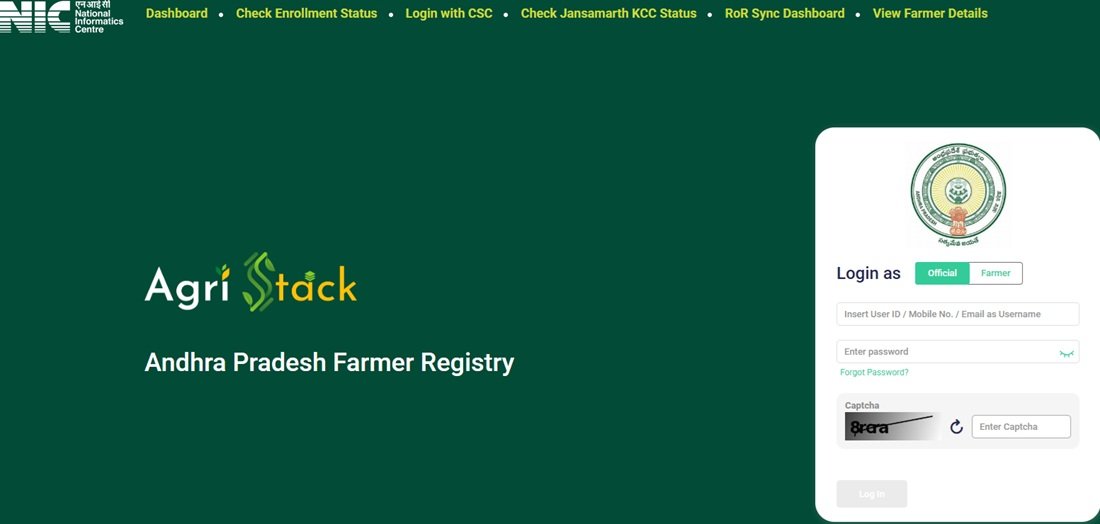
The Andhra Pradesh Farmer Registry Portal provides several facilities for farmers and authorised officials. Its main navigation menu contains the following options:
| Portal Option | Purpose |
|---|---|
| Dashboard | Displays Farmer Registry enrollment statistics and related information. |
| Check Enrollment Status | Allows users to check enrollment status through an Aadhaar Number or Farmer ID. |
| Login with CSC | Provides a separate login facility for Common Service Centre users. |
| Check Jansamarth KCC Status | Allows users to check their Jansamarth KCC status. |
| RoR Sync Dashboard | Displays information related to Record of Rights synchronization and farmer data updates. |
| View Farmer Details | Allows users to search for farmer details using an Aadhaar Number and OTP verification. |
Besides these facilities, the homepage provides separate Official and Farmer login options. It also includes Forgot Password, CAPTCHA verification and Create New User Account options.
Andhra Pradesh AgriStack Portal Login Process
The Andhra Pradesh AgriStack Portal provides separate login options for farmers and officials. Users can select the appropriate login category and enter the credentials requested by the portal.
Follow these steps to access the APFR Portal:
- Visit the official Andhra Pradesh AgriStack Portal.
- Locate the login section on the homepage.
- Select the appropriate login category, either Official or Farmer.
- Enter the login details requested by the portal.
- Use the Show option if you want to check the password entered in the password field.
- Enter the displayed CAPTCHA code in the designated field.
- Click the Log In button to proceed.
After successful authentication, the portal will allow the user to access the services available under the selected login category.
Official Login
The Official Login option is intended for authorised government officials who have the required portal credentials. Officials can select this option and enter their assigned login details to access the authorised services.
Farmer Login
The Farmer Login option allows enrolled farmers with an activated portal account to access their available Self-Login facilities. Farmers who completed their enrollment through CSC or Camp Mode must first create a portal account before using this login option.
Forgot Password Facility
If a registered user cannot access the account because of a forgotten password, the portal provides a Forgot Password option on the login page.
Users can select this option and follow the instructions displayed by the website to proceed with password recovery. The exact recovery requirements depend on the current portal interface.
New User Account Creation on APFR Portal
The Andhra Pradesh AgriStack Portal provides a Create New User Account option for farmers who need to activate their Self-Login facility.
The portal displays an important instruction for farmers whose Farmer Registry was created through CSC or Camp Mode. Such farmers must complete a one-time portal account creation process before they can log in directly as a farmer.
Who Needs to Create a New Portal Account?
Farmers whose Farmer Registry enrollment was completed through either of the following modes must create their portal account before using Self-Login:
- Common Service Centre (CSC) Mode.
- Camp Mode.
This requirement helps farmers activate their individual portal access even if an operator or authorised registration team previously completed their enrollment.
Steps to Create a New User Account
- Open the Andhra Pradesh Farmer Registry Portal.
- Locate the Create New User Account option on the login page.
- Click the option to open the account creation facility.
- Follow the instructions displayed on the account creation page.
- Provide the information requested by the portal and complete the required verification.
- Complete the one-time account creation process as instructed.
- After successful account activation, return to the homepage and select Farmer Login.
Important: The portal specifically requires farmers enrolled through CSC or Camp Mode to create their accounts before accessing Self-Login. This is a one-time registration requirement for activating portal access. Do not confuse this process with creating a new Farmer Registry enrollment.
Andhra Pradesh AgriStack Dashboard and Enrollment Statistics
The Andhra Pradesh AgriStack Portal provides a dedicated Dashboard that displays important information about Farmer Registry enrollment across the state. It helps users understand the overall enrollment position and the progress of Farmer ID generation.
The dashboard displays several statistical indicators related to PM-Kisan beneficiaries, total enrollment, approved Farmer IDs and pending records.
Important Statistics Available on the Dashboard
The following indicators appear on the official Andhra Pradesh Farmer Registry Dashboard:
| Dashboard Indicator | Information Displayed |
|---|---|
| PM-Kisan Beneficiaries | Total number of PM-Kisan beneficiaries considered in the dashboard. |
| Total Enrollment Till Yesterday | Farmer Registry enrollment recorded up to the previous day. |
| Enrollment as a Percentage of PM-Kisan Beneficiaries | Enrollment progress compared with the PM-Kisan beneficiary count. |
| Approved Farmer IDs | Total number of approved Farmer IDs. |
| FID as a Percentage of PM-Kisan Beneficiaries | Approved Farmer IDs expressed as a percentage of PM-Kisan beneficiaries. |
| Enrollment Pending Farmer ID Generation and Approval | Number of enrollment records awaiting Farmer ID generation and approval. |
| Today’s Enrollment via Enhanced Name Matching | Enrollment count recorded through the enhanced name-matching process. |
| Total Today’s Enrollment | Total enrollment count recorded for the current day. |
Other Information Available on the Dashboard
Apart from the main enrollment statistics, the dashboard also displays additional information through different sections.
- Enrollment Mode: Provides information about the modes through which farmers completed enrollment.
- Farmer Enrollment: Top 5 Districts: Displays the five leading districts based on the available enrollment statistics.
- Farmer Enrollment: Bottom 5 Districts: Displays the five districts with comparatively lower enrollment figures.
Data Refresh Information: The portal states that dashboard data gets refreshed every five minutes. Therefore, the displayed figures may change as the system updates enrollment information.
Farmers and other visitors can access the dashboard directly through the following link:
Open Andhra Pradesh AgriStack Dashboard
Check Andhra Pradesh Farmer ID Enrollment Status on AgriStack
The Andhra Pradesh AgriStack Portal provides a separate Check Enrollment Status facility. Farmers can use this service to check their Farmer Registry enrollment details by selecting either an Aadhaar Number or Farmer ID as the search method.
Available Search Options
The enrollment status page provides two search options:
- Aadhaar Number: Users can select this option to search using their Aadhaar Number.
- Farmer ID: Users can select this option to search using their generated Farmer ID.
Steps to Check Enrollment Status Using Aadhaar Number
- Visit the Check Enrollment Status page.
- Locate the Check Status Against section.
- Select the Aadhaar Number option.
- Enter the Aadhaar Number in the designated field.
- Complete the OTP verification process.
- Enter the OTP sent to the mobile number linked with the Aadhaar Number.
- Follow the portal instructions to access the available enrollment information.
Steps to Check Enrollment Status Using Farmer ID
- Open the official Check Enrollment Status page.
- Select Farmer ID under the Check Status Against section.
- Enter the Farmer ID in the required field.
- Complete the verification steps displayed by the portal.
- Proceed to check the available enrollment information.
The portal provides Aadhaar-linked OTP verification for the Aadhaar-based search facility. Users should follow the instructions displayed on the selected search option.
Direct Link: Andhra Pradesh Farmer Registry Enrollment Status
Jansamarth KCC Status Check Facility
The Andhra Pradesh AgriStack Portal also provides a separate facility to check Jansamarth KCC Status. This option helps users access the available status information associated with the Jansamarth Kisan Credit Card (KCC) service.
Unlike the general Farmer Registry enrollment status facility, this section specifically relates to the Jansamarth KCC status check.
Available Search Options
The portal provides two ways to search for Jansamarth KCC status:
- Aadhaar Number.
- Farmer ID.
Steps to Check Jansamarth KCC Status
- Visit the Check Jansamarth KCC Status page.
- Locate the Check Status Against section.
- Select Aadhaar Number or Farmer ID as the search method.
- Enter the required identification details.
- If you select the Aadhaar Number option, complete OTP verification using the mobile number linked with Aadhaar.
- Follow the instructions displayed by the portal to check the available KCC status information.
This facility provides a separate way to access Jansamarth KCC-related status information without confusing it with the general Farmer Registry enrollment status.
Direct Link: Check Jansamarth KCC Status
Andhra Pradesh RoR Sync Dashboard: Features and Reports
The Andhra Pradesh AgriStack Portal provides a dedicated Record of Rights (RoR) Synchronization Dashboard. This section displays information related to land record data exchange, synchronization activities and farmer record updates.
Unlike the regular Farmer Dashboard, the RoR Sync Dashboard focuses on administrative data and land record synchronization. It provides filters, summary statistics and district-wise reports that help authorised users examine the available data.
Filters Available on the RoR Sync Dashboard
The dashboard provides several filters to help users view records for a particular area or period.
- District: Select a district to view the corresponding records.
- Sub-District: Filter information according to the selected sub-district.
- Village: Select a village to narrow down the available information.
- From Date: Select the starting date for the required data period.
- To Date: Select the ending date for the required data period.
- Apply: Apply the selected filters to view the corresponding information.
Summary Statistics Available on the Dashboard
The RoR Sync Dashboard displays several indicators related to the state’s land record and Farmer Registry data.
| Dashboard Indicator | What It Shows |
|---|---|
| Total Districts | Number of districts included in the displayed records. |
| Total Sub-Districts | Number of sub-districts covered by the available data. |
| Total Villages | Number of villages represented in the dashboard. |
| History Data Pulled | Historical records retrieved through the synchronization process. |
| Data Deleted | Records marked as deleted in the available data. |
| Data Inserted | New records inserted into the system. |
| Actions on SFDB Unified Table | Recorded operations involving the SFDB Unified Table. |
| Incremental Farmer IDs Pushed | Count of incremental Farmer ID records pushed through the relevant process. |
| Live Data Pulled | Records retrieved through the live data synchronization process. |
Additional Reports Available on the RoR Sync Dashboard
The portal also displays detailed reports to explain different synchronization activities.
- Data Pulled: History API vs Live API: Compares the historical and live data retrieval information.
- Data Deleted: Breakdown by Reason: Displays the available reasons associated with deleted records.
- Actions on SFDB Unified Table: Shows recorded operations on the unified table.
- Farmer Transition Matrix: Presents changes in farmer landholding categories, including Big, Small, Marginal and Landless classifications.
- Data Inserted: District-wise Breakdown: Displays district-level information about inserted records, along with sub-district and village details.
- Incremental Farmer IDs Pushed: Provides a separate reporting section for incremental Farmer ID data.
Administrative Access to RoR Sync Dashboard
The RoR Sync Dashboard also displays an Admin Login option. This is an administrative facility and should not be confused with the regular Farmer Login available on the portal homepage.
Farmers should use the facilities intended for their account category rather than attempting to access administrative functions.
Direct Link: Open Andhra Pradesh RoR Sync Dashboard
View Farmer Details on Andhra Pradesh AgriStack Portal
The View Farmer Details facility allows users to search for farmer information through the official Andhra Pradesh Farmer Registry Portal. The page provides a search option based on the farmer’s Aadhaar Number and requires OTP verification.
Steps to View Farmer Details
- Visit the View Farmer Details page.
- Locate the Search By Farmer Aadhaar Number option.
- Enter the required Aadhaar Number in the designated field.
- Proceed with the OTP verification process.
- Enter the OTP received on the Aadhaar-linked mobile number, wherever prompted.
- Follow the instructions displayed by the portal to view the available farmer information.
This service provides a direct way to access available Farmer Registry details through Aadhaar-based verification.
Important: Aadhaar and OTP are sensitive authentication details. Farmers should enter them only on the official government portal and should never share an OTP with an unknown person.
Direct Link: View Farmer Details
Important Links for Andhra Pradesh AgriStack Portal
Farmers and authorised users can use the following direct links to access the main Andhra Pradesh AgriStack Portal and its available services.
| Service | Direct Link |
|---|---|
| Andhra Pradesh AgriStack Portal | Open Portal |
| Dashboard | View Dashboard |
| Check Enrollment Status | Check Status |
| CSC Login | Visit Portal |
| Jansamarth KCC Status | Check KCC Status |
| RoR Sync Dashboard | View RoR Dashboard |
| View Farmer Details | View Details |
Frequently Asked Questions (FAQs)
Ans. The official website is https://apfr.agristack.gov.in/farmer-registry-ap/. Farmers and authorised officials can access the available services through this website.
Ans. Farmers can visit the official portal, select Farmer Login, enter their required login credentials and complete CAPTCHA verification to access their accounts.
Ans. Official Login is intended for authorised government officials, whereas Farmer Login allows enrolled farmers with activated portal accounts to access their available Self-Login facilities.
Ans. Farmers whose Farmer Registry enrollment was completed through CSC or Camp Mode must create a one-time portal account before accessing the Self-Login facility.
Ans. Farmers can open the Check Enrollment Status page and select Aadhaar Number or Farmer ID as the search option. Aadhaar-based verification requires an OTP sent to the mobile number linked with Aadhaar.
Ans. Yes. The portal provides an Aadhaar Number option for checking enrollment status. Farmers can use this facility and complete the required OTP verification.
Ans. Farmers can open the Check Jansamarth KCC Status page and search using an Aadhaar Number or Farmer ID. The Aadhaar-based option requires OTP verification through the linked mobile number.
Ans. The RoR Sync Dashboard displays information related to Record of Rights synchronization, including data pulled, deleted and inserted, district-wise reports, farmer transition details and incremental Farmer ID records.
Ans. Yes. The View Farmer Details facility provides a search option based on Farmer Aadhaar Number and requires OTP verification to access the available information.
Ans. According to the official dashboard, its data gets refreshed every five minutes. Therefore, enrollment figures may change as the system updates its records.
Ans. Yes. The homepage displays a Forgot Password option for registered users who have forgotten their passwords and cannot access their accounts.
Ans. No. The Farmer Dashboard shows enrollment statistics, while the RoR Sync Dashboard focuses on land record synchronisation, data updates, and related administrative reports.

Tabassum is a government schemes researcher and writer with 5 years of experience tracking Central and State welfare scheme programmes across India. She has covered 500+ schemes spanning agriculture, women welfare, education, and housing, helping lakhs of beneficiaries understand their entitlements in simple language.