The Rajasthan AgriStack Portal provides an online platform for farmers and authorised officials to access Farmer Registry-related services. Farmers can use this portal to check their enrollment status, view their Farmer Details and access their registered account. The portal also provides a dashboard with enrollment statistics and a separate RoR Synchronization Dashboard to display land record-related data.
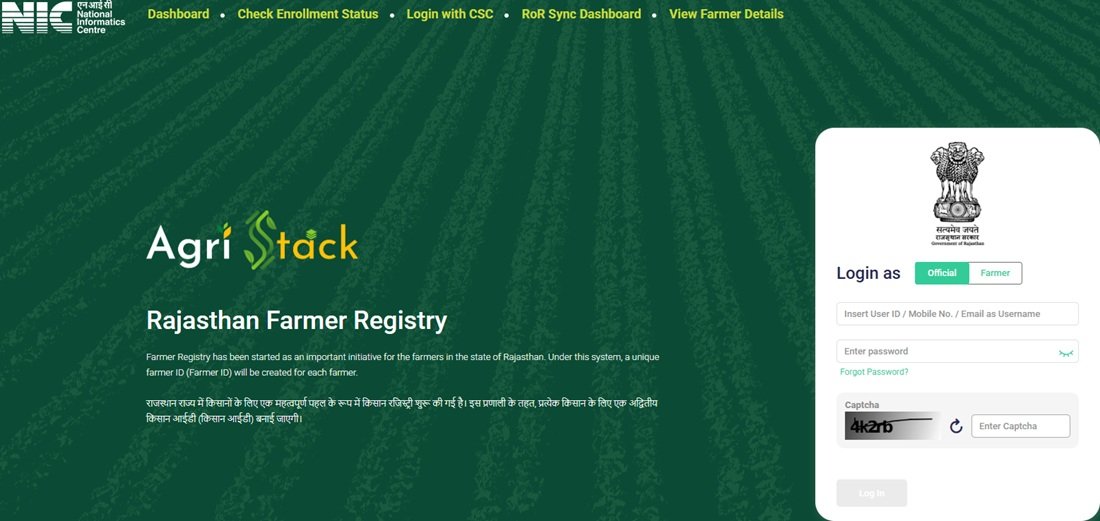
The official portal offers several options, including Dashboard, Check Enrollment Status, Login with CSC, RoR Sync Dashboard and View Farmer Details. Farmers who completed their enrollment through a Common Service Centre (CSC) or a registration camp can also create a portal account to activate their Self-Login access.
Visit the Rajasthan AgriStack Portal to access these services. If you want to understand the Farmer ID registration process, eligibility and other related details, read our Rajasthan Farmer Registry guide.
Key Highlights of Rajasthan AgriStack Portal
Rajasthan AgriStack Portal Overview | |
|---|---|
| Portal Name | Rajasthan AgriStack Portal |
| State | Rajasthan |
| Initiative | AgriStack – Farmer Registry |
| Portal URL | rjfr.agristack.gov.in |
| Main Services | Dashboard, Enrollment Status, Farmer Login, CSC Login, Farmer Details and RoR Synchronization |
| Login Options | Official and Farmer |
| Status Check Options | Aadhaar Number and Farmer ID |
| Farmer Details Verification | Aadhaar Number and OTP |
| Account Creation | One-time portal account creation for eligible CSC/Camp Mode registrations |
| Implemented By | Government of Rajasthan under the AgriStack initiative |
Services Available on Rajasthan AgriStack Portal
The Rajasthan AgriStack Portal provides different services through its homepage. Farmers and authorised users can select the relevant option according to their requirements.
| Portal Service | Purpose |
|---|---|
| Dashboard | Displays Farmer Registry enrollment figures and approved Farmer ID statistics. |
| Check Enrollment Status | Allows farmers to check enrollment status using their Aadhaar Number or Farmer ID. |
| Login with CSC | Provides a separate login option for Common Service Centre users. |
| RoR Sync Dashboard | Displays revenue record synchronization data and district-wise statistics. |
| View Farmer Details | Allows users to retrieve Farmer Details through Aadhaar-based OTP verification. |
Farmers can access these services directly from the official Rajasthan AgriStack website. Some services may require account login or OTP verification.
Farmer Account Creation on Rajasthan AgriStack Portal
Farmers who completed their Rajasthan Farmer Registry enrollment through a CSC or an official camp may need to create a separate portal account before using the Farmer Login facility.
The portal displays an important notice explaining that CSC or Camp Mode registrations do not automatically activate Self-Login access. Such farmers must complete a one-time account creation process through the Create New User Account option.
Follow these steps to create your portal account:
- Visit the Rajasthan AgriStack Portal.
- Open the login section available on the homepage.
- Select the Farmer login option.
- Click on Create New User Account.
- Complete the one-time registration process using the details requested by the portal.
- Follow the instructions displayed on the screen to complete account creation.
- After successful registration, use your registered login credentials to access the Farmer Login facility.
Important: Account creation activates Self-Login access for an already registered farmer. It does not create a new Farmer ID or replace the original enrollment process.
Rajasthan AgriStack Portal Login Process
The Rajasthan AgriStack Portal provides separate login options for farmers and officials. Users should select the appropriate option before entering their credentials.
Farmer Login
Farmers who have already created their portal accounts can use the Farmer Login option to access their accounts.
- Open the official Rajasthan AgriStack Portal.
- Go to the login section.
- Select Farmer under the Login As option.
- Enter your registered mobile number.
- Enter your account password.
- Complete the CAPTCHA verification displayed on the screen.
- Click the Log In button.
The portal will process your login details. After successful authentication, you can access the services available to your account.
Official Login
Government officials and authorised users can select the Official option on the portal’s login page.
- Visit the Rajasthan AgriStack Portal.
- Select Official under the Login As section.
- Enter the registered mobile number.
- Enter the assigned password.
- Fill in the CAPTCHA code.
- Click Log In to proceed.
The portal provides separate access for officials and farmers. Users should select the correct login category and use their authorised credentials.
Forgot Password Option
If you forget your portal password, use the Forgot Password? option available on the login page. Open the option and follow the instructions displayed by the portal to recover or reset your password.
Make sure you use the registered mobile number associated with your portal account. The exact verification steps will depend on the instructions shown on the password recovery page.
Rajasthan Farmer Registry Enrollment Status Check
The Rajasthan AgriStack Portal provides a dedicated facility to check the enrollment status of a farmer. Users can search for their enrollment through either an Aadhaar Number or a Farmer ID.
Open the Check Enrollment Status page to use this facility.
Status Check Using Aadhaar Number
Farmers who want to check their enrollment status using Aadhaar can follow these steps:
- Visit the Rajasthan AgriStack Enrollment Status page.
- Under Check Status Against, select Aadhaar Number.
- Enter the Aadhaar Number as requested by the portal.
- Request OTP verification.
- Check the mobile number linked with your Aadhaar for the OTP.
- Enter the OTP and complete the verification process.
- View the enrollment status displayed by the portal.
Note: The portal sends the OTP to the mobile number linked with the Aadhaar number. Keep that mobile phone available during verification.
Status Check Using Farmer ID
Farmers who already have their Farmer ID can also use it to check their enrollment status.
- Open the Check Enrollment Status page.
- Select Farmer ID under the Check Status Against option.
- Enter the Farmer ID in the required field.
- Complete the verification steps displayed on the portal.
- Submit the details to view the enrollment status.
This option helps farmers who already know their Farmer ID. If you do not know your ID, you can use the Aadhaar-based status check option or visit the View Farmer Details service.
View Farmer Details on Rajasthan AgriStack Portal
The Rajasthan AgriStack Portal provides a separate facility to view farmer details through Aadhaar-based verification. Farmers can use this service to retrieve their registered details without navigating through the main dashboard.
Follow these steps to access the service:
- Visit the View Farmer Details page.
- Locate the Search By Farmer Aadhaar Number option.
- Enter the Aadhaar Number in the required field.
- Request an OTP for verification.
- Enter the OTP received on the Aadhaar-linked mobile number.
- Complete the verification process to view the available farmer details.
This service uses Aadhaar-based OTP verification to protect access to farmer information. Keep your Aadhaar-linked mobile number active before starting the process.
Important: The portal interface confirms the View Farmer Details facility. However, the availability of a separate downloadable Farmer ID card or PDF should be checked on the live page. Do not confuse viewing farmer details with downloading a Farmer ID card.
Rajasthan AgriStack Dashboard and Available Statistics
The Rajasthan AgriStack Dashboard displays important statistics related to Farmer Registry enrollment and Farmer ID generation. It helps users understand the overall progress of the state’s registry work.
Visit the Rajasthan AgriStack Dashboard to view the available statistics.
Key Statistics Available on the Dashboard
| Dashboard Indicator | What It Shows |
|---|---|
| PM Kisan Beneficiaries | The number of PM-KISAN beneficiaries considered in the dashboard. |
| Total Enrollment Till Yesterday | The total number of farmer enrollments recorded up to the previous day. |
| Enrollment as a % of PM Kisan Beneficiaries | The enrollment figure compared with the number of PM-KISAN beneficiaries. |
| Approved Farmer IDs | The number of Farmer IDs approved in the registry. |
| FID as a % of PM Kisan Beneficiaries | The approved Farmer ID count compared with PM-KISAN beneficiaries. |
| Pending Farmer ID Generation and Approval | The number of enrollment cases awaiting Farmer ID generation or approval. |
| Today’s Enrollment Counts via Enhanced Name Matching | The number of enrollments recorded through enhanced name matching on the current day. |
| Total Today’s Enrollment | The total enrollment count recorded for the current day. |
The dashboard also displays an Enrollment Mode section and the top five and bottom five districts based on farmer enrollment. These indicators help users understand enrollment activity across different districts.
Dashboard Data Refresh
The portal displays a note stating that dashboard data gets refreshed every five minutes. Therefore, enrollment figures may change as the system receives new records and updates its statistics.
For this reason, users should check the live dashboard before quoting any enrollment figure. Numbers displayed in an earlier dashboard screenshot may not represent the latest position.
Rajasthan AgriStack RoR Synchronization Dashboard
The Rajasthan AgriStack Portal also provides a dedicated RoR Synchronization Dashboard. RoR refers to Record of Rights, which contains important land ownership and revenue record information.
This dashboard displays information related to the synchronization of revenue records and Farmer Registry data. It also provides district-wise statistics and filters to review records for selected locations and periods.
Open the Rajasthan AgriStack RoR Sync Dashboard to access the available information.
District, Sub-District and Village Filters
The dashboard provides filters that allow authorised users to select specific geographical areas. These include:
- District
- Sub-District
- Village
- From Date
- To Date
After selecting the required filters, users can apply them to review the corresponding synchronization data.
Important Statistics Available on the RoR Dashboard
| Dashboard Indicator | Description |
|---|---|
| Total Districts | Number of districts covered in the displayed data. |
| Total Sub-Districts | Number of sub-districts included in the dashboard. |
| Total Villages | Number of villages covered in the displayed records. |
| History Data Pulled | Historical records retrieved through the data synchronization process. |
| Data Deleted | Records deleted during the synchronization process. |
| Data Inserted | New records inserted into the relevant data system. |
| Actions on SFDB Unified Table | Actions recorded on the SFDB unified data table. |
| Incremental Farmer IDs Pushed | Farmer ID records pushed through the incremental data process. |
| Live Data Pulled | Records retrieved through the live data process. |
District-Wise Data Breakdown
The RoR Synchronization Dashboard also displays district-wise information. Users can review the number of sub-districts, villages and records inserted for individual districts.
It also provides other analytical sections, including:
- Data Pulled – History API vs Live API
- Data Deleted – Breakdown by Reason
- Actions on SFDB Unified Table
- Farmer Transition Matrix
- Data Inserted – District Wise Breakdown
- Incremental Farmer IDs Pushed
The Farmer Transition Matrix displays changes between farmer landholding categories, such as Big, Small, Marginal and Landless. This information helps authorised users review changes recorded in the underlying data.
Data update note: The RoR dashboard displays a Last Updated date and time. Its figures should always be read with the displayed update timestamp. For example, the dashboard information shared for this guide showed an update timestamp of 24 September 2026 at 12:36 PM. Those figures represent that particular dashboard snapshot, not necessarily the latest live position.
Important Links for Rajasthan AgriStack Portal
Farmers and other users can access the following official websites and portal services through these direct links.
| Service | Direct Link |
|---|---|
| Rajasthan AgriStack Portal | Click Here |
| AgriStack Dashboard | Click Here |
| Check Enrollment Status | Click Here |
| View Farmer Details | Click Here |
| RoR Synchronization Dashboard | Click Here |
| Rajasthan Farmer Registry Camps Portal | Click Here |
| Search Farmer Registry Camps | Click Here |
| Farmer Registry FAQ | Click Here |
| RajKisan Sathi Portal | Click Here |
| RajKisan Farmer/Citizen Login | Click Here |
| Rajasthan Farmer Registry – Registration Guide | Read Guide |
Contact Details for Portal-Related Assistance
Farmers who face difficulties while accessing Rajasthan AgriStack services can use the official Rajasthan Agriculture Department’s RajKisan helpdesk for assistance.
| Helpdesk Number | 0141-2927047 |
| Additional Contact Number | 0141-2922613 |
| IP Phone | 27047 |
| helpdesk.rajkisan@rajasthan.gov.in | |
| Working Days | Monday to Friday |
| Working Hours | 09:30 AM to 06:00 PM |
| Official Website | RajKisan Sathi Portal |
These contact details are listed on the official RajKisan Sathi portal. When contacting the helpdesk about an AgriStack issue, explain the problem clearly and provide the relevant enrollment reference if requested. Do not share your Aadhaar OTP or account password with anyone.
Frequently Asked Questions (FAQs)
Ans. The official Rajasthan AgriStack Portal is available at rjfr.agristack.gov.in. It provides Farmer Login, enrollment status checking, Farmer Details, dashboard and RoR synchronization services.
Ans. Farmers can select the Farmer option on the portal’s login page and enter their registered mobile number, password and CAPTCHA code. They must first create a portal account if their enrollment was completed through CSC or Camp Mode.
Ans. Yes. The portal displays a notice asking such farmers to complete one-time registration through the Create New User Account option before using Self-Login access.
Ans. Yes. Farmers can select Aadhaar Number on the Check Enrollment Status page and complete OTP verification. The portal sends the OTP to the mobile number linked with Aadhaar.
Ans. Yes. The portal provides Farmer ID as another option under Check Status Against. Farmers can select this option and enter their Farmer ID to check the available enrollment information.
Ans. View Farmer Details is an Aadhaar-based service on the Rajasthan AgriStack Portal. Users can enter their Aadhaar Number and complete OTP verification to view the available farmer details.
Ans. The portal provides a View Farmer Details option through Aadhaar-based OTP verification. However, a separate Farmer ID card or PDF download facility should not be assumed unless the live portal displays that option.
Ans. The dashboard displays PM-KISAN beneficiaries, total enrollment, approved Farmer IDs, pending Farmer ID generation and approval cases, daily enrollment figures and district-wise enrollment information.
Ans. The dashboard displays a note stating that its data gets refreshed every five minutes. Therefore, the figures may change as the system receives new enrollment information.
Ans. The RoR Synchronization Dashboard displays revenue record synchronization information. It includes district-wise data, historical and live records, inserted and deleted records, SFDB table actions and incremental Farmer IDs pushed.
Ans. Yes. The dashboard provides District, Sub-District, Village and date filters. It also displays district-wise information, including the number of sub-districts, villages and records inserted.
Ans. Farmers can contact the Rajasthan Agriculture Department’s RajKisan helpdesk at 0141-2927047 or 0141-2922613. They can also email helpdesk.rajkisan@rajasthan.gov.in for assistance.

Tabassum is a government schemes researcher and writer with 5 years of experience tracking Central and State welfare scheme programmes across India. She has covered 500+ schemes spanning agriculture, women welfare, education, and housing, helping lakhs of beneficiaries understand their entitlements in simple language.