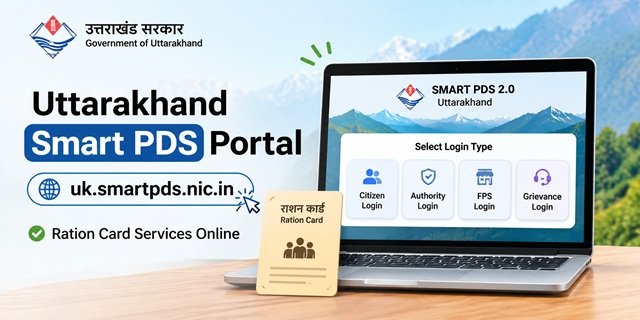
The Uttarakhand Smart PDS Portal, also known as Smart PDS 2.0, provides an online platform for citizens and authorised users to access Public Distribution System (PDS) services. The portal offers separate login facilities for ration cardholders, government authorities, Fair Price Shop (FPS) users and other authorised users.
Through this portal, citizens can access the available citizen login facility, track ration card applications and submit or track grievances. The platform also provides separate sections for FPS users, procurement-related users, user manuals and form references.
Beneficiaries can visit the official portal to access the available services:
Uttarakhand Smart PDS 2.0 Official Portal
The National Informatics Centre (NIC), under the Ministry of Electronics and Information Technology (MeitY), Government of India, has designed, developed and hosted the Smart PDS 2.0 platform.
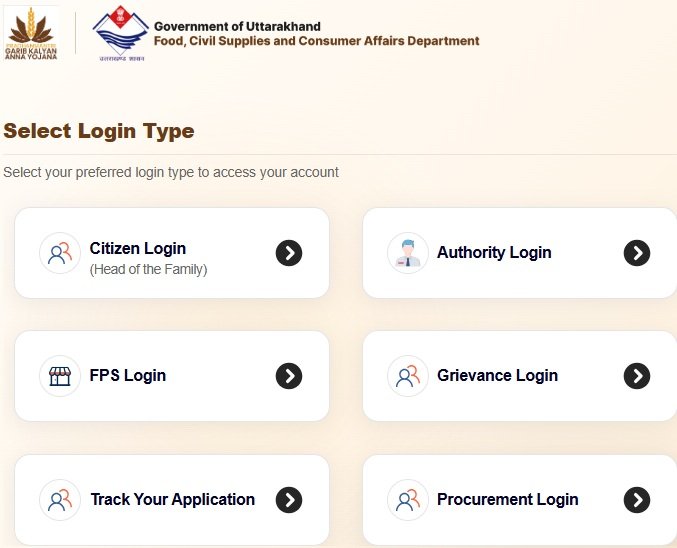
Services Available on Uttarakhand Smart PDS 2.0 Portal
The portal provides different login options and online facilities according to the type of user. The main services available on its homepage include:
- Citizen Login: Allows the Head of the Family to access the citizen account using Aadhaar or ration card credentials.
- Authority Login: Provides login access to authorised government officials through registered credentials.
- FPS Login: Offers a separate login facility for Fair Price Shop users.
- Grievance Login: Allows citizens to submit and track complaints related to the Smart PDS portal.
- Track Your Application: Helps users search for ration card applications using the available identification details.
- Procurement Login: Provides separate login options for transporters, gunny, depot and department users.
- User Manuals: Provides access to user guidance available on the portal.
- Form Reference: Provides a separate section for accessing the available form-related references.
Ration Card Related Services Available in Uttarakhand
The Uttarakhand Food, Civil Supplies and Consumer Affairs Department provides several services related to ration cards. These services help beneficiaries obtain a new ration card, update family details and make changes when their circumstances change.
The department lists the following major ration card services:
- New Ration Card: Citizens can apply for the issuance of a new ration card through the prescribed departmental process.
- Add a Family Member: Beneficiaries can request the addition of an eligible family member to their existing ration card.
- Delete a Family Member: Citizens can request the removal of a member’s name from the ration card when required.
- Correction in Ration Card Details: Applicants can request corrections or modifications in member details and other ration card information.
- Ration Card Transfer: Beneficiaries can request the transfer of their ration card when they shift to another eligible area.
- Ration Card Surrender: Citizens can follow the departmental process to surrender their existing ration card and obtain a surrender certificate.
- Renewal of Ration Card: Beneficiaries can apply for renewal of their ration card as per the department’s prescribed procedure.
- Duplicate Ration Card: Citizens can apply for a duplicate copy if they need a replacement for their existing ration card.
- Ration Card Cancellation: The department also provides a facility for ration card cancellation through its prescribed process.
Important: The Smart PDS 2.0 Citizen Login page provides Aadhaar OTP and Ration Card Number with OTP login options. However, the availability of each service inside the citizen dashboard should be checked after login. The department’s official service pages describe the procedures for these ration card-related services.
How to Login to Uttarakhand Smart PDS Portal
The Uttarakhand Smart PDS Portal provides different login options for citizens, government authorities, FPS users and other authorised users. Users should select the login category that applies to them and enter their registered credentials.
1. Citizen Login (Head of the Family)
Ration cardholders can use the Citizen Login facility to access their account. The portal provides Aadhaar-based and ration card-based login options.
Follow these steps to access the citizen login facility:
- Visit the Uttarakhand Smart PDS Citizen Login Page.
- Select the available login method: Aadhaar OTP or Ration Card Number with OTP.
- If you select Aadhaar OTP, enter your Aadhaar or UID number registered with the account.
- If you select the ration card option, enter your registered ration card number.
- Generate the OTP and enter it in the required field.
- Complete the verification process to access your citizen account.
The portal also provides a facility for legacy users to access the old application by logging in with their ration card number.
2. Authority Login
Government officials and authorised users can access the Authority Login section through their registered credentials. The portal provides three login methods.
- Open the Authority Login Page.
- Select one of the available login methods: Aadhaar OTP, Mobile Number or Login ID.
- Enter the required registered credential according to your selected option.
- Complete the verification process, wherever required.
- Proceed to access the authorised account.
Users must ensure that their Aadhaar number, mobile number or Login ID is registered with the portal account before attempting to log in.
3. FPS Login
Fair Price Shop (FPS) users can access their dedicated login section through the Smart PDS 2.0 portal. The portal provides login options using an FPS ID or Login ID.
- Visit the FPS Login Page.
- Select the FPS ID or Login ID option.
- Enter the required login credentials.
- Complete the verification process, if prompted.
- Access the FPS account after successful authentication.
The portal also displays an FPS New User Registration option for users who do not have a Login ID.
4. Grievance Login
Citizens can use the Grievance Login facility to raise complaints related to the Smart PDS portal and track their submitted grievances. The portal accepts either a ration card number or an Aadhaar card number for authentication.
- Open the Smart PDS Grievance Login Page.
- Select the Ration Card Number or Aadhaar Card Number option.
- Enter the selected number in the required field.
- Enter the captcha code displayed on the screen.
- Generate the OTP and enter the OTP received on your registered mobile number.
- Complete the authentication process to access the grievance facility.
- Use the available options to submit a new grievance or check your complaint history.
5. Procurement Login
The Smart PDS 2.0 portal also provides a separate Procurement Login section for authorised users involved in procurement-related activities. It offers four login categories.
- Transporter
- Gunny
- Depot
- Department
Users can visit the Procurement Login Page and select the relevant category to access the available login facility.
How to Track Ration Card Application Online
Applicants can use the Track Your Application facility on the Uttarakhand Smart PDS Portal to search for their ration card application. The portal provides search options using an Application or Ration Card (RC) Number and an Aadhaar Number.
Follow these steps to track your application:
- Visit the official Track Your Application Page.
- Select the relevant search option available on the page.
- Enter your Application Number, Ration Card Number or Aadhaar Number, as applicable.
- Click on the Search button to proceed.
- Check the available application details displayed on the portal.
- Use the Reset button if you want to clear the entered information and search again.
Applicants should enter the correct identification number to avoid errors while searching for their application.
How to Register and Track a Grievance
Citizens who face an issue related to the Smart PDS portal can use its online grievance facility. The portal allows users to authenticate their identity, submit a new complaint and view their grievance history.
To access the grievance facility, follow these steps:
- Open the Grievance Login Page.
- Choose Aadhaar Card Number or Ration Card Number as the login option.
- Enter the selected identification number.
- Fill in the captcha code and generate the OTP.
- Enter the OTP received on your registered mobile number.
- Complete the authentication process to access the grievance section.
- Use the available option to register a new complaint or check your previous grievance details.
Citizens should keep their registered mobile number accessible during the authentication process.
Important Links
Here are the important official links related to the Uttarakhand Smart PDS 2.0 Portal:
| Service | Official Link |
|---|---|
| Smart PDS 2.0 Official Portal | Click Here |
| Citizen Login | Click Here |
| Authority Login | Click Here |
| FPS Login | Click Here |
| Grievance Login | Click Here |
| Track Ration Card Application | Click Here |
| Procurement Login | Click Here |
| Department of Food and Public Distribution | Click Here |
Contact Details
For information related to the Smart PDS 2.0 platform, citizens can visit the official portal and check the available services and guidance sections.
- Uttarakhand Smart PDS Portal: https://uk.smartpds.nic.in/login
- Department of Food and Public Distribution: https://dfpd.gov.in/
- Portal Developer and Host: National Informatics Centre (NIC), Ministry of Electronics and Information Technology, Government of India.
For portal-related assistance, users can also check the User Manuals and Form Reference sections available on the Smart PDS 2.0 homepage.
Ans. The Uttarakhand Smart PDS Portal is an online platform that provides different login facilities and services for citizens, government authorities, FPS users and other authorised users.
Ans. The official portal is https://uk.smartpds.nic.in/login.
Ans. Citizens can use the Citizen Login option through Aadhaar OTP or Ration Card Number with OTP. The portal also provides separate login facilities for authorities, FPS users and procurement-related users.
Ans. Yes. The Citizen Login section provides a Ration Card Number with OTP option. The ration card number must be registered with the account.
Ans. Visit the Track Your Application page at https://uk.smartpds.nic.in/track. Enter the relevant Application or RC Number or Aadhaar Number and use the Search option.
Ans. Open the Grievance Login page, authenticate using your Aadhaar or ration card number and the OTP verification process, and then use the available option to submit a new grievance.
Ans. Yes. After completing the grievance login process, citizens can use the available facility to view their complaint history and track submitted grievances.
Ans. The National Informatics Centre (NIC), under the Ministry of Electronics and Information Technology, Government of India, designed, developed and hosted the Smart PDS 2.0 platform.
Ans. Yes. The portal provides a separate FPS Login facility through which users can log in using their FPS ID or Login ID. It also displays an FPS New User Registration option.

Tabassum is a government schemes researcher and writer with 5 years of experience tracking Central and State welfare scheme programmes across India. She has covered 500+ schemes spanning agriculture, women welfare, education, and housing, helping lakhs of beneficiaries understand their entitlements in simple language.