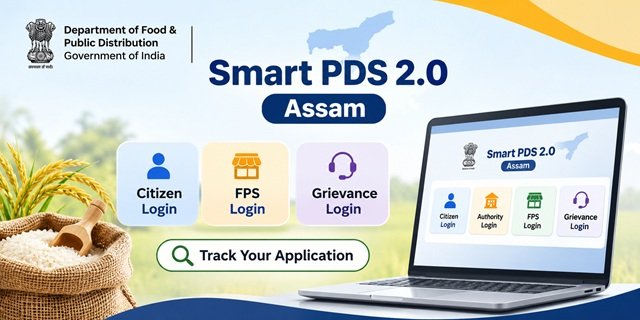
The Government of Assam has introduced the Smart PDS 2.0 portal to provide digital access to various Public Distribution System (PDS) facilities. Through this portal, ration cardholders can access their accounts, check application details, register grievances and track complaints. The platform also provides separate login facilities for government authorities and Fair Price Shop (FPS) dealers. Citizens can use the Assam Smart PDS 2.0 Portal to access these facilities online.
Introduction of Assam Smart PDS 2.0 Portal: A Brief Overview
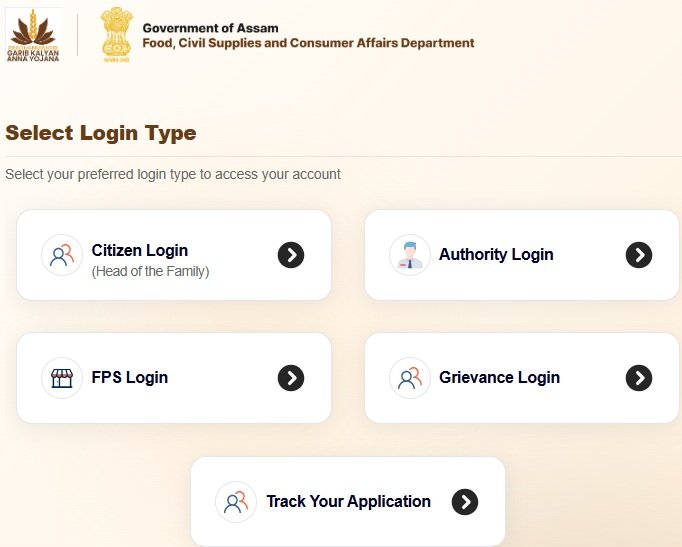
Assam Smart PDS 2.0 is a digital platform that provides different login and tracking facilities related to the Public Distribution System. The portal offers separate access for citizens, departmental authorities and Fair Price Shop dealers. It also includes a grievance management system and an application tracking facility for ration card applicants.
The homepage displays references to the National Food Security Act (NFSA), 2013 and the Pradhan Mantri Garib Kalyan Anna Yojana (PMGKAY). It also highlights the Government of India’s food security initiatives and the Department of Food and Public Distribution.
The National Informatics Centre (NIC), under the Ministry of Electronics and Information Technology (MeitY), Government of India, has designed, developed and hosted the Smart PDS 2.0 portal. Citizens can visit the official website to access the available facilities and select the login option relevant to their requirements.
Assam Smart PDS 2.0 Portal: Important Highlights
Assam Smart PDS 2.0 Portal Overview | |
|---|---|
| Portal Name | Assam Smart PDS 2.0 |
| State | Assam |
| Concerned Department | Food, Public Distribution and Consumer Affairs Department |
| Related Act | National Food Security Act, 2013 |
| Related Scheme | Pradhan Mantri Garib Kalyan Anna Yojana (PMGKAY) |
| Main Purpose | Online access to Smart PDS facilities |
| Login Facilities | Citizen, Authority and FPS Login |
| Other Facilities | Grievance Management and Application Tracking |
| Developed and Hosted By | National Informatics Centre (NIC) |
| Official Website | https://as.smartpds.nic.in/ |
Key Features and Facilities Available on Assam Smart PDS Portal
The Assam Smart PDS 2.0 portal brings several PDS-related facilities together on one platform. Users can select their login category according to their role and access the relevant services. The portal also provides separate options for application tracking and grievance management, so citizens do not need to use the login dashboard for every activity.
The major features and facilities available on the portal include:
- Citizen Login: Access the citizen account through Aadhaar OTP or Ration Card Number with OTP.
- Authority Login: Provide separate login options for authorised officials through Aadhaar OTP, Mobile Number or Login ID.
- FPS Login: Allow Fair Price Shop users to access their accounts through FPS ID or Login ID.
- New FPS Registration: Provide a registration option for new FPS users who do not have a Login ID.
- Grievance Management: Allow citizens to access the grievance system using their registered Ration Card Number or Aadhaar Number.
- Track Complaint: Check an existing complaint using its Complaint Ticket ID.
- Track Application: Search ration card application details using an Application/RC Number or Aadhaar Number.
- User Manuals: Access the user manual section available on the portal.
- Form Reference: Access the Form Reference section displayed on the homepage.
Assam Smart PDS Citizen Login: How to Access Your Account
The Citizen Login facility is available for the Head of the Family on the Assam Smart PDS 2.0 portal. It allows eligible users to access their accounts through their registered Aadhaar Number or Ration Card Number. The portal also provides a separate login reference for legacy users who need to access the old application.
Citizens can follow these simple steps to access their Smart PDS account:
- Visit the Assam Smart PDS Citizen Login Page.
- Select the Aadhaar OTP or Ration Card Number with OTP login option.
- Enter the required Aadhaar or Ration Card Number.
- Generate the OTP and complete the verification process using your registered mobile number.
- After successful verification, proceed to access your citizen account.
Available Citizen Login Options
The portal displays the following login options for citizens:
- Login with Aadhaar OTP: Select this option if your Aadhaar/UID Number is registered with your Smart PDS account.
- Login with Ration Card Number with OTP: Use your registered Ration Card Number to complete the login process through OTP verification.
- Legacy User Login: The portal mentions that legacy users can access the old application by logging in with their Ration Card Number.
Important: Your Aadhaar Number or Ration Card Number must be registered with your account to use the respective login facility.
Authority Login on Assam Smart PDS Portal
The Assam Smart PDS portal provides a separate Authority Login facility for authorised departmental users. Unlike citizen login, this section offers three authentication options to help officials access their registered accounts. Users can select the login method according to the credentials associated with their authority account.
To access the facility, open the Assam Smart PDS Authority Login Page and select one of these options:
- Login with Aadhaar OTP: Enter your registered Aadhaar/UID Number and complete OTP verification.
- Login with Mobile Number: Use the mobile number registered with your authority account.
- Login with Login ID: Enter your registered Login ID to proceed.
The selected Aadhaar Number, mobile number or Login ID must be registered with the respective authority account. The portal will guide users through the authentication process after they select their preferred login method.
FPS Login and New FPS User Registration
Fair Price Shop (FPS) dealers can use the dedicated FPS Login facility to access their accounts on the Assam Smart PDS 2.0 portal. The portal provides two login methods for existing FPS users. It also displays a separate registration option for new FPS users who do not have a Login ID.
Visit the Assam Smart PDS FPS Login Page and select the appropriate option.
- Login with FPS ID: Enter your registered FPS ID to access your account.
- Login with Login ID: Use your registered Login ID to proceed with authentication.
- FPS New User Registration: New FPS users who do not have a Login ID can select the registration option displayed on the page.
Existing FPS users should use their registered credentials. New users can follow the instructions displayed under the FPS registration option to proceed with registration.
Ration Card Services Available in Assam
Apart from the Smart PDS 2.0 portal, the Assam Food, Public Distribution and Consumer Affairs Department provides various ration card-related services under the National Food Security Act, 2013. These services help eligible households obtain new ration cards and update existing family details whenever required.
Some important ration card services available through the department include:
- Application for a new ration card.
- Issuance of a duplicate ration card.
- Inclusion or deletion of family members.
- Issuance of a separate ration card.
- Change of Head of Family.
- Change of Fair Price Shop or residential address.
- Correction and updating of ration card details.
- Surrender of an existing ration card.
These services follow the procedures prescribed by the concerned department. Applicants may need to submit supporting documents to the relevant district or sub-divisional Food, Public Distribution and Consumer Affairs authority.
For detailed procedures and document requirements, visit the department’s official Ration Card Information and Application page. Please note that these are department-level services and the Smart PDS 2.0 portal does not necessarily provide an online application facility for every service listed above.
How to Track Ration Card Application on Assam Smart PDS Portal
Applicants who have already submitted a ration card application can use the Track Your Application facility on the Assam Smart PDS 2.0 portal. This facility provides two search options, allowing users to find their application details through an Application/RC Number or Aadhaar Number.
Follow these steps to check your application details:
- Open the Assam Smart PDS Track Your Application Page.
- Select either Application/RC Number or Aadhaar Number.
- Enter the required number in the search field.
- Click on the Search option.
- Check the application information displayed by the portal.
The page also provides a Reset option to clear the entered details and perform another search. Applicants should enter the correct information to retrieve their application records.
Available Application Tracking Options
- Application/RC Number: Search using the application reference number or ration card number, as applicable.
- Aadhaar Number: Use the Aadhaar Number as the alternative search option displayed on the portal.
If the portal does not display your application details, verify the entered information. You can also contact the concerned Food, Public Distribution and Consumer Affairs office for further assistance.
How to Register and Track Grievances on Assam Smart PDS Portal
The Assam Smart PDS 2.0 portal includes a Grievance Management System for citizens who want to report issues related to Smart PDS services. Users can access this facility through their registered Ration Card Number or Aadhaar Number. The portal also provides a separate complaint tracking page for checking the status of an existing grievance.
Citizens should understand the difference between these two facilities. Grievance Login provides access to the grievance management system, whereas Track Complaint helps users search for an existing complaint through its ticket number.
Grievance Login on Assam Smart PDS Portal
Citizens can follow these steps to access the Grievance Management System:
- Visit the Assam Smart PDS Grievance Login Page.
- Select Login with Ration Card Number or Login with Aadhaar Card Number.
- Enter the required number in the respective field.
- Complete the CAPTCHA verification displayed on the screen.
- Click on the Generate OTP option.
- Enter the OTP sent to your registered mobile number to complete verification.
After successful authentication, citizens can access the grievance-related facilities available through their account. According to the portal information, users can view their complaint history and raise new grievances through this system.
How to Track a Complaint Through Ticket ID
Citizens who have already submitted a grievance can use the separate Track Complaint facility to check their complaint details. They only need the Complaint Ticket ID generated for their submitted complaint.
Follow these steps to track an existing complaint:
- Open the Assam Smart PDS Track Complaint Page.
- Enter your Complaint Ticket ID in the available field.
- Complete the CAPTCHA verification.
- Click on the Search option.
- Check the complaint information displayed on the screen.
Keep your Complaint Ticket ID safe after submitting a grievance. You will need this reference number whenever you use the complaint tracking facility.
Important Links for Assam Smart PDS 2.0 Portal
The Assam Smart PDS 2.0 portal provides separate web pages for citizen login, authority login, FPS login, grievance management and application tracking. Instead of navigating through the homepage, users can open their required section directly using the links provided below.
| Portal Facility | Direct Link |
|---|---|
| Smart PDS Homepage | Click Here |
| Citizen Login | Click Here |
| Authority Login | Click Here |
| FPS Login | Click Here |
| Grievance Login | Click Here |
| Track Complaint | Click Here |
| Track Ration Card Application | Click Here |
| Assam Food Department | Click Here |
| Ration Card Services | Click Here |
| Grievance Redressal | Click Here |
Contact Details for Assistance
Citizens who face difficulties while accessing Assam Smart PDS 2.0 or using ration card-related services can contact the Food, Public Distribution and Consumer Affairs Department, Assam. The department provides a toll-free helpline and email facility for public assistance.
For official assistance, use the following contact details:
| Particulars | Details |
|---|---|
| Department | Food, Public Distribution and Consumer Affairs Department, Assam |
| Office Address | Block E, 1st Floor, Assam Secretariat, Dispur, Guwahati, Assam – 781006 |
| Toll-Free Number | 1800-345-3611 |
| Alternate Helpline | 1967 (BSNL only) |
| Email Address | supplyassamsecretariat@gmail.com |
| Official Website | Contact Department |
For ration distribution or grievance-related issues, citizens can also visit the department’s official Grievance Redressal page to find the relevant grievance officer details.
Frequently Asked Questions (FAQs)
Ans. Assam Smart PDS 2.0 is an online platform that provides separate login facilities for citizens, government authorities and Fair Price Shop dealers. It also offers grievance management and ration card application tracking facilities.
Ans. The official website is https://as.smartpds.nic.in/.
Ans. Open the Citizen Login page and select either Login with Aadhaar OTP or Login with Ration Card Number with OTP. Enter your registered details and complete the OTP verification.
Ans. Yes. The Citizen Login page provides an option to access your account using your registered Ration Card Number with OTP verification.
Ans. Visit the Track Your Application page and select Application/RC Number or Aadhaar Number. Enter the required details and click on Search to check the available application information.
Ans. Open the Grievance Login page and authenticate using your registered Ration Card Number or Aadhaar Number. After OTP verification, you can access the grievance facilities available on the portal.
Ans. Visit the Track Complaint page, enter your Complaint Ticket ID, complete the CAPTCHA verification and click on Search to retrieve the complaint details.
Ans. FPS dealers can visit the dedicated FPS Login page and access their accounts using their registered FPS ID or Login ID.
Ans. Yes. The FPS Login page displays an FPS New User Registration option for users who do not have a Login ID.
Ans. Authority Login is a separate facility for authorised departmental users. It provides login options through Aadhaar OTP, registered Mobile Number and Login ID.
Ans. Visit the official Assam Food Department website to find information about new ration cards, duplicate cards, family member updates and other related services.
Ans. Citizens can contact the Food, Public Distribution and Consumer Affairs Department at 1800-345-3611. The department also provides the 1967 helpline for BSNL users.

Tabassum is a government schemes researcher and writer with 5 years of experience tracking Central and State welfare scheme programmes across India. She has covered 500+ schemes spanning agriculture, women welfare, education, and housing, helping lakhs of beneficiaries understand their entitlements in simple language.