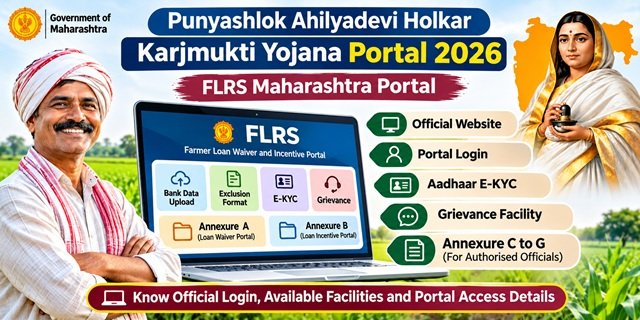
Farmers in Maharashtra can access the online facilities related to the Punyashlok Ahilyadevi Holkar Shetkari Karjmukti Yojana 2026 through the official FLRS Maharashtra portal. The website provides different sections for loan waiver, loan incentive, Aadhaar E-KYC, grievance management, bank data upload and exclusion verification.
FLRS stands for Farmer Loan Waiver and Incentive Portal. The Maharashtra Government uses this digital platform to manage important activities related to the implementation of the scheme. MAHAIT developed the portal, which brings different implementation facilities together on one official website.
Farmers searching for the Punyashlok Ahilyadevi Holkar Karjmukti Yojana official website, Ahilyabai Holkar Karj Mafi Yojana online portal or Maharashtra Karj Mafi Yojana login can visit flrs.maharashtra.gov.in to access the available services.
This article explains the FLRS portal, its different facilities, official login links, Aadhaar authentication section, grievance facility and Annexure C to G portals. For complete information about the scheme’s benefits, eligibility and loan waiver conditions, read our separate guide on Punyashlok Ahilyadevi Holkar Shetkari Karjmukti Yojana 2026.
What is FLRS Maharashtra Portal?
FLRS Maharashtra is the official online portal developed to support the implementation of the Farmer Loan Waiver and Incentive Scheme. It provides separate sections for different activities, allowing farmers, banks and authorised institutional officials to access the facilities relevant to their responsibilities.
The portal supports the online management of loan-related information, Aadhaar authentication, exclusion verification and grievance-related activities. It also provides separate access points for the Loan Waiver Portal and Loan Incentive Portal.
Unlike a general government services website, FLRS focuses specifically on the digital implementation of the Punyashlok Ahilyadevi Holkar Shetkari Karjmukti Yojana 2026. Users can access its homepage at https://flrs.maharashtra.gov.in/.
Facilities Available on Punyashlok Ahilyadevi Holkar Karjmukti Portal
The FLRS homepage displays several facilities related to scheme implementation. Each section serves a specific purpose, and not every facility is intended for direct use by farmers.
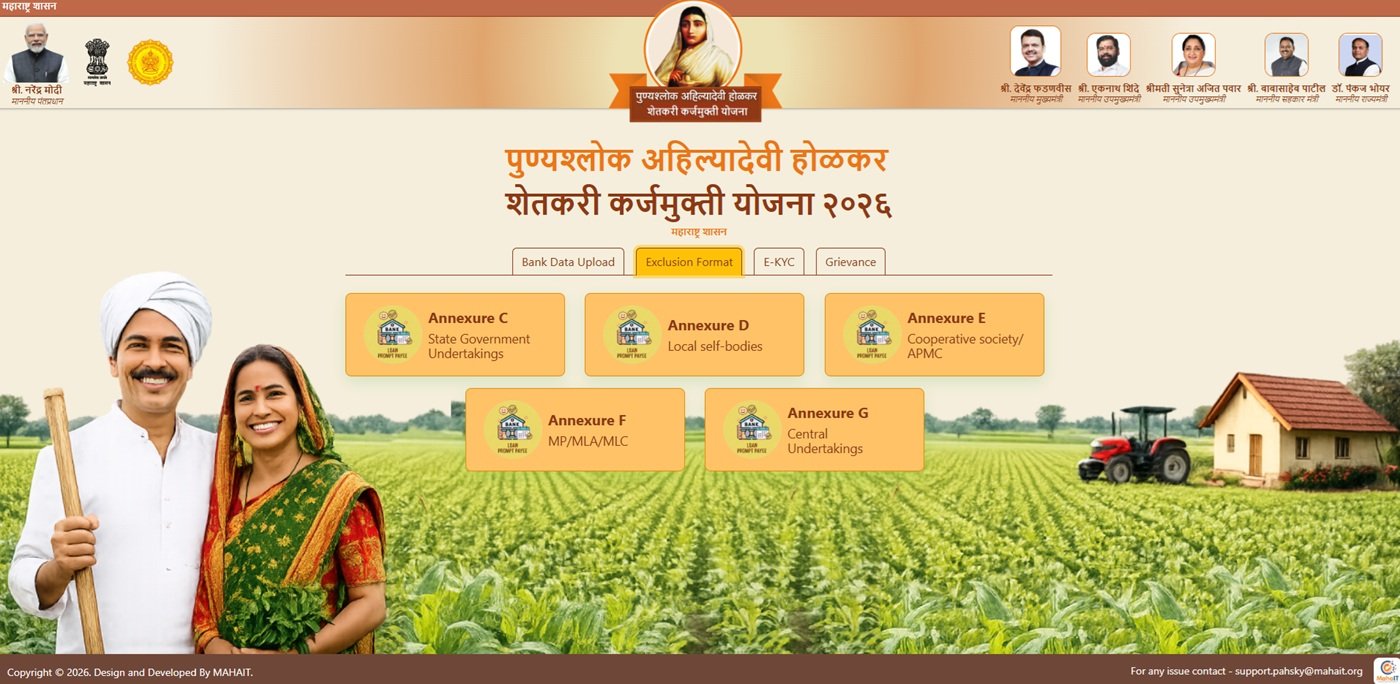
- Bank Data Upload: Provides a section for uploading bank-related data through the authorised process.
- Exclusion Format: Supports the collection of institutional information required for exclusion verification.
- E-KYC: Provides access to Aadhaar authentication for loan account verification.
- Grievance: Provides access to the scheme’s grievance list and report facility.
- Annexure A: Provides access to the Loan Waiver Portal.
- Annexure B: Provides access to the Loan Incentive Portal.
Farmers should select the section that matches their requirement. Banks and authorised institutional officials must use their designated facilities for data submission and verification activities.
Punyashlok Ahilyadevi Holkar Karjmukti Yojana Official Website and Portal Login
Farmers and other users can open the official FLRS website directly through their mobile phone or computer. The homepage displays the available portal sections and their respective access options.
Follow these steps to reach the Punyashlok Ahilyadevi Holkar Karjmukti Yojana official website:
Step 1: Open Google Chrome or another web browser on your device.
Step 2: Enter https://flrs.maharashtra.gov.in/ in the address bar.
Step 3: Open the official FLRS homepage and review the available options.
Step 4: Select the required facility, such as E-KYC, Grievance, Annexure A or Annexure B.
Step 5: Follow the instructions displayed on the selected page. If the section requires authorised login credentials, only the designated user should proceed.
Users should always check the website address before entering any information. The official FLRS portal uses the flrs.maharashtra.gov.in domain.
Annexure A and Annexure B Login Details for Loan Waiver and Incentive
The FLRS homepage displays two separate options for accessing the Loan Waiver Portal and Loan Incentive Portal. These sections relate to the two respective components of the scheme.
Annexure A Loan Waiver Portal
Annexure A provides access to the Loan Waiver Portal. Users can open its official login page through the following link:
Annexure A Loan Waiver Portal Login
Annexure B Loan Incentive Portal
Annexure B provides access to the Loan Incentive Portal, which relates to the regular crop loan repayment incentive component. The FLRS homepage displays this option separately from Annexure A.
The exact direct URL for Annexure B has not been independently verified. Users should open the official FLRS homepage and select the Annexure B option instead of using an unverified direct link.
These portal options should not be confused with a general farmer registration or new public application facility. Users must follow the access instructions provided on the respective official pages.
Aadhaar E-KYC on FLRS Portal
The FLRS website provides a separate E-KYC section for Aadhaar authentication of loan accounts. Farmers included in the verification process can use this facility to access the prescribed authentication process.
The official E-KYC page is available at https://flrs.maharashtra.gov.in/ekyc-login.
Follow these steps to access the Aadhaar E-KYC facility:
Step 1: Visit the official FLRS Maharashtra portal.
Step 2: Select the E-KYC option displayed on the homepage or open the direct E-KYC link.
Step 3: Keep your Aadhaar number and loan account number ready.
Step 4: Check your Aadhaar and loan account details carefully before proceeding.
Step 5: Follow the authentication instructions displayed on the official page and complete the prescribed verification process.
Farmers should check the displayed loan account details carefully. If they notice an incorrect amount or account information, they should contact their concerned bank branch for assistance.
Grievance Portal for Loan Waiver Related Complaints
The FLRS Maharashtra portal also provides a separate Grievance section. This facility allows users to access the grievance list and report section related to the scheme.
Farmers who face difficulties with loan account details or the verification process can visit their concerned bank branch or the District Deputy Registrar of Cooperative Societies. They can also access the official grievance page to check the available facility.
Open FLRS Grievance List and Report Portal
Follow these steps to access the grievance section:
Step 1: Open the official FLRS Maharashtra website.
Step 2: Select the Grievance option from the homepage or open the direct grievance link.
Step 3: Review the options and instructions displayed on the grievance page.
Step 4: Follow the prescribed process available for your issue. If you cannot access the required facility, contact the concerned bank branch or cooperative department office.
For portal-related assistance, users can also email the support team at support.pahksy@mahait.org.
Exclusion Format and Annexure C to G Login Portals
The Exclusion Format section of the FLRS portal collects information required to verify the exclusion conditions under the scheme. The government has provided separate login portals for different government bodies, public representative categories and cooperative institutions.
Annexures C, D, E, F and G are intended for authorised officials of the respective institutions. These portals do not serve as farmer registration forms or public loan waiver application pages.
- Annexure C: State Government Undertakings.
- Annexure D: Local Self Bodies.
- Annexure E: Cooperative Societies and Agricultural Produce Market Committees (APMCs).
- Annexure F: Members of Parliament, Members of Legislative Assembly and Members of Legislative Council.
- Annexure G: Central Government Undertakings.
Authorised officials can access their respective login pages through the following links:
- Annexure C State Government Undertakings Login
- Annexure D Local Self Bodies Login
- Annexure E Cooperative Societies and APMC Login
- Annexure F MP, MLA and MLC Login
- Annexure G Central Government Undertakings Login
The government has issued specific instructions for officials who register and submit information through these portals. Only authorised senior officers, such as CEOs, CAFOs, chairpersons, vice-chairpersons, administrative officers and other officers nominated by the competent authority, can register and submit institutional data.
Junior employees, contractual staff, data entry operators and other unauthorised persons cannot independently register or submit information. Officials must use an email address ending in @gov.in, @nic.in or the official domain of their institution. Personal email accounts such as Gmail, Yahoo, Rediffmail and Hotmail are not accepted.
These portals collect information required for exclusion verification, particularly details that are not available in the Sevaarth, Shalarth or Customized Sevaarth systems. The authorised officials remain responsible for the accuracy, completeness and timely submission of institutional information.
Who Can Use the Punyashlok Ahilyadevi Holkar Karjmukti Yojana Portal?
The Punyashlok Ahilyadevi Holkar Shetkari Karjmukti Yojana portal is primarily designed for authorised officials and institutions involved in implementing the scheme. It provides separate login facilities for different departments, banks, cooperative institutions and government bodies to submit, verify and manage the information required for scheme implementation.
The portal is intended for the following authorised users:
- Banking Institutions: Authorised users of banks and lending institutions can access the bank data upload facility to submit the required loan-related information.
- Government Department Officials: Authorised officers can use the relevant annexure sections to submit information required for checking the scheme’s exclusion criteria.
- State Government Undertakings: Authorised representatives can submit institutional information through Annexure C.
- Local Self-Government Bodies: Authorised officials can use Annexure D to provide the required information.
- Cooperative Societies and APMCs: Authorised representatives can submit information through Annexure E.
- MPs, MLAs and MLCs: The relevant authorised users can access Annexure F.
- Central Government Undertakings: Authorised representatives can submit the required information through Annexure G.
Registration under Annexures C to G is restricted to authorised senior officers or officials formally nominated by the competent authority. Junior staff, contractual employees and data entry operators cannot independently register or submit institutional information through these sections.
Therefore, farmers should not treat this portal as a general farmer registration or loan waiver application website. It primarily supports the administrative and institutional work required to implement the scheme.
Maharashtra Karj Mafi List 2026 and Beneficiary List Information
Farmers searching for the Maharashtra Karj Mafi List 2026 or Ahilyabai Holkar Karj Mafi Yojana 2026 beneficiary list should understand the difference between the FLRS portal and the published loan account lists. The portal provides online scheme facilities, while the government has also made loan account lists available through banks and designated local offices.
According to the Maharashtra Government’s press note dated 4 November 2026, four lists covering a total of 25,82,827 eligible farmer loan accounts had been released for Aadhaar authentication.
- First list: 16,16,201 loan accounts.
- Second list: 4,19,737 loan accounts.
- Third list: 3,59,192 loan accounts.
- Fourth list: 1,15,697 loan accounts.
Farmers can check their loan account details through their concerned bank branches, District Deputy Registrar of Cooperative Societies offices and designated village-level locations, including Gram Panchayats, Gram Chavdis and cooperative development societies.
Farmers can also visit the official FLRS Maharashtra portal for available scheme updates and online facilities. However, the available portal information does not confirm a public farmer-wise searchable beneficiary list or a general PDF download facility.
Those searching for कर्जमाफी योजना २०२६ यादी or Karj Mafi List 2026 PDF Download in Marathi should check the official list information released by the government. They should avoid relying on unofficial PDF files or websites that claim to provide a complete beneficiary list without official verification.
Important Links for FLRS Maharashtra Portal
Users can access the following official links for the different facilities available under the Punyashlok Ahilyadevi Holkar Karjmukti Yojana portal.
- FLRS Maharashtra Official Website
- Annexure A Loan Waiver Portal
- Aadhaar E-KYC Authentication Portal
- Grievance List and Report Portal
- Annexure C State Government Undertakings
- Annexure D Local Self Bodies
- Annexure E Cooperative Societies and APMCs
- Annexure F MP, MLA and MLC
- Annexure G Central Government Undertakings
- Punyashlok Ahilyadevi Holkar Shetkari Karjmukti Yojana 2026 Complete Details
FLRS Portal Contact Details and Support Email
Users who face difficulties while accessing the FLRS Maharashtra portal can use the following official contact information and support facilities.
- Official Website: https://flrs.maharashtra.gov.in/
- Portal Support Email: support.pahksy@mahait.org
- E-KYC Facility: Aadhaar Authentication Portal
- Grievance Facility: Grievance List and Report
- Bank Assistance: Contact your concerned bank branch for loan account details and Aadhaar authentication-related assistance.
- Departmental Assistance: Contact the District Deputy Registrar of Cooperative Societies for scheme-related guidance.
Frequently Asked Questions (FAQs)
Ans. The official website is https://flrs.maharashtra.gov.in/. Farmers and other users can access the available scheme-related facilities through this FLRS Maharashtra portal.
Ans. FLRS stands for Farmer Loan Waiver and Incentive Portal. It is the online platform used for important implementation activities under the Maharashtra farmer loan waiver and incentive scheme.
Ans. MAHAIT developed the FLRS portal for the Government of Maharashtra.
Ans. The portal homepage displays Bank Data Upload, Exclusion Format, E-KYC, Grievance, Annexure A Loan Waiver Portal and Annexure B Loan Incentive Portal.
Ans. Open a browser and visit flrs.maharashtra.gov.in. The official homepage displays the available portal sections and their access links.
Ans. Annexure A provides access to the Loan Waiver Portal. Its official login page is available at flrs.maharashtra.gov.in/annexureA-login.
Ans. Annexure B is the Loan Incentive Portal displayed on the FLRS homepage. Users can select this option from the official website. Its exact direct login URL has not been independently verified.
Ans. Farmers can access the Aadhaar authentication facility through the official FLRS E-KYC portal.
Ans. Keep your Aadhaar number and loan account number ready. You should also check that the displayed loan account information is correct before completing the prescribed authentication process.
Ans. It is a separate grievance-related section displayed on the FLRS homepage. Users can access the available grievance facility through the official grievance page.
Ans. The Exclusion Format section collects institutional information required to verify the scheme’s exclusion conditions. Authorised officials of the specified institutions use the related Annexure C to G portals.
Ans. Only authorised senior officers or officials nominated by the competent authority of the respective institutions can register and submit information. Junior staff, contractual employees and data entry operators cannot independently submit institutional information.
Ans. No. Annexure C to G are institutional portals used for exclusion verification. They are not farmer login pages or public loan waiver application forms.
Ans. The available official portal information does not confirm a public farmer-wise beneficiary list or general PDF download facility. Farmers can check published loan account lists through their bank branches, District Deputy Registrar offices and designated village-level locations.
Ans. Users can contact the portal support team at support.pahksy@mahait.org for portal-related assistance.

Tabassum is a government schemes researcher and writer with 5 years of experience tracking Central and State welfare scheme programmes across India. She has covered 500+ schemes spanning agriculture, women welfare, education, and housing, helping lakhs of beneficiaries understand their entitlements in simple language.