The MP AgriStack Portal is the official online platform for accessing Madhya Pradesh’s Farmer Registry services. The portal provides separate login options for farmers and officials, along with facilities to check enrollment status, view farmer details, check Jansamarth KCC status and access administrative dashboards.
The Government of Madhya Pradesh has introduced the Farmer Registry as an important digital initiative for farmers. Under this system, each registered farmer receives a unique Farmer ID. The state operates its Farmer Registry through the official MP Farmer Registry Portal, which works as part of the national AgriStack initiative.
Farmers who have already completed their registration through a Common Service Centre (CSC) or registration camp can also create a portal account to activate Self-Login access. The portal provides separate facilities for enrollment status checking and viewing farmer details, so users do not need to access their personal dashboard for every service.
This guide explains the actual options available on the Madhya Pradesh AgriStack Portal, including its login facilities, Jansamarth KCC status service, enrollment dashboard and Record of Rights (RoR) synchronization dashboard. It also explains the connection between AgriStack and the state’s separate e-VIKAS fertilizer distribution portal.
MP AgriStack Portal 2026: Key Highlights
MP AgriStack Portal Overview | |
|---|---|
| Portal Name | MP AgriStack / Madhya Pradesh Farmer Registry Portal |
| State | Madhya Pradesh |
| Initiative | AgriStack Farmer Registry |
| Implementing Department | Farmer Welfare and Agriculture Development Department, Madhya Pradesh |
| Official Portal | mpfr.agristack.gov.in |
| Login Options | Farmer and Official Login |
| CSC Facility | Login with CSC |
| Enrollment Status | Aadhaar Number or Farmer ID |
| KCC Status | Jansamarth KCC Status Check |
| Farmer Details | View Farmer Details through Aadhaar verification |
| Dashboard | Enrollment statistics and district-wise reports |
| Additional Facility | RoR Sync Dashboard |
| Related Portal | MP e-VIKAS Portal |
Services Available on the Madhya Pradesh AgriStack Portal
The MP AgriStack website provides several options through its homepage and individual service pages. Each option serves a different purpose. Farmers can use the relevant facility without navigating through unrelated portal sections.
- Farmer Login: Provides registered farmers with access to their portal accounts.
- Official Login: Provides a separate login facility for authorised officials.
- Login with CSC: Offers a dedicated login option for Common Service Centre users.
- Check Enrollment Status: Allows users to check their existing enrollment through Aadhaar Number or Farmer ID.
- Jansamarth KCC Status: Provides a separate facility to check the status associated with a Jansamarth KCC application.
- View Farmer Details: Allows users to retrieve available Farmer Registry details through Aadhaar verification.
- Dashboard: Displays enrollment statistics, approved Farmer IDs, pending records and district-wise enrollment reports.
- RoR Sync Dashboard: Displays administrative information about land-record synchronization and related data operations.
- Create New User Account: Helps eligible farmers who registered through CSC or Camp Mode activate their personal portal login.
These facilities make the MP Farmer Registry Portal useful for both farmers and authorised users who need to access registry-related information. For detailed information about the actual registration process and Farmer ID, read our separate guide on Farmer Registry Madhya Pradesh.
MP AgriStack Portal Login: Official Website Access
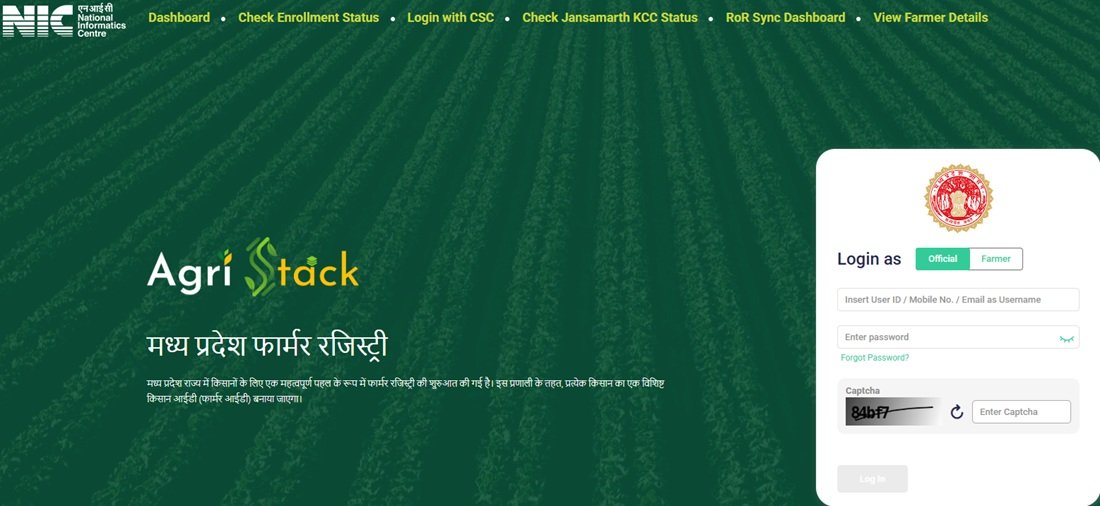
Farmers and officials can access the Madhya Pradesh AgriStack website through its official portal. The homepage displays the AgriStack branding, Madhya Pradesh Farmer Registry heading and available login options.
Use the following official link to open the portal:
Official MP AgriStack Website: https://mpfr.agristack.gov.in/farmer-registry-mp/
After opening the website, users can see the following options:
- Dashboard
- Check Enrollment Status
- Login with CSC
- Check Jansamarth KCC Status
- RoR Sync Dashboard
- View Farmer Details
The homepage also displays the Farmer and Official login options. Users can enter their registered mobile number, password and CAPTCHA to access their accounts. The page provides a Show option to view the entered password and a Forgot Password facility for users who cannot access their accounts.
Farmers should always check the website address before entering their Aadhaar details, registered mobile number or login credentials. Use the official AgriStack domain instead of relying on unknown websites or unofficial login links.
Farmer Login, Official Login and CSC Login on MPFR Portal
The MP AgriStack homepage provides separate login options for Farmer and Official users. It also displays a dedicated Login with CSC option in the main navigation menu.
Farmer Login
Farmers who have created their personal portal accounts can use the Farmer login option. The homepage asks users to enter their registered mobile number and password.
The general login sequence is as follows:
- Visit the MP AgriStack official website.
- Find the Login as section on the homepage.
- Select the Farmer option.
- Enter the registered mobile number.
- Enter the account password.
- Enter the CAPTCHA displayed on the screen.
- Select Log In to continue.
If the user cannot remember the account password, the Forgot Password option provides access to the portal’s password recovery facility. Follow the instructions displayed by the website to proceed.
Official Login
The portal also provides a separate Official option under the Login as section. Authorised officials can select this option and enter their registered login credentials.
Farmers should not select Official Login for their personal accounts. They should use the Farmer option instead.
Login with CSC
The homepage navigation menu includes a separate Login with CSC option. This facility is intended for users who access the portal through the Common Service Centre system.
CSC users should open the official portal and select Login with CSC. They must follow the authentication instructions displayed on the linked page. The available homepage information does not specify every step of the CSC authentication process, so users should follow the live portal instructions rather than rely on an assumed login sequence.
New User Account Creation and Self-Login Activation
The MP AgriStack homepage provides a Create New User Account option for farmers who need to activate their personal login access.
This facility is particularly important for farmers who completed their Farmer Registry through a Common Service Centre or a government registration camp. Completing the registration through CSC or Camp Mode does not automatically mean that the farmer already has a personal login account on the portal.
The homepage displays an important notice explaining this requirement. It asks farmers whose registry was created through CSC or Camp Mode to complete a one-time account registration before logging in. This process activates their Self-Login access.
Account Creation for CSC and Camp Mode Registered Farmers
Farmers who have already completed their registry through CSC or Camp Mode can follow these general instructions:
- Open the official MP Farmer Registry website.
- Find the Create New User Account option on the homepage.
- Select the option to open the account creation facility.
- Read the instructions displayed by the portal.
- Complete the one-time account registration process as instructed.
- Return to the homepage and use the Farmer login option to access the account.
Important: Creating a portal account for Self-Login is different from applying for a new Farmer ID. Farmers who have already completed their registration through CSC or Camp Mode should not treat this account activation facility as a fresh enrollment process.
For the complete Farmer ID registration process, refer to our detailed article on Farmer Registry Madhya Pradesh.
MP Farmer Registry Status Check Through Aadhaar Number or Farmer ID
The MP AgriStack Portal provides a separate Check Enrollment Status facility. Farmers can use this page to check the progress of their existing Farmer Registry enrollment.
The status-check page provides two search options:
- Aadhaar Number
- Farmer ID
When a user selects Aadhaar Number, the portal asks for the Aadhaar number and OTP verification. The system sends the OTP to the mobile number linked with the Aadhaar record.
Enrollment Status Check Through Aadhaar Number
- Open the official MP Farmer Registry Status Check page.
- Find the Check Status Against section.
- Select Aadhaar Number.
- Enter the Aadhaar number in the required field.
- Request the OTP and check the mobile number linked with Aadhaar.
- Enter the received OTP to complete verification.
- Follow the portal instructions to view the enrollment status.
Enrollment Status Check Through Farmer ID
Farmers who already know their Farmer ID can select the Farmer ID option in the Check Status Against section. They should enter the requested details and follow the verification instructions displayed by the portal.
Direct Status Check Link: https://mpfr.agristack.gov.in/farmer-registry-mp/#/checkEnrolmentStatus
This facility helps farmers check an existing enrollment. It does not start a new Farmer Registry application. If you need information about registration, Farmer ID generation or related enrollment requirements, visit our guide on Farmer Registry Madhya Pradesh.
Jansamarth KCC Application Status on MP AgriStack Portal
The Madhya Pradesh AgriStack homepage also provides a dedicated option named Check Jansamarth KCC Status. This service is separate from the regular Farmer Registry enrollment status facility.
The Jansamarth KCC status page provides two search options:
- Aadhaar Number
- Farmer ID
When users select Aadhaar Number, the page asks them to complete OTP verification. The portal sends the OTP to the mobile number linked with the Aadhaar record.
Steps to Access Jansamarth KCC Status
- Open the MP AgriStack Portal.
- Select Check Jansamarth KCC Status from the homepage menu.
- Open the Check Status Against section.
- Select Aadhaar Number or Farmer ID.
- Enter the requested details.
- If you select Aadhaar Number, complete OTP verification using the Aadhaar-linked mobile number.
- Follow the portal instructions to view the available KCC status information.
Direct Jansamarth KCC Status Link: https://mpfr.agristack.gov.in/farmer-registry-mp/#/checkJansamarthKccStatus
Remember that Jansamarth KCC status and Farmer Registry enrollment status are two different services. Checking one does not automatically provide the result of the other.
View Farmer Details on MPFR Portal
The MP Farmer Registry Portal provides a separate View Farmer Details option. This facility allows users to search for their available Farmer Registry details using their Aadhaar number.
The page displays a Search By Farmer Aadhaar Number field and an OTP verification option. The user must complete the required verification before accessing the available information.
Steps to View Farmer Details
- Visit the official View Farmer Details page.
- Find the Search By Farmer Aadhaar Number field.
- Enter the Aadhaar number requested by the portal.
- Request the OTP and check the Aadhaar-linked mobile number.
- Enter the OTP to complete verification.
- Follow the instructions displayed on the page to view the available farmer details.
Direct View Farmer Details Link: https://mpfr.agristack.gov.in/farmer-registry-mp/#/homePrintEnrollmentDetails
Users should keep their Aadhaar details and OTP private. They should complete the verification themselves and avoid sharing the OTP with unauthorised persons.
MP AgriStack Dashboard: Enrollment Statistics and District Reports
The MP AgriStack Dashboard provides an overview of Farmer Registry enrollment across Madhya Pradesh. It displays several numerical indicators that help users understand enrollment progress, approved Farmer IDs and pending records.
Users can open the dashboard directly through the following link:
MP AgriStack Dashboard: https://mpfr.agristack.gov.in/farmer-registry-mp/#/dashboard
Important Statistics Displayed on the Dashboard
The dashboard snapshot shared for this guide displayed the following figures:
| Dashboard Indicator | Displayed Figure |
|---|---|
| PM Kissan Beneficiaries | 95,18,752 |
| Total Enrollment Till Yesterday | 1,21,02,363 |
| Enrollment as a % of PM K Beneficiaries | 127.14% |
| Approved Farmer IDs | 1,20,12,039 |
| FID as a % of PM Kissan Beneficiaries | 127.14% |
| Enrollment Pending Farmer ID Generation and Approval | 257 |
| Today’s Enrollment Counts via Enhanced Name Matching | 19 |
| Total Today’s Enrollment | 120 |
Note: These figures represent a portal snapshot, not permanent or current enrollment totals. The dashboard states that its data gets refreshed every five minutes. Therefore, the displayed figures may change when users revisit the page.
Enrollment Mode and District-Wise Reports
Along with the main statistics, the dashboard includes additional reports that present enrollment information in a more organised format. These include:
- Enrollment Mode: Displays enrollment information according to the available enrollment categories or modes.
- Farmer Enrollment – Top 5 Districts: Shows the leading five districts according to the dashboard’s enrollment data.
- Farmer Enrollment – Bottom 5 Districts: Shows the five districts with the lowest enrollment figures in the displayed report.
These reports help users understand the distribution of Farmer Registry enrollment across different districts. Since the dashboard refreshes its data, the district rankings and numerical figures may also change over time.
Madhya Pradesh RoR Sync Dashboard: Land Record Synchronization Details
The MP AgriStack Portal includes a dedicated RoR Sync Dashboard. RoR stands for Record of Rights, which refers to land-record information maintained by the revenue administration.
This dashboard presents administrative information about land-record data synchronization and related operations. It includes district-level filters, data-pulling statistics, inserted and deleted records, actions on the SFDB Unified Table and incremental Farmer IDs pushed.
Users can access this section through the following direct link:
MP RoR Sync Dashboard: https://mpfr.agristack.gov.in/farmer-registry-mp/#/rorSyncDashboard
Filters Available on the RoR Dashboard
The dashboard provides the following filters to view information for selected areas and periods:
- District
- Sub-District
- Village
- From Date
- To Date
- Apply
Users can select the available filters and apply them to view the corresponding dashboard information. The page also displays its last updated date and an Admin Login option.
Important RoR Synchronization Indicators
The dashboard snapshot supplied for this article displayed the following figures:
| Indicator | Displayed Figure |
|---|---|
| Total Districts | 61 |
| Total Sub-Districts | 445 |
| Total Villages | 57,564 |
| History Data Pulled | 5,78,568 |
| Data Deleted | 60,206 |
| Data Inserted | 4,45,181 |
| Actions on SFDB Unified Table | 4,18,983 |
| Incremental Farmer IDs Pushed | 1,96,529 |
| Live Data Pulled | 13,90,124 |
The supplied dashboard snapshot displayed a last updated date of 24 September 2026. These figures should be read as the values shown in that snapshot, not as the latest live totals.
Reports Available on the RoR Sync Dashboard
The RoR Sync Dashboard contains several reports that present different aspects of the synchronization process.
- Data Pulled – History API vs Live API: Presents information about data pulled through the historical and live API processes.
- Data Deleted – Breakdown by Reason: Shows the available breakdown of deleted records according to the displayed reasons.
- Actions on SFDB Unified Table: Presents information about the operations performed on the unified table.
- Farmer Transition Matrix: Displays changes between landholding categories such as Big, Small, Marginal and Landless.
- Data Inserted – District Wise Breakdown: Shows district-level information, including the number of sub-districts, villages and records inserted.
- Incremental Farmer IDs Pushed: Provides selectable reporting periods of 30 Days, 15 Days and 7 Days.
District-Wise Data Insertion Report
The district-wise breakdown presents the number of sub-districts, villages and records inserted for each listed district. The figures below reproduce the district report from the supplied portal snapshot.
| District | Sub-Districts | Villages | Records Inserted |
|---|---|---|---|
| Dhar | 9 | 1,628 | 3,53,658 |
| Panna | 9 | 1,077 | 2,25,676 |
| Balaghat | 12 | 1,410 | 2,18,690 |
| Ujjain | 12 | 1,149 | 2,11,803 |
| Ratlam | 9 | 1,106 | 1,91,526 |
| Mandsaur | 9 | 983 | 1,88,023 |
| Rajgarh | 9 | 1,763 | 1,75,518 |
| Sagar | 14 | 2,134 | 1,72,353 |
| Rewa | 9 | 1,749 | 1,71,027 |
| Morena | 8 | 877 | 1,51,337 |
| Dewas | 10 | 1,173 | 1,48,059 |
| Jhabua | 6 | 846 | 1,42,577 |
| Shivpuri | 11 | 1,432 | 1,42,225 |
| Bhind | 10 | 979 | 1,41,605 |
| Chhatarpur | 13 | 1,283 | 1,38,545 |
| Seoni | 9 | 1,632 | 1,31,429 |
| Sehore | 10 | 1,108 | 1,28,138 |
| Betul | 11 | 1,481 | 1,23,131 |
| Guna | 8 | 1,388 | 1,22,384 |
| Katni | 9 | 975 | 1,21,249 |
| Chhindwara | 12 | 1,763 | 1,15,358 |
| Shajapur | 7 | 644 | 1,13,206 |
| Vidisha | 12 | 1,662 | 1,03,678 |
| Khandwa (East Nimar) | 9 | 811 | 1,03,099 |
| Ashoknagar | 8 | 912 | 1,00,586 |
| Tikamgarh | 9 | 700 | 98,316 |
| Singrauli | 8 | 832 | 95,713 |
| Agar-Malwa | 5 | 513 | 94,239 |
| Jabalpur | 12 | 1,557 | 73,887 |
| Gwalior | 10 | 753 | 71,734 |
| Datia | 6 | 677 | 68,811 |
| Mandla | 6 | 1,284 | 67,526 |
| Sidhi | 8 | 1,092 | 66,501 |
| Neemuch | 7 | 839 | 65,973 |
| Satna | 8 | 1,474 | 65,702 |
| Narmadapuram | 10 | 1,000 | 62,433 |
| Damoh | 8 | 1,233 | 61,230 |
| Mauganj | 3 | 1,074 | 60,807 |
| Umaria | 7 | 686 | 58,385 |
| Khargone (West Nimar) | 11 | 1,451 | 57,589 |
| Shahdol | 6 | 887 | 54,954 |
| Maihar | 3 | 632 | 53,764 |
| Niwari | 3 | 303 | 52,196 |
| Alirajpur | 5 | 552 | 51,229 |
| Dindori | 3 | 932 | 51,025 |
| Barwani | 9 | 736 | 50,269 |
| Raisen | 12 | 1,558 | 46,650 |
| Anuppur | 4 | 603 | 46,468 |
| Narsimhapur | 6 | 1,089 | 45,849 |
| Sheopur | 5 | 646 | 35,872 |
| Indore | 10 | 686 | 32,839 |
| Bhopal | 3 | 632 | 28,936 |
| Harda | 6 | 574 | 21,685 |
| Burhanpur | 5 | 278 | 14,613 |
| Pandhurna | 2 | 321 | 9,078 |
| NewDist | 0 | 1 | 0 |
| NewDist2 | 0 | 1 | 0 |
| HDist | 0 | 1 | 0 |
| 999 | 0 | 0 | 0 |
| D | 0 | 0 | 0 |
| NewDist3 | 0 | 1 | 0 |
Note: The table reproduces the district-wise entries supplied from the portal. Some entries, such as NewDist, NewDist2, HDist and other temporary-looking labels, also appear in the snapshot. They have been retained rather than silently removed or corrected. The dashboard’s displayed values may change after further synchronization.
The RoR Sync Dashboard is primarily an administrative monitoring facility. Farmers should use the separate Check Enrollment Status and View Farmer Details options for their personal registry-related requirements.
MP e-VIKAS Portal and Fertilizer e-Token Services
Madhya Pradesh also operates a separate digital platform named e-VIKAS for fertilizer distribution. The portal belongs to the Farmer Welfare and Agriculture Development Department, Government of Madhya Pradesh. It aims to support timely and transparent fertilizer distribution through a digital system.
The national AgriStack website also identifies Madhya Pradesh’s e-VIKAS as a Farmer Registry-linked fertilizer distribution system. This connection makes e-VIKAS an important related service to understand, although it operates through a separate website rather than inside the MPFR login page.
Official e-VIKAS Portal: https://evikas.mpkrishi.mp.gov.in/OFRDHome/Home
Important Facilities Available on e-VIKAS
The official e-VIKAS homepage displays several options related to fertilizer distribution and farmer services.
- Farmer e-Token Generation Login: Provides access to the farmer token-generation facility.
- Department Login: Provides a separate login option for authorised department users.
- Fertilizer Calculation: Helps users view recommended fertilizer quantities according to the selected crop and land area.
- Retailer Mobile App: Provides access to information about the retailer application.
- Farmer Mobile App (Balram): Provides access to the farmer mobile application information.
- Information About Farmers Collecting Fertilizer: Provides a separate information facility related to fertilizer collection.
The portal also displays information about different farmer categories and special cases. These include Forest Rights Patta holders, Revenue Patta holders, Sikmi farmers, farmers without a Farmer ID, religious trusts, agriculture farms, KVKs, universities, deceased farmers, disabled or elderly farmers, plantations, special-purpose cases and farmers in dam catchment areas.
These categories help the portal address different situations related to fertilizer distribution. Farmers should select the category that accurately matches their circumstances and follow the instructions available on the official e-VIKAS website.
Fertilizer Calculation Facility
The e-VIKAS portal provides a fertilizer calculation page. Users can select the crop type and crop name, enter or view the land area and check the recommended fertilizer quantities displayed by the system.
The calculator presents nutrient information for Nitrogen (N), Phosphate (P) and Potash (K). It also displays recommended quantities for different fertilizer combinations, including DAP, Urea, MOP and various NPK formulations.
Direct Fertilizer Calculator: Open e-VIKAS Fertilizer Calculator
Farmers should use the calculator as an information facility and follow the relevant agricultural recommendations for their crops and fields.
Difference Between MP AgriStack and e-VIKAS
| MP AgriStack Portal | e-VIKAS Portal |
|---|---|
| Operates the Madhya Pradesh Farmer Registry services. | Supports fertilizer distribution and related farmer services. |
| Provides Farmer and Official login options. | Provides farmer e-token and department login options. |
| Offers enrollment status and Farmer Details facilities. | Offers fertilizer calculation and distribution-related facilities. |
| Includes Dashboard and RoR Sync Dashboard. | Includes fertilizer-related reports and farmer-category information. |
| Official website: mpfr.agristack.gov.in | Official website: evikas.mpkrishi.mp.gov.in |
Both portals serve different purposes. The AgriStack website provides Farmer Registry facilities, while e-VIKAS focuses on fertilizer distribution. The national AgriStack platform identifies the Madhya Pradesh e-VIKAS system as a Farmer Registry-linked fertilizer distribution initiative.
Important Links for MP AgriStack Portal Services
Users can access the main Madhya Pradesh AgriStack facilities through the direct links provided below.
| Service | Direct Link |
|---|---|
| MP AgriStack Official Website | Click Here |
| MP AgriStack Dashboard | Click Here |
| Check Enrollment Status | Click Here |
| Login with CSC | Open Official Portal |
| Jansamarth KCC Status | Click Here |
| RoR Sync Dashboard | Click Here |
| View Farmer Details | Click Here |
| MP e-VIKAS Portal | Click Here |
| e-VIKAS Fertilizer Calculator | Click Here |
| Farmer Registry Madhya Pradesh Guide | Read Complete Guide |
Frequently Asked Questions (FAQs)
Ans. The official Madhya Pradesh Farmer Registry Portal is https://mpfr.agristack.gov.in/farmer-registry-mp/. Farmers and authorised users can access the available portal services through this website.
Ans. The portal provides Farmer and Official Login, CSC Login, Check Enrollment Status, Jansamarth KCC Status, View Farmer Details, Dashboard and RoR Sync Dashboard facilities.
Ans. Farmers can open the official website, select Farmer under the Login as section, enter their registered mobile number and password, complete the CAPTCHA and select Log In.
Ans. Farmers who completed their Farmer Registry through CSC or Camp Mode may need to create a personal portal account before they can use Self-Login. The one-time account creation process activates their portal access.
Ans. Yes. Open the Check Enrollment Status page, select Aadhaar Number, enter the required details and complete OTP verification. The portal sends the OTP to the mobile number linked with Aadhaar.
Ans. Yes. The Check Enrollment Status page provides a Farmer ID option. Select it and follow the instructions displayed by the portal.
Ans. It is a separate facility that allows users to check the available Jansamarth KCC application status through Aadhaar Number or Farmer ID. Aadhaar-based verification requires an OTP sent to the Aadhaar-linked mobile number.
Ans. Open the View Farmer Details page, enter the Farmer Aadhaar Number and complete OTP verification. The portal then provides access to the available farmer information.
Ans. The dashboard displays enrollment statistics, approved Farmer IDs, pending records, daily enrollment information and district-wise enrollment reports. Its displayed data refreshes every five minutes.
Ans. The RoR Sync Dashboard is an administrative monitoring facility. It displays land-record synchronization information, data pulled through APIs, inserted and deleted records, SFDB Unified Table actions and Farmer ID synchronization details.
Ans. No. It primarily displays administrative and synchronization information. Farmers should use the separate Check Enrollment Status facility for their personal enrollment status.
Ans. MP AgriStack provides Farmer Registry services such as login, enrollment status and farmer details. The separate e-VIKAS portal focuses on fertilizer distribution, e-token generation and fertilizer calculation.
Ans. Farmers can visit the official MP e-VIKAS Portal and select the कृषक ई-टोकन जनरेशन लॉगिन option. They should follow the instructions displayed on the portal.
Ans. No. Creating a portal account activates Self-Login access for eligible users, including farmers whose registry was completed through CSC or Camp Mode. It is not the same as submitting a fresh Farmer Registry application.
Ans. You can read our detailed guide on Farmer Registry Madhya Pradesh for registration-related information, Farmer ID details and status-check guidance.

Tabassum is a government schemes researcher and writer with 5 years of experience tracking Central and State welfare scheme programmes across India. She has covered 500+ schemes spanning agriculture, women welfare, education, and housing, helping lakhs of beneficiaries understand their entitlements in simple language.