The Himachal Pradesh AgriStack Portal is an online platform that provides access to the state’s Farmer Registry services. Farmers and authorised officials can use this portal to access login facilities, check existing enrollment status and view farmer details through Aadhaar-based verification.
The portal operates through the official HPFR website: https://hpfr.agristack.gov.in/farmer-registry-hp/. It provides separate login options for officials and farmers, a CSC login facility, an enrollment status section and a facility to view farmer details.
Farmers who completed their Farmer Registry Himachal Pradesh enrollment through a Common Service Centre (CSC) or camp can also create a portal account to activate their Self-Login access. The portal clearly describes this as a one-time account activation process, not a fresh Farmer Registry application.
This guide explains the actual facilities available on the HP AgriStack Portal, including its login options, account activation, enrollment status checking, Aadhaar verification and dashboard information. It also explains the difference between the Farmer Registry portal and the Digital Crop Survey portal so users can access the correct service.
Himachal Pradesh AgriStack Portal: Key Highlights
HP AgriStack Portal Highlights | |
|---|---|
| Portal Name | Himachal Pradesh AgriStack / Farmer Registry Portal |
| Implementing Department | Department of Agriculture, Himachal Pradesh |
| Portal URL | hpfr.agristack.gov.in |
| Portal Platform | AgriStack |
| Technical Organisation Displayed | National Informatics Centre (NIC) |
| Login Options | Official and Farmer |
| CSC Facility | Login with CSC |
| Account Activation | Create New User Account through Aadhaar e-KYC |
| Enrollment Status | Check through Aadhaar Number or Farmer ID |
| Farmer Details | Search using Farmer Aadhaar Number with OTP verification |
| Dashboard | Enrollment statistics and district-wise reports |
| Digital Crop Survey | Separate government portal |
| Portal Access | Online |
Farmer Registry and Digital Crop Survey: Key Difference
Himachal Pradesh has separate AgriStack-related portals for Farmer Registry and Digital Crop Survey. Both operate within the broader digital agriculture framework, but they serve different purposes. Users should not confuse their login pages or services.
| Basis | Farmer Registry Portal | Digital Crop Survey Portal |
|---|---|---|
| Portal | HP Farmer Registry | HP Digital Crop Survey |
| Official Website | Open HPFR Portal | Open HP DCS Portal |
| Main Focus | Farmer Registry and digital farmer identity services | Digital recording of crop-related information |
| Portal Facilities Confirmed | Login, enrollment status and View Farmer Details | Digital Crop Survey services |
The Farmer Registry creates a digital identity for farmers through the state’s Farmer Registry system. The Digital Crop Survey focuses on recording crop information at the field level. The Ministry of Agriculture and Farmers Welfare identifies Farmer Registry, Geo-Referenced Village Maps and Crop Sown Registry as foundational components of AgriStack.
Therefore, farmers who want to access their existing enrollment details should use the HP Farmer Registry Portal, not assume that the Digital Crop Survey website provides the same facilities.
Himachal Pradesh AgriStack Portal: Available Services
The HP AgriStack Portal homepage displays the following menu options and facilities. Each option serves a different purpose.
| Portal Option | Purpose |
|---|---|
| Dashboard | Displays Farmer Registry enrollment figures and district-wise reports. |
| Check Enrollment Status | Allows users to check an existing enrollment using an Aadhaar Number or Farmer ID. |
| Login with CSC | Provides a separate login option for Common Service Centre users. |
| View Farmer Details | Allows users to search farmer details using an Aadhaar Number and OTP verification. |
| Official Login | Provides a login option for authorised officials. |
| Farmer Login | Provides a login option for farmers. |
| Create New User Account | Allows eligible farmers registered through CSC or Camp Mode to activate Self-Login access. |
| Forgot Password | Provides a password recovery option on the login page. |
Important: The Dashboard menu displays the tooltip title “Grievance Redressal” in the homepage navigation, but the page itself opens with the heading “Dashboard” and shows enrollment statistics. The article refers to it as the Dashboard because that is the actual page heading.
HP AgriStack Portal Login: Official and Farmer Access
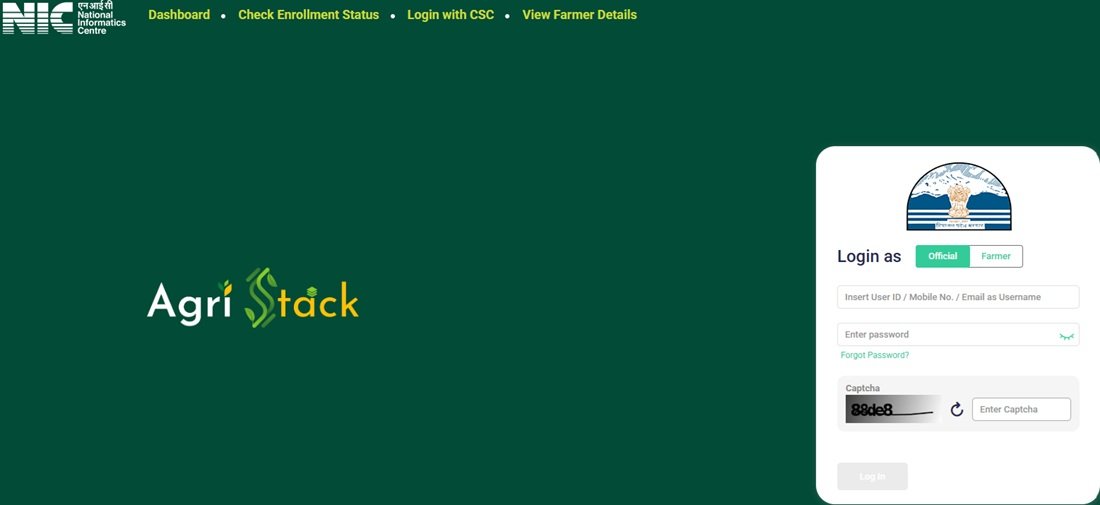
The HP AgriStack Portal provides separate login options for officials and farmers. Users can access the login facility from the official homepage.
Official login page: https://hpfr.agristack.gov.in/farmer-registry-hp/
The homepage displays the following login elements:
- Login as Official
- Login as Farmer
- Password field
- Show password option
- Forgot Password option
- Captcha verification
- Log In button
- Create New User Account option
Users should select the appropriate login category before entering their credentials. The Show option helps users check the password they have entered. The Forgot Password option is available if a user cannot remember the login password.
The portal also displays a Create New User Account option. However, farmers should understand its purpose before using it. The portal’s notice specifically connects this option with activating Self-Login access for farmers whose enrollment took place through CSC or Camp Mode.
Simply visiting the login page does not create a new Farmer Registry enrollment. Users who need information about the initial enrollment process should refer to the separate Farmer Registry Himachal Pradesh guide.
CSC Login and Farmer Account Activation
The HP AgriStack homepage provides a dedicated Login with CSC option. It also displays an important notice for farmers whose Farmer Registry Himachal Pradesh enrollment was completed through a Common Service Centre or Camp Mode.
According to the portal’s notice, these farmers must first create their portal accounts before logging in. This one-time registration activates their Self-Login access.
One-Time Account Activation Through Aadhaar e-KYC
The portal provides the following account creation page:
Create New User Account – Farmer Signup e-KYC
The page opens with the heading Aadhaar e-KYC. It displays a consent statement that explains the purpose of Aadhaar-based identity verification. The statement asks the farmer to authorise verification using Aadhaar information and confirms that the information will be used for identity verification.
The page also displays a Reset option and a Submit button.
Account activation process shown by the portal:
- Open the official HP AgriStack Portal.
- Select the Create New User Account option.
- Open the Aadhaar e-KYC page.
- Read the consent statement carefully.
- Provide consent for Aadhaar-based identity verification and proceed through the portal’s Submit option.
The portal information supplied for this guide confirms the Aadhaar e-KYC consent page, but it does not establish every subsequent screen or verification step. Therefore, users should follow the instructions displayed on the live portal after submitting their consent.
Remember: This account creation facility is for activating Self-Login access for eligible CSC/Camp Mode-registered farmers. It is not a fresh application for Farmer Registry enrollment.
Check Farmer Enrollment Status on HP AgriStack Portal
Farmers can use the Check Enrollment Status facility to check an existing Farmer Registry Himachal Pradesh enrollment. The portal provides two search options: Aadhaar Number and Farmer ID.
Direct status-check link: Check Enrollment Status on HP AgriStack
Enrollment Status Through Aadhaar Number
The portal displays the following options on its status-check page:
- Check Status Against
- Aadhaar Number
- Farmer ID
- Aadhaar Number input option
- OTP verification
When users select Aadhaar Number, the portal asks them to complete OTP verification. It sends the OTP to the mobile number linked with the Aadhaar number.
Users should keep their Aadhaar-linked mobile number active so they can receive the verification code.
Enrollment Status Through Farmer ID
The page also provides Farmer ID as an alternative search option. Users who already know their Farmer ID can select this option to check their enrollment status.
The exact fields and verification steps shown after selecting Farmer ID should be followed as displayed on the live portal. The available portal information confirms the search option but does not establish every subsequent verification step.
Note: Check Enrollment Status helps users check an existing enrollment. It is different from the fresh enrollment process explained in the separate Farmer Registry Himachal Pradesh article.
View Farmer Details Through Aadhaar Verification
The HP AgriStack Portal provides a separate View Farmer Details facility. Farmers can use this page to search their details through Aadhaar-based verification.
Direct link: View Farmer Details
The page displays the heading View Farmer Details and provides a search field labelled Search By Farmer Aadhaar Number. It also includes an OTP verification facility.
Users can access this page through the following steps:
- Open the official HP AgriStack Portal.
- Select View Farmer Details from the homepage menu.
- Open the Aadhaar Number search facility.
- Enter the required Aadhaar details.
- Complete the OTP verification displayed by the portal.
The portal uses this separate page for Aadhaar-based farmer detail searches. Do not confuse it with Check Enrollment Status, which provides Aadhaar Number and Farmer ID as search options.
HP AgriStack Dashboard: Enrollment Statistics and District Reports
The Dashboard is one of the important sections of the Himachal Pradesh AgriStack Portal. It displays state-level Farmer Registry enrollment figures and district-wise enrollment reports.
Direct dashboard link: HP AgriStack Dashboard
The dashboard displays the following indicators in the portal snapshot supplied for this guide:
| Dashboard Indicator | Displayed Figure |
|---|---|
| PM Kissan Beneficiaries | 10,37,206 |
| Total Enrollment Till Yesterday | 6,94,145 |
| Enrollment as a % of PM-KISAN Beneficiaries | 66.93% |
| Approved Farmer IDs | 6,09,083 |
| FID as a % of PM-KISAN Beneficiaries | 66.91% |
| Enrollment Pending Farmer ID Generation and Approval | 280 |
| Today’s Enrollment Counts via Enhanced Name Matching | 22 |
| Total Today’s Enrollment | 98 |
Data refresh: The portal states that dashboard data refreshes every five minutes. The figures above represent the snapshot supplied for this article. Since its capture date was not provided, readers should check the live dashboard for the current figures.
Enrollment Mode and District-Wise Reports
Apart from the numerical indicators, the dashboard displays three additional reporting sections:
- Enrollment Mode: Displays enrollment-related information by mode.
- Farmer Enrollment – Top 5 Districts: Shows the five leading districts in the displayed enrollment report.
- Farmer Enrollment – Bottom 5 Districts: Shows the five districts appearing at the lower end of the displayed enrollment report.
These reports help users understand the progress of Farmer Registry enrollment across Himachal Pradesh. The dashboard is a state-level monitoring facility; it is not the personal enrollment-status page for an individual farmer.
Latest AgriStack Developments in Himachal Pradesh
The Himachal Pradesh Government has taken additional steps to improve the use of AgriStack data beyond the online Farmer Registry portal. Recent official developments show that the state is working towards better coordination and practical use of agricultural data.
State-Level and District-Level AgriStack Task Forces
The Agriculture Department of Himachal Pradesh issued a notification on 13 November 2026, published in the State Gazette on 18 November 2026. The notification constituted a State-Level Task Force (SLTF) and District-Level Task Forces (DLTFs) for the effective use of AgriStack data.
The State-Level Task Force includes senior representatives from departments such as Revenue, Agriculture, Horticulture, Animal Husbandry, Information Technology, Rural Development, Food and Civil Supplies, Finance and Cooperation. It also includes the State Informatics Officer of NIC and representatives from other institutions.
The District-Level Task Forces bring together district administration and departmental representatives, including the Deputy Commissioner, District Revenue Officer and Agriculture Department officials.
The notification assigns these task forces responsibilities such as:
- Identifying important problems faced by farmers and agricultural stakeholders.
- Assessing the availability and readiness of relevant data.
- Finding gaps in existing government systems and processes.
- Identifying practical AgriStack-enabled applications.
- Assessing the expected benefits and feasibility of proposed applications.
- Developing proposals that can improve farmer outcomes and public service delivery.
This notification highlights the state’s effort to use AgriStack data for agricultural planning, improved public services and better coordination between departments. It does not mean that every proposed application is already available on the public Farmer Registry portal.
Official source: Himachal Pradesh Gazette – 18 November 2026.
Farmer ID Generation in Himachal Pradesh
The Ministry of Agriculture and Farmers Welfare publishes state-wise Farmer ID generation figures through official government replies.
According to the Ministry’s reply published on 24 July 2026, Himachal Pradesh had generated 5,95,485 Farmer IDs as of 20 July 2026.
This is a dated state-wise government figure. It is separate from the HP AgriStack dashboard snapshot shown earlier, which displays 6,09,083 approved Farmer IDs. The two figures have different reporting dates and descriptions, so users should not treat them as the same measurement.
Official source: Ministry of Agriculture and Farmers Welfare – Progress in Generating Unique Digital Farmer IDs.
Important Links for HP AgriStack Portal
Farmers can use the following direct links to open the relevant sections of the Himachal Pradesh AgriStack Portal.
| Service | Direct Link |
|---|---|
| HP AgriStack Portal Homepage | Open Portal |
| Dashboard | View Dashboard |
| Check Enrollment Status | Check Status |
| View Farmer Details | View Details |
| Create New User Account | Farmer Signup e-KYC |
| Digital Crop Survey | Open HP DCS Portal |
| Himachal Pradesh Agriculture Department | Official Website |
Contact Details for Portal Assistance
Farmers who need assistance with agriculture-related services can contact the Directorate of Agriculture, Himachal Pradesh, through its officially published contact details.
| Contact Information | Details |
|---|---|
| Department | Directorate of Agriculture, Himachal Pradesh |
| Address | Krishi Bhawan, Boileauganj, Shimla – 171005, Himachal Pradesh |
| Telephone | 0177-2830162, 0177-2830618 |
| Toll-Free Helpline | 1800-180-1551 |
| krishibhawan-hp@gov.in | |
| Official Website | Himachal Pradesh Agriculture Department |
For portal-specific login or enrollment issues, users should also check the instructions displayed on the HP AgriStack website. The contact details above belong to the Agriculture Department and should not be treated as a separately verified HPFR technical helpdesk.
Frequently Asked Questions (FAQs)
Ans. The official HP AgriStack Farmer Registry portal is https://hpfr.agristack.gov.in/farmer-registry-hp/.
Ans. Farmers can open the official portal, select the Farmer login option and enter their registered login credentials along with the displayed Captcha.
Ans. Yes. The homepage displays a separate Login with CSC option for Common Service Centre users.
Ans. The portal instructs farmers whose Farmer Registry enrollment was completed through CSC or Camp Mode to create a portal account before logging in. This one-time process activates their Self-Login access.
Ans. No. The Create New User Account option activates Self-Login access for eligible farmers who already completed their enrollment through CSC or Camp Mode. It is not a fresh Farmer Registry application.
Ans. Farmers can open the Check Enrollment Status page and select either Aadhaar Number or Farmer ID as the search option. The Aadhaar-based option requires OTP verification through the mobile number linked with Aadhaar.
Ans. The portal sends the OTP to the mobile number linked with the Aadhaar number entered by the user.
Ans. Yes. The View Farmer Details page provides a Search By Farmer Aadhaar Number facility with OTP verification.
Ans. The dashboard displays PM-KISAN beneficiary figures, total enrollment, approved Farmer IDs, pending enrollment figures, daily enrollment and district-wise reports.
Ans. The dashboard states that its data refreshes every five minutes. Users should open the live dashboard to see the latest available figures.
Ans. No. The Farmer Registry portal and Digital Crop Survey portal are separate AgriStack-related platforms. The Farmer Registry portal provides enrollment and farmer-detail facilities, while the Digital Crop Survey portal handles crop survey-related services.
Ans. The portal screens reviewed for this guide do not confirm a dedicated Farmer ID card download option. Farmers should check the live portal for any newly introduced facility rather than relying on an unverified download link.
Ans. The homepage menu supplied for this guide does not display a RoR Sync Dashboard option. Therefore, this guide does not list it as an available public portal service.
Ans. Farmers can contact the Directorate of Agriculture, Himachal Pradesh, at 0177-2830162 or 0177-2830618. They can also email krishibhawan-hp@gov.in or call the toll-free helpline 1800-180-1551.

Tabassum is a government schemes researcher and writer with 5 years of experience tracking Central and State welfare scheme programmes across India. She has covered 500+ schemes spanning agriculture, women welfare, education, and housing, helping lakhs of beneficiaries understand their entitlements in simple language.