The Government of Haryana is implementing the AgriStack initiative to develop a digital database of farmers, agricultural land and crop-related information across the state. This initiative aims to improve the delivery of government services and make agricultural records more accessible through digital systems.
To support this initiative, the state provides an online portal hosted on the official AgriStack platform. Farmers and authorised officials can use the AgriStack Haryana Portal to access different online facilities, including the dashboard, enrollment status, user login and farmer details.
The portal also displays enrollment-related statistics, such as total enrollment, approved Farmer IDs, pending cases and district-wise enrollment information. Its dashboard data refreshes every five minutes, helping visitors view updated progress figures.
In this article, readers can find details about the AgriStack Haryana official website, available services, dashboard options, login process, account access, important updates and technical support.
AgriStack Haryana Portal: An Overview
The Haryana AgriStack portal is an online platform developed to support the state’s digital agriculture initiative. It operates through the official AgriStack domain and provides different facilities for farmers and authorised officials.
AgriStack Haryana Portal Overview | |
|---|---|
| Portal Name | AgriStack Haryana Portal |
| Portal Display Name | Haryana Farmer Registry |
| Implementing Initiative | AgriStack |
| Portal URL | hrfr.agristack.gov.in |
| Available Login Options | Official and Farmer |
| Dashboard | Available |
| Enrollment Status | Online status-check facility |
| Farmer Details | Available through Aadhaar-based OTP verification |
| Helpdesk Number | 1800-180-2117 |
| Application Mode | Online portal and supported offline enrollment channels |
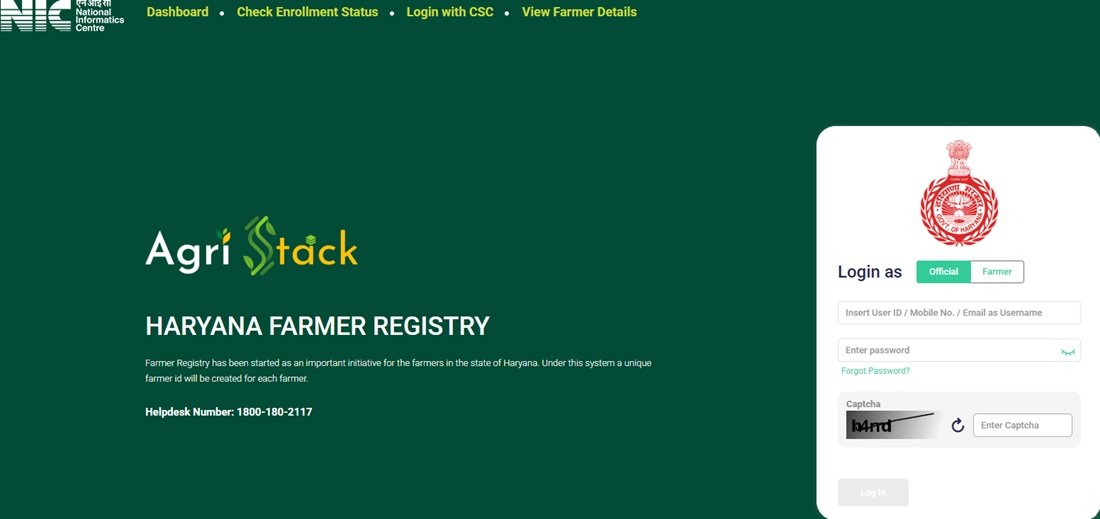
The portal’s homepage displays the name Haryana Farmer Registry. It also carries AgriStack branding and provides access to the state’s enrollment dashboard and related facilities. Readers looking specifically for the registration procedure, Farmer ID creation and related instructions can also visit our separate guide on Farmer Registry Haryana.
Objectives of the AgriStack Haryana Portal
AgriStack aims to create a reliable digital foundation for India’s agricultural sector. Haryana is implementing this initiative by bringing farmer records, land-related information and crop data into a connected digital framework.
The major objectives include:
- Developing a digital database of farmers in Haryana.
- Improving access to agricultural records and digital services.
- Supporting the identification and authentication of farmers.
- Reducing duplication in government records and service delivery.
- Helping departments deliver agricultural schemes and services more efficiently.
- Improving the availability of reliable land and crop-related information.
- Supporting better agricultural planning through verified digital information.
AgriStack Haryana Official Website and Portal Access
Farmers and other users can access the Haryana AgriStack portal through its official website. The portal provides separate options for dashboard access, enrollment status checking, login and viewing farmer details.
Use the following official links to open the relevant portal sections:
- Official Portal: https://hrfr.agristack.gov.in/farmer-registry-hr/
- Dashboard: Open AgriStack Haryana Dashboard
- Enrollment Status: Check Enrollment Status
- Farmer Details: View Farmer Details
- National AgriStack Website: https://agristack.gov.in/
Always check the website address before entering your login credentials or Aadhaar-related information. Use the official portal links instead of relying on unknown third-party websites.
Services and Features Available on AgriStack Haryana Portal
The Haryana AgriStack portal provides several online facilities through its homepage. Users can access the following options according to their requirements:
1. Dashboard
The dashboard displays the enrollment progress and other important statistics related to the Haryana Farmer Registry. It includes the number of PM-KISAN beneficiaries, total enrollment, approved Farmer IDs and pending cases. Users can also view enrollment-related charts and district-wise performance information.
2. Check Enrollment Status
Farmers can use this facility to check their enrollment status. The portal provides two search options: Aadhaar Number and Farmer ID. When users select the Aadhaar option, the system sends an OTP to the mobile number linked with their Aadhaar for verification.
3. Login with CSC
The homepage provides a Login with CSC option for users who need to access the portal through the Common Service Centre facility. Users should follow the authentication process displayed on the official website.
4. Official and Farmer Login
The portal provides separate login options for officials and farmers. Users can select the relevant category and enter their User ID, mobile number or email address as the username. They must also enter their password and the displayed captcha to access their account.
5. View Farmer Details
The View Farmer Details section allows users to search for farmer information using an Aadhaar number. The portal requires OTP verification before displaying the requested details.
6. Create New User Account
The portal also provides a Create New User Account option. This facility is particularly important for users whose Farmer Registry was created through CSC or Camp Mode. Such users must complete a one-time portal account registration before they can use the Self-Login facility.
AgriStack Haryana Dashboard: Available Options and Information
The AgriStack Haryana Dashboard provides an overview of the enrollment progress in the state. Users can open it directly through the official dashboard link.
The dashboard displays several important indicators, including:
- PM-KISAN Beneficiaries: Shows the total number of PM-KISAN beneficiaries reflected in the dashboard.
- Total Enrollment Till Yesterday: Displays the total enrollment recorded up to the previous day.
- Enrollment as a Percentage of PM-KISAN Beneficiaries: Shows the enrollment progress in relation to the PM-KISAN beneficiary count.
- Approved Farmer IDs: Displays the number of Farmer IDs approved by the system.
- Farmer IDs as a Percentage of PM-KISAN Beneficiaries: Shows the proportion of approved Farmer IDs against the beneficiary count.
- Pending Farmer IDs: Displays cases awaiting Farmer ID generation or approval.
- Today’s Enrollment: Shows the enrollment count recorded for the current day.
- Enrollment Mode: Provides information about the different enrollment modes.
- Top and Bottom Five Districts: Displays district-wise enrollment performance.
Important: The portal states that dashboard data refreshes every five minutes. Therefore, enrollment figures may change over time. Readers should visit the live dashboard for the latest numbers instead of relying on previously published statistics.
AgriStack Haryana Login Process
Farmers and authorised officials can access their accounts through the login section available on the official Haryana AgriStack portal. The portal provides separate login categories for officials and farmers.
Follow these steps to access your account:
- Visit the AgriStack Haryana official website.
- Locate the Login as section on the homepage.
- Select the Official or Farmer option, as applicable.
- Enter your registered User ID, mobile number or email address in the username field.
- Enter your account password.
- Type the captcha displayed on the screen.
- Click the Log In button to submit your details.
- After successful authentication, access the options available to your account.
If you cannot remember your password, use the Forgot Password option displayed on the login page and follow the instructions provided by the portal.
Users should not share their password, OTP or other authentication details with anyone. Always complete the login process on the official government portal.
User Registration and Account Access on AgriStack Haryana
The Haryana AgriStack portal provides a Create New User Account option for users who need to activate their portal login access. This facility is especially relevant for farmers whose enrollment was completed through a Common Service Centre or a registration camp.
According to the notice displayed on the official portal, farmers whose Farmer Registry was created through CSC or Camp Mode must first create their portal account. This one-time registration activates their Self-Login access.
To begin the process, follow these steps:
- Open the official Haryana AgriStack portal.
- Click the Create New User Account option below the login section.
- Follow the registration instructions displayed on the website.
- Complete the required verification and account setup steps.
- After successful account creation, return to the login page.
- Select the appropriate login category and use your registered credentials to access the portal.
The exact fields and verification steps may depend on the registration workflow displayed by the portal. Users should follow the instructions on the live website.
Important Updates and Activities on AgriStack Haryana Portal
The Haryana Government is gradually expanding the implementation of AgriStack across the state. Its activities include farmer enrollment, Farmer ID generation, digital mapping of agricultural land and preparation for digital crop surveys.
In a review meeting held on 18 June 2026, the Haryana Government reported that it had geo-referenced 1.75 crore agricultural plots and completed digital mapping in 6,808 out of 7,100 villages. The government also reported more than 11.58 lakh farmer enrollments and 8.32 lakh generated Farmer IDs at that time.
The state also planned to use its Revenue Department database to expand the registry beyond PM-KISAN beneficiaries. This would help bring more farmers into the digital agriculture framework.
For the latest state-level announcements, users can visit the Haryana Government press release portal. They can also check the live AgriStack dashboard for updated enrollment figures.
Common Issues Faced While Accessing AgriStack Haryana
Users may sometimes face login, verification or website-access issues while using the Haryana AgriStack portal. The following points can help them understand what to check:
- Unable to Log In: Check whether you selected the correct login category and entered the registered username and password correctly.
- Forgot Password: Use the Forgot Password option available on the login page.
- Account Not Created: If your enrollment was completed through CSC or Camp Mode, complete the one-time account creation process before attempting Self-Login.
- OTP Not Received: For Aadhaar-based verification, check whether your mobile number is linked with Aadhaar and can receive messages.
- Enrollment Status Not Available: Verify the Aadhaar number or Farmer ID entered and follow the OTP verification process.
- Website Not Loading: Check your internet connection, refresh the page or try accessing the portal again after some time.
- Incorrect Farmer Details: Contact the relevant official support channel for assistance with record-related issues.
If the issue continues, users can contact the official helpdesk at 1800-180-2117.
Important Links Related to AgriStack Haryana
| Service | Official Link |
|---|---|
| AgriStack Haryana Portal | Click Here |
| AgriStack Haryana Dashboard | Click Here |
| Check Enrollment Status | Click Here |
| View Farmer Details | Click Here |
| National AgriStack Website | Click Here |
| Haryana Government Updates | Click Here |
| Farmer Registry Haryana Guide | Read More |
Contact Details and Technical Support
Farmers and other portal users can contact the official helpdesk if they face technical difficulties or need assistance while accessing the Haryana AgriStack portal.
- Helpdesk Number: 1800-180-2117
- Official Portal: AgriStack Haryana
For portal-related assistance, users should explain the issue clearly and provide the relevant details requested by the support team. They should avoid sharing passwords or OTPs with anyone.
Frequently Asked Questions (FAQs)
Ans. AgriStack Haryana Portal is an online platform hosted on the official AgriStack domain. It provides facilities such as dashboard access, enrollment status checking, farmer login and viewing farmer details.
Ans. The official portal is https://hrfr.agristack.gov.in/farmer-registry-hr/.
Ans. Visit https://hrfr.agristack.gov.in/farmer-registry-hr/#/dashboard to view enrollment statistics and district-wise dashboard information.
Ans. Open the official portal, select Farmer under the Login as section, enter the registered username and password, complete the captcha and click Log In.
Ans. Yes. The portal provides separate login options for officials and farmers.
Ans. Open the Check Enrollment Status page and select Aadhaar Number or Farmer ID. Complete the required verification steps to check the status.
Ans. Yes. The portal provides an Aadhaar Number option. It sends an OTP to the mobile number linked with Aadhaar for verification.
Ans. Open the View Farmer Details section, enter the Aadhaar number and complete the OTP verification process.
Ans. The portal instructs users whose Farmer Registry was created through CSC or Camp Mode to complete a one-time account registration. This activates their Self-Login access.
Ans. The portal states that dashboard data refreshes every five minutes. Therefore, the displayed enrollment figures may change over time.
Ans. Users can contact the official helpdesk at 1800-180-2117 for assistance.

Tabassum is a government schemes researcher and writer with 5 years of experience tracking Central and State welfare scheme programmes across India. She has covered 500+ schemes spanning agriculture, women welfare, education, and housing, helping lakhs of beneficiaries understand their entitlements in simple language.