AgriStack Punjab provides an online platform for farmers and authorised officials to access digital agriculture services in the state. Through the official portal, users can find login options, create a portal account, check enrollment status, view farmer details and access dashboard information. The portal also provides separate access options for farmers, officials and Common Service Centres (CSCs).
Farmers who have already completed their enrollment through a CSC or government camp should remember one important point. They must create a separate portal account to activate Self-Login access. Completing Farmer Registry enrollment and creating a portal login account are two different activities.
In this guide, you will learn how to access the AgriStack Punjab portal, use its login options, create an account, reset your password and check the available online services. We have also included important official links and contact details to help farmers find the right support.
AgriStack Punjab Portal 2026 Highlights | |
|---|---|
| Portal Name | AgriStack Punjab Portal |
| Related Service | Punjab Farmer Registry |
| Implementing Framework | AgriStack, Government of India |
| State | Punjab |
| Official Portal | pbfr.agristack.gov.in |
| Login Options | Login with CSC and Login as Official / Farmer |
| Account Facility | Create New User Account |
| Other Portal Options | Forgot Password, Check Enrollment Status, View Farmer Details and Dashboard |
| Registration Support | CSC centres and government camps |
| Application Mode | Online and assisted registration |
AgriStack Punjab Portal 2026: Introduction and Latest Updates
The Government of India introduced AgriStack as a farmer-focused Digital Public Infrastructure (DPI). It aims to make agricultural information more organised and improve the delivery of farmer-related services. The framework includes three important digital components: Farmer Registry, Geo-Referenced Village Maps and Crop Sown Registry.
Under this initiative, states maintain their respective Farmer Registries and issue a unique digital identity called Farmer ID. This identity can help connect a farmer’s details with land records and other relevant agricultural information.
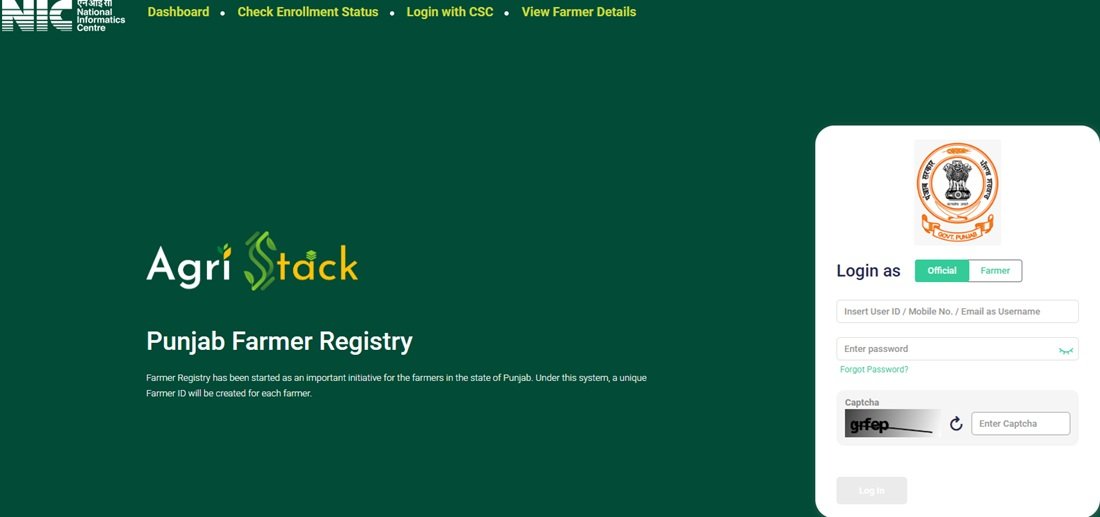
Punjab has its own online portal for accessing Farmer Registry-related facilities. Farmers can visit the official AgriStack Punjab portal to find login options, check enrollment status, view farmer details and access dashboard information.
The portal also supports farmers who completed their registration through a CSC or government camp. Such farmers can create a separate online account to activate their Self-Login facility.
According to the Ministry of Agriculture and Farmers Welfare, Punjab had generated 75,681 Farmer IDs as of 19 March 2026. The Ministry shared this figure through a PIB release dated 24 March 2026. This is a historical figure and should not be treated as the state’s current enrollment count.
What Is AgriStack Punjab Portal and What Services Does It Offer?
AgriStack Punjab portal is the state’s online platform for accessing Farmer Registry-related services. It brings important facilities together so farmers and authorised users can check relevant information without visiting different online pages.
The portal currently displays the following options:
- Dashboard: Displays enrollment progress and other available registry statistics.
- Check Enrollment Status: Allows users to search enrollment details using Aadhaar Number or Farmer ID.
- Login with CSC: Provides a separate login option for Common Service Centres.
- View Farmer Details: Provides a facility to search farmer details using Aadhaar-based verification.
- Login as Official / Farmer: Provides access to the portal’s user login facility.
- Forgot Password: Helps users recover access to their portal accounts.
- Create New User Account: Allows eligible users, including farmers registered through CSC or Camp Mode, to create portal login access.
These facilities serve different purposes. For example, a farmer who only wants to check enrollment status does not necessarily need to log in. However, a farmer who wants to use Self-Login must first complete the required account creation process.
For detailed information about initial Farmer ID enrollment, eligibility and registration requirements, read our Punjab Farmer Registry guide.
AgriStack Punjab Official Website: Portal Access and Important Features
Farmers can access the official AgriStack Punjab portal through the link below.
Official Website: https://pbfr.agristack.gov.in/farmer-registry-pb/
The portal homepage displays the main services and login facilities. Users should select the option that matches the work they want to complete.
Important portal features include:
- Dashboard access for viewing enrollment information.
- Online enrollment status checking.
- Separate login access for CSC users.
- Login facility for farmers and officials.
- One-time account creation for eligible users.
- Password recovery facility.
- Farmer details search through Aadhaar verification.
Always use the official website when entering personal information or completing account-related activities. Avoid sharing your OTP, password or other confidential details with unknown persons.
AgriStack Punjab Login: Farmer and Official Login Process
The AgriStack Punjab portal provides a login facility for farmers and authorised officials. Users should open the official portal and select the relevant login option available on the homepage.
Follow these steps to access the login page:
Step 1: Open the AgriStack Punjab official website.
Step 2: Find the Login as Official / Farmer option on the homepage.
Step 3: Enter your registered User ID, mobile number or email address in the username field, as permitted by the portal.
Step 4: Enter your account password.
Step 5: Complete the captcha displayed on the screen.
Step 6: Select the Log In option to proceed.
If the portal accepts your login details, it will provide access according to your account permissions.
Important: Farmers who completed their enrollment through CSC or Camp Mode must first create a portal account. They cannot use Self-Login until they complete this one-time account activation process.
AgriStack Punjab CSC Login: Access for Common Service Centres
Common Service Centres play an important role in helping farmers access online government services. Farmers who do not have suitable devices or internet access can seek assistance from an authorised CSC.
The AgriStack Punjab homepage displays a separate Login with CSC option. CSC users should select this option to access the relevant facility.
Farmers should understand that CSC login and farmer Self-Login are not the same. A CSC operator uses the designated CSC access facility to assist eligible users. A farmer who wants to log in independently must complete the portal account creation process when required.
For CSC-assisted registration, farmers should carry the required identity and land-related information. They should also verify their personal details before the operator submits the enrollment information.
To access the CSC facility, visit the official portal and select Login with CSC.
Create New User Account on AgriStack Punjab Portal
The Punjab portal provides a Create New User Account option for eligible users who need online login access. This facility is particularly important for farmers whose registry was created through CSC or Camp Mode.
According to the portal’s notice, such farmers must complete a one-time account registration before using Self-Login.
Follow these steps to create your portal account:
Step 1: Visit the AgriStack Punjab portal.
Step 2: Find the Create New User Account option on the homepage.
Step 3: Select the option to open the account creation facility.
Step 4: Follow the instructions displayed on the screen and enter the information requested by the portal.
Step 5: Complete the required verification and submit the account creation request.
Step 6: Follow any confirmation instructions displayed by the portal.
After completing the required process, use the available login facility to access your account.
Note: The publicly visible homepage confirms the account creation facility but does not display the complete field-by-field registration process. Therefore, follow the instructions shown on the live account creation page instead of relying on an assumed list of fields.
How to Activate Self-Login After CSC or Camp Registration
Many farmers complete their initial enrollment through a Common Service Centre or a government registration camp. However, completing enrollment does not automatically mean that the farmer can log in to the portal independently.
The Punjab portal clearly instructs CSC and Camp Mode-registered farmers to create a separate portal account first. This one-time process activates their Self-Login access.
Farmers can follow these steps:
Step 1: Open the official AgriStack Punjab homepage.
Step 2: Select Create New User Account.
Step 3: Complete the one-time account registration by following the portal instructions.
Step 4: Complete any verification required by the portal.
Step 5: Return to the login page after completing the account creation process.
Step 6: Enter your registered login details and password to access Self-Login.
This process separates two activities: adding a farmer’s details to the registry and activating the farmer’s personal portal login. Farmers should not assume that one automatically completes the other.
If you have not completed your initial enrollment, read our Punjab Farmer Registry registration guide for related information.
AgriStack Punjab Forgot Password: Reset Your Login Credentials
Farmers and officials who forget their portal password can use the Forgot Password option displayed on the login page.
Follow these steps to recover access:
Step 1: Visit the official AgriStack Punjab portal.
Step 2: Open the Login as Official / Farmer section.
Step 3: Select Forgot Password.
Step 4: Follow the instructions displayed on the password recovery page.
Step 5: Complete the verification process, if requested.
Step 6: Set or recover your password according to the portal instructions.
Step 7: Return to the login page and try signing in with your updated credentials.
The exact recovery fields and verification steps may depend on the portal’s current interface. Use only the official password recovery facility.
AgriStack Punjab Dashboard: Available Information and Services
The AgriStack Punjab dashboard provides an overview of the state’s Farmer Registry enrollment progress. It helps users understand how many farmers have enrolled and how many Farmer IDs have received approval.
Open the dashboard directly through this link:
The dashboard displays several important indicators, including:
- PM-KISAN beneficiary count.
- Total enrollment till the previous day.
- Enrollment as a percentage of PM-KISAN beneficiaries.
- Number of approved Farmer IDs.
- Farmer IDs pending generation or approval.
- Today’s enrollment count.
- Enrollment mode information.
- Top five districts by enrollment.
- Bottom five districts by enrollment.
The portal also displays a notice that dashboard data refreshes every five minutes. Therefore, the figures may change as the system receives and processes new information.
Farmers and researchers should check the live dashboard before using any enrollment figure in an application or report. A dashboard snapshot from an earlier date should not be treated as the latest state-level data.
Check Farmer Enrollment Status on AgriStack Punjab Portal
Farmers can check their enrollment status online through the dedicated status-check facility. The portal provides two search options: Aadhaar Number and Farmer ID.
Use the following steps to check your status:
Step 1: Open the Punjab enrollment status page.
Step 2: Select the search option available to you. You can use Aadhaar Number or Farmer ID.
Step 3: Enter the required details in the relevant field.
Step 4: If you select Aadhaar-based search, complete the OTP verification process. The portal sends the OTP to the mobile number linked with Aadhaar.
Step 5: Follow the on-screen instructions to submit your search request.
Step 6: Check the enrollment information displayed by the portal.
Keep your Farmer ID or Aadhaar details ready before starting the process. Do not share your OTP with anyone who contacts you unexpectedly.
For more information about enrollment, read the Punjab Farmer Registry guide.
View Punjab Farmer Details Through the AgriStack Portal
The portal provides a separate facility to view farmer details. Farmers can use this option when they want to access their available registry information through the online system.
The View Farmer Details page provides a search facility using the farmer’s Aadhaar number and the required verification process.
Follow these steps:
Step 1: Open the View Farmer Details page.
Step 2: Enter the farmer’s Aadhaar number in the available search field.
Step 3: Complete the OTP or other verification process displayed by the portal.
Step 4: Submit the details and check the information shown on the screen.
Use this facility only for authorised access to the relevant farmer’s information. The availability of a separate Farmer ID card download option could not be confirmed from the publicly visible portal information. Check the live page for any print or download facility available after verification.
Grievance Redressal on AgriStack Punjab Portal
Farmers may face problems while accessing the portal, creating an account, checking enrollment status or viewing their details. They may also notice incorrect information in their registry records.
The publicly visible portal homepage displays login, account creation, password recovery, status checking and farmer details facilities. However, it does not clearly confirm a separate online grievance submission form.
Farmers who face unresolved problems should take the following steps:
- Check the relevant portal service again and follow the instructions displayed on the screen.
- Keep the enrollment reference or Farmer ID ready, if available.
- Note down the exact error message before seeking assistance.
- Contact the relevant Agriculture Department office for guidance.
- Use an authorised CSC or government support channel if the issue relates to assisted registration.
For land ownership or Jamabandi-related discrepancies, farmers can also check the Punjab Land Records portal. The concerned revenue authority can guide them about correction of land records.
Do not submit sensitive identity documents or OTPs through unofficial websites or unknown links.
Common AgriStack Punjab Login and Portal Issues
Farmers may sometimes face login or verification problems while using the portal. The following table explains common situations and the practical steps users can take.
| Problem | What You Can Do |
|---|---|
| Unable to log in after CSC registration | Create a portal account through the Create New User Account option to activate Self-Login. |
| Forgotten password | Use the Forgot Password facility on the login page. |
| OTP not received | Check whether your mobile number is linked with Aadhaar and whether the phone can receive messages. |
| Enrollment status not displayed | Check the Aadhaar Number or Farmer ID entered and try again through the official status page. |
| Farmer details not visible | Complete the verification process and check the information entered before submitting the search. |
| Incorrect land information | Check the relevant Jamabandi and mutation records through the Punjab Land Records portal. |
| Portal page not opening | Try again later, check your internet connection and open the official portal directly. |
| Account creation not completed | Return to Create New User Account and follow the instructions displayed by the portal. |
If these steps do not resolve the problem, contact the relevant Agriculture Department office or seek assistance through an authorised CSC.
Important Links for AgriStack Punjab Portal Services
Farmers can use the following direct links to access important services on the official portal.
| Service | Official Link |
|---|---|
| AgriStack Punjab Official Website | Click Here |
| Punjab Portal Dashboard | Click Here |
| Check Enrollment Status | Click Here |
| View Farmer Details | Click Here |
| Privacy Policy | Click Here |
| Punjab Land Records | Click Here |
| Punjab Agriculture Department | Click Here |
| Punjab Farmer Registry Registration Guide | Read Guide |
AgriStack Punjab Portal Contact Details and Support
Farmers who need assistance with agriculture-related services can contact the Department of Agriculture and Farmers Welfare, Punjab. The Punjab Government website provides the department’s official contact information.
Department: Department of Agriculture and Farmers Welfare, Punjab
Head Office Address:
Institutional Site No. 204,
Phase 6, Kheti Bhawan,
SAS Nagar, Mohali,
Punjab – 160055
Head Office Phone: 0172-2970602
Administrative Secretary Email: fcd@punjab.gov.in
Official Department Page: Department of Agriculture, Punjab
For portal-specific problems, explain the issue clearly and provide the relevant enrollment details when requested through an authorised channel. Do not send your password or OTP by email or disclose them over an unverified phone call.
Frequently Asked Questions (FAQs)
Ans. The official website is pbfr.agristack.gov.in/farmer-registry-pb/. Farmers can use it to log in, access the dashboard, check enrollment status, and view farmer details.
Ans. AgriStack is the broader national digital agriculture initiative. The Punjab Farmer Registry is one of its state-level components. The Punjab portal provides online facilities related to this registry. Read our Punjab Farmer Registry guide for detailed registration information.
Ans. Visit the official portal and select Login as Official / Farmer. Enter your registered User ID, mobile number or email address, password and captcha to proceed.
Ans. Yes. The portal homepage displays a Login with CSC option for the relevant Common Service Centre users.
Ans. Open the official portal and select Create New User Account. Follow the instructions displayed on the account creation page to complete the one-time registration.
Ans. The portal instructs CSC and Camp Mode-registered farmers to create a separate portal account first. Complete the one-time registration through Create New User Account to activate Self-Login access.
Ans. The portal provides a separate Check Enrollment Status facility. Users can search using Aadhaar Number or Farmer ID and complete the required verification.
Ans. Yes. Select Aadhaar Number on the enrollment status page and follow the OTP verification process. The portal sends the OTP to the mobile number linked with Aadhaar.
Ans. Yes. The enrollment status page also provides a Farmer ID search option. Enter the required details and follow the instructions shown on the screen.
Ans. Open the View Farmer Details page on the official portal. Enter the farmer’s Aadhaar number and complete the required verification process.
Ans. Open the login section and select Forgot Password. Follow the verification and recovery instructions displayed by the portal.
Ans. The dashboard displays enrollment progress, approved Farmer IDs, pending cases, daily enrollment figures, enrollment modes and district-wise information.
Ans. The portal displays a notice stating that dashboard data refreshes every five minutes. Check the live dashboard for the latest available figures.
Ans. A separate online grievance submission form could not be confirmed from the publicly visible portal homepage. Farmers can contact the Punjab Agriculture Department or seek assistance through an authorised CSC.
Ans. Visit the Punjab Land Records portal to view Jamabandi and other available revenue records.
Ans. Farmers can contact the Department of Agriculture and Farmers Welfare, Punjab, at 0172-2970602 or email fcd@punjab.gov.in. They can also visit the department’s official website for updated contact information.

Tabassum is a government schemes researcher and writer with 5 years of experience tracking Central and State welfare scheme programmes across India. She has covered 500+ schemes spanning agriculture, women welfare, education, and housing, helping lakhs of beneficiaries understand their entitlements in simple language.