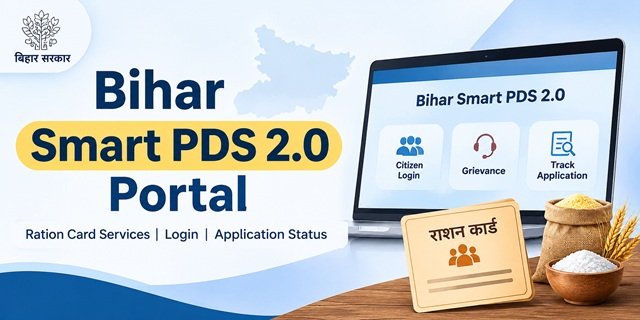
Bihar Smart PDS 2.0 Portal provides an online platform for citizens and authorised users to access ration card-related services. The portal offers separate login options for family members, department authorities, Fair Price Shop (FPS) dealers and grievance users. Citizens can also track submitted applications and access other available services through the official website.
Bihar Smart PDS 2.0 Portal Highlights | |
|---|---|
| Portal Name | Bihar Smart PDS 2.0 Portal |
| Also Known As | BR Smart PDS 2.0 |
| Concerned Department | Food and Consumer Protection Department, Government of Bihar |
| Portal URL | https://br.smartpds.nic.in/ |
| Portal Developer and Host | National Informatics Centre (NIC), Ministry of Electronics and Information Technology |
| Main Purpose | Online management of ration card-related services and FPS operations |
| Available Login Options | Citizen, Authority, FPS, Grievance and Application Tracking |
| Major Services | New ration card, member addition, member deletion, application tracking and grievance management |
| Application Mode | Online through the official portal, wherever the relevant service is available |
| Helpline Number | 1800-3456-194 |
Introduction to Bihar Smart PDS 2.0 Portal
The Bihar Government has introduced the Smart PDS 2.0 Portal to manage important services related to ration cards and the Public Distribution System (PDS). Citizens can visit br.smartpds.nic.in to access the portal and find the available online services.
The portal provides separate login facilities for different users. The head of a family can use Citizen Login, while authorised officials and Fair Price Shop dealers can access their respective login sections. The portal also provides a dedicated grievance facility and an option to track applications.
One important change concerns the older Bihar ePDS system. The Food and Consumer Protection Department has published a notice on its official ePDS website stating that Smart PDS 2.0 now handles ration card creation, card splitting, member addition and member deletion. The notice also confirms that the department has shifted the specified FPS management services to the new portal.
Therefore, citizens looking for these services should visit the new Bihar Smart PDS 2.0 website instead of relying on the old system for services that have moved.
Bihar Smart PDS 2.0 Official Website and Login Link
The official website of Bihar Smart PDS 2.0 is https://br.smartpds.nic.in/. Citizens should use this address to reach the portal and select the relevant service.
The portal provides separate login pages for citizens, department authorities, FPS dealers and grievance users. It also provides a separate application tracking facility.
| Portal Facility | Direct Link |
|---|---|
| Main Portal | Visit Bihar Smart PDS 2.0 |
| Citizen Login | Open Citizen Login |
| Authority Login | Open Authority Login |
| FPS Login | Open FPS Login |
| Grievance Login | Open Grievance Login |
| Application Tracking | Track Application |
Always check the website address before entering your Aadhaar number, ration card number or OTP. Use the official portal rather than an unknown third-party website.
What is BR Smart PDS 2.0 Portal?
BR Smart PDS 2.0 is Bihar’s online portal for managing specified ration card and Public Distribution System services. The letters BR in its web address identify the Bihar portal within the Smart PDS platform.
The portal serves different categories of users through separate login facilities. It helps citizens access ration card-related services, allows authorised department users to perform their assigned work and provides a separate facility for FPS dealers.
The portal also includes a grievance management facility. Citizens can use this facility to submit complaints related to Smart PDS and check their grievance details after authentication.
According to the official portal footer, the National Informatics Centre (NIC), under the Ministry of Electronics and Information Technology (MeitY), designed, developed and hosted the Smart PDS 2.0 portal.
In simple terms, BR Smart PDS 2.0 brings several ration card-related services and user access facilities under one online platform. It also forms part of Bihar’s transition from the older ration card management arrangements to the Smart PDS 2.0 system.
Login Options Available on Bihar Smart PDS 2.0 Portal
The Bihar Smart PDS 2.0 homepage provides five main access options. Each option serves a different purpose, so users should select the correct one before proceeding.
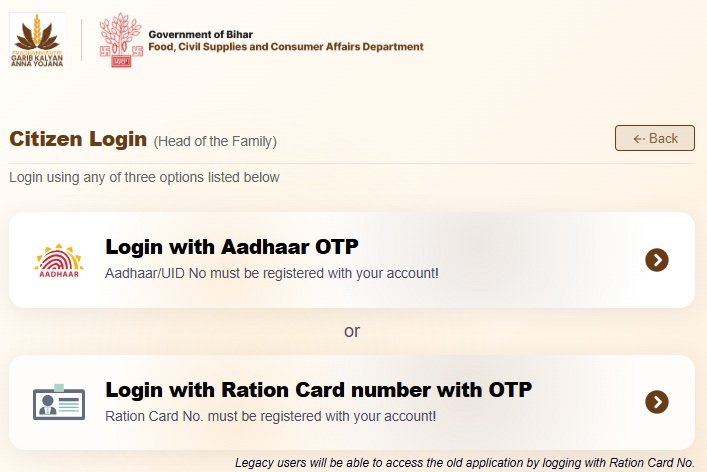
1. Citizen Login (Head of the Family)
Citizen Login is intended for the Head of the Family. Ordinary ration card users should select this option when they want to access the citizen-facing services available through the portal.
Visit the Citizen Login page to open this section. After reaching the login page, follow the instructions displayed on the portal.
2. Authority Login
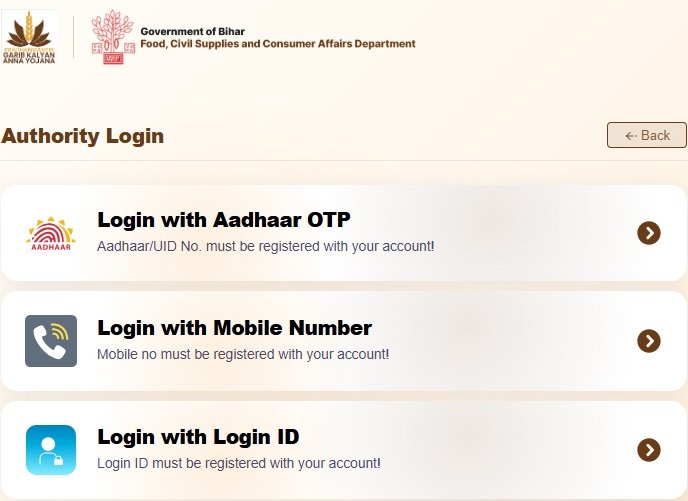
Authority Login is meant for authorised government officials who use the system for their assigned departmental responsibilities. Ordinary citizens should not select this option for personal ration card services.
Authorised users can visit the Authority Login page to access their account.
3. FPS Login
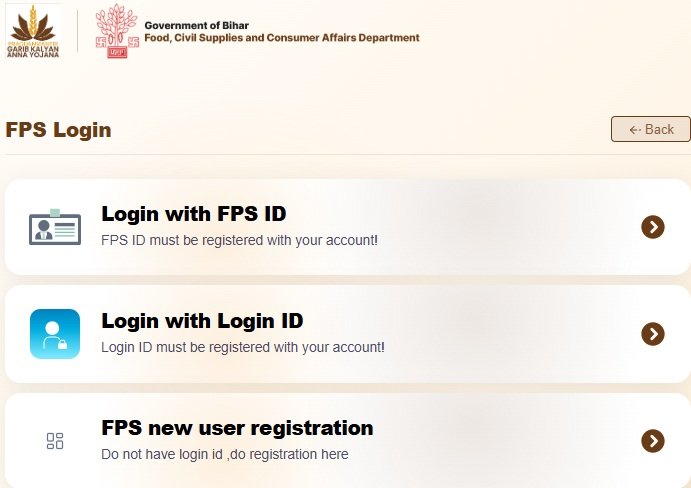
FPS stands for Fair Price Shop. This login option serves authorised ration shop dealers who need to access the portal’s FPS-related facilities.
FPS dealers can open the FPS Login page and follow the instructions provided there.
4. Grievance Login
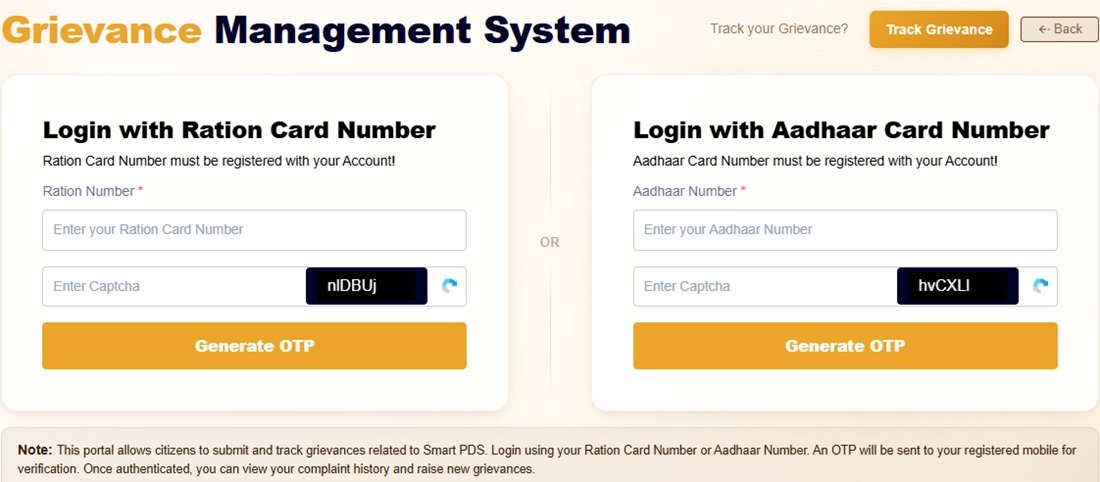
Grievance Login allows citizens to access the Smart PDS Grievance Management System. Users can submit complaints related to Smart PDS and track their grievance details after completing the required verification.
The grievance login page provides two authentication options:
- Ration Card Number: Enter the ration card number registered with the account.
- Aadhaar Number: Enter the Aadhaar number registered with the account.
After entering the selected number, users must complete the captcha and generate an OTP. The portal sends the OTP to the registered mobile number for verification.
After successful authentication, citizens can view their complaint history and raise new grievances through the available facility.
Visit the Bihar Smart PDS Grievance Login page to access this service.
5. Track Your Application
The portal also provides a separate Track Your Application option. Citizens can use this facility to check the progress of an application submitted through the Smart PDS system.
Visit the Application Tracking page and enter the information requested by the portal. Keep your application or reference details ready before starting the process.
Do not confuse application tracking with grievance tracking. Application tracking relates to a submitted service request, whereas grievance tracking relates to a complaint registered through the Grievance Management System.

Services Available on Bihar Smart PDS 2.0 Portal
Bihar Smart PDS 2.0 provides several facilities related to ration card management and user access. The main services identified through the portal and the official transition notice include the following:
- New Ration Card Application: The portal handles the process of creating new ration cards.
- Member Addition: It provides a facility to add a family member to an existing ration card.
- Member Deletion: It supports the removal of a member’s name from a ration card.
- Ration Card Splitting: The official transition notice also identifies card splitting as a Smart PDS 2.0 service.
- e-KYC Related Services: The portal forms part of the state’s digital PDS system, while beneficiary e-KYC follows the prescribed authentication process.
- Application Tracking: Citizens can use the tracking facility to check submitted application progress.
- Grievance Management: Citizens can submit and track complaints related to Smart PDS.
- FPS Management: The department has shifted the specified FPS management functions to Smart PDS 2.0.
The exact options available to a user may depend on the login type, account permissions and current portal configuration. A service appearing in the portal’s general description does not necessarily mean that every user can access it without authentication.
New Ration Card Application Through Smart PDS 2.0
Bihar’s official ePDS website confirms that Smart PDS 2.0 handles new ration card creation. Therefore, citizens looking for the new ration card service should visit the new portal rather than depend on the older application system for this facility.
Follow these steps to reach the citizen-facing application facility:
- Open the official Bihar Smart PDS 2.0 Portal.
- Select Citizen Login (Head of the Family) from the available options.
- Open the Citizen Login page and follow the authentication instructions displayed there.
- After accessing the citizen section, check the available services for the new ration card application.
- Select the relevant application option, if available, and read the instructions carefully.
- Enter the information requested by the portal and provide the documents required for the application.
- Review the information before submitting the application.
- Save the acknowledgement or application reference number, if the portal generates one.
Important: The public-facing information reviewed for this guide does not establish the complete post-login application form, its exact fields or the current document checklist. Applicants should follow the instructions displayed inside the live portal and check its Form Reference section before submitting an application.
Do not rely on an old application form or document list without confirming that Smart PDS 2.0 still accepts it.
Ration Card Member Addition and Deletion Services
A family may need to update its ration card when a new member joins the household or an existing member becomes ineligible for inclusion on that card. Bihar’s official ePDS transition notice specifically confirms that Smart PDS 2.0 handles the addition and removal of ration card members.
Member Addition Service
Citizens who need to add a family member should visit the Smart PDS 2.0 Portal and select Citizen Login (Head of the Family).
After accessing the citizen section, check the available ration card modification services and select the member addition option, if displayed. Follow the portal’s instructions and submit the requested information and supporting documents.
Before submitting the request, check that the new member’s personal details match the relevant identity records. Also, save the application reference number or acknowledgement for future tracking.
Member Deletion Service
The portal also handles requests to remove a member’s name from an existing ration card. Citizens should use the Citizen Login section and look for the relevant member deletion or removal facility.
Follow the instructions displayed by the portal and provide the information or supporting documents it requests. Review the details carefully before submitting the request.
The official transition notice confirms the availability of member addition and deletion through Smart PDS 2.0. However, it does not publish the complete step-by-step process or a universal document list for these services.
Note: The exact application options, verification requirements and supporting documents should be checked on the live portal before submitting a request.
e-KYC Services on Bihar Smart PDS 2.0 Portal
e-KYC stands for electronic Know Your Customer. In the Public Distribution System, it helps verify the identity of ration card beneficiaries through Aadhaar-based authentication and the prescribed verification process.
However, citizens should understand the difference between accessing Smart PDS online and completing beneficiary e-KYC. The Government of India’s e-KYC advisory describes a process in which the Fair Price Shop dealer initiates the beneficiary’s e-KYC request through an electronic Point of Sale (e-PoS) device.
Where Can Bihar Ration Card Beneficiaries Complete e-KYC?
Beneficiaries should visit their Fair Price Shop and ask the dealer about the available e-KYC facility. The dealer can initiate the authentication process through the e-PoS device as prescribed by the department.
The national advisory identifies the following authentication methods:
- Fingerprint Authentication: The beneficiary provides a fingerprint through the e-PoS device.
- Iris Authentication: The beneficiary can use iris-based verification where the required equipment and facility are available.
- OTP Authentication: Aadhaar OTP or another permitted OTP method may be available under the applicable process.
The availability of a particular method depends on the equipment and instructions followed by the concerned authorities.
What Happens if Biometric Authentication Fails?
A fingerprint or other biometric authentication attempt may fail because of technical problems, connectivity issues or biometric mismatches. Such a failure should not automatically mean that a genuine beneficiary loses access to entitled foodgrains.
The Department of Food and Public Distribution advises states and union territories to follow alternative authentication or verification procedures in genuine failure cases. Its official PDS FAQs also explain the no-denial approach for genuine beneficiaries when biometric authentication or technical systems fail.
Beneficiaries facing repeated authentication problems should contact their FPS dealer or the concerned supply office and follow the verification instructions issued by the department.
Important: This section explains the national e-KYC process. It does not establish a separate online e-KYC form or a Bihar-specific completion deadline on the Smart PDS 2.0 website. Check the latest Bihar department instructions before relying on any deadline.
Application Status Tracking on Smart PDS 2.0
After submitting a request through Bihar Smart PDS 2.0, citizens may need to check its progress. The portal provides a separate Track Your Application option for this purpose.
Follow these steps:
- Visit the Bihar Smart PDS 2.0 homepage.
- Select Track Your Application.
- Alternatively, open the direct application tracking page.
- Enter the application or reference details requested by the portal.
- Complete any additional verification displayed on the page.
- Submit the information and check the status shown on the screen.
Keep the application acknowledgement or reference number safe after submitting a request. It can help you identify the correct application when you check its progress or contact the department.
The exact information fields may change with the portal’s current interface. Therefore, enter only the details requested on the live tracking page.
User Manuals and Form Reference
The Bihar Smart PDS 2.0 homepage includes two useful resources: User Manuals and Form Reference. Citizens should check these sections before using a service, especially when they need information about application requirements or portal instructions.
User Manuals
User Manuals can help users understand how to access and operate the portal’s available facilities. If the portal provides a manual for a particular service, read it before starting the process.
Users should follow the latest instructions available on the official portal rather than depend entirely on older guides prepared for the previous Bihar ePDS system.
Form Reference
The Form Reference section is another important resource for applicants. It can help users identify the forms or references associated with the portal’s services.
Before applying for a new ration card or requesting a change in an existing card, check whether the portal provides a relevant form reference or document instruction.
Document checklist: The older Bihar ration card system used a separate user manual that mentioned Aadhaar details, family photographs, residential proof, bank passbook information and other documents. However, this older checklist should not be treated as the confirmed document requirement for every Smart PDS 2.0 application. Always follow the current Form Reference and application instructions.
Old Bihar ePDS Portal vs Smart PDS 2.0 Portal
Bihar previously used the Ration Card Management System, also known as Jan Vitran Ann (JVA), through its ePDS platform. The state has shifted specified ration card and FPS management services to Smart PDS 2.0.
The official ePDS homepage displays notices explaining this transition. These notices identify the services that have moved to the new platform.
| Basis | Old Bihar ePDS System | Smart PDS 2.0 |
|---|---|---|
| Portal | epds.bihar.gov.in | br.smartpds.nic.in |
| System | Ration Card Management System / Jan Vitran Ann | Smart PDS 2.0 |
| New Ration Card Creation | Service shifted to Smart PDS 2.0 | Handled through the new system |
| Card Splitting | Service shifted to Smart PDS 2.0 | Handled through the new system |
| Member Addition | Service shifted to Smart PDS 2.0 | Handled through the new system |
| Member Deletion | Service shifted to Smart PDS 2.0 | Handled through the new system |
| FPS Management | Specified services discontinued on the old portal | Shifted to Smart PDS 2.0 |
The old ePDS website remains useful for understanding the previous system and accessing other links displayed there. However, its official notice clearly directs users to Smart PDS 2.0 for the services listed above.
Therefore, citizens should use the new portal for new ration card creation, card splitting, member addition and deletion instead of searching for these services on the older system.
Grievance Login and Complaint Support
Bihar Smart PDS 2.0 provides a Grievance Management System for citizens who want to raise or track complaints related to the portal and its services.
The grievance page allows users to log in through either their ration card number or Aadhaar number. The selected number must already be registered with the user’s account.
How to Access the Grievance Management System
- Open the Smart PDS Grievance Login page.
- Select the Ration Card Number or Aadhaar Card Number login option.
- Enter the selected number in the relevant field.
- Enter the captcha displayed on the screen.
- Select the option to generate an OTP.
- Enter the OTP received on the registered mobile number.
- Complete the verification process to access the grievance facility.
- After successful login, view your complaint history or submit a new grievance through the available options.
Track an Existing Grievance
The grievance section also provides a Track Grievance option. Citizens can use it to check the details of a complaint already submitted through the grievance system.
Keep the relevant complaint or reference details available and follow the instructions displayed on the grievance page.
Where to Report a PDS Complaint?
For help with ration card or Public Distribution System issues, citizens can also contact the Bihar Food and Consumer Protection Department.
- Department Helpline: 1800-3456-194
- Email: foodbihar@gmail.com
- National PDS Helpline: 1967, where applicable
- Department Website: Food and Consumer Protection Department, Bihar
When submitting a complaint, provide clear information about the issue. Keep the ration card number, application reference or relevant transaction details ready. Also, save the complaint acknowledgement for future communication.
Bihar Smart PDS 2.0 Contact Details
Citizens who face difficulties while using Bihar Smart PDS 2.0 can contact the Food and Consumer Protection Department through its available support channels.
| Contact Information | Details |
|---|---|
| Department | Food and Consumer Protection Department, Government of Bihar |
| Helpline Number | 1800-3456-194 |
| Email Address | foodbihar@gmail.com |
| National PDS Helpline | 1967, where applicable |
| Official Smart PDS Portal | br.smartpds.nic.in |
| Department Website | state.bihar.gov.in/fcp |
| Old ePDS Website | epds.bihar.gov.in |
Citizens can also visit their District Supply Office at the district collectorate for assistance with ration card-related matters. Carry the relevant ration card details, application acknowledgement and supporting records when visiting the office.
Important Links
| Service or Resource | Official Link |
|---|---|
| Bihar Smart PDS 2.0 Portal | Click Here |
| Citizen Login | Click Here |
| Authority Login | Click Here |
| FPS Login | Click Here |
| Grievance Login | Click Here |
| Track Application | Click Here |
| Old Bihar ePDS Portal | Click Here |
| AePDS Bihar | Click Here |
| NFSA Bihar State Page | Click Here |
| Food and Consumer Protection Department | Click Here |
| Department of Food and Public Distribution | Click Here |
Frequently Asked Questions (FAQs)
Ans. Bihar Smart PDS 2.0 is an online platform that handles specified ration card management and Public Distribution System services in Bihar. It provides separate login options for citizens, authorities, FPS dealers and grievance users.
Ans. The official website is https://br.smartpds.nic.in/.
Ans. BR identifies the Bihar portal within the Smart PDS platform. Citizens can use the BR Smart PDS website to access Bihar-specific services.
Ans. The portal provides Citizen Login, Authority Login, FPS Login, Grievance Login and Track Your Application facilities.
Ans. Yes. The official Bihar ePDS website confirms that new ration card creation has shifted to Smart PDS 2.0. Citizens should visit the new portal and check the available application facility after selecting Citizen Login.
Ans. Yes. The official transition notice identifies member addition as a service handled through Smart PDS 2.0. Use the Citizen Login section and follow the instructions available on the portal.
Ans. Yes. Smart PDS 2.0 handles ration card member deletion. Citizens should access the citizen section and follow the current portal instructions for submitting the request.
Ans. Visit br.smartpds.nic.in/track, enter the details requested by the portal and follow the instructions to check your application progress.
Ans. Open the Grievance Login page. Log in using your registered ration card number or Aadhaar number, complete captcha verification and generate an OTP. After successful verification, you can access the available grievance facilities.
Ans. Yes. The Grievance Management System provides a Track Grievance option for checking complaints submitted through the system.
Ans. Beneficiaries should visit their Fair Price Shop and ask the dealer to initiate the e-KYC process through the e-PoS device, following the applicable departmental instructions.
Ans. Contact the FPS dealer or concerned supply office and ask about the prescribed alternative authentication or verification process. Genuine beneficiaries should not lose their entitled foodgrains solely because of a technical or biometric authentication failure.
Ans. No. The older ePDS system included the Ration Card Management System and FPS Management facilities. The department has shifted specified services, including new ration card creation and member addition or deletion, to Smart PDS 2.0.
Ans. No. AePDS is the Aadhaar Enabled Public Distribution System, which provides FPS automation and PDS transaction-related information. Smart PDS 2.0 is a separate portal for the services identified by the Bihar department.
Ans. Citizens can contact the Bihar Food and Consumer Protection Department through its helpline number 1800-3456-194.
Ans. Visit the official Bihar Smart PDS 2.0 homepage and check the User Manuals section. You can also refer to the Form Reference section for available form-related information.

Tabassum is a government schemes researcher and writer with 5 years of experience tracking Central and State welfare scheme programmes across India. She has covered 500+ schemes spanning agriculture, women welfare, education, and housing, helping lakhs of beneficiaries understand their entitlements in simple language.