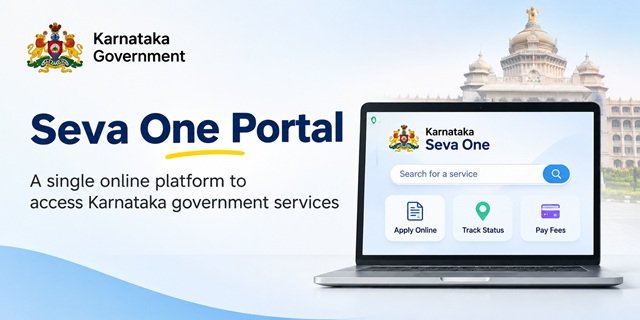
Karnataka residents can use the Seva One Portal (Namma Seve) to find government services, register online, submit applications and check their application status. The portal brings services from multiple departments under one platform and also provides facilities such as eligibility search, Aadhaar e-Sign and department-wise user manuals. Citizens can visit the official website at sevaone.karnataka.gov.in to access these facilities.
Karnataka Seva One Portal Overview | |
|---|---|
| Portal Name | Namma Seve (Seva One) |
| State | Karnataka |
| Managed By | Directorate of Electronic Delivery of Citizen Services (EDCS), Praja Seva Department |
| Purpose | Online access to government services offered by different departments |
| Total Services Displayed | 2,352 services (as displayed in the October 2026 portal snapshot) |
| Single Sign-On Services | 1,086 services |
| Services Requiring Department Login | 1,266 services |
| Registration Mode | Online |
| Login Options | Registered mobile number or email ID with OTP or password |
| Application Tracking | Online application status facility |
| Other Facilities | Eligibility search, e-Sign, service directory and user manuals |
| Offline Service Channels | Grama One, Karnataka One, Bangalore One and Janasevaka |
| Official Website | https://sevaone.karnataka.gov.in/ |
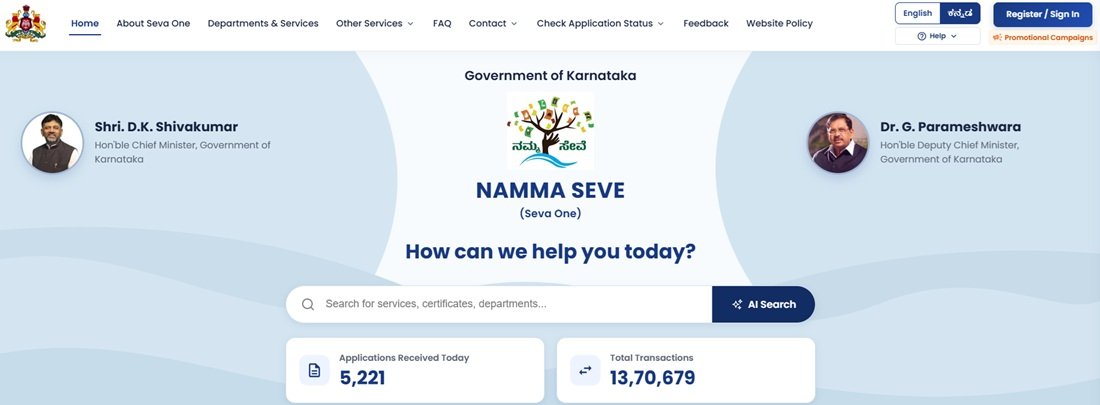
Introduction of Karnataka Seva One Portal (Namma Seve)
The Government of Karnataka provides several citizen services through different departments and service delivery systems. Finding the correct website for a particular certificate, application or public service can sometimes take time. The Karnataka Seva One Portal addresses this problem by bringing information about services from multiple departments together on a common platform.
The official website displays the name Namma Seve (Seva One). The portal operates under the Directorate of Electronic Delivery of Citizen Services (EDCS), Praja Seva Department, Government of Karnataka. Citizens can use its homepage to search for services, explore departments and access the available online facilities.
Seva One does more than provide a list of government services. Its website also offers a citizen login facility, new user registration, an eligibility checker, application tracking, Aadhaar-based e-Sign instructions and department-wise user manuals. These options help users understand where to find a service and what steps they may need to complete.
One important feature is that the portal does not handle every listed service through the same login system. Some services support Seva One Single Sign-On, while others take users to the respective department’s website for a separate login. Citizens should check the instructions shown after selecting a service.
Official portal: Open Karnataka Seva One Website
Karnataka Seva One Portal Login
Citizens can sign in to Seva One through their registered mobile number or email ID. The login page provides OTP-based and password-based access. Users must also enter the captcha displayed on the screen before submitting their login details.
Follow these steps to complete the Namma Seva One login process:
- Visit the official Karnataka Seva One website.
- Open the Register / Sign In option or visit the Apply for Service page.
- Enter your registered email ID or mobile number in the login field.
- For password-based login, enter your account password in the next field.
- For OTP login, select Get OTP and enter the OTP received through the registered contact details, as instructed on the page.
- Enter the captcha shown on the screen.
- Click on Submit to proceed.
After successful login, you can access the citizen facilities available for your account and proceed with services that require Seva One authentication.
Forgot your password? Select the Forgot Password option on the login page and follow the instructions displayed by the portal. If OTP login is available for your account, you can use that option instead of entering your password.
Important: A Seva One account does not automatically provide access to every service listed on the website. Some services require a separate login on the concerned department’s portal.
New User Registration on Seva One Portal
People who have not created an account can use the online registration facility available on the Seva One service page. The registration process asks for basic contact information and a password. The portal also displays a notice about DigiLocker-based user identification and e-KYC through ServicePlus.
Here is the registration process:
- Open the official Seva One Portal.
- Go to the Apply for Service page.
- Select New user? Register here.
- Read the registration notice. The portal explains that ServicePlus uses DigiLocker for user identification and e-KYC.
- If the portal redirects you to DigiLocker, follow the instructions displayed on the official verification page.
- Continue to the Citizen Registration form when the portal provides that option.
- Enter your email ID and mobile number in the required fields.
- Create a password that meets the conditions displayed on the registration form.
- Read the Terms of Use and select the agreement checkbox.
- Click on Submit to continue.
The registration form reviewed for this guide specifies a password of at least nine characters. It requires at least one uppercase letter, one lowercase letter, one number and one permitted special character from the following list: ! @ # $ % ^ & *. Follow the password rules shown on the live form if the portal updates them.
The registration form does not show a separate registration payment step. However, an individual government service may charge an application or processing fee. Check the amount displayed on the relevant service form before submitting an application.
Use an active mobile number and email ID while registering. The portal may use these details for login verification and application-related communication. If the registration process asks for Aadhaar-based verification through DigiLocker, keep access to the required verification details ready.
Services Available on Karnataka Seva One Portal
The Seva One homepage provides a common search facility for government services, certificates and departments. Citizens can enter the name of a service in the search box or browse the department directory to find the relevant option.
The portal’s service information covers different types of public services, including the following broad areas:
- Certificate Services: Services related to income, caste, domicile, birth, death and other certificates, wherever the concerned department provides them online.
- Ration Card Services: Facilities related to ration cards and the Public Distribution System.
- Social Security Services: Services connected with pensions and other social security-related facilities.
- Licence Services: Licence-related applications and departmental facilities.
- Public Grievances: Complaint-related services available through the concerned departments.
- Land and Registration Services: Links to relevant land records, property records and registration-related facilities.
- Tax and Utility Payments: Access to available government tax, property tax, electricity and water-related services.
- RTI and Other Departmental Services: Information and access to other public services listed by the concerned departments.
These are broad service areas, not a guarantee that every service can be completed directly on Seva One. The actual services, application forms and login requirements depend on the department.
The department directory includes public bodies and departments such as Agriculture, BESCOM, BMTC, Bangalore Water Supply and Sewerage Board (BWSSB), Bhoomi, Urban Property Ownership Records (UPOR), Department of Stamps and Registration, Directorate of Social Security and Pensions and other government organisations.
To find a particular service, follow these steps:
- Visit the Seva One homepage.
- Enter the service, certificate or department name in the search box.
- Review the available search results.
- Open the relevant service to read its instructions and access details.
- If you cannot find the service through search, open the Departments & Services section and browse the department directory.
The homepage also displays an AI search option. Citizens can use the search facilities available on the portal to locate relevant services.
Which services support Seva One Single Sign-On?
The portal’s homepage has displayed the following service-count information:
| Service Access Type | Number of Services | Login Requirement |
|---|---|---|
| Single Sign-On Services | 1,086 | Use the integrated Seva One login facility. |
| Department Website Services | 1,266 | Log in again on the respective department website. |
| Total | 2,352 | Combined count displayed by the portal. |
These figures reflect the portal’s displayed information in the October 2026 snapshot. The number of services may change as departments add, remove or update their online facilities.
This distinction matters when you apply for a service. If it supports Single Sign-On, you can use the integrated login facility. If it belongs to the department-login category, the portal may redirect you to another government website. You may then need to sign in separately and follow that department’s application process.
Before proceeding, read the instructions shown on the selected service page. You can also check the department-wise user manuals available through the portal.
Know Your Eligibility Feature on Seva One
Seva One provides a Know Your Eligibility facility to help citizens find services that may match their personal and family circumstances. Instead of searching through every department, users can answer a series of questions and view the services suggested by the portal.
To use this feature, visit the official Know Your Eligibility page and follow these steps:
- Open the Know Your Eligibility page.
- Check that Karnataka appears as the selected state.
- Select the appropriate option under Applying For.
- Click on Next and answer the questions displayed on the screen.
- Provide the requested details, such as date of birth, gender and category.
- Answer the questions about economic status, occupation, annual income and marital status, wherever applicable.
- Provide information about disability status, educational qualification and Aadhaar availability if the portal asks for it.
- Answer the questions about family members, including adults, senior citizens, children and infants.
- Continue through the questions and review the services suggested by the portal.
The eligibility checker may ask for information about the following details:
- Date of birth and gender
- Category, such as General, SC, ST or OBC
- Economic status, including APL or BPL
- Marital status and occupation
- Annual income of the applicant, parents or family
- Benchmark disability status and type of disability
- Highest educational qualification
- Whether the applicant is an only girl child
- Availability of an Aadhaar card
- Family members, including adults, senior citizens, children and infants
You do not necessarily have to answer every question. The page provides a Skip this question option for several fields. Answer the questions accurately wherever you can, as incorrect information may affect the services suggested by the system.
If you already know the name of the service, use the Direct Search facility available on the eligibility page instead of going through the full questionnaire.
Remember: The eligibility checker helps you identify potentially relevant services. It does not approve an application or guarantee that you will receive a scheme benefit. The concerned department checks the application and supporting documents before making its decision.
Applying for Services Through Seva One Portal
After finding the required service, you can check its instructions and start the application process through the available online facility. The exact process depends on the department. Some applications open within the Seva One system, while others redirect users to a separate department website.
Follow the general steps below to apply for a service:
Open the official portal by visiting sevaone.karnataka.gov.in and searching for the service you need.
Select the service by opening the relevant search result and reading the instructions provided by the concerned department.
Sign in if required using your registered mobile number or email ID whenever the service asks for Seva One authentication.
Check the application facility to confirm whether the service opens directly on Seva One or redirects you to another department website.
Complete the form by entering the requested personal, contact and service-related details in the application form.
Upload the documents requested by the concerned department while following the file format and size limits shown on the application form.
Save an incomplete application if you cannot finish the form immediately and the portal provides a save option. You may later find the saved application under the View Incomplete Applications section, wherever this facility is available.
Pay the fee, if applicable by checking the amount displayed on the application page and using one of the payment methods offered by the portal.
Complete e-Sign, if required by following the Aadhaar-based electronic signing process before submitting the application.
Review and submit the application after checking all the information you have entered and correcting any errors.
Save the acknowledgement by noting down the Application Reference Number (ARN) or acknowledgement number generated after submission. Keep it safe for future application status checks and reference.
Some services may provide payment options such as debit card, credit card, net banking or other payment methods. The available options depend on the service and payment gateway displayed during the application.
Do not assume that every service asks for the same documents or charges the same fee. A certificate application, pension-related request and licence application may have different requirements. Always follow the instructions on the selected service form or its department-wise user manual.
After submitting the application, keep your registered mobile number and email ID active. The concerned department may send application updates, verification instructions or requests for additional information through these channels.
Application Status Check on Seva One Portal
After submitting an online application, keep its Application Reference Number or acknowledgement number safe. You may need this number to check the progress of your request.
The Seva One website provides an application status facility with separate options for different service categories. The tracking process may vary depending on the department that handles your application.
Follow these steps to check your Seva One application status:
- Open the official Seva One website.
- Select Check Application Status from the website menu or open the status facility available on the service page.
- Choose the relevant department or application category from the available options.
- Enter your Application ID or reference number in the required field.
- Complete any additional verification shown on the screen.
- Submit the details to view the available application status.
Different application status options
The portal’s status facility includes separate options for certain categories of applications, such as:
- Revenue Department: Select the Revenue Department option when your application belongs to this category. The portal’s sample reference number begins with RD.
- Other Departments: Choose this option for applications handled by other listed departments.
- Student Bus Pass: Use the separate status option for student bus pass applications.
Select the correct category before entering your reference number. If your application was submitted through a department website after a Seva One redirect, check its status on that department’s portal if the instructions require you to do so.
Cannot find your Application ID? Check the SMS messages and email received after submitting the application. The acknowledgement or reference number may be available there. If you still cannot find it, contact the relevant helpdesk with your registered mobile number and application details.
Aadhaar e-Sign Facility on Seva One
Some government applications require an electronic signature before the applicant can complete the submission process. Seva One provides an Aadhaar-based e-Sign facility for applications that ask users to authenticate their identity through this method.
According to the portal’s official e-Sign process guide, users can complete the process through the following steps:
- Open the application that requires an electronic signature.
- Click on the e-Sign option.
- When the portal opens the e-Sign page, enter your Aadhaar number.
- Click on Get OTP.
- Check the mobile number linked with your Aadhaar for the OTP.
- If you do not receive the OTP, use the Resend OTP option, if available.
- Enter the OTP in the required field.
- Select the consent checkbox.
- Click on Submit to complete the e-Sign process.
Keep your Aadhaar-linked mobile phone available before starting the process. The mobile number linked with Aadhaar may be different from the mobile number registered on your Seva One account.
Complete Aadhaar authentication only on the official website or the authorised e-Sign page opened through the application. Never share your OTP with an unknown person or an unauthorised agent.
Seva One User Manuals and Service Guidelines
Different departments may follow different application procedures. A certificate application may ask for information and documents that do not apply to a pension, licence or other departmental service. The Seva One portal provides a user manual facility to help citizens understand the process for individual services.
You can use the manual section before starting an application to check the instructions available for your department.
Follow these steps:
- Visit the Seva One homepage.
- Open the User Manual section or its available link.
- Find the department selection option.
- Select the department related to your required service.
- Review the manuals displayed for that department.
- Open the relevant manual and follow its instructions before applying.
The portal’s department directory covers several government departments and public bodies. These include Revenue, Food and Civil Supplies, Social Welfare, Labour, Health and Family Welfare, Higher Education, BESCOM, BWSSB, BBMP, KSRTC, the Directorate of Social Security and Pensions, Karnataka State Police and other organisations.
The available manuals and department entries may change when the portal updates its service directory. Therefore, select the latest manual available for your particular service rather than relying on an old application guide.
Seva One and Seva Sindhu Portal Difference
People sometimes search for Namma Seva, Namma Seve, Seva One and Seva Sindhu as if they refer to the same website. This can cause confusion when users try to log in or find an application form.
Seva One and Seva Sindhu have separate official website addresses and login interfaces. The Seva One homepage displays the name Namma Seve (Seva One), while the older Seva Sindhu website remains separately accessible. Some parts of the Seva One interface also display Seva Sindhu-related branding or contact references.
| Comparison | Seva One | Seva Sindhu |
|---|---|---|
| Official Website | sevaone.karnataka.gov.in | sevasindhu.karnataka.gov.in |
| Name Displayed | Namma Seve (Seva One) | Seva Sindhu |
| Login Facility | Email ID or mobile number with OTP or password on the service login page | Separate login facility on its website |
| Service Access | Common service search and department directory | Services and facilities available through the Seva Sindhu website |
| Application Status | Status options for different application categories | Separate application tracking facility |
| Other Facilities | Eligibility search, e-Sign and department user manuals | Facilities and links available on the Seva Sindhu website |
If you want to find a service, start by searching for it on Seva One. If the portal lists the service, follow the instructions displayed on its page. If it redirects you to a department website or points you towards Seva Sindhu, continue through the relevant official website.
Do not assume that an account created on one portal will automatically work on the other. The official websites have separate login interfaces, and users should follow the registration and sign-in instructions displayed on the portal they want to use.
Offline Service Facilities Through Grama One, Karnataka One, Bangalore One and Janasevaka
Citizens do not always need to complete every service application on their own through a computer or mobile phone. Karnataka also has physical service delivery channels that help people access selected government services.
Seva One identifies the following channels among its service delivery facilities:
| Service Channel | How It Helps Citizens |
|---|---|
| Grama One | Village-level service centres that help citizens access available government services. |
| Karnataka One | Citizen service centres that provide access to various government and utility-related services. |
| Bangalore One | Citizen service centres operating in Bengaluru for available public services. |
| Janasevaka | A doorstep service delivery channel for selected government services. |
Citizens who need help with an application can visit a nearby service centre that provides the required facility. The general process is as follows:
- Visit a nearby Grama One, Karnataka One or Bangalore One centre that handles your required service.
- Tell the operator which government service you want to access.
- Provide the information and supporting documents requested for the application.
- Check the details entered by the operator before submitting the application.
- Pay the applicable service charge, if any, after confirming the amount.
- Collect the acknowledgement or reference number for future use.
For selected services, citizens may also be able to request doorstep assistance through Janasevaka. Availability depends on the service and the area covered.
You can visit the Karnataka One official website to check its services and facilities. The Karnataka One helpdesk details provided on its website are:
- Helpdesk Number: 080-42474411
- Email: onehelpdesk@karnataka.gov.in
Service charges and available facilities may differ between service centres. Confirm the amount before making payment and collect a receipt for the transaction.
Common Login and Application Issues on Seva One Portal
Users may sometimes face problems while registering, signing in, receiving an OTP, uploading documents or submitting an application. Check the following points before contacting the helpdesk.
1. Forgot the Seva One Password
Open the Seva One login page and select Forgot Password. Follow the instructions displayed by the portal to reset your password. If OTP login is available for your account, you can use that option as well.
2. OTP Is Not Received
Check your mobile network and confirm that you entered the correct registered mobile number. Wait for a short time and request another OTP if the page provides a resend option.
Remember that an Aadhaar e-Sign OTP goes to the mobile number linked with Aadhaar. It may not reach the mobile number registered on your Seva One account.
3. Aadhaar e-Sign Is Not Working
Check whether you entered the correct Aadhaar number and OTP. If the portal displays an error, follow the instructions on the e-Sign page and try again. If the problem continues, contact the helpdesk with the application details.
4. Seva One Website Is Not Opening Properly
Check your internet connection and open the official website again. You can also try an updated version of a modern browser, clear the browser cache and reload the page. Avoid entering personal details on websites that do not use the official Karnataka government domain.
5. Payment Failed or Money Was Deducted
Do not immediately make another payment if the first transaction appears unsuccessful. Check the payment status and your bank or payment app transaction history first. Keep the transaction date, amount, payment reference and application number ready before contacting the helpdesk or the concerned department.
6. Application Is Saved but Not Submitted
If you saved an application without completing it, sign in to your account and check the View Incomplete Applications section, wherever available. Open the saved form, review the entered details and complete the remaining steps.
7. Required Service Is Not Available Through Seva One Login
Not every service displayed on the portal supports Single Sign-On. Some services require a separate login on the concerned department’s website. Open the service details and follow the official redirect or instructions shown on the page.
8. Application Status Is Not Updating
Check whether you entered the correct Application Reference Number and selected the correct department or service category. Some applications use separate tracking facilities. If the status does not change, contact the department responsible for processing your application.
Security advice: Always check the website address before entering personal information. The official Seva One website uses the karnataka.gov.in government domain. Never share your password, OTP, Aadhaar authentication code or banking details with unknown callers or unauthorised agents.
Contact Details and Helpdesk Information
Citizens who face technical difficulties while using the Seva One Portal can refer to the contact information displayed on its official website. Keep your Application Reference Number and registered contact details ready when asking for help about a particular application.
| Contact Information | Details |
|---|---|
| Helpline Number | 080-24410574 |
| Working Days | Monday to Saturday |
| Working Hours | 10:00 AM to 6:00 PM |
| Holidays | Except government holidays |
| Email Address | sevasindhu@karnataka.gov.in |
| Office | Directorate of Electronic Delivery of Citizen Services |
| Office Address | Suvarna Bhavana, BWSSB Building, 3rd Floor, 18th Cross, Malleshwaram, Bengaluru – 560055 |
The contact details above follow the information displayed in the portal’s contact material. The email address uses Seva Sindhu branding, even though this guide covers the Seva One website.
When sending an email about a technical or application-related problem, include the following information where relevant:
- Application Reference Number or acknowledgement number
- Registered mobile number
- Name of the service or department
- A short explanation of the issue
- Relevant transaction details, if the problem concerns payment
For questions about the approval, rejection or processing of a particular certificate, pension, licence or other departmental service, you may also need to contact the concerned department.
Useful Official Pages
- Seva One Official Website
- Apply for Service and Check Application Status
- Know Your Eligibility
- Aadhaar e-Sign Process
- Seva Sindhu Official Website
Frequently Asked Questions (FAQs)
Ans. Karnataka Seva One is a citizen service platform that helps residents find government services offered by different departments. The official website displays the name Namma Seve (Seva One).
Ans. The official website is https://sevaone.karnataka.gov.in/.
Ans. Yes. The official Karnataka portal displays the name Namma Seve (Seva One). People may also search for it as Namma Seva or Seva One.
Ans. Visit the official service page, enter your registered mobile number or email ID, choose OTP or password login, enter the captcha and submit the details.
Ans. Open the Apply for Service page and select New user? Register here. Enter the required contact details, create a password and follow the registration instructions displayed by the portal. The process may also involve DigiLocker-based identification and e-KYC.
Ans. The registration form reviewed for this guide does not display a separate registration payment step. However, individual government services may charge application or processing fees.
Ans. No. Both have separate official website addresses and login interfaces. Start with the portal that lists the service you need and follow its instructions.
Ans. The official websites do not clearly confirm that every Seva Sindhu account works on Seva One. Try the available login option, and register on Seva One if the portal does not recognise your account.
Ans. The portal displayed 2,352 services in the October 2026 snapshot. Of these, 1,086 supported Single Sign-On and 1,266 required users to log in again on the respective department websites. These figures may change.
Ans. Open the Know Your Eligibility page on Seva One and answer the questions about your personal, economic and family circumstances. The portal will show services based on the information you provide.
Ans. No. It helps users identify potentially relevant services. The concerned department checks the application and supporting documents before making the final decision.
Ans. Yes. You can use your account to access multiple services available through the portal. Each application must meet the requirements of the concerned department and may receive a separate reference number.
Ans. Open the Check Application Status facility, select the relevant department or service category and enter your Application ID or reference number. Follow any additional verification instructions shown on the page.
Ans. Check the SMS messages and email received after submitting your application. If you cannot find the reference number, contact the relevant helpdesk with your registered mobile number and application details.
Ans. Yes. The portal provides an Aadhaar-based e-Sign facility for applications that require electronic authentication. Users need to enter their Aadhaar number and verify the OTP sent to their Aadhaar-linked mobile number.
Ans. Check the instructions on the selected service’s application page or open the relevant department-wise user manual. Document requirements differ between services.
Ans. Citizens can visit a nearby Grama One, Karnataka One or Bangalore One centre for assistance with services available through that centre. Janasevaka also provides doorstep access to selected services.
Ans. The contact information displayed for Seva One lists the helpline number as 080-24410574. The stated working hours are Monday to Saturday, 10:00 AM to 6:00 PM, except government holidays.
Ans. The email address displayed in the portal’s contact information is sevasindhu@karnataka.gov.in.

Tabassum is a government schemes researcher and writer with 5 years of experience tracking Central and State welfare scheme programmes across India. She has covered 500+ schemes spanning agriculture, women welfare, education, and housing, helping lakhs of beneficiaries understand their entitlements in simple language.