The Maharashtra AgriStack Portal provides an online platform for accessing different services related to the state’s Farmer Registry. It allows farmers and authorised officials to access registration-related information, check enrollment status, view farmer details and use other available facilities through a single website.
The portal operates under the AgriStack initiative and uses Farmer Registry data to support digital agricultural services in Maharashtra. Instead of visiting different offices for every information-related task, users can access several facilities through the official portal.
Farmers can use the website to check their enrollment status, access their registered details and activate their portal login after completing enrollment through a Common Service Centre (CSC) or camp. The portal also provides separate access options for farmers and officials.
Some of its important facilities include:
- Farmer and official login options.
- CSC login facility.
- New user account creation.
- Farmer Registry enrollment status check.
- Jansamarth KCC status check.
- RoR Sync Dashboard for land record synchronization reports.
- Viewing registered farmer details through Aadhaar verification.
- Dashboard statistics and district-wise enrollment information.
Official Website: https://mhfr.agristack.gov.in/farmer-registry-mh/
Important: The AgriStack portal and the Maharashtra Farmer Registry are closely connected. However, this article focuses on the portal’s login options, dashboard and online facilities. For detailed information about Farmer ID registration, eligibility, land linking and the enrollment process, read our Maharashtra Farmer Registry guide.
Overview of Available Services and Portal Sections
The Maharashtra AgriStack website provides different sections for farmers, officials and users who want to check registration-related information. Each section serves a specific purpose.
| Portal Section | Purpose |
|---|---|
| Dashboard | Displays enrollment statistics and progress reports. |
| Check Enrollment Status | Allows users to check the status of a Farmer Registry enrollment. |
| Login with CSC | Provides a separate login option for Common Service Centre users. |
| Check Jansamarth KCC Status | Provides access to the Jansamarth KCC status-check facility. |
| RoR Sync Dashboard | Displays reports related to land record data synchronization. |
| View Farmer Details | Allows users to access registered farmer details through Aadhaar verification. |
Users should select the relevant section according to their requirements. For example, a farmer who wants to know whether the department has approved an enrollment should use the status-check facility instead of the general dashboard.
Understanding the Homepage and Navigation Menu
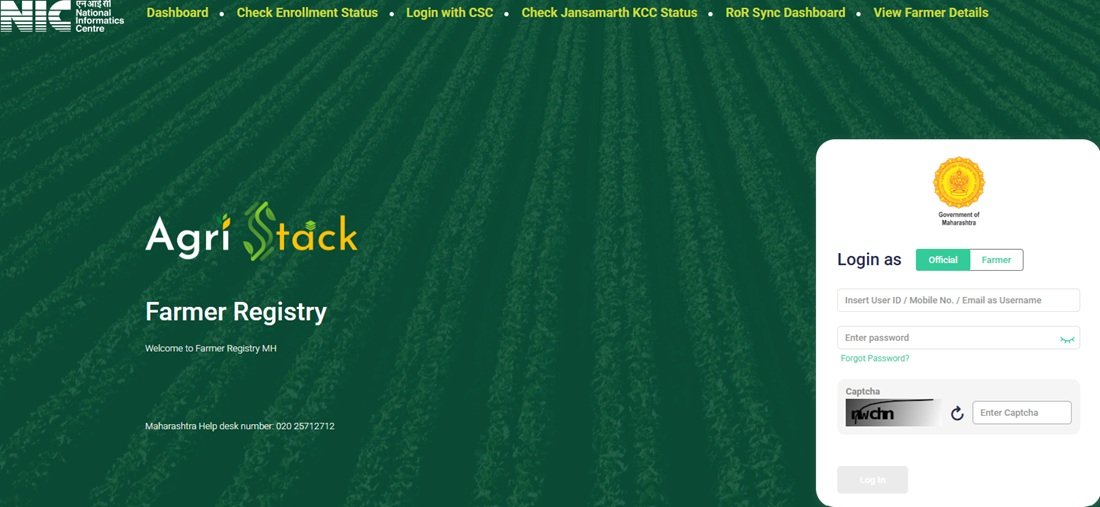
When users open the official website, the homepage provides access to the main services through its navigation menu. The layout helps users reach important sections without searching through multiple pages.
The homepage displays the following major options:
- Dashboard: Opens the enrollment statistics and progress-report section.
- Check Enrollment Status: Takes users to the page where they can check their Farmer Registry enrollment.
- Login with CSC: Opens the separate login facility for CSC users.
- Check Jansamarth KCC Status: Opens the KCC status-check page.
- RoR Sync Dashboard: Displays land record synchronization information.
- View Farmer Details: Opens the facility for accessing registered farmer details.
Users can directly open the relevant section through the following official links:
- Open Dashboard
- Check Enrollment Status
- Check Jansamarth KCC Status
- Open RoR Sync Dashboard
- View Farmer Details
These links open individual sections of the official website. Their availability and displayed information may depend on the portal’s current configuration.
Farmer, Official and CSC Login Options
The portal provides different login options according to the user’s role. Farmers and authorised officials can access the login page and select the appropriate account type.
The main login page displays two account options:
- Official: For authorised government officials who have portal login credentials.
- Farmer: For farmers who have an eligible portal account and want to access their registered information.
The homepage also provides a separate Login with CSC option. This facility is intended for Common Service Centre users who access the portal through their authorised CSC login.
Users should select the correct login category before entering their credentials. A farmer should not use an official account, and a CSC operator should use the designated CSC login facility rather than another user’s credentials.
Official Login Page: Open the login page.
Note: The exact access rights depend on the account type and permissions assigned by the portal administrator. A normal farmer account does not automatically provide access to official or CSC functions.
New User Account Creation and Self-Login Activation
Farmers who completed their enrollment through a CSC or camp may need to create a separate portal account before using the farmer self-login facility. The portal displays an important notice about this one-time account activation requirement.
According to the notice on the official login page, farmers whose Farmer Registry enrollment was completed through CSC or Camp Mode must first use the Create New User Account option. This step completes the one-time registration required to activate Self-Login access.
The account creation facility is important because completing Farmer Registry enrollment and activating a personal portal login are two different activities.
What farmers should understand:
- CSC or camp enrollment does not necessarily mean that a farmer already has an active self-login account.
- The farmer must use the Create New User Account option when the portal requires this one-time registration.
- After completing the required account activation, the farmer can use the available farmer login facility.
- Farmers should use their own registered details and keep their login credentials secure.
Where to find this option: Open the official AgriStack login page and look for the Create New User Account option.
The portal’s visible notice confirms the need for account creation after CSC or camp enrollment. Users should follow the fields and instructions displayed on the live page rather than relying on an outdated step-by-step process.
For information about the original enrollment process through CSC, camp or other available modes, visit our Maharashtra Farmer Registry article.
Farmer Login: Password, CAPTCHA and Account Access
Farmers who have activated their portal accounts can use the Farmer login option to access the available services. The login page displays the fields required to authenticate a registered user.
The visible login interface includes:
- Login as: Farmer or Official.
- Registered Mobile Number: The mobile number associated with the portal account.
- Password: The account password.
- Show: An option to view the entered password while typing.
- CAPTCHA: A security check displayed on the login page.
- Log In: The button used to submit the login details.
- Forgot Password: An option for users who cannot remember their password.
Steps to access the farmer account:
- Visit the official login page.
- Select the Farmer option under the login category.
- Enter the registered mobile number.
- Enter the password associated with the account.
- Complete the CAPTCHA displayed on the screen.
- Check the entered information and select Log In.
If the portal accepts the credentials, it will allow the farmer to access the available account facilities.
Important: Farmers should not share their password or OTP with unknown persons. They should also avoid logging in through unofficial websites or links received from unknown sources.
Forgot Password and Other Login Assistance Options
Farmers may sometimes forget their account password or face difficulty while accessing the portal. The login page provides a Forgot Password option for users who cannot remember their existing password.
Users facing this problem should follow the recovery instructions displayed by the official website. The portal may ask for account-related information or verification before allowing the user to proceed.
Some common login problems include:
- Entering an incorrect registered mobile number.
- Typing an incorrect password.
- Entering an incorrect CAPTCHA.
- Trying to log in before completing one-time account activation.
- Facing a temporary technical issue on the portal.
- Using an account that does not have the required access permission.
What should users do?
- Check whether they selected the correct login category.
- Verify the registered mobile number and password.
- Enter the CAPTCHA carefully.
- Use the Forgot Password option if they cannot remember their password.
- Check whether they completed the required account activation after CSC or camp enrollment.
- Contact the official portal helpdesk if the problem continues.
Users should avoid creating multiple accounts simply because they cannot access an existing account. They should first use the recovery option or seek help from the portal support team.
Dashboard: Enrollment Statistics and Progress Reports
The AgriStack Dashboard provides an overview of Farmer Registry enrollment progress in Maharashtra. It displays important figures that help users understand the scale of enrollment, approved Farmer IDs and pending cases.
The dashboard includes several indicators, such as:
- PM Kisan Beneficiaries.
- Total Enrollment Till Yesterday.
- Enrollment as a percentage of PM Kisan Beneficiaries.
- Approved Farmer IDs.
- Farmer IDs as a percentage of PM Kisan Beneficiaries.
- Enrollment pending Farmer ID generation and approval.
- Total enrollment recorded today.
- Enrollment mode.
- Top five and bottom five districts.
Dashboard data snapshot dated 23 November 2026:
| Dashboard Indicator | Displayed Figure |
|---|---|
| PM Kisan Beneficiaries | 11,911,984 |
| Total Enrollment Till Yesterday | 13,859,302 |
| Enrollment as % of PM Kisan Beneficiaries | 116.35% |
| Approved Farmer IDs | 13,818,547 |
| Farmer IDs as % of PM Kisan Beneficiaries | 116.32% |
| Enrollment Pending Farmer ID Generation and Approval | 3,123 |
| Total Today’s Enrollment | 435 |
The portal dashboard also indicates that its data refreshes every five minutes. Therefore, the figures may change as the system receives new enrollment information and updates its records.
Why can enrollment exceed 100% of PM Kisan beneficiaries?
The dashboard compares Farmer Registry enrollment figures with the PM Kisan beneficiary count. The two figures represent different datasets. Therefore, the enrollment percentage can exceed 100%. Users should not interpret a figure above 100% as proof that every PM Kisan beneficiary has completed registration.
Similarly, total enrollment and approved Farmer IDs are separate indicators. A farmer’s enrollment may appear in the total enrollment figure before the system completes all required approval and ID-generation steps.
View the live figures: Maharashtra AgriStack Dashboard.
Note: The figures above represent a dated dashboard snapshot, not a guarantee of the current live figures. Check the official dashboard for updated statistics.
Farmer Registry Enrollment Status Check
Farmers who have completed the enrollment process can use the portal’s Check Enrollment Status facility to find out the progress of their application. This section helps users identify whether their enrollment has moved forward or whether it still requires further processing.
The current portal interface displays two search options:
- Aadhaar Number: Users can select this option and complete the required Aadhaar-based OTP verification.
- Farmer ID: Users can enter their Farmer ID to check the available enrollment information.
An official Maharashtra support document also mentions the Enrollment ID as a method for checking enrollment status. The available options may differ according to the current portal interface and the relevant process.
Steps to check enrollment status:
- Open the Check Enrollment Status page.
- Select the available search option, such as Aadhaar Number or Farmer ID.
- Enter the required information in the displayed field.
- If you select Aadhaar Number, complete the OTP verification sent to the mobile number linked with Aadhaar.
- Submit the information and check the status displayed by the portal.
If the portal displays a pending status, the farmer should check the exact message and contact the concerned authority when necessary. An official Maharashtra support document advises farmers whose approval is pending to contact their Agriculture Assistant Officer or Talathi.
Farmers should not assume that a pending application has been rejected. They should first understand the status displayed on the portal and follow the instructions provided by the concerned authority.
Useful official document: Maharashtra Government’s OTP and Farmer ID status guidance.
For a complete explanation of Farmer ID enrollment, approval and related requirements, read the Maharashtra Farmer Registry guide.
Jansamarth KCC Application Status
The Maharashtra AgriStack portal also provides a separate facility to check Jansamarth KCC status. Farmers can use this section to access the available status information associated with the Jansamarth KCC facility.
The page displays two search options:
- Aadhaar Number: Users can select this option and complete the required OTP verification.
- Farmer ID: Users can enter their Farmer ID to check the available status.
Steps to check Jansamarth KCC status:
- Visit the Jansamarth KCC Status page.
- Select Aadhaar Number or Farmer ID.
- Enter the required details.
- If you choose Aadhaar Number, complete the OTP verification sent to your Aadhaar-linked mobile number.
- Submit the details and review the information displayed on the screen.
This section is a status-check facility. Farmers should not confuse it with a fresh Kisan Credit Card application or assume that checking the status automatically approves a loan.
For loan eligibility, application decisions, sanction and other banking-related matters, farmers should follow the instructions of the concerned bank or the official Jansamarth platform.
RoR Sync Dashboard: Land Record Synchronization
The RoR Sync Dashboard is a technical reporting section of the Maharashtra AgriStack portal. It displays information about the synchronization of Record of Rights (RoR) data with the relevant Farmer Registry systems.
RoR refers to land record information maintained by the state Revenue Department. The dashboard provides indicators that help users understand the movement and synchronization of land record data within the connected systems.
The dashboard includes several reporting categories, such as:
- History API and Live API data.
- History data pulled.
- Live data pulled.
- Data inserted and deleted.
- Actions on the SFDB Unified Table.
- Incremental Farmer IDs pushed.
- Deleted data breakdown by reason.
- Farmer Transition Matrix.
- District-wise inserted records.
- District-wise incremental Farmer IDs pushed.
RoR Sync Dashboard snapshot:
The following figures appeared in the dashboard information supplied for this article. The dashboard showed a last-updated timestamp of 24 September 2026 at 12:29 PM, with a selected date range from 28 January 2026 to 23 November 2026.
| Indicator | Displayed Figure |
|---|---|
| Total Districts | 35 |
| Sub-districts | 358 |
| Villages | 44,870 |
| History Data Pulled | 479,301 |
| Data Deleted | 61,614 |
| Data Inserted | 15,842 |
| Actions on SFDB Unified Table | 98,481 |
| Incremental Farmer IDs Pushed | 38,449,749 |
| Live Data Pulled | 345,818 |
The dashboard also provides filters for different reporting periods, including 30 days, 15 days and 7 days in relevant sections. Users can examine the available data to understand synchronization activity across districts and villages.
What do these figures mean?
These figures represent system-level data processing and synchronization activities. For example, Data Inserted and Data Deleted show changes recorded in the relevant system tables. Similarly, History Data Pulled and Live Data Pulled indicate data retrieval activity through the respective APIs.
These numbers are not the total number of farmers registered in Maharashtra. They also do not represent the number of land ownership disputes resolved or land records corrected.
Important distinction: The RoR Sync Dashboard helps users understand data synchronization. It is not a land record correction portal. Farmers who find an error in their 7/12 extract or other revenue records should use the appropriate Revenue Department service.
Open the dashboard: Maharashtra RoR Sync Dashboard.
View Farmer Details Through Aadhaar Verification
The portal provides a separate View Farmer Details facility. This section allows users to search for registered farmer information through Aadhaar-based verification.
The page displays a search option for Farmer Aadhaar Number. Users must enter the required Aadhaar information and complete the verification process when the portal requests an OTP.
Steps to access the facility:
- Open the View Farmer Details page.
- Enter the Aadhaar number in the designated field.
- Complete the OTP verification as instructed on the screen.
- Submit the verified information.
- Review the farmer details displayed by the portal.
The facility helps users access the registered information associated with the verified Aadhaar details. The information displayed depends on the records available in the system and the user’s verification.
Users should enter Aadhaar details only on the official government portal. They should never share their Aadhaar OTP with an unknown person or an unauthorised agent.
Direct Link: View Farmer Details.
District-Wise Reports and Other Dashboard Information
Apart from the main enrollment figures, the portal dashboard provides district-level information that helps users understand the progress of Farmer Registry activities across Maharashtra.
The dashboard includes sections for the top five and bottom five districts. It also displays enrollment mode information and other progress indicators.
These reports help users compare enrollment activity across different parts of the state. They can also provide an overview of how the enrollment process is progressing in different districts.
Important information available through the dashboard includes:
- District-wise enrollment performance.
- Top five districts based on the displayed dashboard indicator.
- Bottom five districts based on the displayed dashboard indicator.
- Enrollment mode information.
- Daily enrollment figures.
- Approved Farmer ID statistics.
- Pending Farmer ID generation and approval figures.
Users should check the label and date of each indicator before comparing districts. The top five and bottom five lists depend on the particular metric selected or displayed by the dashboard.
These figures provide an administrative overview. They do not independently establish the eligibility or approval status of an individual farmer.
View district-level information: Open the official dashboard.
Common Login Problems and Their Solutions
Farmers may face login or verification problems while using the Maharashtra AgriStack portal. Most problems relate to incorrect credentials, incomplete account activation, OTP delivery or pending enrollment approval.
| Common Problem | What the User Can Do |
|---|---|
| Incorrect mobile number | Check whether the entered number matches the number registered with the portal account. |
| Forgotten password | Use the Forgot Password option available on the login page. |
| Incorrect CAPTCHA | Enter the CAPTCHA again carefully and check the displayed characters. |
| Self-Login not available | Check whether one-time account creation is pending after CSC or camp enrollment. |
| OTP not received | Verify the Aadhaar-linked mobile number, check mobile network availability and retry after some time. |
| Enrollment approval pending | Contact the concerned Agriculture Assistant Officer or Talathi for guidance. |
| Account access problem | Confirm that the correct login category is selected and contact the portal helpdesk if the issue continues. |
What if Aadhaar OTP is not received?
When a farmer selects Aadhaar-based verification, the portal sends an OTP to the mobile number linked with Aadhaar. If the OTP does not arrive, the farmer should first check mobile connectivity and confirm that the linked mobile number is active.
If the enrollment approval is still pending, the verification process may not proceed as expected. In such cases, farmers should contact the concerned Agriculture Assistant Officer or Talathi and confirm the status of their enrollment.
Farmers can also refer to the official Maharashtra Farmer ID and OTP troubleshooting document.
Do not create duplicate enrollment records just because the portal does not allow login. First check the existing enrollment status and seek assistance from the concerned authority.
Official Website, Important Links and Helpdesk
Farmers should always use the official Maharashtra AgriStack website to access Farmer Registry services. The following links provide direct access to the main portal sections and related government resources.
| Service or Resource | Official Link |
|---|---|
| Maharashtra AgriStack Portal | Visit Portal |
| Dashboard | Open Dashboard |
| Farmer and Official Login | Open Login Page |
| Enrollment Status | Check Status |
| Jansamarth KCC Status | Check KCC Status |
| RoR Sync Dashboard | Open Dashboard |
| View Farmer Details | View Details |
| Maharashtra Agriculture Department | Visit Website |
| MahaDBT Farmer Portal | Visit MahaDBT |
| Mahabhulekh Land Records | View Land Records |
| Digitally Signed 7/12 Extract | Open Digital Satbara |
AgriStack Portal Helpdesk
Farmers who face technical problems while using the Maharashtra Farmer Registry portal can contact the helpdesk number displayed on the official portal.
Portal Helpdesk Number: 020 25712712
Before contacting the helpdesk, users should keep their enrollment details and the exact error message ready. They should explain the issue clearly so the support team can guide them appropriately.
Important distinction: The AgriStack portal displays the helpdesk number 020 25712712. The MahaDBT Farmer Portal separately displays helpline number 022-61316429. These numbers relate to different portal support services. Farmers should contact the relevant helpdesk according to the issue they face.
Frequently Asked Questions (FAQs)
Ans. The Maharashtra AgriStack Portal is an online platform that provides access to Farmer Registry-related services, including login, enrollment status checking, Jansamarth KCC status, farmer details and dashboard reports.
Ans. The official website is https://mhfr.agristack.gov.in/farmer-registry-mh/.
Ans. The portal provides separate login options for Farmers and Officials. It also displays a separate Login with CSC facility for authorised CSC users.
Ans. Farmers can use the Create New User Account option available on the official login page. The portal specifically instructs farmers enrolled through CSC or Camp Mode to complete this one-time account creation process to activate Self-Login access.
Ans. No. Enrollment creates the farmer’s record in the Farmer Registry, while portal account creation activates the separate Self-Login facility when required. Farmers enrolled through CSC or Camp Mode should follow the portal’s account activation notice.
Ans. Open the Check Enrollment Status section, select an available search option such as Aadhaar Number or Farmer ID, enter the required information and complete verification if requested.
Ans. An official Maharashtra support document also mentions Enrollment ID as a status-check option. However, the options displayed on the live portal may differ. Follow the options currently available on the official page.
Ans. Open the Jansamarth KCC Status section, select Aadhaar Number or Farmer ID, provide the required information and complete OTP verification if you choose the Aadhaar option.
Ans. The RoR Sync Dashboard displays technical reports about land record data synchronization, including data pulled, inserted and deleted, along with district-wise information and other system-level indicators.
Ans. No. The RoR Sync Dashboard displays synchronization information. Farmers must use the appropriate Maharashtra Revenue Department service to request corrections in their land records.
Ans. Open the View Farmer Details section, enter the Aadhaar number and complete the OTP verification required by the portal.
Ans. The dashboard compares Farmer Registry enrollment figures with the PM Kisan beneficiary count. These datasets are different, so the displayed percentage can exceed 100%. It does not mean that every PM Kisan beneficiary has completed enrollment.
Ans. Open the login page and select the Forgot Password option. Follow the instructions displayed by the portal to recover access to your account.
Ans. Check whether your Aadhaar-linked mobile number is active and has network connectivity. If the problem continues, check your enrollment approval status and contact the concerned Agriculture Assistant Officer or Talathi when required.
Ans. The helpdesk number displayed on the Maharashtra Farmer Registry portal is 020 25712712.
Ans. No. Both are separate government portals. The AgriStack portal provides Farmer Registry-related services, while the MahaDBT Farmer Portal supports applications and services related to agricultural schemes. Farmer ID is used for relevant MahaDBT services as per the portal’s instructions.
Ans. Read our Maharashtra Farmer Registry guide for detailed information about Farmer ID registration, enrollment modes, land linking, eligibility and related processes.

Tabassum is a government schemes researcher and writer with 5 years of experience tracking Central and State welfare scheme programmes across India. She has covered 500+ schemes spanning agriculture, women welfare, education, and housing, helping lakhs of beneficiaries understand their entitlements in simple language.