The Government of Gujarat has introduced the AgriStack initiative to create a reliable digital record of farmers and agricultural activities across the state. The initiative aims to connect verified farmer information, land records and other agricultural data through a common digital framework. It can help government departments deliver farmer-related services more efficiently and maintain consistent agricultural records.
The AgriStack Gujarat Portal is the state’s online platform for accessing important services connected with the Farmer Registry Gujarat initiative. The portal provides facilities such as account creation, farmer login, enrollment status checking, dashboard statistics, RoR synchronization information and access to farmer details.
Farmers and authorized users can also access the Jansamarth KCC status-check facility through the portal. In addition, Gujarat provides a dedicated mobile application for farmer-related services and a separate Digital Crop Survey platform for collecting crop information from agricultural land.
Users should understand that these services do not all operate through the same website. The AgriStack portal, iKhedut portal and Digital Crop Survey platform have different purposes. This guide explains the main features of the AgriStack Gujarat Portal, its login facilities, available dashboards and connected digital services.
Key Highlights of AgriStack Gujarat Portal
AgriStack Gujarat Portal: Overview | |
|---|---|
| Portal Name | AgriStack Gujarat Portal |
| State | Gujarat |
| Initiative | AgriStack |
| Primary Purpose | Digital management and verification of farmer-related information |
| Official Portal | gjfr.agristack.gov.in |
| Login Facility | Official Login and Farmer Login |
| Major Services | Account creation, login, enrollment status, Jansamarth KCC status, RoR Sync Dashboard and Farmer Details |
| Mobile Application | Farmer Registry Gujarat mobile application |
| Connected Platform | Digital Crop Survey (DCS) |
| Helpline Number | 079-23256200 |
| Application Mode | Online through the portal and mobile application, or with assistance from village-level VCE/CSC centres |
Services Available on AgriStack Gujarat Portal
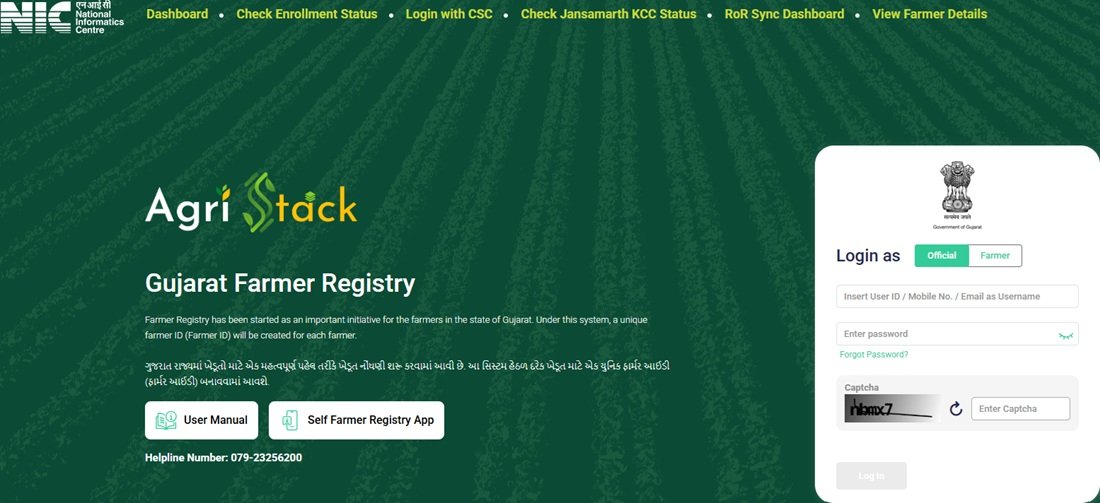
The AgriStack Gujarat Portal provides several online facilities through its homepage. Users can access these services without searching through different sections of the website. The portal displays the main options directly on its homepage.
The following table explains the major services available on the portal:
| Portal Service | Purpose |
|---|---|
| Dashboard | Displays enrollment figures, approved Farmer IDs and other statistical information. |
| Check Enrollment Status | Allows users to check enrollment progress through an Aadhaar number or Farmer ID. |
| Login with CSC | Provides a login facility for authorized Common Service Centre users. |
| Check Jansamarth KCC Status | Allows users to check the available Jansamarth KCC status through an Aadhaar number or Farmer ID. |
| RoR Sync Dashboard | Displays information about land-record synchronization and related data activities. |
| View Farmer Details | Allows users to retrieve farmer details through Aadhaar-based verification. |
| User Manual | Provides the official instructions for using the portal. |
| Self Farmer Registry App | Directs users to the mobile application available on Google Play. |
These facilities make the portal useful for farmers as well as officials who work with agricultural records. The dashboard provides an overview of enrollment activities, while the other services help users check specific information.
AgriStack Gujarat Portal Account Creation
Farmers who want to access the self-login facility must create an account on the AgriStack Gujarat Portal. The portal provides a separate Create New User Account option for this purpose.
One important instruction appears on the portal’s login page. Farmers who completed their enrollment through a CSC centre or Camp Mode must first create an online account to activate their self-login facility. Their earlier enrollment does not automatically mean that they can use the farmer login without completing this account-creation step.
Follow these steps to create an account:
- Visit the official AgriStack Gujarat Portal.
- Open the login section available on the homepage.
- Select the Farmer login option, where applicable.
- Click on Create New User Account.
- Enter the Aadhaar number requested by the portal.
- Complete the OTP verification sent to the mobile number linked with Aadhaar.
- Follow the on-screen instructions to complete the required verification.
- Enter the registered mobile number and verify it through the OTP process.
- Create a password as instructed by the portal.
- Submit the details to complete account creation.
After successful account creation, farmers can use their registered mobile number and password to access the self-login facility. They should keep their login details secure and use the official website whenever they need to access their account.
Important: Creating a portal account and completing farmer enrollment are separate steps. An account allows a user to access the login facility. It does not, by itself, confirm that the farmer’s enrollment has been approved.
AgriStack Gujarat Portal Login Process
The AgriStack Gujarat Portal provides separate login options for officials and farmers. Users should select the correct option according to their role. The login page asks for a registered mobile number, password and CAPTCHA verification.
Farmers can follow the steps below to access their account:
- Open the AgriStack Gujarat Portal.
- Go to the login section on the homepage.
- Select the Farmer option.
- Enter the registered mobile number in the required field.
- Enter the account password.
- Complete the CAPTCHA displayed on the screen.
- Click the Log In button.
- After successful verification, access the services available through the account.
The portal also provides a Show option to view the entered password and a Forgot Password facility for users who cannot remember their login credentials.
Official Login and CSC Login
The portal also provides an Official Login option for authorized government users. The homepage separately displays a Login with CSC facility for authorized Common Service Centre users.
Farmers should not use these login options unless they have the required access credentials and authorization. They should select the Farmer Login option to access their personal account.
AgriStack Gujarat Dashboard and Enrollment Statistics
The AgriStack Gujarat Dashboard provides an overview of farmer enrollment activities across the state. It displays important figures related to PM-KISAN beneficiaries, total enrollment, approved Farmer IDs and pending enrollment activities.
Users can open the dashboard directly through the following link:
Open AgriStack Gujarat Dashboard
Important Information Displayed on the Dashboard
| Dashboard Metric | Information Displayed |
|---|---|
| PM-KISAN Beneficiaries | Total number of PM-KISAN beneficiaries shown in the dashboard. |
| Total Enrollment Till Yesterday | Total farmer enrollment recorded up to the previous day. |
| Enrollment as % of PM-KISAN Beneficiaries | Shows enrollment in relation to the displayed PM-KISAN beneficiary count. |
| Approved Farmer IDs | Number of Farmer IDs shown as approved. |
| FID as % of PM-KISAN Beneficiaries | Displays the approved Farmer ID figure in relation to the PM-KISAN beneficiary count. |
| Enrollment Pending | Shows cases pending Farmer ID generation and approval. |
| Today’s Enrollment | Displays the enrollment recorded on the current day. |
| Enrollment Mode | Provides information about the different enrollment modes. |
| Top and Bottom 5 Districts | Shows the districts with the highest and lowest enrollment figures. |
The dashboard also displays district-wise enrollment information. This helps users understand how enrollment activities are progressing across different parts of Gujarat.
Automatic Refresh: The portal states that dashboard information refreshes every five minutes. Therefore, the displayed figures may change as the system receives updated information.
Note: Dashboard figures are dynamic. Users should check the live dashboard for the latest numbers instead of relying on figures copied from an earlier visit.
Enrollment Status Check on AgriStack Gujarat Portal
Farmers can use the enrollment status facility to check the progress of their enrollment on the AgriStack Gujarat Portal. The portal provides two search options: Aadhaar Number and Farmer ID.
This facility helps users check whether their enrollment has progressed through the system. It is particularly useful for farmers who have already submitted their details and want to know the current status.
Steps to Check Enrollment Status
- Visit the AgriStack Gujarat Portal.
- Click on Check Enrollment Status on the homepage.
- Select the Aadhaar Number or Farmer ID option.
- Enter the required number in the appropriate field.
- If you select Aadhaar Number, complete the OTP verification sent to the mobile number linked with Aadhaar.
- Submit the details to view the available enrollment status.
Farmers who already have their Farmer ID can use that option to check their enrollment information. Users should enter the correct details and follow the verification instructions displayed on the portal.
Direct Link: Check AgriStack Gujarat Enrollment Status
Jansamarth KCC Status Check Facility
The AgriStack Gujarat Portal also provides a separate facility to check Jansamarth KCC status. This option is different from the general enrollment status service.
Users can access this facility through an Aadhaar number or Farmer ID. If they choose the Aadhaar option, the portal asks them to complete OTP verification through the mobile number linked with Aadhaar.
Steps to Check Jansamarth KCC Status
- Open the AgriStack Gujarat Portal.
- Select Check Jansamarth KCC Status from the homepage.
- Choose the Aadhaar Number or Farmer ID option.
- Enter the required information.
- Complete Aadhaar-based OTP verification if you select the Aadhaar option.
- Submit the details to check the status displayed by the portal.
This facility allows users to check the available KCC-related status information through the portal. However, checking a status does not mean that the portal has approved a loan or guaranteed credit. The concerned financial institution follows its applicable rules while processing a Kisan Credit Card application.
Direct Link: Check Jansamarth KCC Status
RoR Synchronization Dashboard on Gujarat AgriStack Portal
The RoR Sync Dashboard is one of the important technical sections of the AgriStack Gujarat Portal. RoR stands for Record of Rights. Land records contain important information about land ownership and related details. The synchronization dashboard displays information about the movement and updating of land-record data within the system.
This dashboard is mainly useful for understanding the status of data synchronization between land-record systems and the AgriStack framework. It provides filters, summary figures and district-wise information about different data activities.
Users can access the dashboard through the following link:
Open Gujarat RoR Synchronization Dashboard
Filters Available on the RoR Dashboard
The dashboard provides filters that help users view information for a selected area and period. These include:
- District: Select a district to view its related records.
- Sub-District: Narrow the information to a particular sub-district.
- Village: View information for a selected village.
- From Date: Select the starting date for the required period.
- To Date: Select the ending date for the required period.
After selecting the required filters, users can view the available synchronization information for the selected area and date range.
Important Data Available on the RoR Sync Dashboard
The dashboard displays several data-related indicators. Their purpose is explained below:
| Dashboard Indicator | What It Shows |
|---|---|
| Total Districts | Number of districts covered in the displayed dashboard data. |
| Total Sub-Districts | Number of sub-districts included in the displayed data. |
| Total Villages | Number of villages represented in the dashboard. |
| History Data Pulled | Records retrieved through the historical data process. |
| Data Deleted | Records removed from the relevant data system. |
| Data Inserted | Records added to the relevant data system. |
| Actions on SFDB Unified Table | Actions recorded against the SFDB Unified Table. |
| Incremental Farmer IDs Pushed | Information about Farmer IDs pushed through the incremental data process. |
| Live Data Pulled | Records retrieved through the live data process. |
Charts and Reports Available on the Dashboard
The RoR Sync Dashboard also provides detailed sections that help users understand different data activities. These include:
- Data Pulled: History API vs Live API: Displays information about historical and live data retrieval.
- Data Deleted: Breakdown by Reason: Shows the available classification of deleted records.
- Actions on SFDB Unified Table: Provides information about actions recorded in the unified table.
- Farmer Transition Matrix: Displays transition-related information for the selected district, where available.
- Data Inserted: District-Wise Breakdown: Shows the distribution of inserted records across districts.
- Incremental Farmer IDs Pushed: Displays information for different recent periods, including 30 days, 15 days and 7 days.
Important Note About Dashboard Figures: The dashboard snapshot reviewed for this article displayed 34 districts, 300 sub-districts and 19,199 villages. It also showed 330,279 historical records pulled, 45,674 records deleted, 52,918 records inserted, 13,912 actions on the SFDB Unified Table, 1,501,333 incremental Farmer IDs pushed and 1,011,293 live records pulled.
These figures belonged to the dashboard snapshot last updated on 23 September 2026 at 07:33 PM. They are historical figures, not confirmed live totals. The dashboard may show different numbers when users visit it.
View Farmer Details Through AgriStack Gujarat Portal
The AgriStack Gujarat Portal provides a separate facility to view farmer details. Users can access this service through the View Farmer Details option available on the homepage.
The portal asks users to enter the farmer’s Aadhaar number and complete OTP verification. This verification helps the system authenticate the request before displaying the available details.
Steps to View Farmer Details
- Visit the official AgriStack Gujarat Portal.
- Click on View Farmer Details.
- Enter the Aadhaar number in the required field.
- Complete the OTP verification sent to the Aadhaar-linked mobile number.
- Submit the verified details.
- View the information made available by the portal.
Users should enter their own Aadhaar details or access information only with the concerned person’s authorization. They should never share an OTP with an unknown person or an unauthorized agent.
Direct Link: View Farmer Details
AgriStack Gujarat Mobile App: Features and Services
Farmers can also access the state’s self-service facility through the official mobile application. The app provides a mobile-based route for completing the required verification and accessing farmer-related services.
The application is available on Google Play under the name Farmer Registry Gujarat. The official Gujarat agriculture portal also shares the app link along with the web portal and related tutorial videos.
Download the App: Farmer Registry Gujarat App on Google Play
Important Features of the Mobile App
- Start the self-service process using Aadhaar details.
- Complete OTP-based verification or the available face-authentication process.
- Create a user account and set a password.
- Log in using the registered mobile number and password or the available OTP option.
- Access the Register as Farmer facility.
- View available farmer and land-related information.
- Fetch land details through the available survey-number option.
- Select the relevant land records and verify the displayed land information.
- Complete the required e-Sign and authentication steps.
Mobile App Registration Process
The mobile application follows a verification-based process. The exact screens may change with app updates, but the official training material explains the general sequence below:
- Download the application from Google Play using the official link.
- Open the app and select the Aadhaar-based option.
- Enter the Aadhaar number and complete the available OTP or face-authentication process.
- Review the details displayed by the application.
- Enter the mobile number and verify it through OTP.
- Set a password and complete account activation.
- Log in to the application.
- Select Register as Farmer to continue with the required farmer-related process.
- Enter the requested contact and farmer-category details.
- Use the Fetch Land Details option and enter the required survey number.
- Select the relevant land records and verify the details.
- Complete the required consent, e-Sign and authentication steps.
- Submit the process and check the confirmation displayed by the app.
Farmers should review the displayed information carefully before submitting it. If the app shows incorrect land details or a mismatch, they should seek guidance from the concerned local revenue authority instead of submitting incorrect information.
Official Training Videos
The Government of Gujarat’s iKhedut portal provides links to tutorial videos for users who need visual guidance. These videos cover the web portal and mobile application.
- Web Portal Tutorial: Watch the official portal tutorial
- Mobile App Tutorial: Watch the mobile app tutorial
Digital Crop Survey (DCS) Services in Gujarat
The Digital Crop Survey, also known as DCS, is another important digital agriculture service available in Gujarat. It focuses on collecting information about crops grown on agricultural land and the irrigation methods used by farmers.
The Gujarat Digital Crop Survey Portal explains that the project aims to create a verified source of farmer and crop information. It can help different departments and other authorized users access consistent and updated agricultural data.
The DCS platform is separate from the main AgriStack Gujarat Portal. Users should visit the dedicated DCS website to access its crop survey facilities.
Major DCS Services
The DCS platform provides facilities connected with crop survey activities. Its homepage includes options such as:
- Become a Crop Surveyor: Provides access to the crop surveyor-related facility.
- State DCS Dashboard: Displays state-level crop survey information.
Farmer’s Role in the Digital Crop Survey
The official DCS training material explains that registered and approved farmers can use the DCS application for eligible self-survey activities. The process includes downloading the application, signing in and accessing the assigned survey tasks.
The general process described in the training material includes these steps:
- Download the DCS application through the official channel provided for the service.
- Sign in using the available farmer login credentials or OTP facility.
- Download the required master data containing plot-related information.
- Open the My Tasks section to access the available survey tasks.
- Select the relevant land plot displayed on the map.
- Reach the required location to start the survey. The training material specifies that the user must be within 20 metres of the plot.
- Enter the required land-use and crop information.
- Provide crop details such as crop name, variety, crop type, sowing date, area, crop condition and irrigation details, wherever requested.
- Upload the required photographs. The training material allows up to three photographs.
- Review the entered information and save the survey details.
- Upload the completed survey data when an internet connection is available.
The exact options available to a user may depend on the assigned survey task and the application’s current version. Farmers should follow the instructions displayed in the official DCS application.
Visit the DCS Portal: Gujarat Digital Crop Survey Portal
Important Links for AgriStack Gujarat Portal
Users can access the official AgriStack Gujarat services through the links given below. These links lead to government portals, official documents and the mobile application.
| Service or Facility | Official Link |
|---|---|
| AgriStack Gujarat Portal | Click Here |
| AgriStack Dashboard | Click Here |
| Enrollment Status Check | Click Here |
| Jansamarth KCC Status | Click Here |
| RoR Synchronization Dashboard | Click Here |
| View Farmer Details | Click Here |
| Official User Manual | Download PDF |
| Farmer Registry Gujarat Mobile App | Download App |
| Digital Crop Survey Portal | Click Here |
| iKhedut Portal | Click Here |
Contact Details for AgriStack Gujarat Portal Assistance
Farmers who face difficulties while accessing the AgriStack Gujarat Portal can contact the helpline number displayed on the official portal.
| Contact Information | Details |
|---|---|
| Helpline Number | 079-23256200 |
| Official Website | AgriStack Gujarat Portal |
| iKhedut Website | iKhedut Portal |
For assistance, farmers should explain the issue clearly and keep the relevant enrollment or application details ready. They should not share their Aadhaar OTP, password or other confidential login information with unknown callers.
Frequently Asked Questions (FAQs)
Ans. The AgriStack Gujarat Portal is an online platform that provides access to farmer-related digital services in Gujarat. It offers facilities such as farmer login, enrollment status checking, Jansamarth KCC status, dashboard statistics, RoR synchronization information and farmer details.
Ans. The official website is https://gjfr.agristack.gov.in/farmer-registry-gj/. Users can visit this website to access the available AgriStack services.
Ans. Farmers can visit the official portal, select the Farmer Login option, enter their registered mobile number and password, complete the CAPTCHA and click Log In. New users must first create an account through the Create New User Account option.
Ans. Yes. Farmers who completed their enrollment through CSC or Camp Mode must first create an online account through the Create New User Account option to activate the self-login facility.
Ans. Users can select Check Enrollment Status on the portal homepage and search using their Aadhaar number or Farmer ID. Aadhaar-based verification requires an OTP sent to the mobile number linked with Aadhaar.
Ans. Yes. The portal provides a separate Check Jansamarth KCC Status facility. Users can enter their Aadhaar number or Farmer ID and complete the required verification to view the available status.
Ans. The RoR Sync Dashboard displays information about land-record synchronization and related data activities. It includes district, sub-district, village and date filters, along with details about records pulled, inserted, deleted and other synchronization activities.
Ans. Farmers can select View Farmer Details on the portal homepage, enter their Aadhaar number and complete OTP verification. The portal then displays the information available for the verified request.
Ans. Yes. The Farmer Registry Gujarat mobile application is available on Google Play. Users can download the official application here.
Ans. No. The Digital Crop Survey portal is a separate platform that focuses on collecting crop and irrigation-related information from agricultural land. Users can visit the official Gujarat DCS Portal to access its services.
Ans. Yes. The portal provides a dashboard displaying enrollment figures, approved Farmer IDs, pending cases, daily enrollment information and district-wise statistics. The dashboard states that its information refreshes every five minutes.
Ans. The helpline number displayed on the official portal is 079-23256200. Farmers can contact this number for portal-related assistance.

Tabassum is a government schemes researcher and writer with 5 years of experience tracking Central and State welfare scheme programmes across India. She has covered 500+ schemes spanning agriculture, women welfare, education, and housing, helping lakhs of beneficiaries understand their entitlements in simple language.