The Tripura AgriStack Portal provides an online platform for farmers and authorised officials to access the state’s Farmer Registry services. Farmers can use this portal to log in, create a user account, check their enrollment status and view their registered details. The portal also displays enrollment statistics, approved Farmer IDs and district-wise enrollment information through its dashboard.
Farmers who completed their enrollment through a Common Service Centre (CSC) or a registration camp can also activate their personal login access by creating a portal account. This guide explains how to use the Tripura AgriStack Portal, access its available services and check Farmer Registry details online.
Introduction to Tripura AgriStack Portal
The Tripura AgriStack Portal operates under the state’s Farmer Registry system. It provides a digital platform where farmers can access their registration-related information and authorised users can use the available portal facilities.
AgriStack is a farmer-centric Digital Public Infrastructure developed to improve the delivery of agricultural services. It connects important agricultural information, including farmer identity, land records and crop-related data, through three foundational registries: Farmer Registry, Geo-Referenced Village Maps and Crop Sown Registry.
Under this system, the government creates a unique digital identity called a Farmer ID for registered farmers. The Farmer ID connects the farmer’s details with digitised land records and helps government departments use verified information while delivering agricultural services.
The Government of Tripura provides its dedicated online platform for these services. Farmers can visit the official Tripura AgriStack Portal to access the available options.
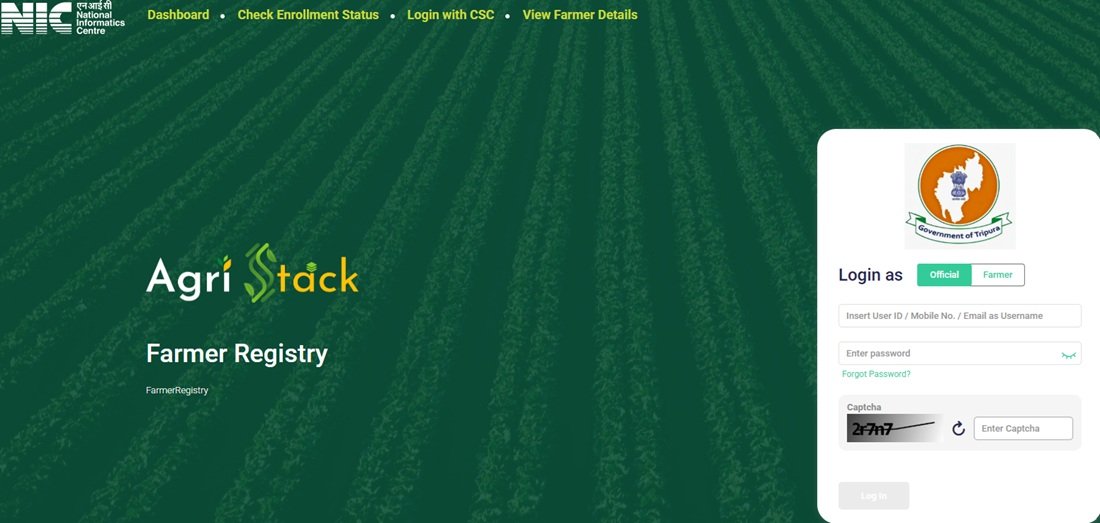
The portal provides separate login options for farmers and officials. It also displays facilities such as Dashboard, Check Enrollment Status, Login with CSC, View Farmer Details and Create New User Account.
Farmers looking for detailed information about the state’s registration system can also read our guide to the Farmer Registry of Tripura Government.
Tripura AgriStack Portal: Key Highlights
Tripura AgriStack Portal Overview | |
|---|---|
| Portal Name | Tripura AgriStack Farmer Registry Portal |
| Implementing Government | Government of Tripura |
| Portal Address | trfr.agristack.gov.in/farmer-registry-tr |
| Primary Purpose | Online access to Farmer Registry services |
| Login Options | Farmer and Official |
| Available Facilities | Dashboard, Enrollment Status, CSC Login and View Farmer Details |
| Account Creation | Online through Create New User Account |
| Status Verification | Aadhaar Number or Farmer ID |
| Portal Access | Online |
AgriStack Farmer Registry and Digital Crop Survey: Understanding the Difference
AgriStack includes multiple digital systems that work together to improve agricultural data management. However, the Farmer Registry and Digital Crop Survey perform different functions. Farmers should understand this difference before using the Tripura AgriStack Portal.
Farmer Registry
The Farmer Registry creates a digital identity for farmers through a unique Farmer ID. It connects the farmer’s identity with available digitised land records and other relevant information. The system helps government departments identify registered farmers and use verified records for agricultural services.
Digital Crop Survey
The Digital Crop Survey records information about crops cultivated on agricultural land parcels. It helps the government collect plot-level crop information through digital survey methods. This information supports agricultural planning, crop monitoring and related government initiatives.
The Government of India identifies three foundational components of AgriStack:
- Farmer Registry
- Geo-Referenced Village Maps
- Crop Sown Registry
The Farmer Registry establishes the farmer’s digital identity, while the Digital Crop Survey collects information about crops grown on agricultural plots. Both support the wider digital agriculture ecosystem, but they are not interchangeable services.
For more information, read the Ministry of Agriculture and Farmers Welfare’s official explanation of AgriStack.
Services Available on the Tripura AgriStack Portal
The Tripura AgriStack Portal displays several options on its homepage. Farmers and authorised users can select the relevant facility according to their requirements.
| Portal Service | Purpose |
|---|---|
| Dashboard | Displays Farmer Registry enrollment statistics and district-level reports. |
| Check Enrollment Status | Allows users to check enrollment status using an Aadhaar Number or Farmer ID. |
| Login with CSC | Provides a separate login option for Common Service Centre users. |
| View Farmer Details | Provides an option to search for farmer details using an Aadhaar Number. |
| Farmer Login | Allows farmers to access their portal accounts. |
| Official Login | Provides a separate login facility for authorised officials. |
| Create New User Account | Allows eligible farmers to create a personal portal account and activate Self-Login access. |
| Forgot Password | Provides an option to recover access when a user forgets the login password. |
These facilities make the portal useful for checking enrollment-related information and accessing available account services without visiting a government office for every online task.
Tripura AgriStack Login: Farmer and Official Access
The Tripura AgriStack homepage provides separate login options for farmers and officials. Users must select the appropriate login category before entering their registered mobile number and password.
Follow these steps to access the login page:
- Visit the official Tripura AgriStack Portal.
- Locate the Login section on the homepage.
- Select Farmer if you want to access your farmer account.
- Select Official if you have authorised official login credentials.
- Enter your registered mobile number.
- Enter your account password.
- Use the Show option if you want to check the password you entered.
- Enter the displayed CAPTCHA code in the required field.
- Click the Log In option to proceed.
The portal also displays a Forgot Password option. Users who cannot remember their password can select this option and follow the instructions displayed on the portal.
Important: Farmers must create and activate their portal account before using Self-Login if their original Farmer Registry enrollment took place through CSC or Camp Mode.
Create a New Farmer Account and Activate Self-Login
The Tripura AgriStack Portal provides a Create New User Account option for farmers who need to activate personal login access. This facility is particularly important for farmers whose initial enrollment took place through a Common Service Centre or a registration camp.
The portal displays an important notice explaining that CSC or Camp Mode enrollment does not automatically provide Self-Login access. Such farmers must complete a one-time portal account registration before logging in through the Farmer option.
Steps to Open the New User Registration Page
- Open the Tripura AgriStack homepage.
- Locate the Create New User Account option below the login section.
- Click this option to open the new user registration page.
- The portal will redirect you to the official Farmer Signup eKYC page.
Direct registration link: Create a New User Account.
The registration page is available through the official portal. However, users should follow the fields and verification instructions displayed on that page. The exact form fields and complete verification sequence should not be assumed without checking the live registration screen.
After completing the required one-time registration, eligible farmers can use their activated Self-Login access through the Farmer login option.
Tripura AgriStack Status Check: Check Farmer Enrollment Online
Farmers can use the Check Enrollment Status facility to verify their enrollment-related information on the Tripura AgriStack Portal. The page provides two search options: Aadhaar Number and Farmer ID.
Follow these steps to open the enrollment status page:
- Visit the Tripura AgriStack Portal.
- Click the Check Enrollment Status option on the homepage.
- The portal will open the enrollment status verification page.
- Choose Aadhaar Number or Farmer ID under the Check Status Against section.
- If you select Aadhaar Number, follow the OTP verification process displayed on the page.
- Enter the OTP sent to the mobile number linked with your Aadhaar when prompted.
- Complete the verification process to proceed.
Direct status-check link: Check Tripura Farmer Enrollment Status.
Check Status Using Aadhaar Number
The portal provides an Aadhaar Number option for enrollment verification. When a farmer selects this option, the page displays an OTP facility and states that the OTP will be sent to the mobile number linked with Aadhaar.
Farmers should keep access to their Aadhaar-linked mobile number before starting this verification process.
Check Status Using Farmer ID
The enrollment status page also displays a Farmer ID option. Farmers who already have their Farmer ID can select this option and follow the verification instructions shown on the portal.
The exact verification fields may depend on the option selected. Therefore, users should follow the instructions displayed on the official page rather than relying on an assumed process.
View Farmer Details Through the Tripura AgriStack Portal
The Tripura AgriStack Portal provides a separate View Farmer Details facility. Farmers can use this page to search for their registered details through an Aadhaar Number-based search option.
This facility is different from Check Enrollment Status. The status-check page helps users verify enrollment, while the View Farmer Details page provides a separate search facility for accessing farmer information.
Steps to Open View Farmer Details
- Visit the official Tripura AgriStack homepage.
- Click the View Farmer Details option.
- The portal will open a separate farmer details page.
- Locate the Search By Farmer Aadhaar Number option.
- Follow the OTP verification instructions displayed on the page.
- Complete the required verification to proceed.
Direct link: View Farmer Details.
Farmers should use this official page to access the available search facility. They should not share their Aadhaar number or OTP with unauthorised persons.
Tripura AgriStack Dashboard: Enrollment Statistics and District Reports
The Dashboard is one of the important facilities available on the Tripura AgriStack Portal. It displays enrollment-related statistics and provides an overview of Farmer Registry progress in the state.
Farmers and other visitors can open the dashboard without going through the regular login page.
Open the official dashboard: Tripura AgriStack Dashboard.
Dashboard Statistics
The dashboard information shared for this guide displayed the following figures:
| Dashboard Indicator | Displayed Figure |
|---|---|
| PM Kisan Beneficiaries | 2,71,108 |
| Total Enrollment Till Yesterday | 1,24,881 |
| Enrollment as a Percentage of PM Kisan Beneficiaries | 46.07% |
| Approved Farmer IDs | 1,13,456 |
| FID as a Percentage of PM Kisan Beneficiaries | 45.22% |
| Enrollment Pending Farmer ID Generation and Approval | 2,299 |
| Today’s Enrollment via Enhanced Name Matching | 1 |
| Total Today’s Enrollment | 25 |
Note: These figures come from a dashboard snapshot shared for this guide. The snapshot does not provide its capture date, so readers should check the live dashboard for the latest figures. The portal also states that its data refreshes every five minutes.
The dashboard displays both the approved Farmer ID count and its percentage. Users should refer to the figures shown on the live portal because the displayed percentage and count in a snapshot may not always reconcile mathematically.
Enrollment Mode and District-Wise Reports
Apart from the main statistics, the dashboard displays additional enrollment-related sections:
- Enrollment Mode: Displays information related to the available enrollment modes.
- Farmer Enrollment: Top 5 Districts: Shows the five leading districts based on the portal’s enrollment data.
- Farmer Enrollment: Bottom 5 Districts: Shows the five districts with comparatively lower enrollment figures.
These sections help visitors understand the distribution of Farmer Registry enrollment across different districts of Tripura.
eJami Integration and Digital Land Records in Tripura
Tripura has developed a digital land-record management system called eJami, also known as Jami Tripura. The system operates under the Revenue Department and provides online land-record services to citizens.
According to the National Informatics Centre (NIC), eJami is a web-based, single-window application developed under the Digital India Land Records Modernization Programme. It provides access to important land-record facilities, including digitally signed Record of Rights (RoR), online mutation tracking, land-map previews, plot history verification and land-unit conversion.
More importantly, NIC confirms that Tripura’s eJami system has integrations with AgriStack. These integrations include:
- Farmplot ID Generation: Supports the generation of digital identification for agricultural land parcels.
- Unified Land API Integration: Supports digital exchange of land-record information.
- Geospatial Data Sharing: Supports the Digital Crop Survey through the sharing of geographical land information.
These integrations connect Tripura’s digital land-record infrastructure with the wider agricultural data ecosystem. They also help support the use of authenticated land and plot information for agricultural digital services.
Farmers should understand that eJami and the AgriStack Farmer Registry are connected systems, but they serve different purposes. eJami focuses on land records, while the Farmer Registry focuses on the digital identity and registration records of farmers.
Official land-record portal: Jami Tripura.
NIC reference: NIC’s official article on Tripura’s digital initiatives and eJami integration.
Farmer ID Generation Progress in Tripura
The Government of India publishes state-wise information about Farmer IDs generated under the AgriStack initiative. According to the Ministry of Agriculture and Farmers Welfare, Tripura had generated 81,433 Farmer IDs as of 20 July 2026.
The Ministry published this information through a written reply in the Rajya Sabha on 24 July 2026. The figure represents the reported Farmer ID generation progress up to the specified date, not the current live dashboard total.
Tripura Farmer ID Progress | |
|---|---|
| State | Tripura |
| Farmer IDs Generated | 81,433 |
| Reporting Date | 20 July 2026 |
| Publishing Authority | Ministry of Agriculture and Farmers Welfare |
| Publication Date | 24 July 2026 |
For comparison, an earlier Ministry release reported 63,325 Farmer IDs for Tripura as of 19 March 2026. The later July report therefore recorded an increase of 18,108 Farmer IDs over the March figure.
Official source: PIB release on state-wise Farmer ID generation progress.
Important Links and Contact Details
Farmers can use the following official links to access different facilities available through the Tripura AgriStack ecosystem.
| Service | Official Link |
|---|---|
| Tripura AgriStack Homepage | Click Here |
| Tripura AgriStack Dashboard | Click Here |
| Create New User Account | Click Here |
| Check Enrollment Status | Click Here |
| View Farmer Details | Click Here |
| Tripura eJami Land Records | Click Here |
| Tripura Agriculture Department | Click Here |
Contact Details
Farmers who face difficulties while using the portal should use the contact or support information displayed on the official Tripura AgriStack website or approach the concerned Agriculture Department office or authorised Common Service Centre for assistance.
We have not included an unverified helpline number or email address. Farmers should rely on the contact information published by the concerned government department.
Frequently Asked Questions (FAQs)
Ans. The Tripura AgriStack Portal is an online platform that provides access to the state’s Farmer Registry services. Farmers can use it to log in, create an account, check enrollment status and view farmer details.
Ans. The official website is https://trfr.agristack.gov.in/farmer-registry-tr/.
Ans. Open the official portal, select Farmer or Official, enter the registered mobile number and password, complete the CAPTCHA and click Log In.
Ans. Open the portal homepage and click Create New User Account. The portal will redirect you to the official Farmer Signup eKYC page, where you can follow the displayed registration instructions.
Ans. Yes. The portal notice states that farmers whose enrollment took place through CSC or Camp Mode must complete a one-time account registration to activate Self-Login access.
Ans. Visit the official portal and click Check Enrollment Status. Select Aadhaar Number or Farmer ID and follow the verification instructions displayed on the page.
Ans. Yes. The enrollment status page provides an Aadhaar Number option. The portal sends an OTP to the mobile number linked with Aadhaar for verification.
Ans. Yes. The Tripura AgriStack status-check page also displays a Farmer ID option. Select it and follow the instructions provided by the portal.
Ans. Open the View Farmer Details page through the official portal. The page provides a Search By Farmer Aadhaar Number option and an OTP-based verification facility.
Ans. The dashboard displays enrollment statistics, approved Farmer IDs, pending enrollment figures, daily enrollment information and district-wise enrollment reports.
Ans. The dashboard notice states that its data refreshes every five minutes.
Ans. eJami is Tripura’s digital land-record management system. It provides online access to land records, mutation tracking, land maps and other land-related services.
Ans. Yes. NIC confirms that eJami integrates with AgriStack for Farmplot ID generation, Unified Land API integration and geospatial data sharing for the Digital Crop Survey.
Ans. According to the Ministry of Agriculture and Farmers Welfare, Tripura generated 81,433 Farmer IDs as of 20 July 2026.
Ans. No. The Farmer Registry creates a digital identity for farmers, while the Digital Crop Survey records crop information at the agricultural plot level. Both form part of the wider AgriStack ecosystem.
Ans. Farmers can visit the Tripura Government Farmer Registry guide for state-specific registration information and use the official AgriStack portal for its online facilities.

Tabassum is a government schemes researcher and writer with 5 years of experience tracking Central and State welfare scheme programmes across India. She has covered 500+ schemes spanning agriculture, women welfare, education, and housing, helping lakhs of beneficiaries understand their entitlements in simple language.