The Keralam AgriStack Portal provides a digital platform for farmers to access their Farmer Registry records and related services in Keralam. Farmers can use this portal to log in to their accounts, check enrollment status, view farmer details through Aadhaar verification and access other available facilities. The portal also provides a RoR Sync Dashboard that displays land record synchronization reports for administrative monitoring.
Farmers who completed their Farmer Registry enrollment through a Common Service Centre (CSC) or a registration camp can create a portal account to activate Self-Login access. Existing Farmer ID holders can also update their agricultural land details through the available land addition facility.
This guide explains the available services, login options, account activation, enrollment status verification, dashboard information and important links related to the official Keralam AgriStack Portal.
Introduction to Keralam AgriStack Portal
The Keralam Government operates the AgriStack Farmer Registry Portal to maintain digital records of farmers and their agricultural land details. The portal forms part of the Central Government’s Digital Agriculture Mission, which aims to develop a reliable digital database for agricultural services and improve the delivery of government benefits.
The official portal identifies itself as the Keralam Farmer Registry. It enables farmers to access their Farmer ID-related information and use facilities such as enrollment status checking, account login and Aadhaar-based farmer detail verification.
The portal also provides access to a RoR (Record of Rights) Synchronization Dashboard. This dashboard displays administrative reports related to land record data, including district-wise information, data synchronization activities and Farmer ID updates.
The Keralam Agriculture Department has also introduced a facility through which existing Farmer ID holders can add information about their additional agricultural land parcels. This facility helps farmers keep their registered land details updated.
Farmers looking for complete information about eligibility, documents and the initial registration process can read our detailed guide on Keralam Government’s Farmer Registry.
Official Portal: https://klfr.agristack.gov.in/farmer-registry-kl/
Keralam AgriStack Portal: Key Highlights
The following table provides a quick overview of the Keralam AgriStack Portal and its main facilities.
Keralam AgriStack Portal: Overview | |
|---|---|
| Portal Name | Keralam Farmer Registry Portal |
| Digital Platform | AgriStack |
| State | Keralam (Keralam) |
| Implementing Department | Department of Agriculture Development and Farmers’ Welfare, Government of Keralam |
| Technical Support | National Informatics Centre (NIC), as indicated by the portal branding |
| Official Website | klfr.agristack.gov.in |
| Login Options | Official and Farmer |
| CSC Facility | Login with CSC |
| Status Verification | Aadhaar Number or Farmer ID |
| Farmer Details Verification | Aadhaar Number and OTP |
| Additional Facility | RoR Sync Dashboard |
| Helpdesk Number | 1800-425-1661 |
AgriStack Farmer Registry and Digital Crop Survey: Difference
AgriStack Farmer Registry and Digital Crop Survey (DCS) are connected with the digital transformation of agriculture, but they serve different purposes. Farmers should understand this difference because both initiatives deal with agricultural information.
AgriStack Farmer Registry
The Farmer Registry creates a digital identity for farmers through a unique Farmer ID. It connects farmer-related information with digitized land records and helps government departments maintain organized farmer records.
The registry can support the delivery of agricultural schemes, subsidies, crop insurance, credit facilities and other farmer-related services. It also provides a common digital reference for identifying farmers and their registered land details.
Digital Crop Survey
The Digital Crop Survey focuses on collecting verified information about crops grown on agricultural plots during different agricultural seasons. It helps government departments maintain updated crop-sown records instead of depending only on older or manually collected information.
The Keralam State Planning Board’s Economic Review 2025 identifies the Farmer Registry, Geo-Referenced Village Maps and Crop Sown Registry as the three foundational registries under AgriStack. It also records Keralam’s participation in the Digital Crop Survey initiative.
| Basis | Farmer Registry | Digital Crop Survey |
|---|---|---|
| Main Purpose | Create a digital identity for farmers | Collect verified crop-sown information |
| Primary Record | Farmer details and land records | Crops cultivated on agricultural plots |
| Output | Unique Farmer ID | Season-wise crop information |
| Use | Farmer identification and service delivery | Crop monitoring and agricultural planning |
Therefore, the Farmer Registry and Digital Crop Survey should not be treated as the same registration process. The Keralam AgriStack Farmer Registry Portal mainly provides access to farmer enrollment and related registry facilities.
Services Available on the Keralam AgriStack Portal
The homepage of the official Keralam AgriStack Portal displays several menu options. Each option serves a different purpose, so farmers and other users should select the relevant facility before proceeding.
| Portal Service | Purpose |
|---|---|
| Dashboard | Displays Farmer Registry enrollment statistics and district-wise reports. |
| Check Enrollment Status | Allows users to check enrollment status using an Aadhaar Number or Farmer ID. |
| Login with CSC | Provides a separate login option for Common Service Centre users. |
| RoR Sync Dashboard | Displays administrative reports related to land record synchronization. |
| View Farmer Details | Allows users to search for farmer details using an Aadhaar Number and OTP verification. |
| Farmer Login | Allows registered farmers to access their portal accounts. |
| Official Login | Provides a separate login option for authorized officials. |
| Create New User Account | Allows eligible farmers with existing CSC or Camp Mode records to activate Self-Login access. |
These options appear on the portal homepage. However, the RoR Sync Dashboard contains administrative reporting facilities, and its presence does not mean that farmers can directly operate every report or synchronization function.
Keralam AgriStack Login: Official and Farmer Access
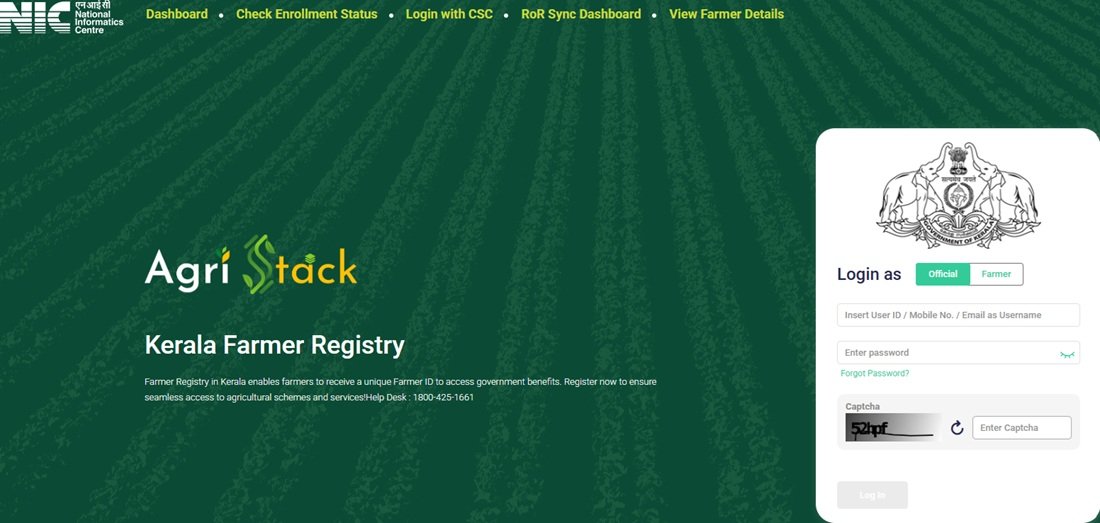
The Keralam AgriStack Portal provides separate login options for officials and farmers. Users can access the login facility through the homepage of the official portal.
Follow these steps to reach the login section:
- Visit the official Keralam AgriStack Portal.
- Locate the login section displayed on the homepage.
- Select the appropriate option between Official and Farmer.
- Enter the registered mobile number in the username field.
- Enter your account password.
- Use the Show option if you want to check the entered password.
- Enter the displayed CAPTCHA code in the required field.
- Click the Log In button to proceed.
The portal also displays a Forgot Password option. Users who cannot remember their existing password can select this option and follow the instructions provided by the portal.
Important: The homepage provides separate Official and Farmer login options. Farmers should select the Farmer option to access their personal account. They should not use official login credentials to access a farmer account.
CSC Login and Farmer Account Activation
The Keralam AgriStack Portal displays a separate Login with CSC option in its main menu. It also provides a Create New User Account facility for farmers whose Farmer Registry records were created through CSC or Camp Mode.
The portal displays an important notice explaining that farmers who completed their enrollment through CSC or Camp Mode must first create a portal account before logging in. This one-time account creation process activates their Self-Login access.
How to activate Self-Login access?
Farmers who already have a Farmer Registry record through CSC or Camp Mode can follow these steps:
- Open the Keralam AgriStack Portal.
- Locate the Create New User Account option below the login section.
- Click the option to open the account creation facility.
- Complete the one-time registration process as instructed on the portal.
- After successful account creation, use the activated Self-Login facility to access the portal.
The account activation page includes an Aadhaar e-KYC consent statement. The user must review the consent information and complete the verification process as instructed by the portal.
Remember: This process activates portal login access for farmers who already have a registration record. It does not mean that they need to submit a fresh Farmer Registry application.
The portal homepage also displays a Login with CSC option. Since the exact CSC authentication screens are not available in the supplied portal information, users should follow the instructions shown after selecting that option.
AgriStack Keralam Status Check: Enrollment Verification
Farmers can use the Check Enrollment Status facility to verify their enrollment information on the Keralam AgriStack Portal. The page provides two search options: Aadhaar Number and Farmer ID.
Farmers who select the Aadhaar Number option must complete OTP verification. The portal sends the OTP to the mobile number linked with their Aadhaar.
Steps to check Farmer Registry enrollment status
- Visit the Check Enrollment Status page.
- Locate the Check Status Against section.
- Select Aadhaar Number or Farmer ID, depending on the information available with you.
- If you select Aadhaar Number, enter the required Aadhaar details.
- Complete the OTP verification using the OTP sent to your Aadhaar-linked mobile number.
- Follow the instructions displayed on the screen to proceed with the status check.
The portal also provides the Farmer ID option as an alternative search method. However, the exact verification steps for this option are not specified in the available screen information. Users should follow the instructions displayed after selecting Farmer ID.
Farmers who have completed enrollment through CSC or a registration camp can use this facility to check their enrollment status. They can separately create a portal account if they want to activate Self-Login access.
Direct Link: Check Keralam AgriStack Enrollment Status
View Farmer Details Through Aadhaar Verification
The Keralam AgriStack Portal provides a separate View Farmer Details facility. Farmers can use this option to search for their registry information through Aadhaar-based verification.
This facility is different from the Check Enrollment Status option. The status page helps users verify their enrollment, whereas View Farmer Details provides a separate search facility for accessing farmer information.
Steps to view Farmer Registry details
- Open the View Farmer Details page.
- Locate the Search By Farmer Aadhaar Number option.
- Enter the required Aadhaar Number.
- Proceed with the OTP verification process.
- Enter the OTP received on the mobile number linked with Aadhaar.
- Follow the instructions displayed by the portal to view the available farmer details.
Users should enter their own correct Aadhaar details and complete the verification process. They should never share their Aadhaar OTP or other authentication details with unauthorized persons.
Direct Link: View Farmer Details on Keralam AgriStack Portal
Keralam AgriStack Dashboard: Enrollment Statistics and District Reports
The Dashboard option on the Keralam AgriStack Portal provides an overview of Farmer Registry enrollment progress across the state. It displays beneficiary-related figures, total enrollment, approved Farmer IDs and pending records.
The dashboard also provides enrollment mode information and district-wise reports. Users can view the top five and bottom five districts based on the enrollment information displayed on the portal.
Keralam AgriStack Dashboard Statistics
The following figures are taken from the dashboard information supplied for this article. The portal refreshes its data every five minutes, so these numbers may change.
| Dashboard Indicator | Displayed Value |
|---|---|
| PM Kisan Beneficiaries | 38,01,577 |
| Total Enrollment Till Yesterday | 25,13,066 |
| Enrollment as a Percentage of PM Kisan Beneficiaries | 66.11% |
| Approved Farmer IDs | 24,84,951 |
| FID as a Percentage of PM Kisan Beneficiaries | 66.11% |
| Pending Farmer ID Generation and Approval | 9 |
| Today’s Enrollment Through Enhanced Name Matching | 4 |
| Total Today’s Enrollment | 55 |
Note: These are the figures from the supplied dashboard snapshot. The capture date was not provided, so readers should not treat them as the latest live statistics. The portal states that dashboard data refreshes every five minutes.
District-wise Enrollment Reports
The dashboard also contains two district-level reports:
- Farmer Enrollment – Top 5 Districts: Displays the five districts appearing at the top of the enrollment report.
- Farmer Enrollment – Bottom 5 Districts: Displays the five districts appearing at the bottom of the enrollment report.
The Enrollment Mode section provides another view of registration activity through different enrollment channels. These reports help users understand the overall enrollment progress shown on the portal.
Dashboard Link: Open Keralam AgriStack Dashboard
Keralam Farmer ID Generation: Latest Available Government Figure
According to the Ministry of Agriculture and Farmers Welfare, Keralam had generated 25,57,460 Farmer IDs as of 20 July 2026. The Union Government published this state-wise figure in a PIB release dated 24 July 2026.
This figure represents the number of Farmer IDs generated by the reported date. It is not the same as the dashboard’s total enrollment or approved Farmer ID figures because the reporting metrics and dates may differ.
Farmers should therefore check the official portal for current enrollment information rather than relying on an older statistical snapshot.
Keralam RoR Sync Dashboard: Land Record Synchronization
The Keralam AgriStack Portal includes a separate RoR Sync Dashboard. RoR stands for Record of Rights, which refers to land ownership and related land record information maintained by the revenue administration.
The dashboard displays reports related to the synchronization of land record information with the Farmer Registry system. It includes district, sub-district and village filters, date selection options and several data monitoring reports.
The portal displays an Admin Login option on this page. Therefore, users should understand that the RoR Sync Dashboard primarily provides administrative monitoring information. It is not a general farmer login facility.
Information Available on the RoR Sync Dashboard
The supplied dashboard screen displayed the following information:
| Indicator | Displayed Value |
|---|---|
| Total Districts | 14 |
| Total Sub-Districts | 78 |
| Total Villages | 1,666 |
| History Data Pulled | 0 |
| Data Deleted | 0 |
| Data Inserted | 0 |
| Actions on SFDB Unified Table | 0 |
| Incremental Farmer IDs Pushed | 0 |
| Live Data Pulled | 0 |
Last Updated: 24 September 2026, 03:51 PM, as displayed in the supplied snapshot.
All the above activity indicators showed zero in that particular snapshot. These values should not be interpreted as proof that no land record synchronization has taken place at other times.
Filters Available on the RoR Dashboard
The dashboard provides the following filters:
- District
- Sub-District
- Village
- From Date
- To Date
- Apply
Users with the required administrative access can use these filters to view information for selected locations and periods.
Reports Available on the Dashboard
The RoR Sync Dashboard displays the following reports and data sections:
- Data Pulled: History API vs Live API: Displays information related to historical and live data retrieval.
- Data Deleted: Breakdown by Reason: Shows the available breakdown of deleted records.
- Actions on SFDB Unified Table: Displays reported actions on the unified table.
- Farmer Transition Matrix: Displays farmer category transition information. The supplied screen showed a matrix for Alappuzha.
- Data Inserted: District-wise Breakdown: Displays district-wise information about sub-districts, villages and inserted records.
- Incremental Farmer IDs Pushed: Provides 30-day, 15-day and 7-day reporting filters.
District-wise Data Inserted Report
The supplied RoR dashboard showed 14 districts with their respective sub-district and village counts. The Records Inserted column displayed zero for every district in that snapshot.
| District | Sub-Districts | Villages | Records Inserted |
|---|---|---|---|
| Alappuzha | 6 | 93 | 0 |
| Ernakulam | 7 | 127 | 0 |
| Idukki | 5 | 68 | 0 |
| Kannur | 5 | 133 | 0 |
| Kasaragod | 4 | 129 | 0 |
| Kollam | 6 | 105 | 0 |
| Kottayam | 5 | 100 | 0 |
| Kozhikode | 4 | 118 | 0 |
| Malappuram | 7 | 138 | 0 |
| Palakkad | 7 | 157 | 0 |
| Pathanamthitta | 6 | 70 | 0 |
| Thiruvananthapuram | 6 | 124 | 0 |
| Thrissur | 7 | 255 | 0 |
| Wayanad | 3 | 49 | 0 |
RoR Synchronization Dashboard: Open Keralam RoR Sync Dashboard
Add Additional Agricultural Land to Existing Farmer Registry
The Keralam Agriculture Department has introduced an important facility for farmers who have already received their Farmer IDs. They can now add details of their additional agricultural land parcels to the existing Farmer Registry record.
Initially, the registration process allowed farmers to submit information about only one agricultural land parcel. The department later made it possible to add details of other agricultural land parcels through the portal and mobile application.
On 12 and 13 October 2026, the Keralam Government’s Information and Public Relations Department published notices asking registered farmers to update their records with information about all agricultural land held in their names.
The department has advised farmers to keep their land details updated because Farmer ID information and registered agricultural land area may be used while delivering agricultural schemes, subsidies, crop insurance and fertilizer-related services.
Steps to Add Additional Land Details
The official English user manual for the Land Addition Module describes the following process for existing Farmer ID holders:
- Open the Keralam AgriStack Portal.
- Log in using your activated farmer account.
- Open the Update My Information section.
- Select Non-KYC Details.
- Open Land Ownership & Land Details.
- Select the Addition option.
- Click + Add New Land (Owned).
- Enter the required land information, including District, Taluk or Sub-District, Village, Survey Number and Sub-Survey Number.
- Select the relevant landowner from the available options.
- Review the entered information and submit the request.
The exact fields and available options may depend on the land record information displayed by the portal.
What Happens After Submitting the Land Addition Request?
Submitting a new land entry does not automatically mean that the land has been added to the approved Farmer Registry record. The Revenue Department must verify and approve the submitted land information.
The land addition process involves the following key stages:
- The farmer enters the additional land details through the available module.
- The system processes the submitted information for verification.
- The Revenue approving authority checks the relevant land records.
- The required Aadhaar OTP-based e-Sign process is completed as instructed in the official manual.
- The additional land details become part of the Farmer Registry record after the required approval.
The official manual also mentions that the land record database used by the module contains RoR data up to May 2026. Farmers should follow the latest instructions shown on the portal if their land details are not available or require correction.
Where Can Farmers Get Help With Land Updates?
Farmers can update their land details themselves by following the official user manual. They can also seek assistance from the following service points:
- Akshaya Centres
- Common Service Centres (CSCs)
- Krishi Bhavans
Official User Manual: Keralam Agriculture Department: Farmer Registry Manuals
Important Links and Contact Details
Farmers can use the following official links to access the Keralam AgriStack Portal and its available facilities.
Important Portal Links
| Service | Official Link |
|---|---|
| Keralam AgriStack Portal | Click Here |
| AgriStack Dashboard | Click Here |
| Check Enrollment Status | Click Here |
| View Farmer Details | Click Here |
| RoR Sync Dashboard | Click Here |
| Farmer Registry User Manuals | Click Here |
| Keralam Agriculture Department | Click Here |
Contact Details for Portal Assistance
Farmers who need assistance with the Keralam Farmer Registry can contact the helpdesk number displayed on the official AgriStack Portal.
| Contact Information | Details |
|---|---|
| Portal Helpdesk | 1800-425-1661 |
| Assistance Centres | Akshaya Centres, CSCs and Krishi Bhavans |
| Official Department | Department of Agriculture Development and Farmers’ Welfare, Government of Keralam |
Farmers should keep their Farmer ID or relevant enrollment information ready while contacting the helpdesk. They should also explain the issue clearly so that the concerned support team can guide them appropriately.
Frequently Asked Questions (FAQs)
Ans. The official Keralam AgriStack Portal is available at https://klfr.agristack.gov.in/farmer-registry-kl/. Farmers can use this website to access login, enrollment status and other available facilities.
Ans. Open the official portal, select the Farmer login option, enter your registered mobile number and password, complete the CAPTCHA and click Log In.
Ans. Farmer Login provides account access to registered farmers, while Official Login is a separate option for authorized officials. Farmers should select the Farmer option to access their personal accounts.
Ans. Farmers whose records were created through CSC or Camp Mode must select Create New User Account and complete the one-time account activation process. This activates their Self-Login access.
Ans. No. The portal asks existing CSC or Camp Mode beneficiaries to create a portal account for Self-Login access. This is an account activation process, not a fresh Farmer Registry enrollment.
Ans. Visit the Check Enrollment Status page and select Aadhaar Number or Farmer ID. If you choose Aadhaar Number, complete the OTP verification using the mobile number linked with Aadhaar.
Ans. Yes. The Check Enrollment Status page provides Farmer ID as one of the available search options. Follow the verification instructions displayed after selecting this option.
Ans. Open the View Farmer Details page, enter your Aadhaar Number and complete OTP verification to access the available farmer information.
Ans. The RoR Sync Dashboard displays administrative reports related to land record synchronization. It includes district-wise information, data retrieval reports, deleted record details, inserted records and Farmer ID synchronization information.
Ans. The supplied portal screen displays an Admin Login option on the RoR Sync Dashboard. Therefore, users should not assume that all administrative reports are available through ordinary farmer accounts.
Ans. Yes. Keralam has introduced a facility that allows existing Farmer ID holders to add details of their additional agricultural land parcels through the portal and mobile application.
Ans. The Revenue approving authority verifies the submitted land information. The additional land details become part of the Farmer Registry record after the required verification and approval.
Ans. Farmers can visit the official Keralam Agriculture Department website to access the available Farmer Registry user manuals.
Ans. The Keralam AgriStack Portal displays 1800-425-1661 as its helpdesk number. Farmers can contact this number for assistance related to the portal.
Ans. The Farmer Registry Portal and Digital Crop Survey serve different purposes. The Farmer Registry maintains farmer identity and land-related records, while the Digital Crop Survey collects information about crops cultivated on agricultural plots.
Ans. The dashboard displays a note stating that its data refreshes every five minutes. Therefore, enrollment figures may change when users revisit the page.
Ans. According to the Ministry of Agriculture and Farmers Welfare, Kerala had generated 25,57,460 Farmer IDs as of 20 July 2026. The Government published this figure through a PIB release dated 24 July 2026.
Ans. Farmers can follow the official land addition user manual or seek assistance from Akshaya Centres, Common Service Centres and Krishi Bhavans.
Ans. The Keralam AgriStack Portal is the online platform through which users access Farmer Registry-related facilities. For detailed information about the initial registration process, eligibility and documents, read our guide on Farmer Registry Keralam.

Tabassum is a government schemes researcher and writer with 5 years of experience tracking Central and State welfare scheme programmes across India. She has covered 500+ schemes spanning agriculture, women welfare, education, and housing, helping lakhs of beneficiaries understand their entitlements in simple language.