The West Bengal e-Paddy Portal is an online platform developed by the Department of Food and Supplies, Government of West Bengal, to help farmers access paddy procurement services. Through this portal, farmers can complete online registration, check their registration details, complete Aadhaar verification, locate nearby paddy purchase centres, book procurement slots and check their bank payment status. The portal also provides access to the Farmer Registration Certificate (FRC) and other procurement-related services. Farmers can visit epaddy.wb.gov.in to use these facilities and get information about the state’s paddy procurement process.
West Bengal e-Paddy Portal: Key Highlights | |
|---|---|
| Portal Name | West Bengal e-Paddy Portal |
| Department | Department of Food and Supplies, Government of West Bengal |
| Official Website | epaddy.wb.gov.in |
| Main Purpose | Online farmer registration and management of paddy procurement services |
| Major Services | Farmer Registration, Farmer Profile, eKYC, Self Scheduling, Purchase Centre Locator and Bank Status |
| Registration Mode | Online through the official e-Paddy Portal |
| Registration Documents | Voter ID, Land Document and Bank Passbook (Front Page) |
| Maximum Document Size | 2 MB per file, as displayed on the registration page |
| Marketing Season | KMS 2026–27 |
| Common Paddy MSP for 2026–27 | ₹2,441 per quintal |
| Grade A Paddy MSP for 2026–27 | ₹2,461 per quintal |
| Farmer Helpline | 1800 345 5505 / 1967 (Toll Free) |
| Office Address | Khadyashree Bhawan, 11A, Mirza Ghalib Street, Kolkata – 700087, West Bengal |
What is West Bengal e-Paddy Portal?
The e-Paddy Portal is the official online platform of the West Bengal Food and Supplies Department for managing services related to paddy procurement from farmers. It connects farmers with the government’s procurement system and helps them complete important activities without visiting a department office for every small task.
Suppose you grow paddy and want to sell your produce at a government procurement centre. You may first need to register your details, provide information about your agricultural land and bank account, and complete the required verification. After registration, you can use the portal to check your farmer profile, find a suitable purchase centre and book a date for selling your paddy.
The portal brings these services together in one place. It also allows farmers to check whether their registration and bank details have been verified and whether the department has recorded their paddy purchase and payment information.
The Department of Food and Supplies operates the portal, while the National Informatics Centre (NIC), Government of India, has developed it. Farmers can access its public services through the official website at https://epaddy.wb.gov.in/.
The portal displays information about procurement centres, registered rice mills, registered farmers, procured paddy quantity and other procurement activities. Its homepage statistics are updated every two hours, according to the website’s displayed information.
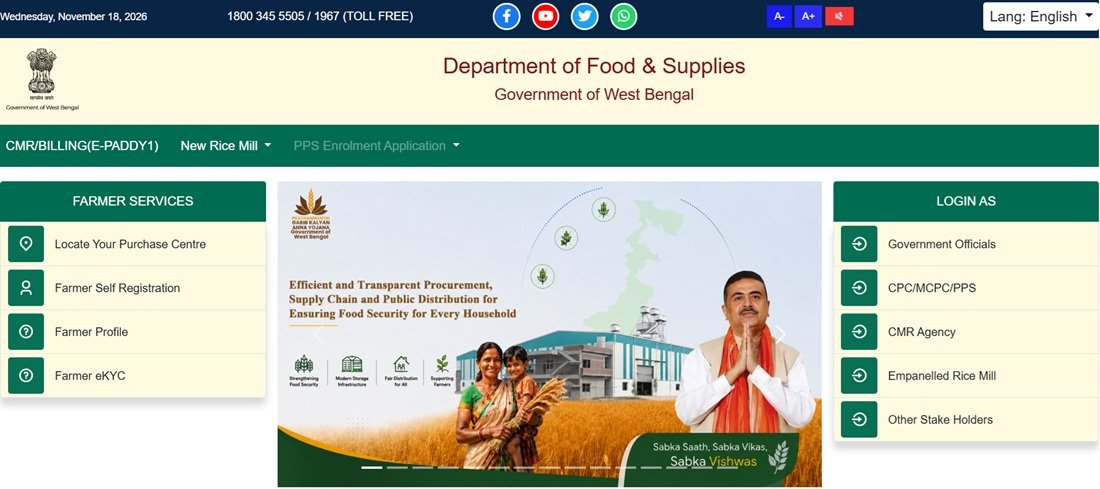
As displayed on the portal on 18 November 2026, the KMS 2026–27 dashboard showed 2,87,278 registered farmers. It also displayed 299 Centralised Procurement Centres (CPCs), 52 FPO/FPC centres, 55 SHG centres, 52 Society centres, 4 LAMPS and 53 registered rice mills. The procurement and beneficiary counters showed zero in that snapshot. These figures represent the portal’s displayed position on that date and may change as procurement activities progress.
Farmers should use the official e-Paddy website for registration and procurement-related services. They should not confuse e-Paddy registration with a separate Farmer ID or AgriStack registration. The portal asks for Krishak Bandhu details in certain situations, but that does not make the two registration processes the same.
e-Paddy Portal Services and Features
The West Bengal e-Paddy Portal offers several services for farmers. Each service has a specific purpose, so farmers can use the relevant page instead of visiting different department offices for every requirement.
1. Farmer Self Registration
Farmers can use the online registration facility to submit their personal details, address, agricultural land information, procurement centre preference and bank account details. The registration form also asks for supporting documents, including Voter ID, land records and the front page of the bank passbook.
After completing the required registration process, the farmer can obtain a Farmer Registration Certificate (FRC). This certificate acts as an important reference for accessing farmer-related services on the portal.
2. Farmer Profile
The Farmer Profile service allows registered farmers to find their submitted information. They can search using their Registration Number or Aadhaar Number. The portal also provides other search options on the profile page, including EPIC Number and Krishak Bandhu ID, as displayed in the available interface.
Farmers can use this service to view registration details, check verification information, access land-related records and review procurement and payment details available in their profiles.
3. Farmer eKYC
The portal provides Aadhaar-based verification options for farmers. Depending on the available verification facility, a farmer may complete the required process through OTP or biometric authentication. The Farmer Profile section also provides an Aadhaar eKYC option through OTP verification.
Farmers should complete verification only through the official portal and use their own Aadhaar details. They should never share an OTP with an unknown person.
4. Self Scheduling and Paddy Slot Booking
Farmers can use the Self Scheduling facility to select a procurement centre, enter the quantity of paddy they want to sell and choose an available procurement date and time slot.
The portal provides two options: Self Scheduling and Emergency Scheduling. Regular self-scheduling is available between 8 AM and 8 PM, as stated on the portal. The actual slot options depend on the procurement centre and available dates.
5. Know Your Nearest Purchase Centre
Farmers can locate nearby paddy purchase centres by selecting their district and block. They can also narrow the search using optional filters such as agency type, centre type and date range.
The results can show the purchase centre’s name, centre type, agency, Purchase Officer’s name and mobile number, venue address, purchase date, slot availability and centre location.
Find Your Nearest Purchase Centre
6. Farmer Bank Status
The Farmer Bank Status page helps farmers check the bank account information linked to their e-Paddy registration. Farmers can search using their Registration Number, Aadhaar Number, EPIC Number or Krishak Bandhu ID.
The page displays bank account details along with the available status and message. Farmers can use this service to identify whether their bank information needs attention.
7. Farmer Registration Certificate (FRC)
After registration, farmers can access their Farmer Registration Certificate through the relevant portal service. The certificate generation page asks for the farmer’s registration number and captcha verification.
How to Register on West Bengal e-Paddy Portal?
Farmers who want to participate in the government’s paddy procurement process can use the e-Paddy Portal’s online registration facility. The registration form collects information about the farmer, residential address, agricultural land, preferred purchase centre and bank account. It also asks for supporting documents so that the department can verify the submitted information.
Before starting, keep your Aadhaar details, mobile number, Voter ID, land documents and bank passbook ready. The portal asks farmers to upload the Voter ID, land document and bank passbook front page. Each uploaded file must be within 2 MB.
Follow the steps below to understand the farmer registration process.
Step 1: Visit the official West Bengal e-Paddy Portal. On the homepage, look for the farmer services section and select the Farmer Self Registration option. You can also open the direct Farmer Registration page.
Step 2: The registration page will ask you to enter your Aadhaar Number. Enter the number carefully. The portal uses Aadhaar-based verification to confirm the farmer’s identity.
Step 3: Complete the OTP verification process. Select the option to get an OTP, enter the OTP received on your registered mobile number and validate it. If the OTP does not arrive, use the resend option when available. The page also displays a biometric authentication option.
Step 4: After verification, complete the Personal Details section. The registration form collects information such as the farmer’s name, gender, age, mobile number, EPIC Number and details of the father, mother or spouse. It also asks whether the farmer is registered under the Krishak Bandhu scheme. If the farmer selects Yes, the form provides options to search and verify Krishak Bandhu details using Aadhaar, EPIC or KB ID.
Step 5: Enter your residential address. Select the correct district, block, Gram Panchayat and village, and provide your PIN code. Make sure the address matches your actual residence and supporting records.
Step 6: Move to the Land and Procurement Centre section. Enter your agricultural land details, including district, block, Mouza, Khatian Number, Dag Number and land area in decimal. Select the applicable ownership type, such as Owned, Rented, Leased for more than one year, Shared Cultivation or Multiple Ownership. Use the available land record verification option wherever applicable.
Step 7: Provide the purchase centre information requested by the form. Select the appropriate district and block and enter the required farmer and registration details. The department uses the submitted land and location information to process the farmer’s procurement records.
Step 8: Complete the Bank Details section. Enter your bank’s IFSC code, bank name, branch name, account type and account number. The form asks you to enter the account number again for confirmation. Select whether the account is Single or Joint. If you use a joint account, provide the second account holder’s name and relationship as requested.
Step 9: Upload the required documents in the Document Upload section. The portal asks for your Voter ID, land documents and the front page of your bank passbook. Upload the land documents as one PDF file. Keep each file within the maximum size of 2 MB.
Step 10: Read the declaration carefully. The form includes declarations related to the submitted Khatian and self-declaration. Confirm that the information and documents you have provided are correct.
Step 11: Review the information entered in all sections. If you find an error, go back and correct it before submission. The portal marks all fields as mandatory, so complete every required field.
Step 12: Submit the registration form. Keep the acknowledgement or registration details generated by the portal safely. You may need your registration number to access your Farmer Profile or download your Farmer Registration Certificate later.
Important: The registration page’s first screen asks for Aadhaar Number and OTP verification. The remaining registration sections appear as part of the multi-step form. Follow the fields and instructions currently displayed on the live portal, as the department may update its registration process.
e-Paddy Portal Login: Farmer Access Guide
Farmers often search for e-Paddy WB login or e-Paddy WB Gov In Login when they want to access their registration details or use a particular service. However, the portal provides different types of access for different users.
The homepage displays login categories for Government Officials, CPC/MCPC/PPS, CMR Agency, Empanelled Rice Mill and Other Stakeholders. These are role-based access options for the department and procurement-related organisations. Farmers should not select an official or agency login unless they have the required authorised credentials.
For regular farmer services, use the relevant public service page. For example, open Farmer Registration to register, Farmer Profile to search your details, Self Scheduling to book a procurement slot and Farmer Bank Status to check bank information. Some services may ask you to verify your identity through Aadhaar OTP or another verification method.
To access the portal:
Step 1: Visit epaddy.wb.gov.in.
Step 2: Identify the farmer service you want to use from the homepage.
Step 3: Open the relevant service page and enter the requested details, such as Registration Number or Aadhaar Number.
Step 4: Complete OTP verification if the page asks for it.
Step 5: Follow the instructions displayed on the screen to view your details or complete the selected activity.
Note: Do not use the departmental login for ordinary farmer services. The public farmer pages are the appropriate starting point for registration, profile search, slot booking and bank status checks.
e-Paddy Farmer Registration Status Check
After submitting an e-Paddy registration form, farmers may want to know whether the department has processed their application. The Farmer Profile page provides access to registration details and available verification information. It also displays the movement of the registration through different processing stages, where applicable.
Farmers can use the following process to check their e-Paddy registration status.
Step 1: Open the official Farmer Profile page.
Step 2: Select the search option available on the page. The portal supports searches using Registration Number or Aadhaar Number. Other available search fields may include EPIC Number and Krishak Bandhu ID.
Step 3: Enter the selected identification detail correctly. If you select Registration Number, use the number provided during registration.
Step 4: Click the option to get farmer details. Complete any verification requested by the portal.
Step 5: Review the information displayed on the screen. The profile may show personal details, Aadhaar verification, bank account verification, Krishak Bandhu information, mobile verification and land-related records.
Step 6: Check the registration movement section, if available. The portal may show stages such as Registration in Process, CPU, Nodal, BDO, Sent to Bank and Active. These stages help farmers understand the progress of their submitted details.
If the portal displays a pending verification or an error message, read the message carefully. Contact the concerned block or district authority if the issue requires departmental action.
Download West Bengal Farmer Registration Certificate (FRC)
The Farmer Registration Certificate (FRC) is an important document generated after the farmer’s registration on the e-Paddy Portal. Farmers can use the certificate as a reference when accessing their registration and procurement-related services.
The portal provides a separate certificate generation page. Keep your registration number ready before opening it.
Step 1: Visit the official Farmer Registration Certificate generation page.
Step 2: Enter your e-Paddy Registration Number in the prescribed field. Use the complete number exactly as provided by the portal.
Step 3: Enter the captcha code displayed on the screen. The captcha helps verify that a person is using the page.
Step 4: Submit the details to proceed. If the registration number is valid and the record is available, the portal can display the relevant certificate.
Step 5: Use the available print or download option to save the Farmer Registration Certificate. Keep a digital copy and, if required, a printed copy for future reference.
If the certificate does not appear, check the registration number again. You can also open the Farmer Profile page to verify your registration details.
e-Paddy Farmer eKYC Process
Farmer verification is an important part of the e-Paddy registration and procurement process. The portal provides an Aadhaar eKYC option through OTP verification in the Farmer Profile section. It also displays biometric authentication as an option in the registration process.
To check or complete the available Aadhaar verification process, follow these steps.
Step 1: Open the e-Paddy Farmer Profile page.
Step 2: Search for your farmer record using your Registration Number or another supported identification option.
Step 3: Open the available farmer details and look for the Aadhaar verification or eKYC section.
Step 4: Select the Aadhaar eKYC option if it is available for your record. The portal may ask you to complete OTP verification.
Step 5: Enter the OTP received on the mobile number linked to your Aadhaar and validate it.
Step 6: Check the verification status displayed in your Farmer Profile. If the portal shows an error, follow the message and contact the concerned authority if necessary.
Important: Aadhaar eKYC through OTP and biometric authentication at the procurement centre are not necessarily the same activity. The Purchase Officer handbook for KMS 2025–26 describes fingerprint or IRIS authentication during paddy purchase. Farmers should follow the verification method displayed for their particular service and procurement activity.
Find Your Nearest Paddy Purchase Centre
Before booking a paddy procurement slot, farmers should identify the purchase centre where they want to sell their produce. The e-Paddy Portal provides a dedicated Know Your Nearest Purchase Centre facility. It allows farmers to search for centres by district and block and view the available centre information.
Follow these steps to locate a purchase centre in West Bengal.
Step 1: Open the official Know Your Nearest Purchase Centre page.
Step 2: Select your district from the dropdown list. The portal provides district options across West Bengal, including Alipurduar, Bankura, Birbhum, Cooch Behar, Darjeeling, Hooghly, Howrah, Jalpaiguri, Jhargram, Malda, Murshidabad, Nadia, North 24 Parganas, Paschim Bardhaman, Paschim Medinipur, Purba Bardhaman, Purba Medinipur, Purulia, South 24 Parganas and Uttar Dinajpur.
Step 3: Select your block. The available block options depend on the district you choose.
Step 4: If you want to narrow the results, select an Agency Type. The available options include BENFED, CONFED, DCFS, NAFED, PAMCL and WBECSC.
Step 5: You can also select a Centre Type. The portal provides options such as Co-operative Society, CPC, FPO/FPC, LAMPS, MCPC, PAMS and SHG.
Step 6: Use the From Date and To Date filters if you want to search for centres within a particular period. These filters are optional.
Step 7: Submit the selected filters to view the list of purchase centres. Check the centre name, type, agency, Purchase Officer’s name and mobile number, venue address and purchase date.
Step 8: Review the slot availability and centre location information before selecting a centre for procurement. If the page displays a fixed schedule, check that information as well.
This service helps farmers find the nearest suitable paddy purchase centre without searching for centre details separately.
e-Paddy Self Scheduling and Paddy Slot Booking
The e-Paddy Portal provides a Self Scheduling facility through which eligible registered farmers can select a procurement centre and book an available slot for selling paddy. Instead of visiting a centre only to ask about a date, farmers can check the available scheduling options online.
The portal provides two scheduling modes: Self Scheduling and Emergency Scheduling. The page states that farmer self-scheduling is allowed between 8 AM and 8 PM. This refers to the time window for using the online self-scheduling facility, not necessarily the working hours of every purchase centre.
Before booking, keep your Registration Number, Aadhaar Number or another supported identification detail ready. You should also know the approximate quantity of paddy you want to sell.
Step 1: Open the official Farmer Self Scheduling page.
Step 2: Select Self Scheduling if you want to book a regular procurement slot. The page also provides an Emergency Scheduling option. Use the appropriate option according to your requirement and the portal’s instructions.
Step 3: Search for your farmer record. The portal allows searches using Aadhaar Card, EPIC Number, Krishak Bandhu ID or Registration Number. Enter the correct detail and submit it.
Step 4: Select the Slot Details. Choose your block, procurement centre and venue address from the available options. Check the centre details carefully before moving ahead.
Step 5: Review your Farmer Details. The portal may display your name, total paddy sold so far, last sale date, last scheduled date, previous purchase centre, land area, average production per acre, maximum balance paddy available for sale and mobile number. Check these details before confirming.
Step 6: Move to Procurement Details. Select the district and procurement centre, enter the quantity of paddy you want to sell in quintals and choose the procurement date available on the portal.
Step 7: Select an available time slot. The page displays slot blocks such as 9 AM to 10 AM, 10 AM to 11 AM and other available time periods. The actual choices depend on the centre and the dates shown on the portal.
Step 8: Complete OTP verification. Generate an OTP if required, enter the received code and validate it. If your mobile number needs updating, use the available mobile update process.
Step 9: Check the bank details displayed on the screen. The portal asks farmers to confirm whether the account number, IFSC code, branch name and bank name are correct. Select the appropriate response after checking the information.
Step 10: Submit the scheduling request. After successful completion, use the available acknowledgement or print option to save the booking details.
Important points about paddy booking:
- The portal’s Self Scheduling page states that farmers can book their own slots between 8 AM and 8 PM.
- The available dates and time slots depend on the selected procurement centre.
- The quantity available for sale may depend on the farmer’s recorded land details, applicable production calculations and departmental approval.
- The portal displays the maximum balance paddy available for sale in the farmer details section, where applicable.
- Emergency scheduling is a separate option. The Purchase Officer handbook for KMS 2025–26 describes emergency slots for specified reasons and supporting documents. Farmers should check the current season’s instructions before relying on those older rules.
Check Farmer Bank Account and Payment Status
Farmers should make sure that the bank account linked to their e-Paddy registration is correct. An incorrect account number, inactive account or bank validation problem may affect the payment process. The portal provides a separate Farmer Bank Status page for checking the bank information available in the farmer’s record.
Follow these steps to check your bank status.
Step 1: Visit the official Farmer Bank Status page.
Step 2: Select the available search method. You can search using your Registration Number, Aadhaar Number, EPIC Number or Krishak Bandhu ID.
Step 3: Enter the required number and select the option to get farmer details.
Step 4: Check the registration information displayed on the page. Review the name as per Aadhaar, Krishak Bandhu and bank records, wherever shown.
Step 5: Look for the Bank Account section. The page displays the available bank status and related message for the farmer’s record.
Step 6: Complete OTP verification if the portal asks for it. Submit the required verification details to proceed.
Step 7: If the bank status shows an error or requires correction, read the message carefully. You may need to contact the concerned Purchase Officer, Disbursement Officer or department official for further assistance.
The Farmer Profile page also displays purchase and payment-related information, where available. Farmers can check scheduled quantity, sold quantity, purchase details, payment due and payment status through their profile.
Important: The Purchase Officer handbook for KMS 2025–26 states that payment within three working days was a top priority. It also describes follow-up action for delayed payments. This is an older-season instruction; farmers should confirm the applicable payment timeline for KMS 2026–27 with the department.
West Bengal Paddy Procurement: MSP and Payment Details for KMS 2026–27
The Minimum Support Price (MSP) is the price announced by the Government for specified agricultural crops. For paddy, the Central Government announces separate MSP rates for Common and Grade A varieties for each marketing season.
For KMS 2026–27, the Cabinet Committee on Economic Affairs approved the following paddy MSP rates. The Ministry of Agriculture and Farmers Welfare announced these rates through the Press Information Bureau on 13 May 2026.
| Paddy Variety | MSP for KMS 2026–27 | MSP for KMS 2025–26 | Increase |
|---|---|---|---|
| Common Paddy | ₹2,441 per quintal | ₹2,369 per quintal | ₹72 per quintal |
| Grade A Paddy | ₹2,461 per quintal | ₹2,389 per quintal | ₹72 per quintal |
These are the Central Government’s announced MSP rates. The actual procurement of paddy through West Bengal’s system depends on the applicable state procurement instructions, purchase centre arrangements and verification of the farmer and produce.
Is there an additional ₹20 incentive in West Bengal?
The West Bengal Purchase Officer handbook for KMS 2025–26 mentions an additional incentive of ₹20 per quintal for farmers selling paddy at Centralised Procurement Centres (CPCs) and mobile CPCs (mCPCs). However, the available official material does not confirm that the same incentive applies to KMS 2026–27. Therefore, farmers should not assume that this additional amount is currently payable unless the department issues a fresh order.
How does the payment process work?
After the purchase centre records the paddy sale, the department processes the payment using the bank details available in the farmer’s registration. Farmers should therefore ensure that their bank account is active and that the account holder’s name matches the required identity records.
The KMS 2025–26 handbook also explains that dormant, inactive, Jan-Dhan or loan-linked accounts may create payment problems in certain cases. Returned transactions may require bank validation through the portal. Since these instructions relate to an earlier marketing season, farmers should check the current department instructions if their payment is delayed.
For the latest official MSP announcement, read the Government of India’s MSP notification for Kharif Marketing Season 2026–27.
Documents Required for e-Paddy Registration
Farmers should keep the following documents ready before starting their online registration on the West Bengal e-Paddy Portal. The registration page specifically asks applicants to prepare these documents in advance.
- Aadhaar Card: For entering Aadhaar details and completing the required identity verification.
- Voter ID Card: A scanned copy of the farmer’s Voter ID, with a maximum file size of 2 MB.
- Land Documents: Land records, including the required Khatian details, uploaded as one PDF file of up to 2 MB.
- Bank Passbook: A scanned copy of the front page of the bank passbook, within the 2 MB file-size limit.
- Mobile Number: A working mobile number for OTP verification and portal communication.
The portal marks all registration fields as mandatory. Keep the original documents available so that you can enter the correct information while filling out the form.
Important e-Paddy Portal Links
Farmers can use the following direct links to access the main services of the West Bengal e-Paddy Portal.
| Service | Official Link |
|---|---|
| e-Paddy Portal Homepage | Click Here |
| Farmer Self Registration | Click Here |
| Farmer Profile | Click Here |
| Know Your Nearest Purchase Centre | Click Here |
| Farmer Self Scheduling | Click Here |
| Farmer Bank Status | Click Here |
| Farmer Registration Certificate (FRC) | Click Here |
| Department of Food and Supplies, West Bengal | Click Here |
| KMS 2026–27 Paddy MSP Announcement | Click Here |
e-Paddy Portal Helpline and Contact Details
Farmers who face problems during registration, verification, slot booking or payment can contact the Department of Food and Supplies, Government of West Bengal. The portal displays the following toll-free helpline numbers and department address.
- Department: Department of Food and Supplies, Government of West Bengal
- Toll-Free Helpline: 1800 345 5505
- Alternative Toll-Free Number: 1967
- Office Address: Khadyashree Bhawan, 11A, Mirza Ghalib Street, Kolkata – 700087, West Bengal
- Official Portal: https://epaddy.wb.gov.in/
- Department Website: https://food.wb.gov.in/
For a registration or land-record issue, farmers can also approach the concerned Block Development Officer (BDO) or the relevant district or sub-division food and supplies office. For payment-related problems, contact the Purchase Officer or Disbursement Officer at the concerned procurement centre and keep your registration number and purchase details ready.
Frequently Asked Questions (FAQs)
Ans. The official website is https://epaddy.wb.gov.in/. It is managed by the Department of Food and Supplies, Government of West Bengal.
Ans. Open the Farmer Registration page, enter your Aadhaar Number, complete OTP verification and fill in the personal, address, land, bank and document details requested by the form.
Ans. The registration page asks farmers to keep their Voter ID, land documents and the front page of their bank passbook ready. It also requires Aadhaar details and OTP verification. Each uploaded document must be within 2 MB.
Ans. Visit the Farmer Profile page, search using your Registration Number or another supported identification detail and check the registration and verification information displayed on the screen.
Ans. Open the FRC generation page, enter your registration number and captcha, and submit the details. Use the available print or download option if your certificate appears.
Ans. Open your Farmer Profile and look for the Aadhaar verification or eKYC option. If the service is available, follow the OTP verification instructions displayed by the portal.
Ans. Visit the Know Your Nearest Purchase Centre page, select your district and block, and apply optional agency, centre type or date filters to view the available purchase centres.
Ans. Self Scheduling is an online facility that allows farmers to select a procurement centre, enter the quantity of paddy they want to sell and choose an available procurement date and time slot.
Ans. The e-Paddy Self Scheduling page states that farmers can use the self-scheduling facility between 8 AM and 8 PM. The available procurement slots depend on the selected centre.
Ans. Visit the Farmer Bank Status page, search using your Registration Number, Aadhaar, EPIC or Krishak Bandhu ID and check the bank status and message displayed on the page.
Ans. The Central Government has fixed the MSP at ₹2,441 per quintal for Common paddy and ₹2,461 per quintal for Grade A paddy for KMS 2026–27. Farmers should check the applicable procurement instructions issued by the West Bengal Government.
Ans. The available West Bengal Purchase Officer handbook mentions this incentive for CPC and mobile CPC sales during KMS 2025–26. A corresponding KMS 2026–27 order confirming its continuation was not available in the material reviewed. Farmers should confirm the current position with the department.
Ans. Farmers can contact the toll-free helpline at 1800 345 5505 or 1967 for assistance related to the e-Paddy Portal.

Tabassum is a government schemes researcher and writer with 5 years of experience tracking Central and State welfare scheme programmes across India. She has covered 500+ schemes spanning agriculture, women welfare, education, and housing, helping lakhs of beneficiaries understand their entitlements in simple language.