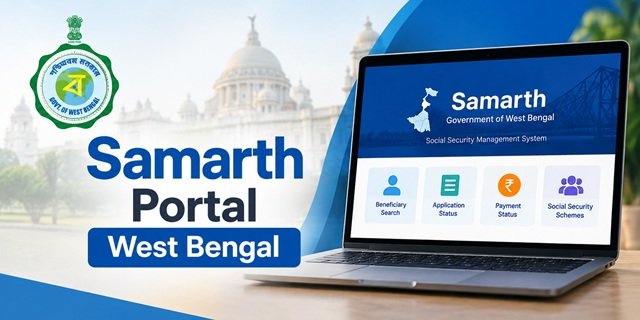
The Samarth Portal West Bengal provides an online facility to track social pension applications and check available pension payment details. The Government of West Bengal uses this digital platform to manage beneficiary information related to different social security schemes. Through its public tracking page, applicants and pensioners can search for their records using a Beneficiary ID, registered Mobile Number or Aadhaar Number.
If you want to check your Old Age Pension West Bengal status online, track an application or view available payment information, you can use the official Samarth tracking facility. The portal also covers other pension categories, including Widow Pension, Disability Pension, Jai Johar, Taposili Bandhu, Farmer Pension and Fisherman Pension.
Samarth Portal West Bengal: Key Information at a Glance | |
|---|---|
| Portal Name | Samarth Portal |
| State | West Bengal |
| Official Website | samarth.wb.gov.in |
| Managed By | Finance Department, Government of West Bengal |
| Designed By | National Informatics Centre (NIC) |
| Primary Purpose | Digital management of social pension schemes and beneficiary information |
| Key Public Services | Applicant Tracking and Pension Payment Status Checking |
| Available Search Options | Beneficiary ID, Mobile Number and Aadhaar Number |
| Payment Information | Payment details available for the selected financial year, subject to portal records |
| Direct Status Tracking Link | Track Applicant and View Payment Status |
What Is Samarth Portal West Bengal?
The Samarth Portal is an online platform of the Government of West Bengal that supports the management of social pension schemes and their beneficiary records. It brings different social security pension categories under a common digital system, making it easier for applicants and existing beneficiaries to access the information available for their records.
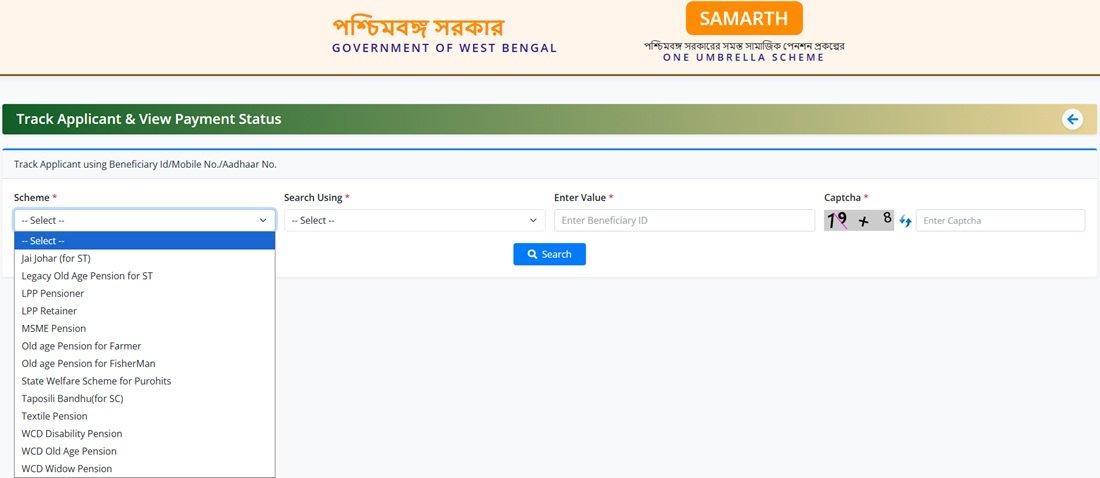
One of its important public services is the Track Applicant & View Payment Status facility. Through this page, users can search for an application or beneficiary record by selecting the relevant scheme and entering one of the available identification details. The portal provides three search options: Beneficiary ID, Mobile Number and Aadhaar Number.
The facility is useful for people who want to check their pension application details or view available payment information without going through the main portal’s login process.
It is important to understand that Samarth is not a separate pension scheme. It is a digital platform for managing information related to different social security schemes. The pension amount, eligibility conditions and other benefits depend on the particular scheme under which a person is registered.
Samarth WB Gov In: Official Portal and Status Check Link
Beneficiaries can access the main Samarth Portal and its public tracking facility through the official website. If your purpose is to check an application or pension record, you can directly open the tracking page instead of searching through the portal’s homepage.
| Purpose | Official Link |
|---|---|
| Samarth Portal Login | Open Samarth WB Gov In |
| Applicant Status Check | Track Applicant Status |
| Pension Payment Status | View Payment Status |
The public tracking page is titled Track Applicant & View Payment Status. It contains separate facilities for searching applicant or beneficiary information and viewing available payment details.
What Services Are Available on the Samarth Portal?
The Samarth Portal provides access to different services related to social pension records. Its public tracking facility is particularly useful for beneficiaries who want to check their application details or payment information online.
| Service | Purpose |
|---|---|
| Applicant Tracking | Search for an application or beneficiary record using an available identification detail. |
| Beneficiary Search | Find a record using Beneficiary ID, Mobile Number or Aadhaar Number. |
| Payment Status | View the payment information available for the selected financial year. |
| Scheme Selection | Select the pension or social security category associated with the beneficiary record. |
| Online Record Access | View the information returned by the public tracking facility. |
Some portal services may require authorised login credentials. The public tracking facility is meant for searching available applicant and payment information. It is different from the login facility used by authorised users.
Social Security Schemes Covered Under the Samarth Portal
The Samarth tracking page includes several social pension and welfare categories. These include schemes for senior citizens, widows, persons with disabilities, farmers, fishermen and other eligible groups.
Before checking your pension status, identify the scheme under which you submitted your application or receive benefits. Select the matching category from the scheme dropdown on the official tracking page.
| Scheme or Category | Beneficiary Group or Reference |
|---|---|
| Taposili Bandhu | Eligible beneficiaries covered under the Scheduled Caste pension scheme. |
| Jai Johar | Eligible beneficiaries covered under the Scheduled Tribe pension scheme. |
| Widow Pension | Eligible widowed women covered under the relevant pension category. |
| Disability Pension | Eligible persons with disabilities covered under the relevant scheme. |
| Old Age Pension | Eligible senior citizens covered under the applicable pension scheme. |
| Farmer Pension | Eligible farmers covered under the relevant pension category. |
| Fisherman Pension | Eligible fishermen covered under the relevant pension category. |
| LPP Retainer | A separate category available in the Samarth tracking dropdown. |
| LPP Pensioner | A separate category available in the Samarth tracking dropdown. |
| MSME Pension | A separate pension category listed on the portal. |
| Textile Pension | A separate pension category listed on the portal. |
| Old Age Pension for Farmer | A pension category specifically listed for farmers. |
| Old Age Pension for Fisherman | A pension category specifically listed for fishermen. |
| Legacy Old Age Pension for ST | A separate old age pension category listed on the tracking page. |
The scheme dropdown may contain additional categories. The names used on the portal may differ from the common names people use for pension schemes. Therefore, always select the category that matches your application or beneficiary record.
If you want to know about the eligibility conditions, pension amount or application process of a particular scheme, read its dedicated scheme guide. The Samarth Portal mainly helps users access the records available for the selected category.
How to Check Samarth WB Gov In Status Online?
Applicants and existing pension beneficiaries can use the Samarth public tracking facility to search for their records. You do not need to access the main login page for this purpose. Keep your Beneficiary ID, registered mobile number or Aadhaar number ready before starting the process.
Follow the steps below to check your application status through the Samarth WB Gov In Status Check facility.
Step 1: Visit the official Samarth tracking page. Open the Samarth Track Applicant and View Payment Status page through your browser.
Step 2: Select your scheme. On the tracking page, find the Scheme dropdown. Select the pension or social security scheme under which you submitted your application or receive benefits. Make sure that you choose the correct category.
Step 3: Select the search method. Under the Search Using option, choose one of the identification methods available on the page:
- Beneficiary ID
- Mobile Number
- Aadhaar Number
Step 4: Enter your identification details. Enter the required information in the Enter Value field. For example, if you select Beneficiary ID, enter your beneficiary identification number. Similarly, provide the requested mobile or Aadhaar details if you select either of those options.
Step 5: Enter the captcha code. Type the characters displayed in the captcha image. If the captcha is not clear, refresh it and enter the newly displayed characters.
Step 6: Submit the search request. Click the Search button to submit your details. The portal will display the result based on the information entered and the beneficiary record available for the selected scheme.
If the portal does not display your record, check whether you selected the correct scheme and entered the identification details accurately. You can also try another available search option if you have the required information.
How to Check Old Age Pension West Bengal Status Online?
Senior citizens receiving benefits under a West Bengal old age pension category can check their available beneficiary information through the Samarth Portal. The public tracking page allows users to search for a pension record using a Beneficiary ID, Mobile Number or Aadhaar Number.
However, the portal lists different old age pension categories. Therefore, selecting the correct scheme is important. A beneficiary registered under a general old age pension category should not automatically select the farmer or fisherman pension option.
Follow these steps for an Old Age Pension West Bengal Status Check Online:
Step 1: Visit the official Samarth applicant tracking page.
Step 2: Open the Scheme dropdown and select the category under which your old age pension record is registered. The available options include WCD Old Age Pension, Legacy Old Age Pension for ST, Old Age Pension for Farmer and Old Age Pension for Fisherman, among others.
Step 3: Under Search Using, select Beneficiary ID, Mobile Number or Aadhaar Number.
Step 4: Enter the required identification details in the field provided.
Step 5: Complete the captcha verification and click the Search button.
Step 6: Review the result displayed on the screen. The portal will show the information available for the selected scheme and beneficiary record.
If you are unsure which old age pension category applies to you, check your application receipt or contact the office responsible for your pension. Selecting an incorrect scheme may prevent the portal from finding your record.
Note: The same general tracking process applies to other categories listed on the portal, including Widow Pension, Disability Pension, Jai Johar, Taposili Bandhu, Farmer Pension, Fisherman Pension, LPP Pensioner and LPP Retainer. Select the category associated with your record before searching.
How to Check Old Age Pension Status by Mobile Number or Aadhaar?
The Samarth public tracking page provides Mobile Number and Aadhaar Number as two of its available search options. Beneficiaries who do not have their Beneficiary ID readily available can use either option, provided they have the information required for their registered record.
To check your pension record by mobile number or Aadhaar number, follow these steps:
- Open the official Samarth tracking page.
- Select the pension category associated with your application or beneficiary record.
- Open the Search Using dropdown.
- Select Mobile Number or Aadhaar Number.
- Enter the requested number in the value field.
- Complete the captcha verification.
- Click Search and check the result displayed on the screen.
Make sure that you enter the correct details associated with your pension record. If the search does not return the expected result, verify the selected scheme and try another available search method.
Privacy reminder: Use your Aadhaar or mobile number only on the official government portal. Do not enter sensitive personal information on an unknown website or share it with unauthorised persons.
How to Check Pension Payment Status on Samarth Portal?
Checking an application record and checking a pension payment are two different activities. Applicant tracking helps users search for their application or beneficiary information. The View Payment Status section helps beneficiaries check the payment details available for a selected financial year.
If you want to check your old age, widow or disability pension payment information, follow the steps below:
Step 1: Visit the official Samarth tracking page.
Step 2: Locate the View Payment Status section on the page.
Step 3: Check the fields displayed in this section and enter the information requested by the portal.
Step 4: Select the financial year for which you want to view your pension payment information.
Step 5: Submit the required details as instructed on the page and review the result.
Always select the correct financial year before checking your pension payment status. The information displayed may depend on the scheme and the beneficiary record available in the system.
Important: A payment entry displayed on the Samarth Portal does not independently confirm that the pension amount has reached your bank account. Check your bank passbook or account statement to confirm the actual credit.
What Details Can You See After a Samarth Status Check?
The information returned by the Samarth Portal depends on the selected scheme, search method and beneficiary record available in the system. After submitting a search request, users may be able to view applicant or beneficiary-related information and, where available, payment details.
The payment status facility also allows users to select a financial year and check the payment information available for that period.
However, every beneficiary record may not display identical information. If you cannot find a particular detail on the portal, contact the concerned implementing office for clarification.
Why Is My Old Age Pension Status Not Showing on Samarth?
Sometimes, the Samarth Portal may not return a matching record even after you submit a search request. This does not automatically mean that the government has rejected your application or stopped your pension. First, check the details entered on the tracking page.
Some possible reasons for a failed search include:
- Incorrect scheme selection: You may have selected a pension category different from the one associated with your record.
- Wrong Beneficiary ID: The identification number may not match the details available in the portal.
- Incorrect mobile number: You may have entered a number that is not associated with your application or beneficiary record.
- Aadhaar number error: A typing mistake in the Aadhaar number may prevent the portal from finding your record.
- Captcha error: The captcha characters may have been entered incorrectly.
- Record not available: Your information may not be available in the public tracking system for the selected category.
If the search still does not work, try another available search option using the information you have. For example, if your mobile number search does not return the expected result, try searching with your Beneficiary ID.
If all available search methods fail, contact the office responsible for your pension and ask them to verify your beneficiary record.
Why Is My Pension Payment Delayed?
If your pension has not reached your bank account, do not immediately assume that the government has discontinued your benefit. A missing payment can have different reasons, and the actual cause needs to be checked against your beneficiary and bank records.
Some possible issues that may affect pension payments include:
- Incorrect or outdated bank account information.
- An inactive or restricted bank account.
- A mismatch in personal details recorded by the concerned institutions.
- Aadhaar-linking or Direct Benefit Transfer (DBT) issues, where applicable.
- Payment processing or administrative issues requiring verification.
These are possible reasons and may not apply to every delayed pension payment. Check the payment information on the Samarth Portal and contact your bank or the responsible government office to identify the actual issue.
What Should You Do If Your Pension Amount Is Not Credited?
If you have not received your expected pension amount, check the payment information on Samarth and verify your bank account separately. You can follow these steps to identify the next action:
Step 1: Check the payment status. Open the official Samarth tracking page and review the payment information for the relevant financial year.
Step 2: Check your bank statement. Review your bank passbook or account statement to confirm whether the pension amount has been credited.
Step 3: Verify your bank account. Make sure that your bank account is active and that the bank has recorded the correct account details.
Step 4: Check Aadhaar and DBT details, if applicable. If your pension payment depends on Aadhaar-linked banking or Direct Benefit Transfer, ask your bank to verify the relevant status.
Step 5: Contact the concerned government office. If you cannot identify the reason for the missing payment, approach the BDO, SDO, municipality or another authority responsible for your pension category and location.
Step 6: Keep your documents ready. Carry your Beneficiary ID or application details along with the relevant bank records when you visit the office.
Do not conclude that your pension has been stopped only because the payment entry is missing. Ask the responsible authority to check your individual beneficiary and payment records.
Difference Between Jai Bangla and Samarth Portal
Jai Bangla and Samarth are related to West Bengal’s social pension system, but they should not be treated as identical terms. Jai Bangla is associated with the state’s social security pension initiatives, whereas Samarth is the digital platform used to manage social pension information and provide access to applicant and payment tracking facilities.
The following table explains their basic differences:
| Particular | Jai Bangla | Samarth Portal |
|---|---|---|
| Nature | Social security pension initiative | Digital management platform |
| Primary Role | Associated with social pension schemes | Supports the management and access of scheme-related records |
| User Requirement | Information about relevant pension schemes | Searching for applicant records and checking available payment information |
| Useful For | Understanding the relevant welfare scheme | Tracking a record through the available online facility |
In simple terms, beneficiaries should refer to the relevant scheme information to understand its benefits and eligibility conditions. They can use the Samarth tracking page to search for the applicant or payment details available for their records.
Important Links for Samarth Portal West Bengal
Beneficiaries can use the following links to access the Samarth Portal, check pension status and read related scheme information.
| Service | Link |
|---|---|
| Samarth Portal | Visit Samarth Portal |
| Applicant Status and Payment Tracking | Check Status |
| Finance Department, Government of West Bengal | Visit Finance Department Website |
| National Informatics Centre (NIC) | Visit NIC Website |
| Aadhaar Card Information | Read Aadhaar Card Information |
| Samarth Portal Guide | Read the Samarth Portal Guide |
| West Bengal Old Age Pension Scheme | View Scheme Details |
Contact Details for Samarth Portal and Pension-Related Help
If you face any difficulty while checking your application or pension payment status, contact the authority responsible for the relevant scheme. The appropriate office may depend on your pension category and place of residence.
- Official Portal: Samarth Portal
- Department responsible for portal operations: Finance Department, Government of West Bengal.
- Portal Design and Development: National Informatics Centre (NIC).
- Local Assistance: Contact the concerned BDO, SDO, municipality, municipal corporation or other implementing authority, as applicable.
Keep your Beneficiary ID or application details ready when requesting assistance. If your complaint concerns a missing pension payment, also keep the relevant financial year and bank statement available. Never share your Aadhaar number or other sensitive personal information on unofficial websites.
Frequently Asked Questions (FAQs)
Q.1. What is the Samarth Portal of West Bengal?
Ans. Samarth is an online platform of the Government of West Bengal that supports the management of social pension schemes and beneficiary information. It also provides a public facility to track applicant records and view available pension payment details.
Q.2. How can I check my Samarth WB Gov In status online?
Ans. Visit the official Samarth tracking page, select your scheme, choose an available search method, enter the required details and captcha, and click Search.
Q.3. How can I check my West Bengal old age pension status online?
Ans. Open the Samarth public tracking page and select the old age pension category associated with your record. Enter your Beneficiary ID, Mobile Number or Aadhaar Number, complete the captcha and submit the search request.
Q.4. Can I check my old age pension status using my mobile number?
Ans. Yes. The Samarth public tracking facility provides Mobile Number as a search option. Select the relevant scheme, choose Mobile Number under Search Using and enter the required details.
Q.5. Can I check my pension status using my Aadhaar number?
Ans. Yes. The portal provides Aadhaar Number as one of the available search options. Select the relevant scheme and Aadhaar Number option, enter the requested details and submit the search.
Q.6. How can I check my pension payment status on Samarth?
Ans. Open the official tracking page and locate the View Payment Status section. Enter the information requested by the portal, select the relevant financial year and submit the details to view the available payment information.
Q.7. Which pension schemes are available on the Samarth Portal?
Ans. The portal lists several categories, including Old Age Pension, Widow Pension, Disability Pension, Jai Johar, Taposili Bandhu, Farmer Pension, Fisherman Pension and other pension categories.
Q.8. Why is my pension record not showing on the Samarth Portal?
Ans. Your record may not appear because of an incorrect scheme selection, wrong Beneficiary ID, incorrect mobile or Aadhaar details, captcha error or an unavailable record. Verify your details and try another available search method.
Q.9. Does a payment entry on Samarth confirm that the pension amount has reached my bank account?
Ans. No. A payment entry on the portal does not independently confirm the credit in your bank account. Check your bank passbook or account statement to verify the actual payment.
Q.10. What should I do if my West Bengal pension payment is delayed?
Ans. First, check the payment information on the Samarth Portal and verify your bank account. If the amount is still not credited, contact your bank or the concerned BDO, SDO, municipality or implementing authority for assistance.
Q.11. Is Samarth a separate pension scheme?
Ans. No. Samarth is a digital platform used for managing information related to different social pension schemes. The benefits depend on the particular pension scheme under which a person is registered.
Q.12. Is Samarth Portal and Jai Bangla the same?
Ans. No. Jai Bangla is associated with West Bengal’s social security pension initiatives, whereas Samarth provides a digital platform for managing social pension information and accessing applicant and payment tracking facilities.

Tabassum is a government schemes researcher and writer with 5 years of experience tracking Central and State welfare scheme programmes across India. She has covered 500+ schemes spanning agriculture, women welfare, education, and housing, helping lakhs of beneficiaries understand their entitlements in simple language.