The Punjab Da Crorepati Mobile App is the official mobile application developed for the Government of Punjab’s statewide quiz competition. It allows eligible participants to register, access their accounts, complete the mandatory Mock Practice Round and participate in the app-based quiz rounds.
The application provides several sections to help participants use the competition platform. These include the home dashboard, quiz rules, prize distribution, syllabus and quiz instructions. Participants can also switch between English and Punjabi to understand the available information.
In this guide, we explain how to download the Punjab Da Crorepati Mobile App, create an account, log in using an OTP, complete the registration process and use its important features. We have also explained the different screens visible in the application so that new participants can understand how to navigate it.
Punjab Da Crorepati Mobile App: Overview
| Punjab Da Crorepati Mobile App Key Details | |
|---|---|
| Application Name | Punjab Da Crorepati |
| App Developer | Government of Punjab |
| Developing Agency | Punjab State eGovernance Society |
| Package ID | in.dit.quiz |
| Application Category | Education |
| Available Platform | Android (Google Play) |
| Login Method | Registered Mobile Number and OTP |
| Registration Verification | Aadhaar Authentication and Mobile OTP Verification |
| Available Languages | English and Punjabi |
| Main Features | Registration, Login, Mock Practice Round, Quiz Rounds, Quiz Rules, Prizes and Syllabus |
| Official App Download | Download Punjab Da Crorepati on Google Play |
| Official Website | punjabdacrorepati.punjab.gov.in |
| Helpline | 1100 |
What Is the Punjab Da Crorepati Mobile App?
The Punjab Da Crorepati Mobile App is a digital platform created to facilitate participation in the Punjab Da Crorepati Quiz Competition. The Government of Punjab uses this application to provide participants with access to registration and the online stages of the competition.
Unlike a general knowledge application that offers quizzes for casual practice, this app is connected to a specific government-organised competition. Eligible participants use their registered accounts to access the competition dashboard and attempt the available rounds.
The application also provides important competition-related information. Participants can check the quiz rules, prize distribution, syllabus and instructions before starting a round. The interface includes English and Punjabi language options.
As per the official competition guidelines, participants must complete the Mock Practice Round before attempting Round 1. The actual app-based competition then proceeds through the prescribed rounds in sequence.
For complete information about the competition, including its eligibility conditions, benefits and prize structure, read our detailed guide to the Punjab Da Crorepati Quiz Competition Scheme.
Is the Punjab Da Crorepati Mobile App Official?
Yes. The application is published under the name Government of Punjab on Google Play. Its package ID is in.dit.quiz, which helps users identify the correct application.
Participants should always use the official download link instead of installing an application from an unknown website or an APK file received through messaging platforms.
Before installing the app, check these details:
- Application Name: Punjab Da Crorepati
- Developer Name: Government of Punjab
- Package ID: in.dit.quiz
- Official Website: punjabdacrorepati.punjab.gov.in
Click here to open the Punjab Da Crorepati Mobile App on Google Play.
How to Download the Punjab Da Crorepati Mobile App
Android users can download the Punjab Da Crorepati Mobile App directly from Google Play. Follow these steps to install the application on your smartphone:
Step 1: Open the Google Play Store on your Android smartphone.
Step 2: Search for Punjab Da Crorepati in the search bar. Alternatively, open the official app download link.
Step 3: Check that the application name is Punjab Da Crorepati and the developer name is Government of Punjab.
Step 4: Tap the Install button to download the application.
Step 5: Wait until the installation process finishes.
Step 6: Tap Open to launch the application.
Step 7: Once the app opens, you will see the Punjab Da Crorepati welcome screen. You can proceed to the login or new registration option.
Important: Do not download an APK file from an unofficial website. Always verify the developer name before installing the application.
Punjab Da Crorepati Mobile App: First Screen and Welcome Interface
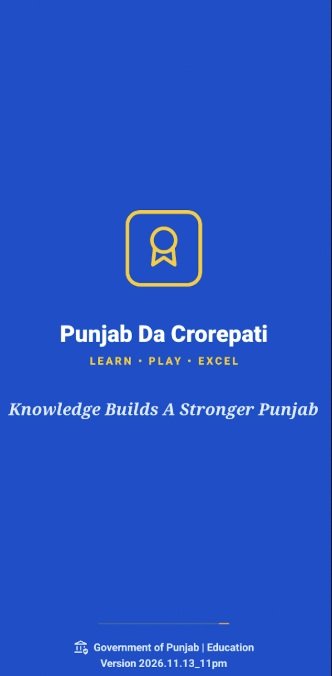
After opening the application, users first see the Punjab Da Crorepati splash screen. It displays the application name, its tagline and the Government of Punjab identification at the bottom.
This screen introduces the official application before taking users to the login and registration interface. Once the opening screen finishes, users can proceed to their account.
How to Register on the Punjab Da Crorepati Official Mobile App
New participants must complete the registration process before accessing the competition rounds. The application provides a separate option for new users who do not already have an account.
Keep your mobile number and Aadhaar details ready before starting. Participants who are studying in an educational institution may also need their institution-related details, depending on their eligibility category.
Step-by-Step Punjab Da Crorepati App Registration Process
Step 1: Open the Mobile Application
Launch the Punjab Da Crorepati Mobile App on your smartphone. On the welcome screen, select the sign-up or new participant option if you are registering for the first time.
Step 2: Enter Your Mobile Number
Enter an active mobile number in the registration section. Tap the option to receive an OTP. The application uses this OTP to verify your mobile number.
Step 3: Verify Your Mobile Number
Enter the OTP received on your mobile number in the required field. Complete the verification process to proceed with registration.
Step 4: Complete Aadhaar Authentication
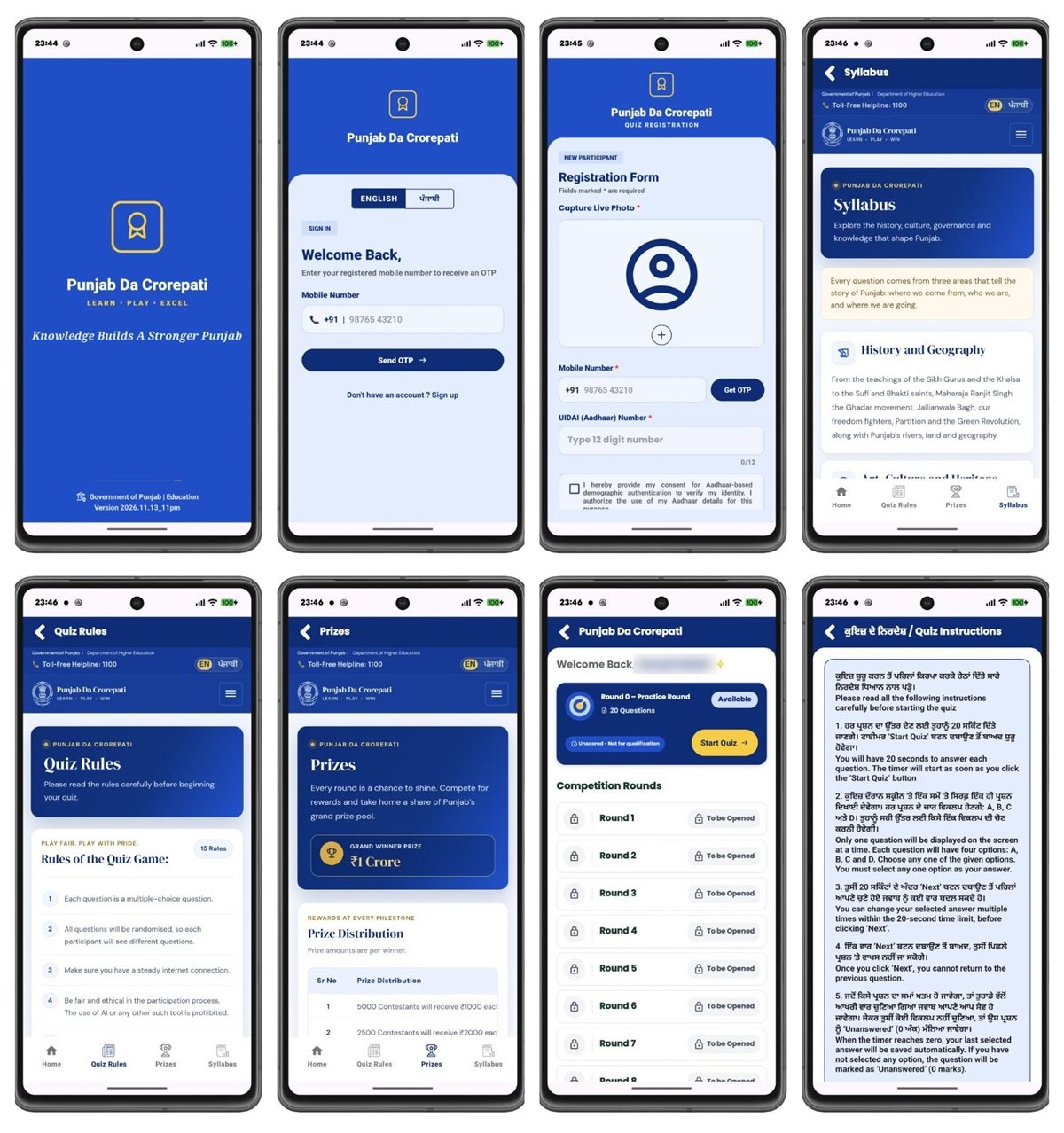
Proceed with the Aadhaar authentication process as directed by the application. The registration interface shown in the app includes an Aadhaar number field and a consent option for Aadhaar-based authentication.
According to the official guidelines, Aadhaar authentication establishes the participant’s identity, age and state of residence. Aadhaar-based e-KYC is not required. The mobile number used for OTP verification also does not need to be linked to the participant’s Aadhaar.
Step 5: Capture Your Live Photograph
The registration screen displays a Capture Live Photo option. Follow the instructions shown on your phone to capture and submit the required photograph for registration and identity verification.
Step 6: Enter the Required Personal Details
Provide the additional information requested by the application, such as your district, place of residence and educational institution details, wherever applicable. Make sure that the information is accurate before proceeding.
Step 7: Review and Submit Your Registration
Carefully review the details entered in the registration form. Submit the form after checking that the information is correct and the required verification steps are complete.
Step 8: Access Your Participant Account
After completing the registration process, use your registered mobile number and OTP to access the application. You can then check the available competition information and your dashboard.
Important Registration Instructions:
- Each participant can maintain only one registration account.
- Participants must complete Aadhaar authentication and mobile OTP verification.
- The mobile number used for OTP verification does not have to be linked to Aadhaar.
- The name, date of birth and address recorded during Aadhaar authentication are treated as final for eligibility purposes and cannot be edited.
- Participants must provide accurate information about their district, residence and educational institution, wherever applicable.
- Successful registration does not automatically guarantee qualification for later rounds. Eligibility verification and competition rules will apply.
How to Login to the Punjab Da Crorepati Mobile App
Participants who have already registered do not need to create another account. They can access their existing account through the mobile number used during registration.
Follow these steps to complete the Punjab Da Crorepati app login:
Step 1: Open the Punjab Da Crorepati Mobile App.
Step 2: Select the sign-in option displayed on the welcome screen.
Step 3: Enter your registered mobile number.
Step 4: Tap the Send OTP button.
Step 5: Enter the OTP received on your mobile number.
Step 6: Complete the verification process to access your account.
Use the same mobile number that you provided during registration. Keep this number active because the application uses OTP verification for login.
Punjab Da Crorepati Mobile App Dashboard: What Can You Access?
After logging in, participants reach the home dashboard of the Punjab Da Crorepati Mobile App. This screen provides access to the practice round and the competition rounds.
The dashboard shown in the app screenshots contains the following important sections:
1. Welcome Section
The dashboard displays a welcome message for the registered participant. It provides a personalised starting point after login.
2. Mock Practice Round
The dashboard displays the Mock Practice Round separately from the actual competition rounds. Participants can check its availability and start the practice quiz using the displayed button.
3. Competition Rounds
The dashboard lists the competition rounds in sequence. Participants can check the status of each round and access it when it becomes available under the competition schedule and qualification conditions.
4. Bottom Navigation Menu
The application screenshots show four main navigation options at the bottom of the screen:
- Home: Opens the participant dashboard.
- Quiz Rules: Displays the rules and instructions for the quiz.
- Prizes: Shows the prize information and distribution structure.
- Syllabus: Provides the subjects and topics covered in the competition.
Mock Practice Round in the Punjab Da Crorepati App
The Mock Practice Round is a mandatory practice stage that helps participants understand how the actual online quiz works. Every registered participant must complete it before attempting Round 1.
The practice round familiarises users with the application interface, question format, response timer and competition process. It gives participants an opportunity to understand how to select an answer and move through the quiz.
As specified in the official guidelines, the score obtained in the Mock Practice Round does not count towards qualification or ranking in the actual competition.
To access the practice round:
- Open the Punjab Da Crorepati Mobile App.
- Log in using your registered mobile number and OTP.
- Open the home dashboard.
- Locate the Mock Practice Round card.
- Check whether the round is available.
- Tap the Start Quiz option and follow the on-screen instructions.
Complete the practice round before attempting the actual competition. The official guidelines require participants to complete the Mock Practice Round first and then attempt the competition rounds in sequence.
Quiz Rules Section in the Punjab Da Crorepati Mobile App
The Quiz Rules section helps participants understand the conditions they must follow during the competition. The app screenshots show a separate page titled Quiz Rules, where users can read the rules before starting the quiz.
The visible instructions and official guidelines cover important points such as:
- The competition primarily uses multiple-choice questions.
- Each question has one correct answer.
- Questions may be text-based, image-based or audio-visual.
- Questions are presented according to the prescribed competition format.
- Participants must select an answer within the displayed time limit.
- Participants must follow the instructions provided by the competition authorities.
- Using another person’s account, sharing OTPs or obtaining unauthorised assistance is prohibited.
- Participants must not use unauthorised software, applications, scripts or other unfair means.
Read the complete instructions available in the application before starting any round. The official guidelines and instructions issued by the Working Group will apply throughout the competition.
How Much Time Is Given for Each Question in the App?
During app-based rounds, participants generally receive a maximum of 20 seconds to answer each question, unless the Working Group specifies a different time limit for a particular question.
The timer displayed on the official platform determines the available response time. Once the prescribed time expires, the platform will not accept an answer and will proceed according to the configured round settings.
Therefore, participants should read each question carefully and select the correct option before the timer ends.
Prizes Section in the Punjab Da Crorepati Mobile App
The Punjab Da Crorepati Mobile App includes a separate Prizes section. Participants can open this section to understand the reward structure associated with different stages of the competition.
The app screenshots show the Grand Winner Prize of ₹1 crore and a prize distribution section. The official guidelines also provide the round-wise prize matrix.
Some important prize details mentioned in the official guidelines are:
- Round 5: 5,000 participants receive ₹1,000 each.
- Round 6: 2,500 participants receive ₹2,000 each.
- Round 7: 1,250 participants receive ₹3,000 each.
- Round 8: 625 participants receive ₹5,000 each.
- Round 9: 395 participants receive ₹10,000 each.
- District-level stages: Eligible participants receive prizes according to their positions and the prescribed prize matrix.
- Grand Winner: The selected winner receives ₹1 crore.
Prize eligibility remains subject to the prescribed verification and approval process. Participants should check the official prize matrix rather than assuming that registration or participation guarantees a cash reward.
For the complete prize distribution, read our detailed article on the Punjab Da Crorepati Quiz Competition Scheme.
Syllabus Section in the Punjab Da Crorepati Mobile App
The Syllabus section helps participants understand the subjects and topics covered in the Punjab Da Crorepati Quiz Competition. The application screenshots show a separate syllabus page with topic-wise information.
According to the official guidelines, the syllabus covers the following broad areas:
1. History and Geography
This section covers Punjab’s history, important historical personalities, freedom movements, geographical features, rivers, land and other related topics.
2. Art, Culture and Heritage
Participants should prepare topics related to Punjabi language and literature, folk music, Bhangra, Giddha, festivals, heritage sites, traditional crafts, food and sporting achievements.
3. Governance and Public Awareness
This section includes information about the Punjab Legislative Assembly, state and district administration, judiciary, government schemes, public services, state helplines and other matters related to governance and public awareness.
4. Quantitative Aptitude
The quantitative aptitude section covers basic mathematics, including addition, subtraction, multiplication, division, percentages, ratios, averages, profit and loss, simple interest, time and distance, number series and basic data interpretation.
The official syllabus states that quantitative aptitude questions will involve simple everyday calculations designed to be solved within 20 seconds without a calculator.
English and Punjabi Language Options in the App
The Punjab Da Crorepati Mobile App provides language options for users who prefer English or Punjabi. The screenshots show an English and ਪੰਜਾਬੀ language selector on the login screen. The app interface also displays a language option on its information pages.
Participants can select their preferred available language while using the application. The quiz instructions screenshot also displays information in Punjabi and English, helping users understand the competition rules.
How to Play the Quiz Through the Punjab Da Crorepati Mobile App
The online qualifying rounds of the competition take place through the mobile application. Participants must use their registered accounts and follow the instructions displayed on the screen.
Follow these general steps before attempting an available round:
- Keep your smartphone sufficiently charged.
- Make sure you have a stable internet connection.
- Open the Punjab Da Crorepati Mobile App.
- Log in using your registered mobile number and OTP.
- Open the home dashboard and check the available round.
- Read the quiz instructions before starting.
- Tap the Start Quiz option when the round is available.
- Read each question and select one answer within the displayed timer.
- Continue answering the questions according to the on-screen instructions.
- Complete the round within the prescribed time and follow the qualification rules.
Participants must attempt the rounds in sequence. They cannot skip a preceding round and directly attempt a later round. The Mock Practice Round must also be completed before Round 1.
Important Rules to Follow While Playing the Quiz
Participants should follow the official competition guidelines to avoid disqualification. Keep these important instructions in mind:
- Participate through your own registered account.
- Do not create multiple registration accounts.
- Do not share your login credentials or OTP with another person.
- Do not allow another person to participate using your account.
- Do not seek assistance from another person during a quiz round.
- Do not use unauthorised applications, software, scripts, bots or devices to gain an advantage.
- Maintain a stable internet connection and sufficient battery during the round.
- Complete each round within its prescribed time.
- Follow the instructions issued by the Working Group.
The official guidelines also state that participants are responsible for their devices, internet connections and battery availability. A re-attempt may be considered in the event of a verified system-wide server outage or official platform failure, subject to the Working Group’s assessment and approval. A normal device or network problem does not automatically guarantee another attempt.
Punjab Da Crorepati Mobile App: Common Problems and Possible Solutions
Participants may sometimes face problems while installing the app, receiving an OTP or accessing their accounts. The following checks can help resolve common issues.
1. App Is Not Installing
Check your internet connection and available storage space. Open the official Google Play listing and try installing the application again.
2. OTP Is Not Received
Check whether your mobile number is correct and your phone has network coverage. Wait briefly before requesting another OTP. Use the same number that you provided during registration.
3. Unable to Login
Enter the registered mobile number and complete OTP verification. If you have changed your mobile number or cannot access the registered number, contact the official help channel for guidance.
4. Registration Is Not Completing
Check that you have entered the required details correctly and completed the Aadhaar authentication and mobile OTP verification steps. Also ensure that you have not already created another registration account.
5. Mock Practice Round Is Not Available
Check the home dashboard and the current availability status of the practice round. Follow the latest instructions displayed in the app and on the official portal.
6. Quiz Gets Interrupted
Before starting a round, check your internet connection and smartphone battery. Close unnecessary applications and avoid interruptions during the quiz. The official guidelines do not guarantee a re-attempt for ordinary device or network problems.
7. A Round Is Not Showing on the Dashboard
Check the competition schedule, your qualification status and the availability information displayed in the application. Participants can attempt rounds only after completing the preceding stages and meeting the applicable conditions.
Privacy and Data Verification in the Punjab Da Crorepati Mobile App
The Punjab Da Crorepati Mobile App uses participant information for registration, identity verification and the administration of the competition. The official guidelines state that the Working Group may collect and process information such as Aadhaar authentication details, photographs, mobile numbers, educational or occupational details and device or usage information for competition-related purposes.
The guidelines also clarify that photographs captured through the app during registration and online rounds for identity verification will be used only for verification and will not be published or used for publicity.
Participants should follow these precautions while using the application:
- Download the application only from its official listing.
- Enter Aadhaar and personal details only through the official registration process.
- Never share your OTP or account credentials with another person.
- Review the privacy policy available through the official platform.
- Provide accurate information during registration and verification.
For further information, read the Punjab Da Crorepati Privacy Policy.
Punjab Da Crorepati Mobile App vs Official Portal
The mobile application and the official portal are connected to the same competition, but users may visit them for different purposes. The mobile app provides access to the app-based quiz experience, while the portal provides competition information and access to official documents.
| Feature | Mobile App | Official Portal |
|---|---|---|
| Application or Website | Punjab Da Crorepati Mobile App | punjabdacrorepati.punjab.gov.in |
| Account Access | Mobile number and OTP | Registration and account-related options as provided on the portal |
| Quiz Participation | Used for app-based quiz rounds | Provides access to competition information |
| Mock Practice Round | Available through the app dashboard | Provides competition-related information |
| Quiz Rules | Available in the app | Available through the official website and guidelines |
| Prize Information | Available in the Prizes section | Available on the portal |
| Syllabus | Available in the Syllabus section | Available through official competition information |
For a detailed explanation of the website, its sections and registration-related information, read our separate guide to the Punjab Da Crorepati Official Portal.
Important Links Related to Punjab Da Crorepati Mobile App
| Purpose | Direct Link |
|---|---|
| Download the Mobile App | Punjab Da Crorepati on Google Play |
| Official Competition Portal | Visit Official Portal |
| Official Competition Guidelines | Download Guidelines PDF |
| Privacy Policy | View Privacy Policy |
| Official Portal Guide | Read Portal Guide |
| Competition Scheme Details | Read Scheme Guide |
Contact Details for Punjab Da Crorepati Mobile App Help
Participants who face problems related to registration, verification or participation should use the official help and grievance channels provided by the competition authorities.
- Helpline Number: 1100 (as displayed in the official app and portal screenshots).
- Official Website: punjabdacrorepati.punjab.gov.in
For competition-related grievances, follow the reporting mechanism prescribed by the Working Group. Keep relevant details and supporting evidence available when reporting a technical problem.
Frequently Asked Questions (FAQs)
Ans. The Punjab Da Crorepati Mobile App is the official mobile application for the Government of Punjab’s quiz competition. Participants use it for registration, login, the Mock Practice Round and app-based quiz rounds.
Ans. Android users can download the application from its official Google Play listing. Check that the developer name is Government of Punjab.
Ans. The package ID of the app is in.dit.quiz.
Ans. Open the application, choose the new participant registration option, verify your mobile number through OTP, complete Aadhaar authentication and provide the other required details. Submit the registration form after checking your information.
Ans. Open the app, enter your registered mobile number, request an OTP and complete the verification process to access your account.
Ans. Yes. The official guidelines require Aadhaar authentication to establish the participant’s identity, age and state of residence. Aadhaar-based e-KYC is not required.
Ans. No. The official guidelines state that the mobile number used for OTP verification does not need to be linked to the participant’s Aadhaar.
Ans. It is a mandatory practice stage that helps participants understand the quiz format, response timer and application interface before attempting Round 1. Its score does not count towards qualification or ranking.
Ans. No. Every registered participant must complete the Mock Practice Round before attempting Round 1.
Ans. Participants generally receive a maximum of 20 seconds per question during app-based rounds, unless a different time limit is specified for a particular question.
Ans. The app screenshots show English and Punjabi language options.
Ans. The official competition guidelines describe the qualifying rounds as app-based. Participants should use the mobile application and follow the instructions issued through the official platform.
Ans. No. The official guidelines permit each participant to maintain only one registration account.
Ans. Check your mobile number and network connection, wait briefly and request an OTP again. If the problem continues, contact the official help channel.
Ans. Keep evidence of the issue and report it through the designated grievance mechanism. A re-attempt may be considered only when the Working Group verifies a system-wide server outage or official platform failure.
Ans. Open the Syllabus and Prizes sections in the Punjab Da Crorepati Mobile App. You can also read the official competition guidelines on the official portal.
Ans. The helpline number displayed in the app and portal screenshots is 1100.
Ans. Read our detailed guide to the Punjab Da Crorepati Quiz Competition Scheme for eligibility, prizes, rounds and other competition details.

Tabassum is a government schemes researcher and writer with 5 years of experience tracking Central and State welfare scheme programmes across India. She has covered 500+ schemes spanning agriculture, women welfare, education, and housing, helping lakhs of beneficiaries understand their entitlements in simple language.