
The Manipur AgriStack Portal provides online access to important farmer-related services, including enrollment status checks, farmer details, account login and dashboard information. Farmers who have completed their enrollment through a Common Service Centre (CSC) or camp can also create a portal account to activate Self-Login access. This guide explains the available portal options and how to use them.
Manipur AgriStack Portal 2026: Overview | |
|---|---|
| Portal Name | Manipur AgriStack Portal |
| State | Manipur |
| Official Portal | mnfr.agristack.gov.in |
| Implementing Framework | AgriStack Initiative |
| Main Services | Portal Login, Account Creation, Enrollment Status, Farmer Details and Dashboard |
| Login Options | Official, Farmer and CSC Login |
| Account Activation | Aadhaar e-KYC for portal account creation |
| Application Mode | Online portal and assisted CSC/Camp enrollment |
Introduction to the Manipur AgriStack Portal
The Manipur AgriStack Portal is the state’s online platform for accessing services related to the digital farmer database. It operates through the official government portal hosted at mnfr.agristack.gov.in.
The portal provides different options for farmers and officials. These include account creation, login, enrollment status checking, access to farmer details and a public dashboard. It also provides a separate option for checking Jansamarth KCC status.
One important point is that farmers should not confuse initial enrollment with portal account creation. A farmer who has already completed enrollment through a CSC or camp must first create a portal account to activate Self-Login access. This account activation step does not mean that the farmer needs to register again.
Farmers looking for complete information about enrollment and the Farmer ID system can also read our Manipur Farmer Registry guide.
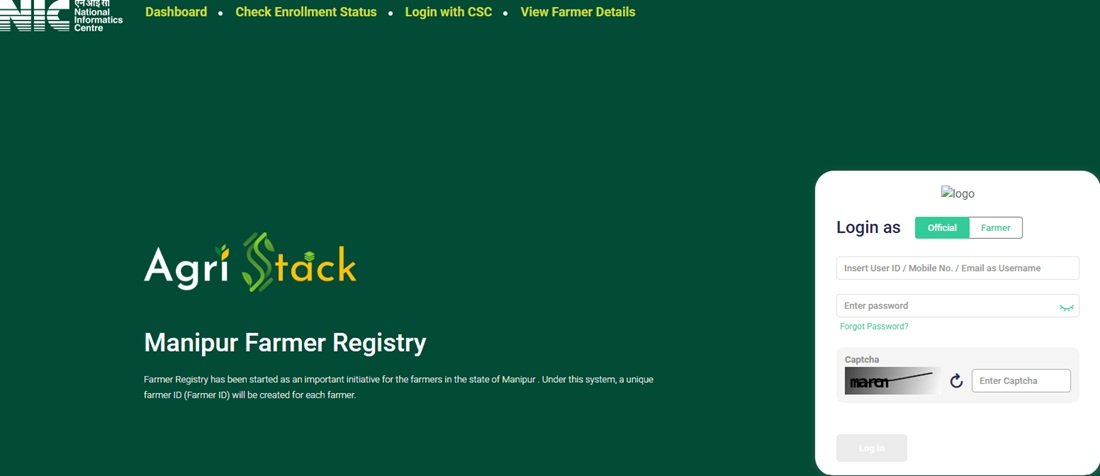
Official Portal Website and Login Options
Farmers can access the Manipur AgriStack services through the official website. The portal’s homepage displays several navigation options that help users reach the required service.
Official Portal: Open the Manipur AgriStack Portal
The homepage provides the following options:
- Dashboard: Opens the public dashboard, which displays enrollment and Farmer ID-related information. The portal identifies this option with the Grievance Redressal label.
- Check Enrollment Status: Allows users to check enrollment details using an Aadhaar number or Farmer ID.
- Login with CSC: Provides a separate login option for Common Service Centre users.
- View Farmer Details: Allows users to search for farmer details using an Aadhaar number and OTP verification.
The login page also provides separate login categories for Official and Farmer users. Users can enter their username and password, complete the captcha and proceed with login. The page also displays options for password recovery and new account creation.
Use the official website instead of third-party pages that claim to provide Farmer ID login or registration services.
Online Services Available on the Manipur AgriStack Portal
The portal provides multiple options for farmers, CSC users and officials. Each option serves a different purpose.
| Portal Option | Purpose |
|---|---|
| Dashboard | Displays enrollment figures and other Farmer ID-related statistics. |
| Check Enrollment Status | Checks enrollment status through Aadhaar number or Farmer ID. |
| Login with CSC | Provides a separate login facility for CSC users. |
| View Farmer Details | Provides access to farmer details through Aadhaar-based OTP verification. |
| Create New User Account | Allows eligible users to create a portal account through Aadhaar e-KYC. |
| Jansamarth KCC Status | Provides an option to check the status of a Jansamarth KCC application. |
| Forgot Password | Provides an account password recovery option. |
These options do not all perform the same function. For example, the enrollment status facility checks an existing enrollment record, while the new user account option helps eligible users activate portal access.
New User Account Creation and Aadhaar e-KYC
Farmers who completed their Manipur Farmer Registry enrollment through CSC or Camp Mode must create a portal account before using Self-Login access. The official portal displays this instruction on its login page.
Follow these steps to reach the new account creation facility:
- Visit the Manipur AgriStack official website.
- Open the login page.
- Select the Create New User Account option.
- The portal will open the Aadhaar e-KYC page.
- Read the consent statement displayed on the screen.
- Complete the Aadhaar-based verification process by following the portal instructions.
- Submit the required details to complete the account creation process.
Direct Account Creation Link: Create a New User Account
The portal uses Aadhaar e-KYC for this account creation facility. Keep your Aadhaar-linked mobile number accessible because Aadhaar-based verification may require OTP authentication.
Important: This process creates portal login access. It is not a fresh Farmer Registry enrollment process. Farmers who have not completed their initial enrollment should check the available enrollment arrangements separately. Read our Manipur Farmer Registry article for related enrollment information.
Self-Login Activation After CSC or Camp Registration
Farmers who completed their enrollment through a Common Service Centre or an official registration camp may need to activate their own portal login separately.
The Manipur portal clearly displays a notice about this requirement. It states that farmers whose records were created through CSC or Camp Mode must first create a portal account before logging in. The portal provides the Create New User Account option for this one-time registration.
The account activation process generally follows these steps:
- Open the official Manipur AgriStack Portal.
- Select Create New User Account on the login page.
- Proceed to the Aadhaar e-KYC page.
- Complete the verification and account creation steps shown on the screen.
- After completing the process, return to the login page.
- Use the portal login facility to access your account.
Farmers should remember that CSC/Camp enrollment and Self-Login activation are two separate steps. Creating a portal account does not automatically mean that a new Farmer ID has been generated or approved.
Manipur AgriStack Portal Login Process
Farmers who have created their portal accounts can use the login facility to access their accounts. The portal provides separate login categories for Official and Farmer users.
Follow these steps to access the login page:
- Visit the official Manipur AgriStack website.
- Open the login section.
- Select the appropriate login category, such as Farmer or Official.
- Enter the username or other login details requested by the portal.
- Enter your account password.
- Complete the captcha displayed on the screen.
- Click the Log In button.
Make sure you select the correct login category and enter the details associated with your portal account. If you have not created an account after CSC or Camp Mode enrollment, complete the one-time account creation process first.
The homepage also provides a separate Login with CSC option. CSC users should use the appropriate login facility rather than the regular farmer login option.
Farmer Enrollment Status Check
The Manipur AgriStack Portal provides a dedicated facility to check enrollment status. Farmers can use either their Aadhaar number or Farmer ID to search for their enrollment record.
Direct Status Check Link: Check Manipur Farmer Enrollment Status
Follow these steps:
- Open the official enrollment status page.
- Find the Check Status Against option.
- Select either Aadhaar Number or Farmer ID.
- If you select Aadhaar Number, enter the required Aadhaar details.
- Complete the OTP verification. The portal states that it sends the OTP to the mobile number linked with Aadhaar.
- Submit the verification details and check the status displayed on the screen.
Farmers who already have a Farmer ID can select the Farmer ID option instead of searching through Aadhaar.
If your enrollment details do not appear, check the information entered and try again. You can also contact the CSC or camp through which you completed your enrollment for assistance.
Jansamarth KCC Application Status Check
The Manipur AgriStack homepage also displays an option named Check Jansamarth KCC Status. This facility is meant for users who want to check the status of an application associated with the Jansamarth Kisan Credit Card process.
To access this facility:
- Visit the Manipur AgriStack Portal.
- Find the Check Jansamarth KCC Status option on the homepage.
- Open the option to proceed to the relevant status-check facility.
- Follow the instructions displayed on the linked page to check your application status.
The Jansamarth Portal is a national platform for credit-linked government schemes. It includes the Kisan Credit Card scheme among its listed services.
For information about the wider credit-linked scheme platform, visit the official Department of Financial Services Jansamarth page.
Note: The Manipur AgriStack homepage confirms the availability of the Jansamarth KCC status option. Users should follow the instructions on the linked page for the exact application details and verification requirements.
Accessing Farmer Details Through the Portal
The portal provides a separate View Farmer Details facility. Farmers can use this option to search for their details through an Aadhaar-based verification process.
Direct Link: View Farmer Details
Follow these steps:
- Open the View Farmer Details page.
- Find the Search By Farmer Aadhaar Number option.
- Enter the Aadhaar number requested by the portal.
- Complete the OTP verification process.
- Submit the details to access the available farmer information.
The portal uses OTP-based verification to protect access to farmer details. Keep your Aadhaar-linked mobile number available while using this facility.
This page provides access to farmer details after verification. Do not assume that it offers a downloadable Farmer ID card or PDF unless the portal displays that facility after login and verification.
Understanding the AgriStack Dashboard and Its Data
The Manipur AgriStack Portal provides a public dashboard that displays enrollment-related information. Visitors can open the dashboard without treating it as a personal farmer login page.
Dashboard Link: Open Manipur AgriStack Dashboard
The dashboard includes several data sections, such as:
- PM Kisan Beneficiaries: Displays the beneficiary figure used in the dashboard.
- Total Enrollment Till Yesterday: Shows the cumulative enrollment figure up to the previous day.
- Enrollment as a Percentage of PM Kisan Beneficiaries: Displays enrollment in relation to the beneficiary figure.
- Approved Farmer IDs: Shows the number of Farmer IDs approved in the displayed data.
- Farmer IDs as a Percentage of PM Kisan Beneficiaries: Displays the approved Farmer ID figure as a percentage.
- Enrollment Pending Farmer ID Generation and Approval: Shows the pending figure displayed by the dashboard.
- Today’s Enrollment: Displays the current day’s enrollment count.
- Enrollment Mode: Shows enrollment information according to the available mode.
- Top and Bottom Five Districts: Displays district-wise enrollment performance when data is available.
The dashboard also displays a data refresh notice indicating that its figures refresh every five minutes. Therefore, the figures may change over time.
Farmers and researchers should check the dashboard directly before quoting any enrollment number. Avoid relying on old screenshots or previously published figures because they may no longer represent the latest position.
The dashboard also labels its Dashboard option as Grievance Redressal. However, users should check the available screen and instructions before assuming that it provides a complete online complaint submission and tracking facility.
Password Reset and Account Recovery
Farmers who cannot access their accounts can use the Forgot Password? option displayed on the portal login page.
Follow these steps:
- Visit the official Manipur AgriStack website.
- Open the login page.
- Click the Forgot Password? option.
- Follow the instructions displayed on the screen.
- Complete the required verification and password recovery steps.
The exact recovery fields and verification requirements should be followed as displayed by the portal. Do not share your password, OTP or Aadhaar authentication details with another person.
Portal Link: Manipur AgriStack Login Page
Common Portal Issues and Their Possible Solutions
Users may sometimes face difficulties while opening the portal, creating an account or checking their enrollment details. The following suggestions can help resolve common access problems.
| Problem | What You Can Do |
|---|---|
| Portal page is not opening | Check your internet connection, refresh the page and try again after some time. |
| OTP is not received | Check whether your Aadhaar-linked mobile number is active and can receive messages. Retry after a short interval. |
| Account creation is not completed | Check the Aadhaar e-KYC details and follow the verification instructions shown on the portal. |
| Login is unsuccessful | Check your login category, username, password and captcha. Use the Forgot Password option if required. |
| Enrollment status is not showing | Check the Aadhaar number or Farmer ID entered. If the record remains unavailable, contact the CSC or camp where you enrolled. |
| Farmer details are not appearing | Check the Aadhaar details and complete the OTP verification process correctly. |
| Dashboard figures are not updated | Refresh the dashboard and check again. The portal displays a notice that its data refreshes every five minutes. |
If the issue continues, use the official portal and the available government channels for assistance. Avoid sharing personal information with unofficial agents or websites.
For problems related to the underlying enrollment record, land details or Farmer ID, refer to the relevant guidance in our Manipur Farmer Registry guide.
Important Links
Here are the important links related to the Manipur AgriStack Portal and its available services.
| Service | Official Link |
|---|---|
| Manipur AgriStack Portal | Click Here |
| New User Account Creation | Click Here |
| Farmer Enrollment Status | Click Here |
| View Farmer Details | Click Here |
| AgriStack Dashboard | Click Here |
| Manipur Digital Crop Survey Portal | Click Here |
| National AgriStack Portal | Click Here |
| Manipur Agriculture Department | Click Here |
| Manipur Farmer Registry Guide | Click Here |
Contact and Support
Farmers who face difficulties with the portal should first check the relevant service instructions and retry the process. For enrollment-related problems, they can also approach the CSC or registration camp through which they completed their enrollment.
For department-level information, visit the official Department of Agriculture, Government of Manipur website. The department website provides official information, notices and contact-related sections.
Farmers can also visit the Government of Manipur official website for state government information.
Important: We could not verify a dedicated Manipur AgriStack helpline number from the official portal. Therefore, farmers should not rely on unverified phone numbers shared on third-party websites.
Frequently Asked Questions (FAQs)
Ans. The official Manipur AgriStack Portal is mnfr.agristack.gov.in. Farmers can use it to access enrollment status, farmer details, account login and other available services.
Ans. Open the official portal, select the appropriate login category, enter your account credentials, complete the captcha and click the Log In button.
Ans. Yes. The portal instructs farmers enrolled through CSC or Camp Mode to create a new user account before using Self-Login access.
Ans. Yes. The Create New User Account page provides an Aadhaar e-KYC facility for portal account creation.
Ans. Yes. Open the Check Enrollment Status page and select Aadhaar Number or Farmer ID to search for your enrollment record.
Ans. Yes. Select Aadhaar Number on the status-check page and complete the OTP verification. The portal states that it sends the OTP to the mobile number linked with Aadhaar.
Ans. Open the View Farmer Details page, enter the Aadhaar number requested by the portal and complete OTP verification to access the available details.
Ans. The portal provides a View Farmer Details option. However, a separate Farmer ID download or PDF facility could not be confirmed from the available portal information.
Ans. The Manipur AgriStack homepage displays a Check Jansamarth KCC Status option. Open that option and follow the instructions provided on the linked page.
Ans. The dashboard displays enrollment figures, approved Farmer IDs, pending records, daily enrollment information and district-wise enrollment data when available.
Ans. The portal displays a notice stating that dashboard data refreshes every five minutes.
Ans. Check your login category, username, password and captcha. If you forget your password, use the Forgot Password option available on the login page.
Ans. Visit the official Manipur AgriStack Portal or the Manipur Agriculture Department website.

Tabassum is a government schemes researcher and writer with 5 years of experience tracking Central and State welfare scheme programmes across India. She has covered 500+ schemes spanning agriculture, women welfare, education, and housing, helping lakhs of beneficiaries understand their entitlements in simple language.