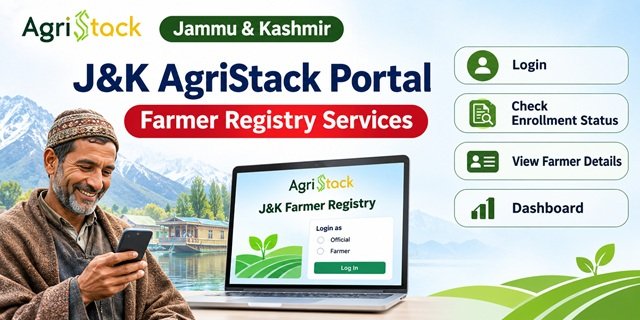
The Jammu & Kashmir AgriStack Portal provides an online platform for farmers, Common Service Centre (CSC) users and authorised officials to access digital Farmer Registry services in the Union Territory. Through this portal, users can log in, create a portal account, check enrollment status, view farmer details and access the dashboard. It also provides separate login options for farmers and officials, along with a dedicated facility for CSC users.
The portal operates under the AgriStack initiative and is managed through the official website of the Jammu & Kashmir Farmer Registry. Farmers who have already completed their Farmer Registry in Jammu and Kashmir through CSC or Camp Mode must complete a one-time portal account creation process before using Self-Login. The website also provides Aadhaar-based facilities to check enrollment status and view available farmer details. This guide explains the portal’s available services, login options, dashboard information and the correct way to use each facility.
Jammu & Kashmir AgriStack Portal Key Highlights | |
|---|---|
| Portal Name | Jammu & Kashmir AgriStack Portal |
| Portal Category | Digital Farmer Registry Portal |
| Initiative | AgriStack |
| Managed By | Government of Jammu & Kashmir |
| Main Objective | Provide online access to Farmer Registry-related services and digital records. |
| Official Portal | jkfr.agristack.gov.in |
| Available Login Options | Farmer Login, Official Login and Login with CSC |
| Account Creation | Available through the Create New User Account option |
| Identity Verification | Aadhaar e-KYC |
| Enrollment Status | Check through Aadhaar Number or Farmer ID |
| View Farmer Details | Search using Farmer Aadhaar Number and OTP verification |
| Dashboard | Enrollment statistics, Farmer ID figures and district-wise enrollment information |
| CSC Facility | Separate Login with CSC option |
| Access Mode | Online through a web browser |
| Official Website | Visit J&K AgriStack Portal |
Introduction of Jammu & Kashmir AgriStack Portal: A Brief Insight
The Government of Jammu & Kashmir has introduced a dedicated online portal under the AgriStack initiative to provide digital access to Farmer Registry-related services. The portal brings several useful options together on one website, allowing farmers and authorised users to access their accounts, check enrollment information and view available farmer records without searching for separate service websites.
The official website operates under the name J&K Farmer Registry and displays the AgriStack branding. Its homepage explains that the Farmer Registry initiative aims to create a unique Farmer ID for each farmer in the Union Territory. Along with this information, the website provides different facilities for farmers, government officials and Common Service Centre (CSC) users.
However, the portal is not limited to a login facility. It provides several separate options, including Farmer Login, Official Login, Login with CSC, Check Enrollment Status, View Farmer Details and a Dashboard. Each option serves a different purpose. For example, a farmer can use the enrollment status facility to check available registration information, while an authorised user can access the relevant login facility according to their role.
One important feature of the J&K AgriStack Portal is the Create New User Account option. Farmers who have already completed their Farmer Registry in Jammu and Kashmir through a CSC or Camp Mode must create a portal account before using the Self-Login facility. This is a one-time account activation process for accessing the existing registry through the portal. It should not be confused with fresh Farmer Registry enrollment.
The portal also provides an Aadhaar e-KYC facility for creating a new user account. In addition, its enrollment status page allows users to check their information using an Aadhaar Number or Farmer ID. Another separate page lets users search for farmer details using an Aadhaar Number and OTP verification.
The dashboard provides an overview of enrollment progress in Jammu & Kashmir. It displays figures such as the number of PM-KISAN beneficiaries, total enrollments, approved Farmer IDs, pending records and daily enrollment counts. Users can also find district-wise enrollment information, including the top five and bottom five districts.
In this article, we will explain the available facilities of the Jammu & Kashmir AgriStack Portal, how to access its login options, how to create a portal account and how to use the enrollment status, farmer details and dashboard facilities.
Jammu & Kashmir AgriStack Portal: Key Highlights
The Jammu & Kashmir AgriStack Portal provides different online facilities through a single website. Before using it, farmers and other users should understand which services are available and what each option does.
The portal mainly provides access to the following facilities:
- Farmer Login: Allows farmers with an active portal account to access the available online services.
- Official Login: Provides a separate login option for authorised government officials.
- Login with CSC: Allows CSC users to access the portal through the dedicated CSC login facility.
- Create New User Account: Helps eligible users complete one-time portal account creation through Aadhaar e-KYC.
- Check Enrollment Status: Allows users to check enrollment information using an Aadhaar Number or Farmer ID.
- View Farmer Details: Provides access to available farmer details through Aadhaar-based search and OTP verification.
- Dashboard: Displays enrollment statistics, approved Farmer ID figures and district-wise enrollment information.
These options appear on different sections or pages of the official website. Users should select the facility according to their requirement rather than using the same login option for every service.
Services and Facilities Available on J&K AgriStack Portal
The Jammu & Kashmir AgriStack Portal brings several Farmer Registry-related facilities together. Its homepage provides separate options for login, account creation, enrollment status, farmer details and dashboard access. Understanding these facilities can help users reach the correct page without confusion.
1. Farmer Login
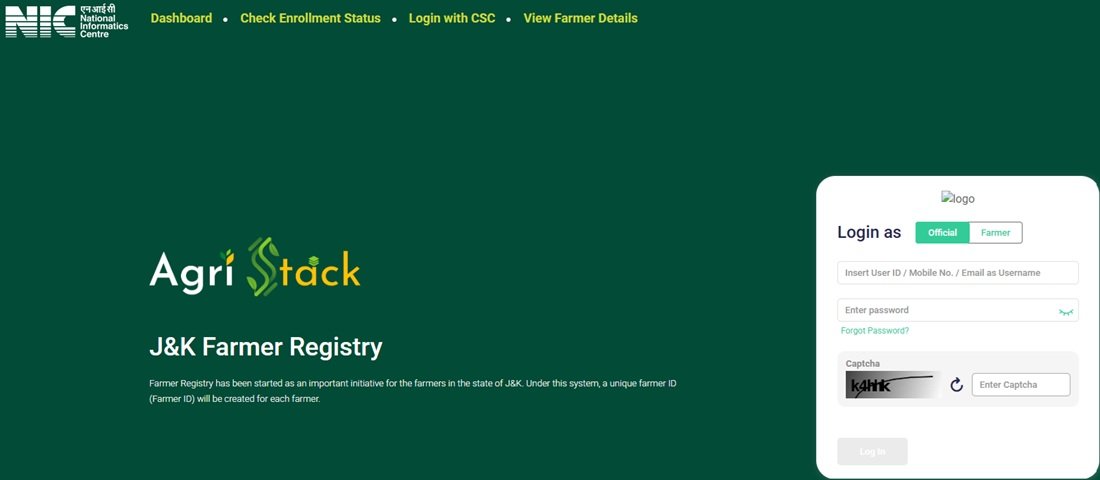
The Farmer Login option allows farmers to access their portal accounts. Users must select the Farmer login category on the homepage and enter the information requested by the login form. The page also displays a CAPTCHA field and a Log In button.
Farmers who completed their registry through CSC or Camp Mode must first create their portal account through the Create New User Account facility before using Self-Login.
2. Official Login
The portal provides a separate Official login option for authorised government users. Officials who have been provided with valid login credentials can select this option to access the services available to their user category.
Farmers should not use the Official login option to access their personal accounts. They should select the Farmer category instead.
3. Login with CSC
The homepage includes a separate Login with CSC option for Common Service Centre users. This facility allows CSC users to access the portal through the designated CSC login option.
CSC operators must follow the official registration guidelines while handling beneficiary information. They should enter the beneficiary’s details carefully and use their CSC credentials only for authorised activities.
4. Create New User Account
The Create New User Account option helps eligible users activate their portal access. The website specifically instructs farmers whose Farmer Registry was created through CSC or Camp Mode to complete this one-time account creation before using Self-Login.
The account creation page opens an Aadhaar e-KYC screen. It displays an identity verification consent statement and a Submit button. Users must read the consent statement and follow the instructions displayed on the page to proceed.
5. Check Enrollment Status
The Check Enrollment Status facility allows users to check their available enrollment information. The page provides two search options: Aadhaar Number and Farmer ID. When a user selects the Aadhaar-based option, the portal sends an OTP to the mobile number linked with that Aadhaar.
6. View Farmer Details
The View Farmer Details facility provides a separate way to search for farmer information. Its page displays a Search By Farmer Aadhaar Number option. Users must follow the Aadhaar and OTP verification instructions shown on the screen to access the available details.
7. Dashboard
The J&K AgriStack Dashboard displays an overview of Farmer Registry enrollment progress in the Union Territory. It includes PM-KISAN beneficiary figures, total enrollment, approved Farmer IDs, pending enrollment records and daily enrollment statistics.
The dashboard also provides enrollment information for the top five and bottom five districts. According to the portal information shared, its data refreshes every five minutes.
How to Access the Official J&K AgriStack Portal?
Farmers, CSC users and authorised officials can access the Jammu & Kashmir AgriStack Portal through its official website. The homepage provides direct access to different login and information services. Users do not need to search for separate websites for every available facility.
Follow these simple steps to open the portal:
- Open a web browser such as Google Chrome on your mobile phone, laptop or computer.
- Enter the official website address: https://jkfr.agristack.gov.in/farmer-registry-jk/#/.
- Wait for the J&K Farmer Registry homepage to load.
- Check the available options, including Dashboard, Check Enrollment Status, Login with CSC and View Farmer Details.
- Select the service you want to use.
- Follow the instructions displayed on the selected page.
Always check the website address before entering personal information. Use the official AgriStack domain and avoid websites that use similar names but do not belong to the government portal.
How to Login to Jammu & Kashmir AgriStack Portal?
The J&K AgriStack homepage displays separate login categories for farmers and authorised officials. It also provides a dedicated Login with CSC option in the website menu. Users should select the correct option according to their role and use the credentials or verification method requested by the portal.
Farmer Login Process
Farmers who have already created their portal accounts can use the Farmer Login option to access their accounts. Follow these steps:
- Visit the official J&K AgriStack Portal.
- Locate the Login as section on the homepage.
- Select the Farmer option.
- Enter the login details requested by the portal.
- Enter the CAPTCHA displayed on the screen.
- Click the Log In button to submit your details.
- After successful authentication, follow the options available in your account.
If you have already completed your Farmer Registry in Jammu and Kashmir through CSC or Camp Mode but have not created a portal account, complete the one-time account creation process first. The portal requires this step before you can use Self-Login.
Official Login
Government officials who have authorised portal credentials can use the Official login option. To access this facility, open the homepage and select Official under the Login as section.
Enter the credentials provided to you and complete the verification shown on the screen. This login category is intended for authorised officials, so ordinary farmers should use the Farmer option instead.
Login with CSC
Common Service Centre users can access the portal through the Login with CSC option available in the main menu. Open the official website, select Login with CSC and follow the authentication instructions displayed on the page.
CSC operators should use their authorised CSC credentials and handle beneficiary information according to the mandatory guidelines displayed on the portal. They must not enter misleading information or use their CSC ID for unauthorised activities.
How to Create a New User Account on J&K AgriStack Portal?
The J&K AgriStack Portal provides a separate Create New User Account option on its homepage. This facility is particularly important for farmers whose Farmer Registry in Jammu and Kashmir was created through CSC or Camp Mode.
The portal displays a clear instruction for such farmers: they must create their portal account once before using Self-Login. This process activates their online access to the existing registration. It does not mean that they must submit a fresh Farmer Registry enrollment application.
Aadhaar e-KYC Process
The Create New User Account option opens an Aadhaar e-KYC page. The page displays a consent statement explaining that the user authorises identity verification through Aadhaar information. It also provides a Reset option and a Submit button.
Follow these steps to begin the account creation process:
- Open the J&K AgriStack Portal homepage.
- Find the Create New User Account option below the login section.
- Click this option to open the account creation page.
- Check that the Aadhaar e-KYC page has opened.
- Read the identity verification consent statement displayed on the screen.
- Provide the required consent and follow the Aadhaar e-KYC instructions shown by the portal.
- Click Submit to proceed with the verification process.
- Complete any further steps displayed by the website to finish the one-time account creation process.
You can also open the account creation page directly through this link: J&K AgriStack Aadhaar e-KYC and Account Creation.
Important: The Aadhaar e-KYC page displays a consent statement for identity verification. Read it carefully before proceeding. The exact information fields and subsequent verification steps may depend on the live portal form.
Important Note for Farmers Registered through CSC or Camp Mode
The official portal displays a special notice for farmers who completed their Farmer Registry through CSC or Camp Mode. According to this notice, such farmers must first create their portal account before logging in through Self-Login.
For example, if a CSC operator has already completed your Farmer Registry enrollment, you should not assume that you need to repeat the entire registration process. Instead, open the Create New User Account option and complete the one-time account creation process through Aadhaar e-KYC.
Once you complete this step, you can return to the homepage and use the Farmer Login option to access your portal account. This distinction is important because creating a portal account and completing a fresh Farmer Registry enrollment are two different activities.
How to Check Enrollment Status on J&K AgriStack Portal?
The Jammu & Kashmir AgriStack Portal provides a separate Check Enrollment Status page. Users can open this facility to check their available enrollment information through either an Aadhaar Number or Farmer ID.
The page displays a Check Status Against option and provides two search categories. When users select the Aadhaar Number option, the portal asks them to complete OTP verification. The OTP is sent to the mobile number linked with their Aadhaar.
Check Status Using Aadhaar Number
If you want to check your enrollment status using Aadhaar, follow these steps:
- Open the Check Enrollment Status page.
- Locate the Check Status Against option.
- Select Aadhaar Number.
- Enter your Aadhaar Number in the field provided by the portal.
- Follow the instructions to request an OTP.
- Check the mobile number linked with your Aadhaar for the OTP.
- Enter the OTP on the portal and submit the details.
- Check the enrollment information displayed on the screen.
The portal specifically states that it sends the OTP to the mobile number linked with Aadhaar. Therefore, keep access to that mobile number available while using the Aadhaar-based status check facility.
Check Status Using Farmer ID
The Check Enrollment Status page also provides a Farmer ID option. Users who want to check their enrollment information through their Farmer ID can select this option instead of Aadhaar Number.
- Visit the official Check Enrollment Status page.
- Under Check Status Against, select Farmer ID.
- Enter the Farmer ID requested by the portal.
- Follow the verification instructions displayed on the screen.
- Submit the required information to check the available enrollment status.
Make sure you enter the correct Farmer ID. If the portal asks for additional verification, complete the steps shown on the page before checking the result.
How to View Farmer Details on J&K AgriStack Portal?
The J&K AgriStack Portal provides a separate View Farmer Details facility. This option allows users to search for available farmer information through the Aadhaar Number-based facility displayed on the page.
Unlike the enrollment status page, which provides two search categories, the View Farmer Details page displays a Search By Farmer Aadhaar Number option. The portal uses OTP verification as part of the process.
Follow these steps to access the facility:
- Open the View Farmer Details page.
- Locate the Search By Farmer Aadhaar Number option.
- Enter the Aadhaar Number requested by the portal.
- Follow the on-screen instructions to complete OTP verification.
- Check the mobile number linked with Aadhaar for the verification OTP.
- Enter the OTP and submit the information.
- After successful verification, check the farmer details made available by the portal.
Before using this facility, make sure that you have entered the correct Aadhaar Number. Complete the OTP verification only through the official website. Do not share your OTP with another person.
You can access this service directly through the following link: https://jkfr.agristack.gov.in/farmer-registry-jk/#/homePrintEnrollmentDetails.
J&K AgriStack Dashboard: Statistics and Available Information
The Jammu & Kashmir AgriStack Portal provides a dedicated Dashboard that displays an overview of enrollment progress across the Union Territory. Users can open the dashboard to view important figures related to PM-KISAN beneficiaries, total enrollment, approved Farmer IDs and daily enrollment activity.
The dashboard also displays district-wise enrollment information. This helps users understand how enrollment is progressing across different districts of Jammu & Kashmir.
According to the dashboard information shared for this article, the following statistics were displayed:
| Dashboard Information | Displayed Figures |
|---|---|
| PM-KISAN Beneficiaries | 12,71,753 |
| Total Enrollment Till Yesterday | 10,03,424 |
| Enrollment as a Percentage of PM-KISAN Beneficiaries | 81.17% |
| Approved Farmer IDs | 3,68,750 |
| Farmer IDs as a Percentage of PM-KISAN Beneficiaries | 81.11% |
| Enrollment Pending Farmer ID Generation and Approval | 665 |
| Today’s Enrollment Counts via Enhanced Name Matching | 2,639 |
| Total Today’s Enrollment | 28,848 |
Note: These figures represent the dashboard snapshot shared for this article. They are not permanent figures and may change as enrollment continues. The portal displays a note stating that dashboard data gets refreshed every five minutes. Always visit the live dashboard to check the latest available figures.
PM-KISAN Beneficiaries
This dashboard section displays the total number of PM-KISAN beneficiaries considered in the enrollment statistics. It provides a reference figure for understanding the progress of Farmer Registry enrollment in Jammu & Kashmir.
Total Farmer Enrollment
The Total Enrollment Till Yesterday figure shows the number of farmer enrollments recorded up to the previous day, as displayed on the dashboard. Users can compare this figure with the PM-KISAN beneficiary count to understand the overall enrollment coverage.
Approved Farmer IDs
The Approved Farmer IDs section displays the number of Farmer IDs approved in the system. This figure is different from the total enrollment count because an enrollment record and an approved Farmer ID are not necessarily the same status.
Pending Farmer ID Generation and Approval
The dashboard also displays the number of enrollment records pending Farmer ID generation and approval. This figure helps users understand how many records are still awaiting the relevant processing stages shown by the portal.
Daily Enrollment Statistics
The dashboard provides daily enrollment figures, including the Total Today’s Enrollment count and enrollment through Enhanced Name Matching. These figures help users track enrollment activity recorded during the current day.
District-Wise Enrollment Data
The dashboard includes two district-wise sections: Farmer Enrollment – Top 5 Districts and Farmer Enrollment – Bottom 5 Districts. These sections provide a district-level view of enrollment performance. Users can open the dashboard to check the districts appearing in these lists and review the available figures.
How to Open the J&K AgriStack Dashboard?
- Visit the official J&K AgriStack Portal.
- Click the Dashboard option available in the main menu.
- Wait for the dashboard page to load.
- Review the PM-KISAN beneficiary figures, enrollment statistics and approved Farmer ID count.
- Scroll down to view the daily enrollment figures and district-wise enrollment sections.
- Refresh the page when you want to check the latest figures.
You can also open the dashboard directly through this link: J&K AgriStack Dashboard.
Important Guidelines for CSC VLEs
The J&K AgriStack Portal displays mandatory guidelines for Common Service Centre Village Level Entrepreneurs (CSC VLEs). These instructions explain how CSC operators should handle beneficiary information while completing Farmer Registry-related work.
CSC VLEs should read and follow these instructions carefully because the portal’s guideline poster places responsibility on the CSC ID holder for activities performed through their ID.
The official guideline poster highlights the following points:
- Enter the beneficiary’s mobile number while completing registration. The poster states that a maximum of two registrations can be completed using one mobile number.
- Enter only the land details belonging to the beneficiary. Do not enter another person’s land information.
- The CSC ID holder must confirm that the CSC ID belongs to them and accept responsibility for unlawful activities or failure to follow the prescribed guidelines.
- Providing wrong or misleading information may lead to penalties or legal implications under the Bharatiya Nyaya Sanhita (BNS).
These instructions are important for every CSC VLE handling beneficiary registration. Operators should verify the information provided by the beneficiary and enter only genuine details. They should also keep their CSC login credentials secure and must not allow unauthorised persons to use their CSC ID.
Following these guidelines helps maintain the accuracy of beneficiary records and reduces the risk of incorrect information entering the system.
Important Links Available
Users can access the following pages directly through the official Jammu & Kashmir AgriStack Portal. These links lead to the homepage, account creation page, enrollment status facility, farmer details page and dashboard.
| Service / Facility | Official Link |
|---|---|
| J&K AgriStack Portal Homepage | Visit Official Portal |
| Create New User Account / Aadhaar e-KYC | Open Account Creation Page |
| Check Enrollment Status | Check Enrollment Status |
| View Farmer Details | View Farmer Details |
| AgriStack Dashboard | Open Dashboard |
| J&K Farmer Registry Complete Guide | Read Farmer Registry Article |
Contact Details in Case of Help Needed
Users who face difficulties while accessing the Jammu & Kashmir AgriStack Portal should first check the instructions displayed on the relevant portal page. For example, farmers who cannot access Self-Login should check whether they have completed the one-time account creation process required for CSC or Camp Mode registrations.
CSC operators should also check their login details and follow the mandatory guidelines displayed on the portal. If an issue relates to beneficiary information or the existing enrollment record, users should seek assistance through the authorised registration channel handling their case.
The portal information shared for this article does not display a separate helpline number or dedicated email address for AgriStack support. Therefore, users should avoid relying on unofficial phone numbers or websites. Always check the official portal for the latest contact instructions or department notices.
Frequently Asked Questions (FAQs)
Ans. The official website is https://jkfr.agristack.gov.in/farmer-registry-jk/. Users can access Farmer Login, Official Login, CSC Login, account creation, enrollment status, farmer details and dashboard facilities through this portal.
Ans. The portal provides Farmer Login, Official Login, Login with CSC, Create New User Account, Check Enrollment Status, View Farmer Details and Dashboard facilities.
Ans. Open the official website, select Farmer under the Login as section, enter the requested login details, complete the CAPTCHA and click Log In. Users must first create their portal account if their registry was completed through CSC or Camp Mode.
Ans. Farmer Login is meant for farmers accessing their personal portal accounts, while Official Login is provided for authorised government users. Select the login category that matches your role.
Ans. Yes. The official website provides a separate Login with CSC option for Common Service Centre users. CSC operators can select this facility and follow the authentication instructions displayed on the portal.
Ans. This option allows eligible users to complete one-time portal account creation. It is especially important for farmers whose Farmer Registry was created through CSC or Camp Mode because they must create their portal account before using Self-Login.
Ans. No. The one-time account creation process activates portal access for farmers whose Farmer Registry already exists through CSC or Camp Mode. It is not the same as completing a fresh Farmer Registry enrollment.
Ans. Visit the official homepage, click Create New User Account and open the Aadhaar e-KYC page. Read the identity verification consent statement, follow the instructions and click Submit to proceed.
Ans. Aadhaar e-KYC is the identity verification facility displayed on the Create New User Account page. It asks users to provide consent for identity verification through their Aadhaar information.
Ans. Open the Check Enrollment Status page and select the Aadhaar Number or Farmer ID option. Enter the requested information and complete the verification steps displayed by the portal.
Ans. Yes. Select Aadhaar Number under Check Status Against and follow the OTP verification process. The portal states that it sends the OTP to the mobile number linked with Aadhaar.
Ans. Yes. The Check Enrollment Status page provides a separate Farmer ID option. Select it, enter the requested Farmer ID and follow the verification instructions displayed on the screen.
Ans. Open the View Farmer Details page, enter the Aadhaar Number requested by the portal and complete OTP verification. After successful verification, check the farmer details made available on the screen.
Ans. The dashboard displays PM-KISAN beneficiaries, total enrollment, enrollment percentage, approved Farmer IDs, pending Farmer ID generation and approval, daily enrollment statistics and district-wise enrollment information.
Ans. The dashboard displays a note stating that its data gets refreshed every five minutes. The figures may therefore change as new enrollment information becomes available.
Ans. CSC VLEs must enter the beneficiary’s mobile number, complete a maximum of two registrations using one mobile number, enter only the beneficiary’s land details and take responsibility for activities performed through their CSC ID. Wrong or misleading information may lead to penalties or legal implications under the Bharatiya Nyaya Sanhita (BNS), as stated in the portal’s guideline poster.
Ans. The portal information covered in this article confirms access through the official website. It does not establish a separate public mobile application for farmers. Users can open the website through a mobile browser.
Ans. Check the instructions available on the relevant portal page and use the authorised registration channel for assistance with your case. The portal information covered here does not display a separate helpline number or dedicated support email address.

Tabassum is a government schemes researcher and writer with 5 years of experience tracking Central and State welfare scheme programmes across India. She has covered 500+ schemes spanning agriculture, women welfare, education, and housing, helping lakhs of beneficiaries understand their entitlements in simple language.