Goa AgriStack Portal provides an online interface through which farmers and authorised users can access Farmer Registry services. The portal includes options such as Farmer and Official Login, CSC Login, enrollment status checking, viewing farmer details and accessing the dashboard. Farmers can use these facilities to check their records and access available portal services without visiting different websites. This guide explains each important option available on the official Goa AgriStack Portal and how to use it.
Introduction to Goa AgriStack Portal: An Overview
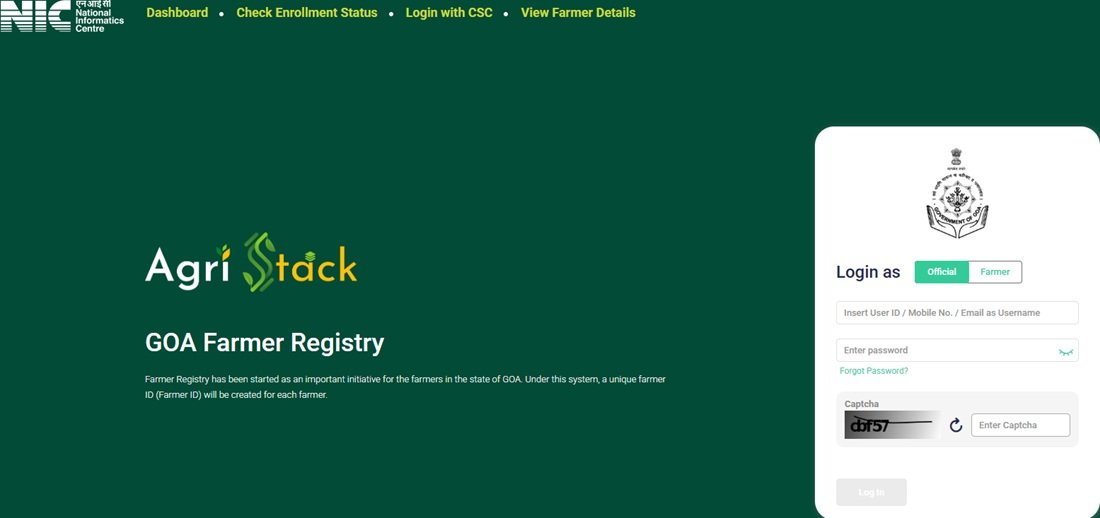
The Government of Goa uses a dedicated online portal for its AgriStack Farmer Registry activities. The portal opens under the name GOA Farmer Registry and provides different facilities for farmers, officials and CSC users.
Users can access the portal to check enrollment status, view farmer details, log in to their accounts and explore the dashboard. It also provides a separate login option for Common Service Centre (CSC) users.
The portal is particularly useful for farmers who want to check their enrollment records or access their registered details. If you want to understand the Farmer ID initiative, its purpose and the enrollment process, read our detailed guide on Goa Farmer Registry.
Goa AgriStack Official Website and Portal Access
Farmers and authorised users can access the Goa AgriStack Portal through its official website. The portal does not require users to visit the general Goa Government website to access its Farmer Registry services.
Follow these steps to open the portal:
- Open a web browser on your mobile phone, laptop or computer.
- Visit the official Goa AgriStack website using the link below.
- Wait for the portal homepage to load.
- Choose the service you want to access from the available menu.
Official Portal: Goa AgriStack Portal
The homepage displays the GOA Farmer Registry name and provides options such as Dashboard, Check Enrollment Status, Login with CSC and View Farmer Details.
Services and Options Available on the AgriStack Portal of Goa
The official portal provides different options for accessing Farmer Registry information and account services. Each option serves a specific purpose.
| Portal Option | Purpose |
|---|---|
| Dashboard | Displays enrollment statistics and other available portal indicators. |
| Check Enrollment Status | Helps users check enrollment using an Aadhaar number or Farmer ID. |
| Login with CSC | Provides a separate login facility for CSC users. |
| View Farmer Details | Allows users to search for registered farmer details using Aadhaar-based verification. |
| Official Login | Provides account access for authorised officials. |
| Farmer Login | Allows registered farmers to access their portal accounts. |
| Create New User Account | Provides one-time account registration for eligible farmers enrolled through CSC or Camp Mode. |
| Forgot Password | Provides an option to recover access when a user cannot remember the account password. |
These options appear on the official portal. Their availability does not mean that every user can access every facility without completing the required login or verification process.
Goa AgriStack Dashboard: Information and Available Indicators
The Goa AgriStack dashboard displays information about Farmer Registry enrollment and related activities. Users can open the Dashboard option from the portal homepage to view the available statistics.
The dashboard includes the following indicators:
- PM Kisan Beneficiaries: Shows the number of PM-Kisan beneficiaries considered in the dashboard.
- Total Enrollment Till Yesterday: Displays the cumulative enrollment count up to the previous day.
- Enrollment as a Percentage of PM-Kisan Beneficiaries: Shows enrollment in relation to the PM-Kisan beneficiary count.
- Approved Farmer IDs: Displays the number of Farmer IDs approved in the registry.
- Farmer IDs as a Percentage of PM-Kisan Beneficiaries: Shows the approved Farmer ID count in relation to the PM-Kisan beneficiary figure.
- Enrollment Pending Farmer ID Generation and Approval: Displays the number of cases awaiting the relevant processing stages.
- Today’s Enrollment Counts via Enhanced Name Matching: Shows the enrollment count recorded through this category.
- Total Today’s Enrollment: Displays the total enrollment recorded for the current day.
- Enrollment Mode: Shows enrollment information according to the available registration modes.
- Top and Bottom Five Districts: Displays district-wise enrollment information where data is available.
The portal states that dashboard data refreshes every five minutes. Therefore, the figures can change as the system updates its records. Users should check the live dashboard instead of relying on old screenshots or previously published statistics.
How to open the dashboard:
- Visit the official Goa AgriStack Portal.
- Click on the Dashboard option.
- Allow the dashboard to load.
- Check the available enrollment figures and district-wise information.
Direct Link: Open Goa AgriStack Dashboard
Login to the Goa AgriStack Portal: Farmer and Official Access
The Goa AgriStack Portal provides separate login categories for farmers and officials. Users can select the appropriate category on the login screen before entering their account details.
Follow these steps to access the login page:
- Open the Goa AgriStack Portal.
- Open the login section.
- Select Farmer or Official, depending on your account type.
- Enter your User ID, mobile number or email address in the username field, as permitted by the login screen.
- Enter your password.
- Complete the captcha displayed on the screen.
- Click on the Log In button.
After successful verification, the portal will process your login request. The available account features may depend on your assigned user category and access permissions.
How to Create a New Farmer Login Account?
The portal provides a Create New User Account option. However, its login page displays a specific instruction for farmers whose enrollment was created through CSC or Camp Mode.
Such farmers must complete a one-time account registration before they can use the Self-Login facility. The account creation page provides an Aadhaar e-KYC option and displays an Aadhaar consent statement.
To access this facility:
- Open the Goa AgriStack login page.
- Click on Create New User Account.
- The portal will open the Aadhaar e-KYC registration page.
- Read the consent information displayed on the screen.
- Follow the portal instructions to complete the required verification.
This facility activates portal account access for the specified category of already-enrolled farmers. It should not be confused with the initial Farmer Registry enrollment process.
Direct Link: Create New User Account
CSC Login: Access for Common Service Centre Operators
The Goa AgriStack Portal provides a separate Login with CSC option. This facility is intended for users who access the system through the Common Service Centre login route.
CSC users can follow these steps to reach the login facility:
- Visit the official Goa AgriStack website.
- Find the Login with CSC option on the homepage.
- Click on it to proceed.
- Follow the authentication instructions displayed by the portal.
The CSC login option is separate from the regular Farmer and Official login categories. Users should follow the authentication process provided on the screen rather than using another account category.
Official Website: Goa AgriStack Portal
Check Farmer Enrollment Status Through the Portal
Farmers can use the enrollment status facility to check their records in the Goa Farmer Registry. The portal provides two search options: Aadhaar Number and Farmer ID.
To check the enrollment status, follow these steps:
- Open the Goa AgriStack Portal.
- Click on Check Enrollment Status.
- Select Aadhaar Number or Farmer ID under the Check Status Against option.
- If you select Aadhaar Number, enter your Aadhaar details as requested.
- Complete OTP verification. The portal states that it sends the OTP to the mobile number linked with Aadhaar.
- Enter the OTP and proceed according to the instructions displayed on the screen.
Farmers who already know their Farmer ID can select the corresponding search option instead of using Aadhaar.
Direct Link: Check Enrollment Status
If your enrollment details do not appear, first check the information you entered. You can also read our guide on Goa Farmer Registry to understand the possible reasons behind a missing Farmer ID record and the next steps.
View Farmer Details Using Aadhaar Verification
The portal provides a separate View Farmer Details facility. Unlike the enrollment status option, this section specifically allows users to search for farmer details using an Aadhaar number.
Follow these steps to use the facility:
- Visit the official Goa AgriStack Portal.
- Click on View Farmer Details.
- The portal will open the Aadhaar-based search page.
- Enter your Aadhaar number in the required field.
- Complete the OTP verification process displayed on the screen.
- Proceed to access the available farmer details.
The portal provides an OTP field for this search facility. Keep your Aadhaar-linked mobile number accessible while completing the verification.
Direct Link: View Farmer Details
Note that the availability of this search facility does not by itself confirm a separate Farmer ID card download option. Check the options displayed after verification for the services currently available to your account.
Grievance Redressal: Accessing the Help Facility
The Goa AgriStack Portal displays a Dashboard option in its main navigation. The portal also identifies this option with a Grievance Redressal tooltip.
Users can open the dashboard through the homepage and check the available information. However, the publicly visible portal information does not establish a complete grievance submission process, such as a complaint form, ticket number or complaint tracking facility.
If you face a problem with login, enrollment status or farmer details, you should first check the relevant portal option. For assistance that the portal does not resolve, contact the Directorate of Agriculture, Goa, using its official contact details.
Portal: Goa AgriStack Dashboard
Common Portal Access Issues and Their Solutions
Users may sometimes face difficulty while opening the portal or using its login and verification facilities. The following checks can help with common access-related problems.
| Issue | What You Can Do |
|---|---|
| Portal page does not open | Check your internet connection and open the official website again. |
| Login is unsuccessful | Check your selected account category, username, password and captcha. |
| Forgotten password | Use the Forgot Password option available on the login page. |
| OTP not received | Check whether your Aadhaar-linked mobile number is active and able to receive messages. Retry the process if the portal allows it. |
| Farmer details not found | Recheck the Aadhaar number or Farmer ID entered and verify the enrollment details. |
| CSC account access problem | Use the separate Login with CSC option and follow its authentication instructions. |
| Self-Login not available after CSC or Camp enrollment | Check whether you have completed the one-time Create New User Account process. |
If the issue continues, contact the Directorate of Agriculture, Goa. Avoid sharing your password or OTP with anyone claiming to provide unofficial portal support.
Important Links for Goa AgriStack Portal
Use the following direct links to access the main facilities available on the Goa AgriStack Portal.
| Portal Service | Direct Link |
|---|---|
| Goa AgriStack Official Website | Open Portal |
| Dashboard | View Dashboard |
| Check Enrollment Status | Check Status |
| Create New User Account | Open Account Registration |
| View Farmer Details | View Details |
| Directorate of Agriculture, Goa | Visit Website |
| Goa Farmer Registry Guide | Read Complete Guide |
Contact Details for Portal-Related Assistance
If you face an issue that you cannot resolve through the portal, you can contact the Directorate of Agriculture, Government of Goa. The department handles agricultural development activities and operates through its head office and other offices across the state.
Use the following official contact details to seek guidance:
- Department: Directorate of Agriculture, Government of Goa
- Address: Krishi Bhavan, Tonca, Caranzalem, Goa – 403002
- Phone: 0832-2465443, 0832-2465441
- Email: dir-agri.goa@nic.in
- Official Website: www.agri.goa.gov.in
When contacting the department, explain whether your problem relates to portal login, OTP verification, enrollment status or viewing farmer details. This will help the concerned office understand your issue.
Frequently Asked Questions (FAQs)
Ans. The official website is https://gafr.agristack.gov.in/farmer-registry-ga/.
Ans. The portal provides Dashboard, Check Enrollment Status, Login with CSC, View Farmer Details, Farmer Login and Official Login facilities.
Ans. Visit the official portal and click on the Dashboard option available in the main navigation.
Ans. The portal states that dashboard data refreshes every five minutes.
Ans. Yes. The login page provides separate Farmer and Official account options.
Ans. Yes. The homepage provides a separate Login with CSC option.
Ans. Open the login section and click Create New User Account. The portal provides an Aadhaar e-KYC facility for the one-time account registration process.
Ans. The portal instructs farmers enrolled through CSC or Camp Mode to complete a one-time account registration before using the Self-Login facility.
Ans. Yes. Select Aadhaar Number under Check Enrollment Status and complete the OTP verification process.
Ans. Yes. The status-check page provides a Farmer ID search option as well.
Ans. Select View Farmer Details on the portal, enter your Aadhaar number and complete the required OTP verification.
Ans. The publicly available portal information confirms the View Farmer Details facility, but it does not establish a separate Farmer ID card download facility. Check the latest options available after verification.
Ans. You can contact the Directorate of Agriculture, Goa, at 0832-2465443 or 0832-2465441, or email dir-agri.goa@nic.in.
Ans. The official Goa interface opens under the name GOA Farmer Registry and provides the state’s AgriStack Farmer Registry services. Read our Goa Farmer Registry guide for information about the Farmer ID initiative and enrollment.

Tabassum is a government schemes researcher and writer with 5 years of experience tracking Central and State welfare scheme programmes across India. She has covered 500+ schemes spanning agriculture, women welfare, education, and housing, helping lakhs of beneficiaries understand their entitlements in simple language.