Chhattisgarh Smart PDS 2.0 Portal is an online platform that brings important Public Distribution System (PDS) services under one digital system. It provides separate login facilities for ration cardholders, department officials and Fair Price Shop (FPS) operators. Citizens can also use its grievance management and application tracking facilities to check updates related to their requests.
The portal operates under the Department of Food and Public Distribution, Government of India, and uses the Chhattisgarh-specific portal interface. Through this platform, users can access the relevant login options, track applications and complaints, and find help through available user manuals and public reports.
Introduction of Chhattisgarh Smart PDS 2.0 Portal: A Brief Overview
The Chhattisgarh Smart PDS 2.0 Portal provides a digital platform for accessing services related to the Public Distribution System. It brings different user categories onto one homepage and offers separate access points for citizens, government authorities and Fair Price Shop operators.
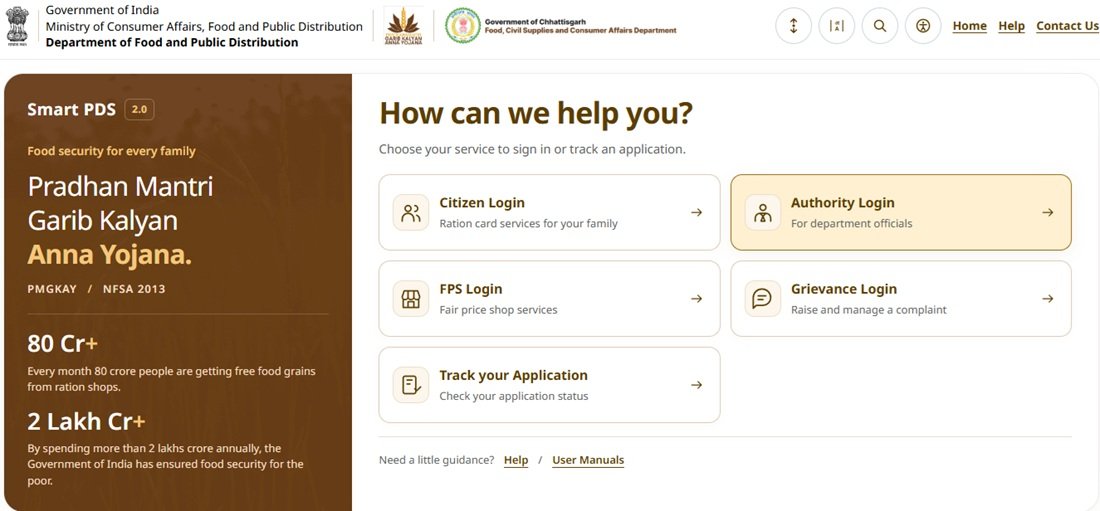
The portal displays the Pradhan Mantri Garib Kalyan Anna Yojana (PMGKAY) and the National Food Security Act (NFSA), 2013 as part of its food security framework. Its homepage also highlights that more than 80 crore people receive free food grains every month through ration shops and that the Government of India spends more than ₹2 lakh crore annually to support food security.
The Department of Food and Public Distribution, Government of India, is responsible for the portal. The National Informatics Centre (NIC), under the Ministry of Electronics and Information Technology (MeitY), has designed, developed and hosted Smart PDS 2.0.
Chhattisgarh residents can visit the dedicated state portal to access the available services and login facilities.
Official Portal: https://cg.smartpds.nic.in/
Key Features and Services Available on Chhattisgarh Smart PDS 2.0 Portal
The Smart PDS 2.0 homepage separates its services according to the type of user. This arrangement helps citizens, department officials and ration shop operators reach their respective login pages without searching through unrelated options.
Here are the main facilities displayed on the Chhattisgarh Smart PDS 2.0 Portal:
- Citizen Login: Provides Aadhaar OTP and Ration Card OTP login options for citizens.
- Authority Login: Allows authorised department officials to access their accounts through Aadhaar OTP, mobile number or Login ID.
- FPS Login: Provides login facilities for Fair Price Shop operators through FPS ID or Login ID.
- FPS New User Registration: Allows eligible FPS users to create a Login ID for accessing the portal’s services.
- Grievance Management: Allows citizens to access the grievance system using their registered Ration Card Number or Aadhaar Number.
- Track a Complaint: Helps users check complaint details through the complaint ticket ID.
- Track an Application: Provides an option to check application-related status using an Application/RC Number or Aadhaar Number.
- Help and User Manuals: Provides guidance material to help users understand the portal and its services.
- Public Reports: Offers access to public information and reports available through the portal.
These facilities make the portal a common access point for different users involved in Chhattisgarh’s Public Distribution System.
Login Options Available on Chhattisgarh Smart PDS 2.0 Portal
The portal provides separate login options for citizens, government authorities and Fair Price Shop operators. Each user category has its own authentication methods, so users should select the correct login option before proceeding.
1. Citizen Login
Citizen Login is intended for the head of the family. The portal provides two ways to access a citizen account: Aadhaar OTP and Ration Card OTP. Users must have their relevant mobile number or ration card details registered with the account.
Available Login Methods:
- Login with Aadhaar OTP: Users can enter their Aadhaar number and receive an OTP on the mobile number linked to Aadhaar.
- Login with Ration Card OTP: Users can enter their Ration Card Number and receive an OTP on the mobile number registered with the account.
Citizen Login Link: Click Here to Open Citizen Login
Aadhaar OTP Login: Login with Aadhaar OTP
Ration Card OTP Login: Login with Ration Card OTP
The portal also provides a separate legacy login option for existing users who need to access the older application using their Ration Card Number.
2. Authority Login
Authority Login is meant for authorised government officials who work with the Public Distribution System. The portal offers three authentication methods, allowing registered officials to select the login option linked to their account.
Available Login Methods:
- Login with Aadhaar OTP: Officials can authenticate their accounts using a registered Aadhaar number and OTP.
- Login with Mobile Number: Officials can use the mobile number registered with their portal account.
- Login with Login ID: Registered users can enter their assigned Login ID to access the account.
Authority Login Link: Click Here to Open Authority Login
Aadhaar OTP Login: Login with Aadhaar OTP
Mobile Number Login: Login with Mobile Number
Login ID Access: Login with Login ID
3. FPS Login
FPS Login is designed for Fair Price Shop operators who need to access the services provided for ration shops. The portal offers two login methods and a separate registration facility for new FPS users.
Available Options:
- Login with FPS ID: Registered FPS users can enter their FPS ID to access their accounts.
- Login with Login ID: Users can sign in with the Login ID registered with the portal.
- FPS New User Registration: New users can create a Login ID to access the available FPS services.
FPS Login Link: Click Here to Open FPS Login
FPS ID Login: Login with FPS ID
Login ID Access: Login with Login ID
New FPS User Registration: Register Here
Ration Card Services Available on Smart PDS 2.0 Portal
Ration cardholders are among the main users of the Chhattisgarh Smart PDS 2.0 Portal. The homepage provides a dedicated Citizen Login facility and an application tracking option for users who want to check the progress of their requests.
The portal currently displays these ration card-related access options:
- Citizen Account Access: Ration cardholders can access the Citizen Login section using Aadhaar OTP or Ration Card OTP.
- Ration Card-based Login: Users can authenticate their accounts through the Ration Card Number when the number is registered with the account.
- Application Tracking: Citizens can check the status of an application using an Application/RC Number or Aadhaar Number.
- Grievance Support: Ration cardholders can access the grievance system and raise complaints related to Smart PDS after authentication.
These facilities help ration cardholders access their accounts and follow up on applications or complaints. However, users should check the services available after login before assuming that every ration card modification, member addition or deletion facility is available directly through this portal.
For additional information about ration card rules, application forms and department notifications, citizens can also visit the official Chhattisgarh Food Department website. This is a separate departmental website, not the Smart PDS 2.0 login portal.
How to Track Ration Card Application Status on Smart PDS Portal
Applicants can use the Track your Application facility on the Chhattisgarh Smart PDS 2.0 homepage to check the status of an application. The tracking page provides two search options, so users can select the one for which they have the required details.
Available Search Options:
- Application / RC Number
- Aadhaar Number
Steps to Track Application Status:
- Visit the official Chhattisgarh Smart PDS 2.0 Portal.
- Select the Track your Application option.
- Choose Application / RC Number or Aadhaar Number.
- Enter the required details in the search field.
- Complete the verification process, if displayed, and select Search.
- Check the application details shown on the screen.
Applicants can also open the tracking page directly through the link below.
Direct Link: Track Ration Card Application Status
Grievance Management System on Chhattisgarh Smart PDS Portal
The Smart PDS 2.0 Portal includes a Grievance Management System for citizens who want to report issues related to the Public Distribution System. Users can access the grievance section through their registered Ration Card Number or Aadhaar Number and verify their identity through an OTP.
The portal also provides a separate facility to track an existing complaint through its acknowledgement or ticket ID. This allows users to follow up on a grievance without submitting the same complaint again.
1. Grievance Login
Citizens can access the grievance system using either of the two available login methods. The mobile number registered with the relevant account receives an OTP for verification.
Available Login Methods:
- Login with Ration Card Number
- Login with Aadhaar Card Number
Steps to Access Grievance Login:
- Open the Grievance Login page.
- Select Ration Card Number or Aadhaar Number.
- Enter the selected number and the displayed CAPTCHA.
- Click Generate OTP.
- Enter the OTP received on the registered mobile number.
- After successful verification, access the grievance facility and submit your complaint.
Direct Link: Open Smart PDS Grievance Login
2. Track Complaint Status
Citizens who have already submitted a complaint can use the Track a Complaint facility to check its progress. The portal asks users to enter the complaint ticket ID mentioned in the acknowledgement received after registration.
Steps to Track a Complaint:
- Visit the Track a Complaint page.
- Enter the complaint ticket ID received after submitting the grievance.
- Complete the CAPTCHA verification displayed on the page.
- Click the Search option to view the available complaint details.
Direct Link: Track Smart PDS Complaint Status
Help, User Manuals and Public Reports
Users who need assistance while accessing the Chhattisgarh Smart PDS 2.0 Portal can refer to the Help section available on its homepage. The portal also lists User Manuals and Public Reports to help users understand the platform and access available public information.
Before using a service for the first time, users should check the relevant guidance material. Department officials and FPS operators should use the login instructions applicable to their account type. Citizens can use the available help material when they face difficulties with login, application tracking or grievance services.
The portal homepage displays the following information sections:
- Help: Assistance and guidance for portal users.
- User Manuals: Instructions related to the portal and its services.
- Public Reports: Publicly accessible reports available through Smart PDS 2.0.
- Form Reference: Reference material related to forms available on the portal.
- About Us: Information about the portal.
- Contact Us: Contact-related information for users.
- Sitemap: A structured view of the portal’s sections.
Users can visit the official Smart PDS 2.0 homepage to access these sections. The availability and content of individual reports or manuals may depend on the portal’s current configuration.
Important Links Available on Chhattisgarh Smart PDS 2.0 Portal
The Chhattisgarh Smart PDS 2.0 Portal provides separate web pages for its major services. Users can use the following official links to open the relevant login, registration, application tracking or grievance facility directly.
| Service Name | Official Link |
|---|---|
| Smart PDS 2.0 Homepage | Click Here |
| Citizen Login | Click Here |
| Citizen Login with Aadhaar OTP | Click Here |
| Citizen Login with Ration Card OTP | Click Here |
| Authority Login | Click Here |
| FPS Login | Click Here |
| FPS New User Registration | Click Here |
| Grievance Login | Click Here |
| Track Application Status | Click Here |
| Track Complaint Status | Click Here |
| Chhattisgarh Food Department | Click Here |
Contact Details in Case of Help Needed
Users who face difficulties while accessing Smart PDS 2.0 should first check the Help and Contact Us sections available on the official portal. They should use the contact details published by the concerned department for assistance with login, application tracking or grievance-related issues.
The Smart PDS 2.0 homepage identifies the Department of Food and Public Distribution, Government of India, as the department responsible for the portal and NIC, MeitY, as its developer and hosting agency. For Chhattisgarh-specific ration card and Public Distribution System matters, users can also refer to the state Food Department’s official website.
Smart PDS 2.0 Portal: https://cg.smartpds.nic.in/
Chhattisgarh Food Department: https://fcs.cg.gov.in/
Users should verify the latest contact information on these official websites before sending a request or visiting a department office.
Frequently Asked Questions (FAQs)
Ans. Chhattisgarh Smart PDS 2.0 is an online platform that provides digital access to services related to the Public Distribution System. It offers separate login facilities for citizens, government officials and Fair Price Shop operators, along with application tracking and grievance services.
Ans. The portal belongs to the Department of Food and Public Distribution, Government of India. The National Informatics Centre (NIC), under MeitY, has designed, developed and hosted the platform.
Ans. The official website is https://cg.smartpds.nic.in/.
Ans. The homepage displays four main access options: Citizen Login, Authority Login, FPS Login and Grievance Login. It also provides separate facilities to track applications and complaints.
Ans. Citizens can log in using Aadhaar OTP or Ration Card OTP. The relevant mobile number or Ration Card Number must be registered with the account.
Ans. Authorised officials can access their accounts through Aadhaar OTP, registered mobile number or Login ID, depending on the login details linked to their accounts.
Ans. FPS operators can log in using their registered FPS ID or Login ID. The portal also provides a separate registration option for new FPS users.
Ans. Yes. The homepage provides an FPS New User Registration option through which eligible users can create a Login ID to access the available FPS services.
Ans. Open the Track your Application page and select Application / RC Number or Aadhaar Number. Enter the required details and use the Search option to check the available status.
Ans. Open the Grievance Login page and select Ration Card Number or Aadhaar Number. Enter the required details, complete the CAPTCHA and generate an OTP. After verification, access the grievance facility to submit your complaint.
Ans. Visit the Track a Complaint page and enter the complaint ticket ID mentioned in your acknowledgement. Complete the CAPTCHA verification and select Search to view the available details.
Ans. Yes. Citizens can access the dedicated Citizen Login page through Aadhaar OTP or Ration Card OTP, subject to the registration details linked to their accounts.
Ans. Users can visit the official Smart PDS 2.0 homepage and open the Help or User Manuals section to check the available guidance material.
Ans. Yes. The Smart PDS 2.0 portal provides its own homepage, login options, application tracking and grievance facilities. The older AePDS portal is a separate platform used for PDS-related reports and transaction information.

Tabassum is a government schemes researcher and writer with 5 years of experience tracking Central and State welfare scheme programmes across India. She has covered 500+ schemes spanning agriculture, women welfare, education, and housing, helping lakhs of beneficiaries understand their entitlements in simple language.