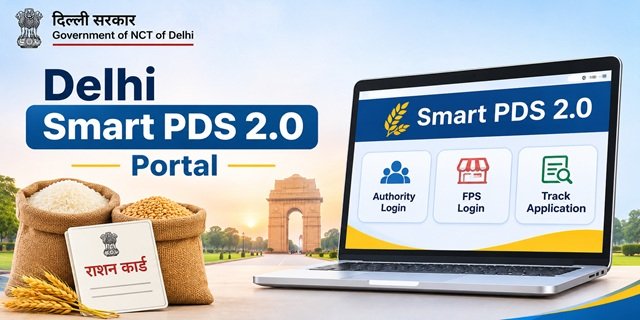
The Delhi Smart PDS 2.0 Portal is an online platform designed to support the digital management of the Public Distribution System (PDS) in Delhi. It provides dedicated login facilities for authorities, Fair Price Shop (FPS) operators and grievance-related activities. Citizens can also use its online facilities to track ration card applications and complaints.
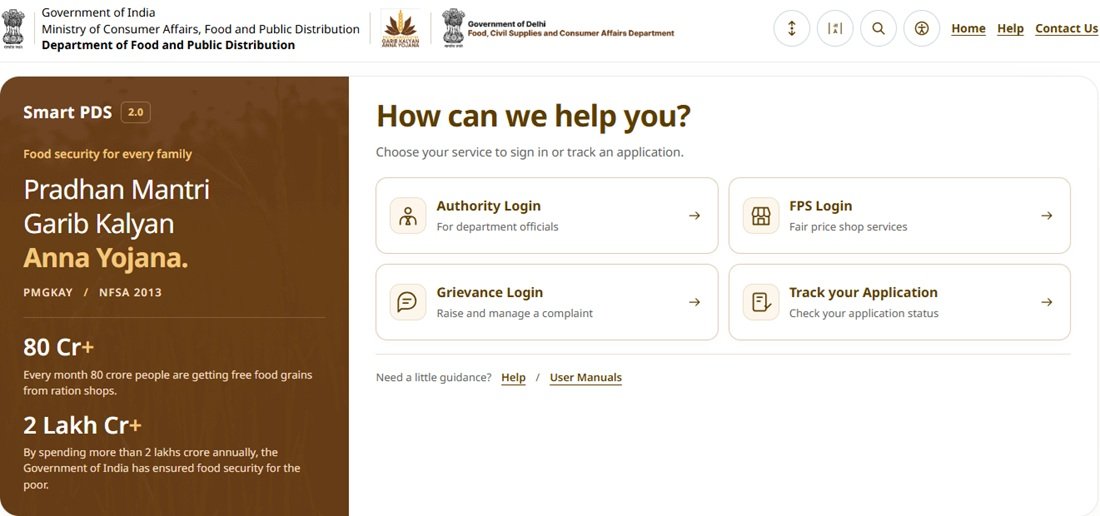
You can access the official portal at https://dl.smartpds.nic.in/. The homepage identifies the platform with the Government of India, Ministry of Consumer Affairs, Food and Public Distribution, and the Department of Food and Public Distribution. The portal also displays the Delhi logo and the title Smart PDS 2.0.
The National Informatics Centre (NIC), under the Ministry of Electronics and Information Technology, Government of India, has designed, developed and hosted the portal, as mentioned in its official footer. The platform supports the technology-driven management of the Public Distribution System and provides separate access options for different users.
One important point for Delhi ration card holders is that Smart PDS 2.0 and the Delhi e-District portal are separate platforms. The Smart PDS 2.0 portal provides facilities such as application tracking, complaint tracking and dedicated login options. For ration card application services, such as applying for a new card or requesting changes in family details, applicants should also check the services available on the Delhi e-District portal.
This article explains the available facilities, login methods, grievance registration process and tracking options on the Delhi Smart PDS 2.0 Portal.
Key Features and Facilities Available on Delhi Smart PDS 2.0 Portal
The Delhi Smart PDS 2.0 Portal brings several online facilities together. Its homepage provides different options for officials, FPS operators and users who want to track applications or complaints.
- Authority Login: Provides a separate login facility for authorised department officials.
- FPS Login: Allows registered Fair Price Shop operators to access their portal accounts.
- FPS New User Registration: Provides a registration facility for eligible FPS users to create a login ID.
- Grievance Login: Allows users to access the grievance management system through ration card or Aadhaar details.
- Track Your Application: Helps applicants check the status of their ration card applications.
- Track a Complaint: Allows users to check complaint progress through the complaint ticket ID.
- User Manuals: Provides access to manuals that can help users understand the portal’s functions.
- Form Reference: Provides a reference facility for forms associated with the portal.
- Help and Contact Us: Offers support-related information for users who need assistance.
- Feedback: Provides an option to share feedback about the portal.
The homepage also provides access to important website policies, including the Privacy Policy, Copyright Policy, Terms and Conditions and Hyperlinking Policy. Users can visit the official Smart PDS 2.0 homepage to access these facilities.
Login Options Available on Delhi Smart PDS 2.0 Portal
The portal provides separate login options according to the user’s role. An authority user, FPS operator and person accessing the grievance system may need different login details. Therefore, users should select the correct login option before entering their information.
The main login facilities available on the portal include:
| Login Facility | Purpose | Official Link |
|---|---|---|
| Authority Login | Access for authorised department officials | Login Here |
| FPS Login | Access for registered Fair Price Shop users | Login Here |
| Grievance Login | Access to the grievance management system | Login Here |
| Track Your Application | Check ration card application status | Track Status |
| Track a Complaint | Check the status of a registered complaint | Track Complaint |
Each facility serves a different purpose. For example, an FPS operator should use the FPS Login option instead of Authority Login. Similarly, a person who only wants to check an application or complaint status can use the relevant tracking facility without selecting an official login option.
Authority Login on Delhi Smart PDS 2.0 Portal
The Authority Login facility is intended for authorised officials who have registered accounts on the Delhi Smart PDS 2.0 Portal. The portal provides three ways to access an authority account: Aadhaar OTP, mobile number and Login ID.
Officials can follow these steps to access the Authority Login page:
- Visit the Delhi Smart PDS 2.0 Portal.
- Select the Authority Login option from the homepage.
- The portal will open the authority login page.
- Choose one of the available login methods: Aadhaar OTP, Mobile Number or Login ID.
- Enter the required details according to the selected method.
- Complete the OTP verification process wherever the portal asks for it.
- After successful verification, proceed to access the authorised account.
The portal provides the following three login methods:
1. Login Through Aadhaar OTP
Officials can use their Aadhaar number to access the account through OTP verification. The Aadhaar number must already be registered with the authority account.
Click here for Authority Aadhaar Login.
2. Login Through Mobile Number
Officials can also access their accounts through the mobile number registered with the portal. They should enter the same mobile number associated with their authority account and complete the required verification.
Click here for Mobile Number Login.
3. Login Through Login ID
Users who have a registered Login ID can select this option to access their authority account. They must enter the Login ID linked to their account and follow the instructions displayed on the screen.
Click here for Authority Login ID Access.
Important: These login methods are for registered and authorised users. Having an Aadhaar number or mobile number alone does not automatically provide access to an authority account.
FPS Login and New User Registration Facility
Fair Price Shop operators can use the FPS Login facility to access their registered accounts on the Delhi Smart PDS 2.0 Portal. The portal provides two login methods: FPS ID and Login ID. It also offers a separate registration option for new FPS users.
How to Login Through FPS ID
FPS operators who have a registered FPS ID can follow these steps:
- Open the official Smart PDS 2.0 Portal.
- Select the FPS Login option.
- Choose the Login with FPS ID option.
- Enter the FPS ID registered with the portal.
- Complete the verification or other login requirements displayed on the screen.
- Proceed to the account after successful authentication.
Click here to Login Through FPS ID.
How to Login Through Login ID
FPS operators who have a registered Login ID can use the alternative login method. They should open the FPS Login section, select the Login ID option and enter their registered credentials as requested by the portal.
Click here to Login Through FPS Login ID.
FPS New User Registration
The portal also provides a separate registration facility for FPS users who need to create a Login ID. This option is useful for eligible FPS users who do not yet have login credentials for the portal.
To access the registration facility:
- Visit the Delhi Smart PDS 2.0 Portal.
- Open the FPS New User Registration option.
- Enter the information requested in the registration form.
- Check the details before submitting the form.
- Complete the registration process according to the instructions displayed on the portal.
Click here for FPS New User Registration.
FPS operators should use accurate details while registering. They should also keep their registered login information secure and avoid sharing it with unauthorised persons.
Grievance Management System on Delhi Smart PDS 2.0 Portal
The Delhi Smart PDS 2.0 Portal provides a Grievance Management System for users who want to raise or track complaints related to the Smart PDS platform. Users can access this facility through their Ration Card Number or Aadhaar Card Number, subject to the account verification requirements.
The grievance login page provides an OTP-based verification process. Users need to enter their registered details, complete the CAPTCHA and generate an OTP. The portal sends the OTP to the mobile number registered with the account.
How to Login to the Grievance Management System
- Visit the Delhi Smart PDS 2.0 Portal.
- Select the Grievance Login option.
- Open the Grievance Management System login page.
- Choose the available identification method and enter your Ration Card Number or Aadhaar Card Number.
- Enter the CAPTCHA displayed on the screen.
- Select the Generate OTP option.
- Enter the OTP received on your registered mobile number.
- Complete the verification to access the grievance facility.
Click here to Open the Grievance Login Page.
After successful authentication, users can view their complaint history and raise a new grievance through the available options. They should provide clear and correct information while submitting a complaint so that the concerned authority can understand the issue.
Note: The Ration Card Number or Aadhaar Number must be associated with the portal account. Users should also have access to the mobile number registered with that account to complete OTP verification.
Application Status and Complaint Tracking Facilities
Users do not always need to log in to an account to check the progress of an application or complaint. The Delhi Smart PDS 2.0 Portal provides separate tracking options for these purposes. Applicants can use the application tracking page, while people who have already received a complaint ticket can use the complaint tracking facility.
How to Track Ration Card Application Status
The Track Your Application facility allows users to search for their ration card application through the identification options displayed on the portal. Users can select Application / RC No. or Aadhaar Number, depending on the details available to them.
Follow these steps to check the status:
- Open the Track Your Application page.
- Select the available search option: Application / RC No. or Aadhaar Number.
- Enter the required application, ration card or Aadhaar details.
- Complete any verification requirement displayed on the page.
- Select the Search button.
- Check the application details and status shown on the screen.
The page also provides a Reset option to clear the entered information and start a fresh search.
How to Track a Complaint on Smart PDS 2.0 Portal
After submitting a complaint, users should keep the complaint ticket ID mentioned in the acknowledgement. They can use this ID to check the complaint status through the Track a Complaint facility.
- Visit the Track a Complaint page.
- Enter the complaint ticket ID received after submitting the complaint.
- Enter the CAPTCHA displayed on the page.
- Use the available audio CAPTCHA option if you need an alternative.
- Select the Search option to check the complaint details.
- Review the tracking information displayed on the screen.
Users should enter the correct ticket ID because the portal uses it to identify the complaint. If they cannot find the acknowledgement or ticket ID, they can use the grievance login facility to check their complaint history, subject to successful verification.
Ration Card Application and Modification Services
Ration card holders in Delhi may need to apply for a new ration card or update family details when their circumstances change. Common requests include adding a family member, deleting a member, correcting details or updating other ration card information.
However, users should understand the difference between the Delhi Smart PDS 2.0 Portal and the Delhi e-District portal before applying. The Smart PDS 2.0 homepage provides application tracking and grievance-related facilities. The Delhi e-District portal separately lists government services and provides citizen access for online applications.
For ration card-related applications, users should check the services currently available through the Delhi e-District Portal. Depending on the service and the applicable government instructions, the available requests may include:
- Application for a new ration card.
- Addition of a family member to an existing ration card.
- Deletion of a family member from a ration card.
- Correction or modification of ration card details.
- Other ration card services listed by the concerned department.
The Delhi e-District portal provides options to apply for services, track applications and download or print certificates where the relevant service supports these facilities. Applicants should select the required ration card service and read its instructions before submitting an application.
Important clarification: Do not assume that every ration card application or modification service is available through a Citizen Login on the Smart PDS 2.0 Portal. The portal’s currently listed homepage facilities and the services available on e-District are separate. Applicants should use the official service page that lists the required facility.
The Delhi Government has also published a public notice regarding fresh and pending ration card applications. Applicants can check the department’s official public notice dated 15 May 2026 for the related instructions.
Important Links
Users can access the important Delhi Smart PDS 2.0 services directly through the links below. We have also included the separate official portals for ration card services and public distribution information.
| Service / Portal | Direct Link |
|---|---|
| Delhi Smart PDS 2.0 Portal | Click Here |
| Authority Login | Click Here |
| Authority Aadhaar Login | Click Here |
| Authority Mobile Login | Click Here |
| Authority Login ID | Click Here |
| FPS Login | Click Here |
| FPS ID Login | Click Here |
| FPS Login ID | Click Here |
| FPS New User Registration | Click Here |
| Grievance Management System | Click Here |
| Track Your Application | Click Here |
| Track a Complaint | Click Here |
| Delhi e-District Portal | Click Here |
| Delhi Food Supplies Department | Click Here |
| Delhi National Food Security Portal | Click Here |
| Delhi AePDS Portal | Click Here |
Contact Details
Users who face difficulties with ration card services or the Public Distribution System can contact the Department of Food, Supplies and Consumer Affairs, Government of NCT of Delhi.
Department: Department of Food, Supplies and Consumer Affairs, Government of NCT of Delhi
Office Address:
K-Block, Vikas Bhawan,
I.P. Estate, New Delhi-110002
Email: cfood@nic.in
Public Distribution System Helpline Numbers:
- 1967
- 1800-11-0841
Citizens can use these helpline numbers to seek assistance or report issues related to the Public Distribution System. The Delhi Food Supplies Department also lists these numbers for public grievances. For department-related information, users can visit the official Public Distribution System page.
Frequently Asked Questions (FAQs)
Ans. The Delhi Smart PDS 2.0 Portal is an online platform that provides digital facilities for the Public Distribution System in Delhi. It offers authority login, FPS login, grievance management, application tracking and complaint tracking options.
Ans. The official website is https://dl.smartpds.nic.in/.
Ans. Authorised officials with registered accounts can use the Authority Login facility. They can access it through Aadhaar OTP, a registered mobile number or a Login ID.
Ans. FPS operators can log in through their registered FPS ID or Login ID. They should select the FPS Login option and use the appropriate login method.
Ans. Eligible FPS users can visit the FPS New User Registration page at this link and follow the instructions to create a Login ID.
Ans. Open the Grievance Login page and enter your Ration Card Number or Aadhaar Number. Complete the CAPTCHA and OTP verification using the mobile number registered with the account. After login, use the available option to submit a grievance.
Ans. Visit the Track Your Application page. Select Application / RC No. or Aadhaar Number, enter the required details and select Search.
Ans. Open the Track a Complaint page. Enter the complaint ticket ID mentioned in your acknowledgement, complete the CAPTCHA and select Search.
Ans. The Smart PDS 2.0 homepage provides an application tracking facility. For a new ration card application, check the services available on the Delhi e-District portal and follow the department’s current instructions.
Ans. Applicants should check the ration card services listed on the Delhi e-District portal. The available services and application instructions may depend on the department’s current arrangements.
Ans. No. Delhi Smart PDS 2.0 and Delhi AePDS are separate online platforms. The Smart PDS 2.0 portal is available at dl.smartpds.nic.in, while the Delhi AePDS portal is available at epos.delhi.gov.in.
Ans. Citizens can contact the Delhi Food Supplies Department through 1967 or 1800-11-0841 for assistance related to the Public Distribution System.

Tabassum is a government schemes researcher and writer with 5 years of experience tracking Central and State welfare scheme programmes across India. She has covered 500+ schemes spanning agriculture, women welfare, education, and housing, helping lakhs of beneficiaries understand their entitlements in simple language.