The Government of Odisha has launched the Unified Pension Management Portal (UPMP) to make pension-related services easier for eligible citizens. Through the UPMP Odisha Portal, applicants can apply for pension benefits, complete Aadhaar-based eKYC, check application status, view pension details, download beneficiary cards, and access other pension services online. The portal brings important services related to the Madhu Babu Pension Yojana (MBPY) and National Social Assistance Programme (NSAP) under one platform.
UPMP Odisha Portal 2026 Highlights | |
|---|---|
| Portal Name | Unified Pension Management Portal (UPMP) |
| State | Odisha |
| Launched On | 10 November 2026 |
| Launched By | Government of Odisha |
| Department | Social Security and Empowerment of Persons with Disabilities (SSEPD) Department |
| Main Objective | To provide online access to pension application, verification, beneficiary and payment-related services |
| Major Schemes | Madhu Babu Pension Yojana (MBPY) and National Social Assistance Programme (NSAP) |
| Available Services | Online application, Aadhaar eKYC, status tracking, beneficiary search, pension identity card, digital passbook and grievance registration |
| Application Mode | Online and through Common Service Centres (CSCs) and Block Development Offices (BDOs) |
| Official Website | upmp.odisha.gov.in |
| Helpline Numbers | 1800-345-6770 and 155335 |
Introduction of Odisha Unified Pension Management Portal (UPMP)
The Government of Odisha introduced the Unified Pension Management Portal on 10 November 2026 to simplify access to social security pension services. The portal provides a common digital platform where eligible citizens can access different pension-related facilities without visiting multiple websites or government offices for every service.
Before the introduction of this platform, applicants and existing pension beneficiaries had to depend on different channels for application-related work, verification, beneficiary information and other services. The UPMP brings several of these facilities together and helps beneficiaries manage their pension-related requirements through a single website.
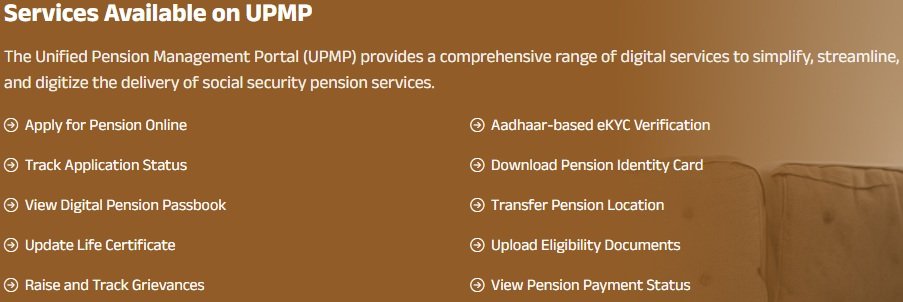
The portal primarily covers pension services associated with the Madhu Babu Pension Yojana (MBPY) and the National Social Assistance Programme (NSAP). It also provides facilities such as Aadhaar-based eKYC, application tracking, beneficiary search, pension identity card, digital pension passbook, life certificate submission, pension location transfer and grievance registration.
According to the Chief Minister’s Office announcement, the launch also included the removal of the quota system under the Madhu Babu Pension Yojana. The government announced that 5,05,817 additional eligible beneficiaries would be included under the initiative. Applicants can submit their applications online or seek assistance through a Common Service Centre or the concerned Block Development Office.
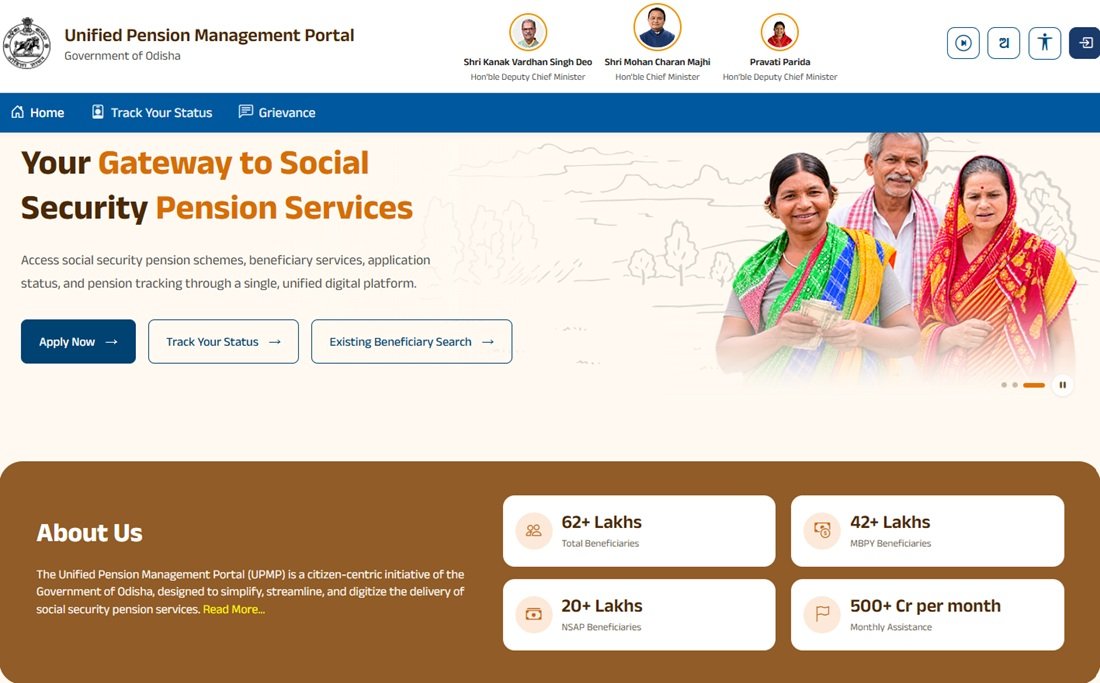
The portal is maintained with technical support from the Odisha Computer Application Centre (OCAC). Citizens can visit the official UPMP homepage to access its available services.
Pension Schemes Available on UPMP Odisha
The UPMP Odisha Portal provides access to pension services associated with the following major social security programmes:
1. Madhu Babu Pension Yojana (MBPY)
The Madhu Babu Pension Yojana (MBPY) is a state government pension scheme that provides financial assistance to eligible elderly people, widows, persons with disabilities and other notified categories. The scheme aims to support vulnerable residents who meet the prescribed conditions.
Applicants can use the UPMP portal to access the available MBPY application and beneficiary-related facilities. For scheme-specific rules and government notifications, visit the official MBPY page.
2. National Social Assistance Programme (NSAP)
The National Social Assistance Programme is a centrally sponsored social security programme that provides assistance to eligible beneficiaries under different pension components. The UPMP portal includes access to NSAP-related pension services in Odisha.
Applicants should check the relevant scheme guidelines before submitting an application because eligibility conditions and benefit amounts may differ between pension categories.
Eligibility and Pension Amount Displayed on UPMP
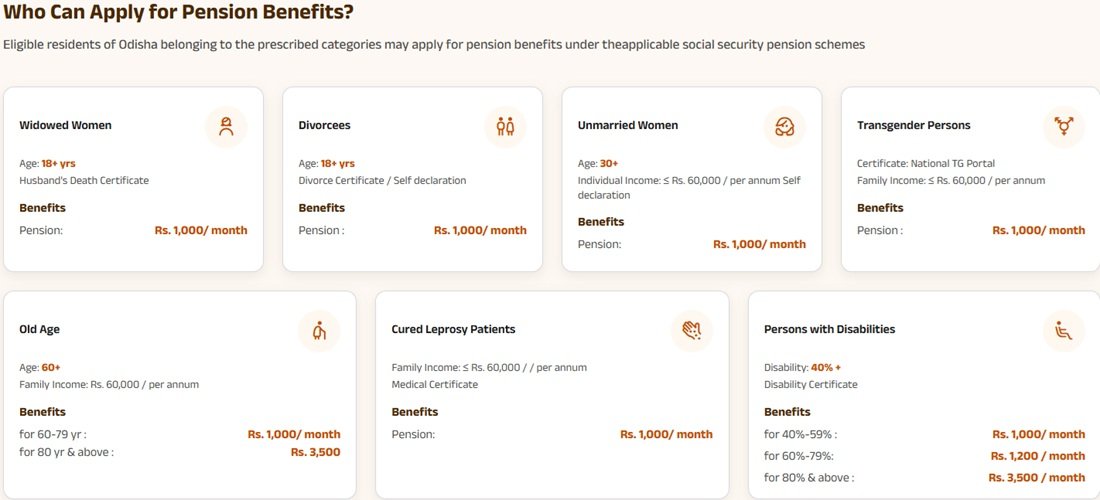
The UPMP homepage displays different pension categories along with their age, income and document-related conditions. The following table summarises the information shown on the portal.
| Beneficiary Category | Conditions Displayed on Portal | Monthly Pension |
|---|---|---|
| Widowed Women | Age of 18 years or above and husband’s death certificate | ₹1,000 |
| Divorcees | Age of 18 years or above and divorce certificate or self-declaration | ₹1,000 |
| Unmarried Women | Age of 30 years or above and individual annual income not exceeding ₹60,000 | ₹1,000 |
| Transgender Persons | National Transgender Certificate and family income not exceeding ₹60,000 per year | ₹1,000 |
| Senior Citizens | Age of 60 to 79 years or 80 years and above; family income not exceeding ₹60,000 per year | ₹1,000 for 60–79 years; ₹3,500 for 80 years and above |
| Cured Leprosy Patients | Family income not exceeding ₹60,000 per year and medical certificate | ₹1,000 |
| Persons with Disabilities | Valid disability certificate; pension amount depends on disability percentage | ₹1,000 for 40–59%; ₹1,200 for 60–79%; ₹3,500 for 80% and above |
Important: The table reflects the category information displayed on the UPMP portal. It should not be treated as a complete statement of eligibility rules for every MBPY or NSAP pension component. Applicants should check the latest scheme guidelines and official notifications before applying.
UPMP Odisha Portal Login
Applicants and existing beneficiaries can visit the official UPMP website to access the services available on the portal. The homepage provides separate options for pension application, status tracking, beneficiary search and other facilities.
Follow these steps to access the portal:
- Visit the UPMP Odisha official website.
- Open the homepage and review the available service options.
- Select the service you want to use, such as pension application, status tracking or beneficiary search.
- Enter the details requested on the selected service page.
- Complete the required verification, if the portal asks for it.
- Follow the instructions displayed on the screen to continue.
The portal provides service-specific access options. Applicants should follow the instructions on the relevant page instead of assuming that every service requires the same login credentials.
New Pension Application Through UPMP
Eligible citizens can use the UPMP Odisha Portal to submit a new pension application. The application facility allows applicants to select the relevant pension category, provide personal details and upload supporting documents.
Before starting the process, applicants should keep their Aadhaar details, active mobile number and category-related documents ready. The portal may require Aadhaar-based verification during the application process.
Steps to Apply for Pension Online
- Open the UPMP Pension Application page.
- Enter your active mobile number wherever the portal asks for it.
- Verify the mobile number through the OTP received on your phone.
- Follow the verification instructions displayed on the screen.
- If the portal asks you to use the UPMP mobile application, follow the QR code or installation instructions provided there.
- Enter your Aadhaar details and complete the required eKYC process.
- Provide the personal information requested in the application form.
- Select the pension category that applies to you.
- Enter the additional information required for the selected category.
- Upload the relevant supporting documents in the prescribed format.
- Review the information carefully and correct any errors before submission.
- Submit the application and save the acknowledgement or reference details shown by the portal.
Applicants should enter accurate information and upload clear documents. An incorrect detail or an unreadable document may lead to a request for correction or further verification.
Submitting an application does not mean that the government has approved the pension. The concerned authority will verify the application and take a decision according to the applicable scheme rules.
Aadhaar-Based eKYC Verification on UPMP
Aadhaar-based eKYC is an important part of the pension application process on the UPMP portal. It helps verify the applicant’s identity through the verification facility provided by the portal.
During the application process, applicants may need to enter their Aadhaar number and complete the verification steps shown on the screen. The portal may also ask applicants to use a camera-based verification facility or follow instructions through the UPMP mobile application.
Applicants should carefully follow the on-screen instructions. They should also make sure that the Aadhaar details entered in the application are correct.
Existing Beneficiary Search on UPMP Odisha
Existing pension beneficiaries can use the UPMP portal to search for their beneficiary details. This facility helps users locate their pension records through the information requested by the portal.
To search for an existing beneficiary:
- Visit the Existing Beneficiary Search page.
- Enter the details requested on the page.
- Complete the verification process, if required.
- Submit the information to search for the beneficiary record.
- Check the details displayed on the screen.
Make sure that the information you enter matches the details available in the pension record. If the portal does not display the expected record, contact the concerned department or use the grievance facility for assistance.
UPMP Odisha Application Status Check
Applicants who have submitted a pension application can use the UPMP status tracking facility to check the progress of their application. The portal provides an online option to search for application-related details through the information requested on the page.
Follow these steps to check the UPMP Odisha application status:
- Visit the UPMP Status Tracking page.
- Enter your registered mobile number or other details requested by the portal.
- Complete the OTP or verification process, if displayed.
- Submit the details to access your application information.
- Check the application status and other details available on the screen.
The status page may show application, authentication and other related information. Applicants should follow any instructions displayed against their application if the portal asks them to complete further verification or submit additional documents.
How to Check UPMP Odisha Pension Payment Status?
Existing pension beneficiaries can use the portal’s beneficiary and profile-related services to access available pension information. The payment details shown to a beneficiary may depend on the information available in the portal record.
To check the available pension payment information:
- Open the UPMP status tracking page or the relevant beneficiary service.
- Enter the details requested by the portal.
- Complete the required authentication.
- Open the beneficiary or application information displayed on the screen.
- Check the payment-related details available in your record.
If the portal does not display the expected payment information, beneficiaries should contact the concerned pension authority or register a grievance through the official website.
How to Download the UPMP Pension Identity Card?
The UPMP portal provides a facility for beneficiaries to access their pension identity card. Existing beneficiaries can visit the dedicated page and follow the authentication process to view or download the card, where the record is available.
- Visit the UPMP Beneficiary Card page.
- Enter the details requested on the page.
- Complete the required verification or authentication.
- Check the beneficiary details displayed on the screen.
- Use the available option to view or download the pension identity card.
If the card does not appear, check whether your beneficiary record is available on the portal. You can also contact the concerned department for assistance.
Digital Pension Passbook and Payment Status
The UPMP Odisha Portal provides a profile-related facility through which beneficiaries can access their digital pension information. The digital passbook helps beneficiaries view the pension details available in their records.
To access the facility, open the UPMP Profile page and follow the authentication instructions displayed on the screen.
After successful verification, check the information available in your profile. The services and details displayed may depend on the beneficiary record and the facilities currently enabled on the portal.
Pension Location Transfer and Life Certificate Update
The UPMP portal also lists facilities related to pension location transfer and life certificate submission. These services can help existing beneficiaries manage certain pension-related requirements through the online platform.
Pension Location Transfer
Beneficiaries who need to update their pension location can visit the UPMP Profile page and check the available location transfer facility. Follow the instructions shown by the portal and submit the required information.
Life Certificate
Beneficiaries can also check the life certificate facility available through their UPMP profile. Open the profile page, complete the required verification and follow the instructions provided for submitting or updating the life certificate.
Beneficiaries should check the portal for the current procedure and any additional requirements before submitting a request.
How to Upload Documents for Application Resubmission on UPMP?
If the portal asks an applicant to correct an application or submit additional documents, the applicant can check the application resubmission facility. This option helps users respond to document-related requirements raised during the application process.
Follow these steps:
- Open the UPMP Application Resubmission page.
- Enter the application or beneficiary details requested by the portal.
- Complete the required verification.
- Check the correction or document requirement displayed on the screen.
- Upload the correct document in the prescribed format.
- Review the information and submit the resubmission request.
- Save any acknowledgement or reference number provided by the portal.
Applicants should upload the document requested by the concerned authority. Submitting an unrelated or unclear document may not resolve the issue.
Grievance Registration and Tracking on UPMP
Beneficiaries and applicants who face problems with pension applications or portal services can use the grievance facility available on the UPMP website. The facility allows users to submit their complaints or service-related issues through the online platform.
To register a grievance:
- Visit the UPMP Grievance page.
- Enter the details requested by the portal.
- Provide your application or beneficiary information, wherever required.
- Describe the issue clearly and mention the relevant details.
- Submit the grievance through the available option.
- Save the acknowledgement or reference number, if the portal provides one.
Applicants should explain the issue in simple language and provide accurate details. They should keep the grievance reference number for future communication or tracking, where that facility is available.
Offline Pension Application Through CSC and BDO Offices
Citizens who cannot complete the online pension application themselves can seek assistance through the available offline or assisted channels. The Government of Odisha has also announced application support through Common Service Centres (CSCs) and Block Development Offices (BDOs).
Application Through a Common Service Centre (CSC)
Applicants can visit a nearby Common Service Centre and ask the operator for assistance with the UPMP pension application. They should carry their Aadhaar details, mobile number and relevant category documents. The CSC operator can help them access the portal and complete the online application process.
Application Through the Block Development Office (BDO)
Applicants can also approach the concerned Block Development Office for pension application-related assistance. They should contact the office to understand the applicable procedure and the documents required for their pension category.
Applicants should collect and preserve any acknowledgement or reference details generated after submitting the application.
UPMP Odisha Portal Helpline Number and Contact Details
Applicants and existing pension beneficiaries can contact the official helpline numbers for assistance with UPMP services.
| Contact Information | Details |
|---|---|
| Helpline Number 1 | 1800-345-6770 |
| Helpline Number 2 | 155335 |
| Official Portal | https://upmp.odisha.gov.in/ |
| Grievance Facility | Register a Grievance Online |
For application-specific issues, beneficiaries should keep their application reference number or beneficiary details ready before contacting the concerned authority.
Important Links for UPMP Odisha Portal
| Service | Official Link |
|---|---|
| UPMP Official Website | Click Here |
| UPMP Homepage | Click Here |
| New Pension Application | Click Here |
| Application Status Check | Click Here |
| Existing Beneficiary Search | Click Here |
| Pension Identity Card | Click Here |
| Digital Pension Passbook and Profile | Click Here |
| Application Resubmission | Click Here |
| Grievance Registration | Click Here |
| Frequently Asked Questions | Click Here |
| Portal Sitemap | Click Here |
| Website Policy | Click Here |
| Terms and Conditions | Click Here |
| Official MBPY Guidelines | Click Here |
| MBPY Scheme Details | Click Here |
Frequently Asked Questions (FAQs)
Ans. UPMP stands for Unified Pension Management Portal. The Government of Odisha launched this platform to provide online access to pension application, beneficiary information, status tracking and other pension-related services.
Ans. The Government of Odisha launched the Unified Pension Management Portal on 10 November 2026.
Ans. The official website is https://upmp.odisha.gov.in/.
Ans. The portal provides access to pension services associated with the Madhu Babu Pension Yojana (MBPY) and the National Social Assistance Programme (NSAP).
Ans. Visit the pension application page, enter the requested details, complete the required verification, select your pension category and upload the supporting documents.
Ans. Open the status tracking page, enter the requested mobile number or other details and complete the verification process to view the available application information.
Ans. Yes. Existing beneficiaries can use the Existing Beneficiary Search facility to look up their pension records.
Ans. Yes. Visit the Beneficiary Card page and follow the authentication instructions to view or download the card, if your record is available.
Ans. Yes. Beneficiaries can visit the UPMP Profile page to access the digital pension information available for their records.
Ans. Yes. Applicants and beneficiaries can use the online grievance facility to submit pension-related complaints or service issues.
Ans. Visit the application resubmission page, enter the requested details and upload the document required by the portal.
Ans. Yes. Applicants can seek assistance from a nearby Common Service Centre (CSC) to complete the online pension application process.
Ans. The helpline numbers displayed for the portal are 1800-345-6770 and 155335.
Ans. No. The concerned authority must verify the application and confirm the applicant’s eligibility under the applicable pension scheme before approving the benefit.

Tabassum is a government schemes researcher and writer with 5 years of experience tracking Central and State welfare scheme programmes across India. She has covered 500+ schemes spanning agriculture, women welfare, education, and housing, helping lakhs of beneficiaries understand their entitlements in simple language.