The Bihar AgriStack Portal provides online access to Farmer Registry services in Bihar. Farmers can use the website to check their enrollment status, view their recorded details and check the status of their Jansamarth Kisan Credit Card (KCC). The portal also provides separate login options for farmers and government officials, along with a dedicated option for Common Service Centres (CSCs).
Farmers who completed their Bihar Farmer Registry enrollment through a CSC or registration camp should pay attention to one important instruction. They must create a portal account before using the Farmer Login facility. This one-time process activates their self-login access.
This guide explains the available services on the official Bihar AgriStack website, how to use its login options, how to create a new user account and how to check the different details available through the portal.
Bihar AgriStack Portal: Introduction and Key Highlights
The Bihar AgriStack Portal is the online platform for accessing the state’s Farmer Registry services. It allows farmers and authorised officials to use different digital facilities through a single website.
The portal provides both public-facing services and login-based facilities. A farmer can check enrollment progress or view available farmer details through the relevant service page. Registered users can also access the login facility after completing the required account setup.
The portal is particularly useful for farmers who have already completed their Bihar Farmer ID enrollment and now want to check its progress or access their recorded information.
Bihar AgriStack Portal: Key Details | |
|---|---|
| Portal Name | Bihar Farmer Registry Portal / AgriStack Bihar |
| Official Website | bhfr.agristack.gov.in |
| Platform | AgriStack |
| Login Options | Farmer and Official |
| CSC Facility | Login with CSC |
| Dashboard | Enrollment and Farmer ID progress information |
| Status Check | Aadhaar Number or Farmer ID |
| Other Online Services | View Farmer Details and Check Jansamarth KCC Status |
| Account Facility | Create New User Account and Forgot Password |
| Application Mode | Online portal services |
Official portal: Open Bihar AgriStack Portal
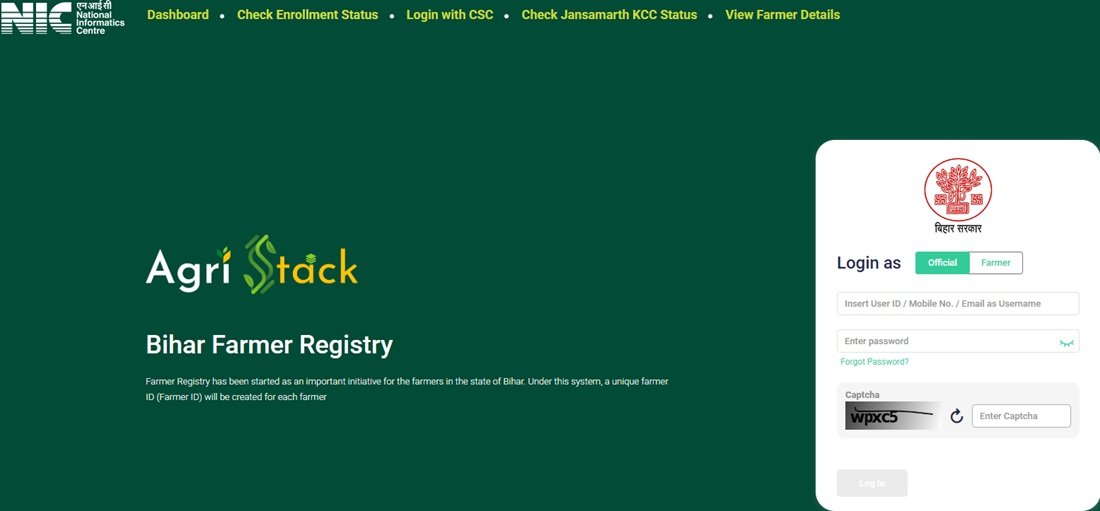
Official Bihar AgriStack Portal Website and Login Page
Farmers should use the official Bihar Farmer Registry website to access AgriStack services. The portal provides a common entry point for its dashboard, enrollment status, CSC login, Jansamarth KCC status and farmer details facilities.
Official website: https://bhfr.agristack.gov.in/farmer-registry-bh/#/
After opening the website, users can find the following main options:
- Dashboard: Displays enrollment figures and Farmer ID progress.
- Check Enrollment Status: Helps farmers check the progress of their enrollment using Aadhaar Number or Farmer ID.
- Login with CSC: Provides a separate login facility for Common Service Centres.
- Check Jansamarth KCC Status: Provides access to the KCC status-check facility.
- View Farmer Details: Allows users to search for farmer details through the available verification process.
The login section also provides separate options for Farmer and Official users. It includes password entry, CAPTCHA verification, a Forgot Password option and a Create New User Account facility.
Always check the website address before entering personal information. Avoid using unofficial websites that claim to provide Bihar AgriStack login or Farmer ID services.
Services and Features Available on Bihar Farmer Registry Portal
The Bihar AgriStack website offers several facilities related to Farmer Registry access and verification. Each option serves a different purpose, so farmers should select the service that matches their requirement.
Dashboard
The dashboard displays state-level enrollment information, including total enrollment, approved Farmer IDs, pending cases and daily enrollment figures. It also provides district-wise enrollment information.
Check Enrollment Status
This facility helps farmers check the progress of their Farmer Registry enrollment in Bihar. The page offers Aadhaar Number and Farmer ID as identification options and uses OTP verification for the Aadhaar-based process.
Login with CSC
The portal provides a separate Login with CSC option for Common Service Centres. CSC operators can use the relevant facility to access the services available to their authorised accounts.
Check Jansamarth KCC Status
Farmers can use this service to check the status associated with their Jansamarth Kisan Credit Card application. The page offers Aadhaar Number or Farmer ID as identification options.
View Farmer Details
This option allows users to search for recorded farmer details using an Aadhaar number and complete the verification requested by the portal.
Farmer and Official Login
The login section separates farmer access from official access. Users should select the correct account type before entering their credentials.
Create New User Account
Farmers who need to activate self-login after CSC or Camp Mode enrollment can use this option to complete the one-time portal account creation process.
How to Login to Bihar AgriStack Portal as a Farmer or Official
The Bihar AgriStack login page provides two account types: Farmer and Official. Select the correct option according to your role. Farmers should not use the Official login option to access their personal account.
Steps for Farmer Login
- Open the official Bihar AgriStack Portal.
- Find the login section on the homepage.
- Under the Login as option, select Farmer.
- Enter the username or login credential requested by the portal.
- Enter your account password.
- Complete the CAPTCHA displayed on the screen.
- Click the Log In button.
- After successful verification, follow the options available in your account.
Important: Farmers who completed their enrollment through a CSC or Camp Mode must first create a portal account. The portal displays a notice about this one-time registration requirement. If you have not completed this step, use the Create New User Account option before attempting to log in.
Steps for Official Login
- Visit the Bihar Farmer Registry Portal.
- Go to the login section.
- Select Official under the Login as option.
- Enter the authorised login credentials.
- Enter the password and complete the CAPTCHA.
- Click Log In to proceed.
The Official login facility is intended for authorised users. Farmers should select the Farmer option instead.
How to Create a New User Account on Bihar AgriStack Portal
The Bihar portal provides a Create New User Account option for farmers who need to set up their login access. This facility is particularly important for farmers whose Farmer Registry enrollment was completed through a CSC or Camp Mode.
According to the notice displayed on the official portal, such farmers must complete a one-time account creation process before they can use the Farmer Login facility.
Steps to Create a New Account
- Visit the official Bihar AgriStack website.
- Go to the login section and select Farmer.
- Read the notice about account creation for farmers registered through CSC or Camp Mode.
- Close the notice and click Create New User Account.
- Follow the Aadhaar e-KYC and consent instructions displayed by the portal.
- Enter the information requested on the screen.
- Complete the verification process shown by the website.
- Submit the details and follow any further instructions displayed by the portal.
The exact fields and verification steps may change as the portal updates its process. Therefore, follow the instructions displayed on the official website instead of relying on an old screenshot or an unofficial tutorial.
Keep ready: Your Aadhaar details and access to the mobile number required for the verification process. Never share an OTP with an unauthorised person.
How to Activate Self-Login After CSC or Camp Registration
Completing Farmer Registry enrollment and creating a portal login account are two different steps. A farmer may have already completed enrollment through a CSC or registration camp but may still need to activate personal login access on the Bihar portal.
The official website specifically displays a notice for farmers registered through CSC or Camp Mode. It instructs them to create a new user account as a one-time step before using Self-Login.
Follow These Steps to Activate Self-Login
- Open the Bihar AgriStack Portal.
- Select the Farmer login option.
- Check the notice about CSC and Camp Mode enrollment.
- Click Create New User Account.
- Complete the Aadhaar e-KYC and consent steps requested by the portal.
- Submit the information and complete any additional verification shown on the screen.
- Return to the login page after completing account creation.
- Select Farmer and enter your login credentials to access the account.
This is a one-time portal account activation process. It does not mean that the farmer must submit a second Farmer Registry enrollment application.
If you have already created your account but cannot log in, check your credentials and use the Forgot Password option if required.
Bihar AgriStack Portal Dashboard: Available Information and Features
The Bihar AgriStack dashboard provides a state-level view of Farmer Registry enrollment and approval progress. It helps visitors understand how many farmers have enrolled, how many Farmer IDs have been approved and how many cases remain pending.
Farmers can open the dashboard without going through the personal login process.
Direct dashboard link: View Bihar AgriStack Dashboard
Information Available on the Dashboard
- PM-KISAN beneficiary count
- Total enrollment till the previous day
- Enrollment as a percentage of PM-KISAN beneficiaries
- Approved Farmer IDs
- Enrollment pending Farmer ID generation and approval
- Today’s enrollment figures
- Enrollment through enhanced name matching
- Cumulative zero-match enrollment count
- Top five districts by farmer enrollment
- Bottom five districts by farmer enrollment
- Enrollment mode information
Bihar Farmer Registry Dashboard Statistics
The following figures were visible on the Bihar portal dashboard on 23 November 2026. These figures are a dated snapshot, not permanent totals. The portal indicates that its data refreshes every five minutes.
| Dashboard Indicator | Figure on 23 November 2026 |
|---|---|
| PM-KISAN Beneficiaries | 86,36,562 |
| Total Enrollment Till Yesterday | 54,71,147 |
| Enrollment as % of PM-KISAN Beneficiaries | 63.35% |
| Approved Farmer IDs | 54,50,118 |
| Farmer IDs as % of PM-KISAN Beneficiaries | 63.35% |
| Enrollment Pending Farmer ID Generation and Approval | 257 |
| Today’s Enrollment Through Enhanced Name Matching | 44 |
| Cumulative Zero Match Enrollment Count from 01 February 2026 | 0 |
| Total Today’s Enrollment | 227 |
Note: The figures above reflect the dashboard snapshot shared for 23 November 2026. For the latest figures, visit the live Bihar Farmer Registry dashboard.
What Does the Dashboard Tell Farmers?
The dashboard gives an overall picture of enrollment activity across Bihar. For example, the total enrollment figure shows how many enrollment records the portal reports, while the approved Farmer ID figure shows the number of IDs approved by the system.
The pending figure indicates cases awaiting Farmer ID generation and approval. It does not represent every possible reason for an individual farmer’s delay. A farmer should use the separate status-check service to view personal enrollment progress.
Similarly, the top and bottom five district sections help visitors compare district-level enrollment activity. These figures do not show the personal status of an individual farmer.
How to Check Bihar Farmer Registry Enrollment Status Online
Farmers can check their enrollment progress through the Check Enrollment Status option on the Bihar AgriStack Portal. The page provides two identification choices: Aadhaar Number and Farmer ID.
Direct status-check link: Check Bihar Farmer Registry Enrollment Status
Steps to Check Enrollment Status Using Aadhaar Number
- Open the Check Enrollment Status page.
- Find the Check Status Against option.
- Select Aadhaar Number.
- Enter your Aadhaar number carefully.
- Complete the verification steps displayed on the page.
- Request the OTP if the portal prompts you to do so.
- Enter the OTP received on the mobile number linked with Aadhaar.
- Submit the details and review the status displayed on the screen.
Steps to Check Enrollment Status Using Farmer ID
- Visit the official enrollment status page.
- Select Farmer ID under the identification option.
- Enter your Farmer ID in the required field.
- Complete the verification requested by the portal.
- Submit the information to view the available status.
The exact verification fields may depend on the option selected and the portal’s current interface. Follow the instructions shown on the page.
What Should You Do If the Status Does Not Appear?
- Check whether you entered the correct Aadhaar number or Farmer ID.
- Make sure you selected the correct identification option.
- If the portal requests an OTP, check that you can access the required mobile number.
- Refresh the page and try again if the service does not respond.
- If the status remains unavailable, contact the CSC or registration camp that handled your enrollment, or seek guidance from the concerned local agriculture office.
If you want to understand the complete enrollment process rather than only check its progress, read our Bihar Farmer Registry and Farmer ID guide.
How to Check Jansamarth KCC Status Through Bihar AgriStack Portal
The Bihar AgriStack Portal also provides a separate facility to check Jansamarth Kisan Credit Card status. Farmers can use this option to check the status associated with their KCC application through the identification methods available on the page.
Direct link: Check Jansamarth KCC Status
Steps to Check Jansamarth KCC Status
- Open the Jansamarth KCC Status page.
- Find the Check Status Against option.
- Select Aadhaar Number or Farmer ID, depending on the details available to you.
- Enter the requested identification number.
- Complete the OTP verification if the portal asks for it.
- Submit the details and review the status displayed on the screen.
The portal’s status-check facility helps users access the available KCC application information. It does not approve a loan or guarantee that a bank will sanction credit. The concerned bank or lending institution makes the final lending decision under its applicable rules.
How to View and Verify Farmer Details Online
The View Farmer Details facility allows users to search for information recorded in the Bihar Farmer Registry. The portal provides a search option based on the farmer’s Aadhaar number and requires OTP verification.
This facility can help farmers review their recorded details after completing Farmer Registry enrollment.
Direct link: View Bihar Farmer Details
Steps to View Farmer Details
- Visit the View Farmer Details page.
- Find the Search By Farmer Aadhaar Number option.
- Enter the Aadhaar number requested by the portal.
- Request and enter the OTP if prompted.
- Complete the verification process.
- Review the farmer information displayed by the website.
Enter your details carefully and use only the official portal. Do not share your Aadhaar OTP with another person or an unauthorised agent.
What If You Find Incorrect Details?
If the portal displays incorrect information, first identify which record contains the error. For example, an issue may relate to identity details or land information. The correction process depends on the type of discrepancy and the department responsible for maintaining that record.
Do not submit another enrollment application simply because you notice an incorrect detail. Seek guidance from the CSC, registration camp or concerned government office that can identify the correct correction procedure.
How to Reset or Recover Bihar AgriStack Portal Login Password
Farmers who cannot remember their portal password can use the Forgot Password option displayed on the Bihar AgriStack login page. This facility helps existing users follow the portal’s password recovery process.
Steps to Recover Your Password
- Open the Bihar AgriStack Portal.
- Go to the login section.
- Select the correct account type, such as Farmer.
- Click the Forgot Password option.
- Follow the instructions displayed on the password recovery page.
- Enter the requested account information and complete verification.
- Set or recover your password according to the portal’s instructions.
- Return to the login page and try signing in with the updated credentials.
The portal may update its password recovery steps from time to time. Follow the current instructions on the website. If the recovery facility does not work, contact the CSC or local office that assisted with your enrollment.
Important Links for Bihar AgriStack Portal
Farmers can use the following direct links to open the main Bihar AgriStack services. Save the official website to avoid searching for it every time.
| Service | Official Link |
|---|---|
| Bihar AgriStack / Farmer Registry Portal | Open Portal |
| Bihar AgriStack Dashboard | View Dashboard |
| Check Enrollment Status | Check Status |
| Check Jansamarth KCC Status | Check KCC Status |
| View Farmer Details | View Details |
| AgriStack Official Website | Visit AgriStack |
| Bihar Agriculture Department DBT Portal | Open DBT Agriculture Portal |
| Bihar Farmer Registry Registration Guide | Read Farmer Registry Guide |
Note: The Bihar Agriculture Department’s DBT portal and the Bihar AgriStack Farmer Registry portal are separate online systems. Use the DBT website for its own agriculture registration and scheme-related services. Use the AgriStack portal for the Farmer Registry services explained in this guide.
Contact and Support Information
If you face a problem while using the Bihar AgriStack Portal, first check the instructions displayed on the relevant service page. The correct support channel may depend on the type of problem.
- CSC or Camp Mode enrollment: Contact the CSC operator or registration camp that handled your enrollment if you need help with your initial registration or self-login activation.
- Farmer login problem: Check whether you completed the one-time account creation process. Use the Forgot Password option if you cannot remember your password.
- Enrollment status problem: Verify the Aadhaar number or Farmer ID entered. If the status remains unavailable, seek help from the registration centre or concerned local agriculture office.
- Incorrect farmer information: Identify the record containing the error and ask the responsible registration or government office about the applicable correction process.
- Jansamarth KCC query: Use the portal’s KCC status-check facility. For loan sanction or bank-related decisions, contact the concerned lending institution.
The portal information reviewed for this guide does not establish a separate public Bihar AgriStack helpline number. Therefore, farmers should not rely on unverified phone numbers circulated online. Use the official website and the registration channel through which you enrolled.
For issues related specifically to Bihar Agriculture Department DBT registration, visit the official DBT Agriculture portal. Its contact details are meant for DBT-related support and should not be treated as a dedicated AgriStack helpdesk.
Frequently Asked Questions (FAQs)
Ans. The official Bihar AgriStack and Farmer Registry portal is bhfr.agristack.gov.in. Farmers can use it to check enrollment status, view farmer details and access other available services.
Ans. Open the official portal, select Farmer under the Login as option, enter your login credentials and password, complete the CAPTCHA and click Log In. Officials should select the Official option.
Ans. Open the portal, select Farmer in the login section and click Create New User Account. Follow the Aadhaar e-KYC, consent and verification instructions displayed on the website.
Ans. The portal instructs farmers registered through CSC or Camp Mode to create a user account before using Self-Login. Complete this one-time account creation process and then try logging in again.
Ans. Select Farmer on the login page, click Create New User Account and complete the verification steps shown by the portal. This activates the account access required for Self-Login.
Ans. Open the Check Enrollment Status page, select Aadhaar Number or Farmer ID, enter the requested details and complete the verification process.
Ans. Yes. The Bihar portal provides an Aadhaar Number option on its enrollment status page. The portal sends an OTP to the mobile number linked with Aadhaar when Aadhaar-based verification is requested.
Ans. Yes. Select Farmer ID under the Check Status Against option and enter your Farmer ID. Complete any additional verification requested by the portal.
Ans. Visit the View Farmer Details page, enter the Aadhaar number requested by the portal and complete OTP verification to review the available information.
Ans. Open the Jansamarth KCC Status page, select Aadhaar Number or Farmer ID, enter the required details and complete the verification process.
Ans. The dashboard displays state-level enrollment information, including PM-KISAN beneficiaries, total enrollment, approved Farmer IDs, pending cases, daily enrollment figures and district-wise enrollment information.
Ans. The dashboard displays overall enrollment figures. To check your own enrollment progress, use the separate Check Enrollment Status facility.
Ans. Open the portal login page and click Forgot Password. Follow the verification and password recovery instructions displayed by the website.
Ans. No. The Bihar AgriStack portal provides Farmer Registry services, while the DBT Agriculture portal handles the Agriculture Department’s separate registration and scheme-related services. They are different online systems.
Ans. The portal specifically instructs farmers enrolled through CSC or Camp Mode to create a new user account before using Self-Login. Follow the notice and account instructions displayed on the official website.
Ans. No. The portal provides a KCC status-check facility, but the concerned bank or lending institution makes the final decision on loan approval.
Ans. A dedicated public AgriStack helpline number could not be confirmed from the portal information reviewed for this guide. Farmers should contact the CSC or camp that handled their enrollment, or seek guidance from the concerned local agriculture office.
Ans. You can open the official website through a mobile browser. Select the required service and follow the instructions displayed on the screen.

Tabassum is a government schemes researcher and writer with 5 years of experience tracking Central and State welfare scheme programmes across India. She has covered 500+ schemes spanning agriculture, women welfare, education, and housing, helping lakhs of beneficiaries understand their entitlements in simple language.