The Uttarakhand AgriStack Portal provides a digital platform for accessing the state’s AgriStack services. Through the official UKFR portal, farmers and officials can access their respective login sections, check enrollment status, use CSC login, view farmer details and access dashboard statistics. The portal also provides an Aadhaar e-KYC facility for users who need to create a new portal account.
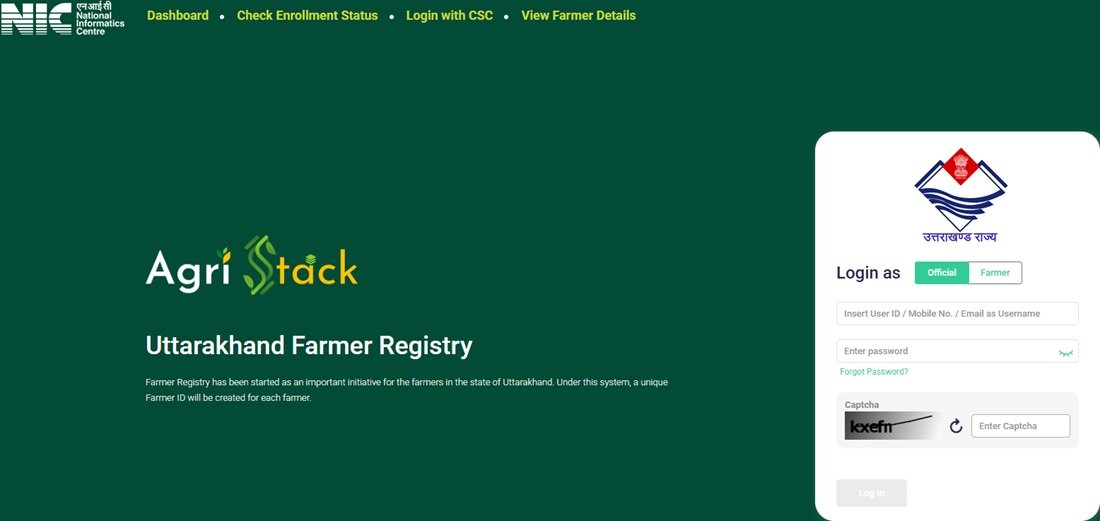
The portal homepage displays separate options for Dashboard, Check Enrollment Status, Login with CSC and View Farmer Details. It also allows users to log in as an Official or Farmer. Users who completed their Farmer Registry Uttarakhand process through CSC or Camp Mode must first create a portal account to activate self-login access.
This guide explains the features and services of the Uttarakhand AgriStack Portal, including its login process, new account creation, Aadhaar e-KYC, enrollment status facility, dashboard and important links.
Introduction to Uttarakhand AgriStack Portal
The Government of Uttarakhand operates a dedicated AgriStack portal for the state. Farmers and officials can use this portal to access different facilities related to the state’s AgriStack system. The portal is officially available through the UKFR website, which uses the domain ukfr.agristack.gov.in.
The homepage identifies the platform as the Uttarakhand Farmer Registry and explains that the system will create a unique Farmer ID for each farmer. However, the portal offers more than a login page. It also provides a dashboard, enrollment status checking, CSC access and an Aadhaar-based facility to view farmer details.
The portal provides two main login roles: Official and Farmer. It also displays a separate Login with CSC option. Farmers who completed their registration through CSC or Camp Mode must create a portal account once before they can use self-login access. The portal displays this instruction through a notice on its homepage.
AgriStack forms part of the wider Digital Agriculture Mission. The Uttarakhand Agriculture Department identifies AgriStack, Farmer Registry, Geo-referenced Village Cadastral Maps, Crop Sown Registry, Agricultural Decision Support System, Soil Survey and Profile Mapping, and Digital General Crop Estimation Survey as important components of this mission. You can read more on the Uttarakhand Agriculture Department’s Digital Agriculture Mission page.
Farmers can visit the official portal to access the available services:
Official Portal: Uttarakhand AgriStack Portal
For a separate explanation of the state’s Farmer Registry Uttarakhand process, users can also visit the related guide on this website.
Uttarakhand AgriStack Portal: Key Highlights
The following table summarises the main details and facilities available on the Uttarakhand AgriStack Portal.
Uttarakhand AgriStack Portal Overview | |
|---|---|
| Portal Name | Uttarakhand AgriStack Portal |
| Portal Abbreviation | UKFR |
| State | Uttarakhand |
| Portal Category | Digital Agriculture Portal |
| Official Website | ukfr.agristack.gov.in |
| Login Roles | Official and Farmer |
| CSC Login | Available |
| Dashboard | Available |
| Enrollment Status Check | Aadhaar Number and Farmer ID |
| View Farmer Details | Aadhaar Number and OTP-based facility |
| New User Account | Aadhaar e-KYC facility |
| Account Activation Notice | Applicable to users registered through CSC or Camp Mode who need to activate self-login access |
Services Available on Uttarakhand AgriStack Portal
The Uttarakhand AgriStack Portal provides several options on its homepage. Users can access the dashboard, check enrollment status, open the CSC login facility and view farmer details. The portal also provides login and new account creation options.
Here is a brief explanation of the main facilities available on the portal:
| Portal Service | Purpose |
|---|---|
| Dashboard | Displays enrollment figures, approved Farmer IDs, pending records and district-wise enrollment information. |
| Check Enrollment Status | Allows users to check enrollment status using an Aadhaar Number or Farmer ID. |
| Login with CSC | Provides a separate login option for Common Service Centre users. |
| View Farmer Details | Provides an Aadhaar number-based search facility followed by OTP verification. |
| Official Login | Allows authorised officials to access the portal through the Official login option. |
| Farmer Login | Allows farmers with portal accounts to access the Farmer login section. |
| Create New User Account | Opens the Aadhaar e-KYC facility for creating a new portal account. |
| Forgot Password | Provides a password recovery option on the login page. |
Uttarakhand AgriStack Portal Login Process
The Uttarakhand AgriStack Portal provides separate login roles for officials and farmers. Users can find these options in the login section on the homepage. Before logging in, they should select the correct role and keep their registered login details ready.
Follow these steps to access the portal:
- Visit the official Uttarakhand AgriStack Portal.
- Locate the login section on the homepage.
- Select Official or Farmer, depending on your account type.
- Enter the login details requested by the portal.
- Enter the displayed CAPTCHA code in the designated field.
- Click the Log In button to continue.
The login page also provides a Show option beside the password field. Users can select it to view the password they have entered. The page also displays a Forgot Password? option for users who cannot remember their login password.
Important: The portal homepage displays Official and Farmer login roles. Users should select the role that matches their account. CSC users should use the separate Login with CSC facility where applicable.
New User Account Creation on UKFR Portal
The Uttarakhand AgriStack Portal provides a Create New User Account option on its homepage. This facility is important for users whose registration was completed through CSC or Camp Mode but who have not yet activated their self-login access.
The portal displays a specific notice explaining this requirement. According to the notice, users whose registration was created through CSC or Camp Mode must first create their portal account. They need to complete this one-time registration before they can use the self-login facility.
The account creation page opens an Aadhaar e-KYC section. It displays a consent statement for identity verification through Aadhaar information, along with Reset and Submit options.
Follow these steps to open the new account facility:
- Open the Uttarakhand AgriStack Portal homepage.
- Find the Create New User Account option below the login section.
- Click the option to open the Aadhaar e-KYC page.
- Read the Aadhaar identity verification consent statement displayed on the page.
- Enter or provide the details requested by the Aadhaar e-KYC interface.
- Review the information and follow the instructions shown on the portal.
- Use the Submit option to proceed with the process.
The page also provides a Reset option. Users can use it if they need to clear the entered information and start again.
Direct Link: Create New User Account through Aadhaar e-KYC
Note: The visible portal page confirms the Aadhaar e-KYC consent, Reset and Submit options. It does not provide a complete list of fields or all verification screens in the information shared for this guide. Therefore, users should follow the instructions displayed during the actual e-KYC process.
Uttarakhand AgriStack Enrollment Status Check
The Uttarakhand AgriStack Portal provides a separate Check Enrollment Status facility. Users can access this section directly from the homepage without opening the regular login dashboard.
The status-check page displays the Check Status Against section with two options:
- Aadhaar Number: Users can select this option and complete OTP verification. The portal sends the OTP to the mobile number linked with Aadhaar.
- Farmer ID: Users can select this option to check enrollment status through their Farmer ID.
Follow these steps to open the enrollment status facility:
- Visit the official Check Enrollment Status page.
- Locate the Check Status Against section.
- Select Aadhaar Number or Farmer ID.
- If you select Aadhaar Number, enter the required details and proceed with OTP verification.
- Check the mobile number linked with Aadhaar for the OTP.
- Enter the OTP and follow the instructions displayed on the portal.
Users who select the Farmer ID option should enter the details requested by the portal. They should carefully check the information before submitting it.
Direct Link: Uttarakhand AgriStack Enrollment Status Check
Uttarakhand AgriStack Dashboard: Features and Statistics
The Uttarakhand AgriStack Portal provides a public dashboard that displays important enrollment-related statistics. Users can open this section directly from the homepage through the Dashboard option.
The dashboard presents information about PM-KISAN beneficiaries, total enrollment, approved Farmer IDs, pending records and daily enrollment. It also provides district-level enrollment information through separate sections for the top five and bottom five districts.
The dashboard information shared for this article displayed the following figures:
| Dashboard Indicator | Displayed Figure |
|---|---|
| PM-KISAN Beneficiaries | 10,23,545 |
| Total Enrollment Till Yesterday | 4,71,004 |
| Enrollment as a Percentage of PM-KISAN Beneficiaries | 46.42% |
| Approved Farmer IDs | 4,33,145 |
| Farmer IDs as a Percentage of PM-KISAN Beneficiaries | 46.41% |
| Enrollment Pending Farmer ID Generation and Approval | 98 |
| Today’s Enrollment Through Enhanced Name Matching | 214 |
| Total Today’s Enrollment | 4,128 |
Important: These figures represent the dashboard snapshot shared for this article. The capture date was not provided, so users should not treat these numbers as the latest live statistics. The dashboard states that its data refreshes every five minutes. Therefore, the displayed figures may change over time.
The Uttarakhand AgriStack Dashboard also contains the following sections:
- Enrollment Mode: Displays enrollment-related information according to the available modes.
- Farmer Enrollment – Top 5 Districts: Shows the five leading districts according to the dashboard’s enrollment data.
- Farmer Enrollment – Bottom 5 Districts: Shows the five districts appearing at the bottom of the displayed enrollment data.
Users can open the dashboard through the following direct link:
Open Uttarakhand AgriStack Dashboard
View Farmer Details on Uttarakhand AgriStack Portal
The Uttarakhand AgriStack Portal provides a separate View Farmer Details facility. This section allows users to search for farmer details using a Farmer Aadhaar Number and complete OTP verification.
The page displays the heading Search By Farmer Aadhaar Number and provides an OTP-based verification facility.
Follow these steps to access this section:
- Visit the View Farmer Details page.
- Locate the Search By Farmer Aadhaar Number field.
- Enter the required Aadhaar number.
- Proceed with the OTP verification displayed by the portal.
- Enter the OTP and follow the instructions shown on the screen.
Users should enter their own correct Aadhaar details and complete the verification process. The information available after verification depends on the options and access rules displayed by the portal.
Direct Link: View Farmer Details on UKFR Portal
Aadhaar e-KYC for New User Account Activation
The Uttarakhand AgriStack Portal uses an Aadhaar e-KYC page for its new user account facility. When users click Create New User Account, the portal opens a page titled Aadhaar e-KYC.
This page displays a consent statement. Through this statement, the user authorises identity verification using Aadhaar information and confirms that the Aadhaar details provided belong to them. The statement also explains that the information will be used for identity verification and handled under applicable privacy and data protection rules.
The page displays two main options:
- Reset: Allows users to clear the entered information and restart the process.
- Submit: Allows users to proceed after reviewing the displayed consent and providing the required information.
Users should read the consent statement carefully before proceeding. They should provide their own correct Aadhaar details and use the facility only for the stated identity verification purpose.
This e-KYC facility is particularly relevant to users who completed their registration through CSC or Camp Mode and need to activate self-login access. The portal describes account creation as a one-time process for these users.
Open Aadhaar e-KYC: UKFR New User Account Page
Important Links
Users can access the main services of the Uttarakhand AgriStack Portal through the following direct links.
| Service | Direct Link |
|---|---|
| Uttarakhand AgriStack Portal Homepage | Click Here |
| AgriStack Dashboard | Click Here |
| Check Enrollment Status | Click Here |
| View Farmer Details | Click Here |
| Create New User Account / Aadhaar e-KYC | Click Here |
| Uttarakhand Agriculture Department | Click Here |
| Digital Agriculture Mission in Uttarakhand | Click Here |
| AgriStack Information by Board of Revenue | Click Here |
| Uttarakhand Agriculture Department Contact Details | Click Here |
| Kisaan Helpline | Click Here |
Contact Details and Helpdesk
Users who face difficulties while accessing the Uttarakhand AgriStack Portal can contact the Agriculture Department or visit their nearby Agriculture Office for assistance. The Uttarakhand Agriculture Department also provides a dedicated Kisaan Helpline number.
Uttarakhand Kisaan Helpline: 18001801551
The Agriculture Department has also published the following contact details:
| Department | Directorate of Agriculture, Uttarakhand |
| Office Address | Krishi Bhawan, Nanda-Ki-Chowki, Premnagar, Dehradun-248007, Uttarakhand |
| Landline Numbers | 0135-2972421 / 0135-2972422 |
| Fax | 0135-2972425 |
| dir-agri-ua@nic.in | |
| Kisaan Helpline | 18001801551 |
For the latest contact information, users should refer to the official Agriculture Department contact page and Kisaan Helpline page.
Users can also visit their nearby Agriculture Office for assistance with AgriStack-related queries. The department provides this guidance on its Digital Agriculture Mission page.
Frequently Asked Questions (FAQs)
Ans. The Uttarakhand AgriStack Portal is the state’s official digital platform for accessing AgriStack-related facilities. It provides dashboard information, enrollment status checking, CSC login, farmer details and new user account creation.
Ans. The official website is https://ukfr.agristack.gov.in/farmer-registry-uk/.
Ans. UKFR refers to the Uttarakhand portal hosted under the Farmer Registry section of the AgriStack platform. Users can access it through the official ukfr.agristack.gov.in domain.
Ans. The portal provides two login roles, Official and Farmer. It also displays a separate Login with CSC option on the homepage.
Ans. Yes. Farmers can select the Farmer option in the login section and enter the details requested by the portal.
Ans. The portal notice states that users whose registration was created through CSC or Camp Mode must complete a one-time account creation process to activate their self-login access.
Ans. Yes. The Create New User Account option opens an Aadhaar e-KYC page. It displays an identity verification consent statement, along with Reset and Submit options.
Ans. Yes. Select Aadhaar Number under Check Status Against and complete OTP verification. The portal sends the OTP to the mobile number linked with Aadhaar.
Ans. Yes. The Check Enrollment Status page provides Farmer ID as another option under Check Status Against.
Ans. Yes. The dashboard displays PM-KISAN beneficiary figures, total enrollment, approved Farmer IDs, pending records, daily enrollment and district-wise enrollment sections.
Ans. The dashboard states that its data refreshes every five minutes. Therefore, the displayed statistics may change over time.
Ans. Yes. The portal provides a View Farmer Details section. Users can search through a Farmer Aadhaar Number and complete OTP verification.
Ans. Yes. The login page displays a Forgot Password option for users who cannot remember their login password.
Ans. The Uttarakhand Agriculture Department lists 18001801551 as its Kisaan Helpline number. Users can also contact their nearby Agriculture Office for assistance.
Ans. Users can visit the official Uttarakhand AgriStack Portal, the Agriculture Department website and the Board of Revenue website. These government websites provide portal access and information about the Digital Agriculture Mission and AgriStack.

Tabassum is a government schemes researcher and writer with 5 years of experience tracking Central and State welfare scheme programmes across India. She has covered 500+ schemes spanning agriculture, women welfare, education, and housing, helping lakhs of beneficiaries understand their entitlements in simple language.