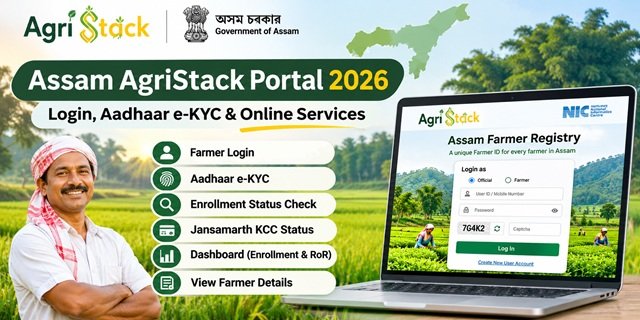
The Assam AgriStack Portal provides a digital platform for accessing Farmer Registry services in the state. Farmers, officials and authorised Common Service Centre (CSC) operators can use the portal to access different facilities, including account login, Aadhaar e-KYC, enrollment status checks and farmer details. It also provides a separate facility to check Jansamarth KCC status and an administrative dashboard to monitor land record synchronization.
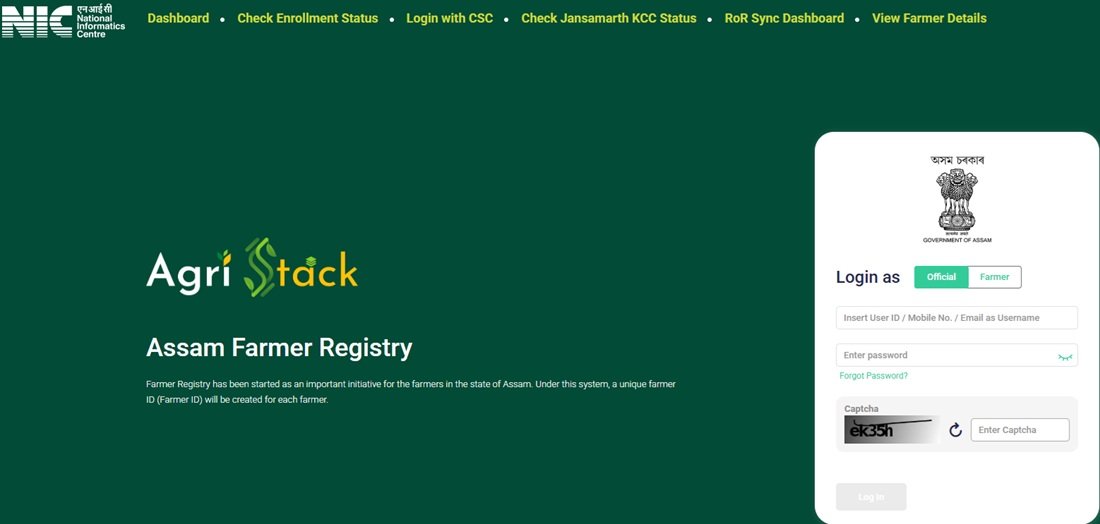
The official portal, developed for Assam’s Farmer Registry initiative, displays separate login options for farmers and officials. It also provides facilities such as the Farmer Registry Dashboard, Check Enrollment Status, Login with CSC, Check Jansamarth KCC Status, RoR Sync Dashboard and View Farmer Details. This guide explains these portal facilities and the steps users can follow to access them.
Assam AgriStack Portal Key Highlights
Assam AgriStack Portal Overview | |
|---|---|
| Portal Name | Assam AgriStack Portal |
| Official Website | asfr.agristack.gov.in |
| Portal Name on Homepage | Assam Farmer Registry |
| Portal Platform | AgriStack |
| Primary Purpose | Access to Assam Farmer Registry services and related digital facilities |
| Login Options | Farmer, Official and CSC |
| Account Creation | Available through Aadhaar e-KYC |
| Status Check | Aadhaar Number or Farmer ID |
| Additional Facility | Jansamarth KCC Status Check |
| Dashboard Facilities | Farmer Registry Dashboard and RoR Synchronization Dashboard |
| Portal Access | Online |
Services and Facilities Available on Assam AgriStack Portal
The Assam AgriStack Portal offers several facilities through its homepage menu. Each option serves a different purpose, so users can directly visit the relevant section instead of navigating through unrelated pages.
- Dashboard: Displays Farmer Registry enrollment figures, approved Farmer IDs, pending records and district-wise enrollment information.
- Check Enrollment Status: Allows users to check their enrollment status using an Aadhaar Number or Farmer ID.
- Login with CSC: Provides a separate login facility for Common Service Centre users.
- Check Jansamarth KCC Status: Helps users check their Jansamarth Kisan Credit Card (KCC) status using an Aadhaar Number or Farmer ID.
- RoR Sync Dashboard: Displays information related to the synchronization of Records of Rights (RoR) and Farmer Registry data.
- View Farmer Details: Provides an Aadhaar-based OTP verification facility to access farmer details.
- Farmer and Official Login: Provides separate login options for farmers and government officials.
- Create New User Account: Allows eligible existing registrants to create a portal account through Aadhaar e-KYC and activate Self-Login access.
These facilities make the portal useful for farmers, CSC operators and authorised officials who need to access or monitor different Farmer Registry services in Assam. For information about the Farmer ID registration process itself, users can visit the detailed Farmer Registry Assam Guide.
Official Assam AgriStack Portal Access
Farmers and other users can access the official Assam AgriStack Portal through the following website:
Official Portal: https://asfr.agristack.gov.in/farmer-registry-as/
After opening the homepage, users can find the available services in the navigation menu. The portal displays options for the Dashboard, Check Enrollment Status, Login with CSC, Check Jansamarth KCC Status, RoR Sync Dashboard and View Farmer Details.
Users should access the portal through its official government-linked domain and avoid entering Aadhaar details or other personal information on unrelated websites.
Login Options Available on Assam AgriStack Portal
The Assam AgriStack homepage provides separate login options for farmers and officials. Users can select the appropriate login category and enter the requested credentials to access their accounts. The login interface also displays password visibility, CAPTCHA verification and a Forgot Password option.
Farmer Login
Farmers can select the Farmer option under the Login as section on the homepage. They can then enter their registered login credentials, complete the CAPTCHA verification and select the Log In option.
Farmers who registered through a CSC or a government registration camp should first complete the one-time account creation process if they have not activated their Self-Login access. The portal displays this instruction on its homepage.
Official Login
Government officials can select the Official option under the Login as section. They must enter the login credentials assigned to them and complete the CAPTCHA verification before accessing the portal.
The official login facility is intended for authorised users. Farmers should select the Farmer login option instead of using the official login facility.
CSC Login
The homepage also provides a separate Login with CSC option. Common Service Centre operators can select this option to access the CSC login facility.
CSC operators should use their authorised login credentials and follow the instructions displayed on the portal. This option is separate from the Farmer and Official login choices available on the homepage.
New User Account Creation and Aadhaar e-KYC
The Assam AgriStack Portal provides a Create New User Account option for users who need to activate their portal login access. The account creation page displays an Aadhaar e-KYC section and asks users to provide consent for identity verification using Aadhaar information.
Users can access the account creation page directly through the following link:
Create New User Account: Open Aadhaar e-KYC Page
Aadhaar e-KYC Process
The portal displays an Aadhaar e-KYC heading with a consent statement. This statement explains that the user authorises identity verification through Aadhaar information. It also confirms that the information provided for verification will be handled according to applicable data protection and privacy laws.
Users can follow these steps to access the account creation facility:
- Visit the official Assam AgriStack Portal.
- Select the Create New User Account option on the homepage.
- The portal will open the Aadhaar e-KYC page.
- Read the Aadhaar identity verification consent statement carefully.
- Provide consent and follow the verification instructions displayed on the page.
- Use the Submit option to proceed with the account creation process.
The page also provides a Reset option. Users can use it to clear the entered information and restart the process if required.
Important Note for CSC and Camp Mode Registered Farmers
The portal displays an important notice for farmers whose Farmer Registry was created through CSC or Camp Mode. Such farmers must first create their portal account before logging in. They need to select Create New User Account and complete the one-time registration process to activate Self-Login access.
This process activates portal login access for an existing registration. It should not be confused with a fresh Farmer Registry enrollment. Farmers who want to understand the original registration process can refer to the detailed Farmer Registry Assam Article.
Assam Farmer Enrollment Status Check
The Assam AgriStack Portal provides a separate Check Enrollment Status facility. Users can select either Aadhaar Number or Farmer ID to check their enrollment status.
Open the official status-check page through this link:
Enrollment Status: Check Enrollment Status on Assam AgriStack Portal
The page displays a Check Status Against section with two options: Aadhaar Number and Farmer ID.
Status Check Through Aadhaar Number
Users who select Aadhaar Number can proceed with the Aadhaar-based verification facility. The portal states that it will send an OTP to the mobile number linked with the Aadhaar number.
- Open the Check Enrollment Status page.
- Select Aadhaar Number under the Check Status Against section.
- Enter the Aadhaar details requested by the portal.
- Complete the OTP verification using the mobile number linked with Aadhaar.
- Follow the on-screen instructions to view the enrollment status.
Status Check Through Farmer ID
The portal also provides a Farmer ID option. Users who already have their Farmer ID can select this option and follow the verification instructions displayed on the page.
The exact fields and verification steps may depend on the option selected. Users should enter the requested information carefully and follow the portal’s instructions to view their status.
Jansamarth KCC Status Check on Assam AgriStack Portal
One useful additional facility on the Assam AgriStack Portal is the Check Jansamarth KCC Status option. It allows users to access a dedicated status-check page for Jansamarth Kisan Credit Card (KCC) applications or records.
Unlike the general enrollment status page, this facility specifically relates to Jansamarth KCC status. Users can access it directly through the following link:
Jansamarth KCC Status: Check Jansamarth KCC Status
The page displays a Check Status Against section with two options:
- Aadhaar Number: Users can select this option and complete OTP verification. The portal states that it sends the OTP to the mobile number linked with Aadhaar.
- Farmer ID: Users can select this option and follow the verification instructions displayed on the page.
Users should choose the appropriate option and provide the requested details. They should also ensure that they access the Jansamarth KCC status page from the official Assam AgriStack website.
View Farmer Details on Assam AgriStack Portal
The portal provides a separate View Farmer Details facility. Users can access this page to search for farmer details through an Aadhaar-based verification process.
The page displays the Search By Farmer Aadhaar Number option and an OTP verification facility. Users need to enter the Aadhaar number and complete the verification process to proceed.
Follow these steps:
- Visit the View Farmer Details page.
- Enter the Farmer Aadhaar Number in the requested field.
- Complete the OTP verification process using the registered mobile number, as instructed by the portal.
- Follow the on-screen instructions to access the available farmer details.
Users should enter their own Aadhaar details or use this facility only when they have proper authorisation. They should not share OTPs or Aadhaar information with unauthorised persons.
Assam AgriStack Dashboard: Enrollment Statistics
The Assam AgriStack Portal includes a Dashboard that displays important Farmer Registry statistics. It provides an overview of total enrollment, approved Farmer IDs, pending records and daily enrollment activity. Users can also find enrollment information related to different districts.
Access the dashboard through the following official link:
Assam AgriStack Dashboard: Open Dashboard
The dashboard displays the following information:
PM-KISAN Beneficiaries
This figure represents the number of PM-KISAN beneficiaries displayed on the dashboard. The portal uses this figure as a reference for presenting Farmer Registry enrollment progress.
Total Farmer Enrollment
The Total Enrollment Till Yesterday figure displays the number of farmer enrollment records counted up to the previous day. The dashboard also shows enrollment as a percentage of PM-KISAN beneficiaries.
Approved Farmer IDs
This section displays the number of Farmer IDs approved in the registry. The dashboard also shows the percentage of approved Farmer IDs in relation to the displayed PM-KISAN beneficiary count.
Pending Farmer ID Generation and Approval
The dashboard displays the number of enrollment records pending Farmer ID generation and approval. This figure helps users understand how many records are still awaiting the required processing.
Daily Enrollment Statistics
The dashboard provides daily enrollment information through two separate figures:
- Today’s Enrollment Counts via Enhanced Name Matching: Displays the number of enrollments recorded through the enhanced name-matching process.
- Total Today’s Enrollment: Displays the total enrollment count for the current day.
The portal states that dashboard data gets refreshed every five minutes. Therefore, the displayed figures can change as the system receives and processes new records.
District-Wise Enrollment Data
The Assam AgriStack Dashboard also includes two district-level sections:
- Farmer Enrollment – Top 5 Districts: Displays the five districts with the highest enrollment figures.
- Farmer Enrollment – Bottom 5 Districts: Displays the five districts with the lowest enrollment figures.
These sections help users understand how Farmer Registry enrollment is progressing across different districts of Assam.
Dashboard Statistics Displayed on 20 November 2026
During the portal inspection on 20 November 2026, the Assam AgriStack Dashboard displayed the following figures. These numbers are only a dated snapshot and should not be treated as permanent or current figures.
| Dashboard Information | Displayed Figure |
|---|---|
| PM-KISAN Beneficiaries | 24,87,399 |
| Total Enrollment Till Yesterday | 18,04,376 |
| Enrollment as a % of PM-KISAN Beneficiaries | 72.78% |
| Approved Farmer IDs | 16,25,509 |
| FID as a % of PM-KISAN Beneficiaries | 72.74% |
| Enrollment Pending Farmer ID Generation and Approval | 826 |
| Today’s Enrollment Counts via Enhanced Name Matching | 504 |
| Total Today’s Enrollment | 5,885 |
Users should visit the live Assam AgriStack Dashboard to check the latest available statistics.
Assam RoR Synchronization Dashboard
The Assam AgriStack Portal also provides a separate RoR Sync Dashboard. RoR stands for Record of Rights, which contains land ownership and related land record information. This dashboard displays information about land record data synchronization and related administrative activities.
Users can open the dashboard through the following official link:
RoR Synchronization Dashboard: Open RoR Sync Dashboard
The dashboard provides filters and data indicators to help authorised users monitor synchronization activities across Assam.
District, Sub-District and Village Filters
The dashboard provides filters for District, Sub-District and Village. It also includes From and To date fields to select a particular reporting period. Users can apply the selected filters to view the corresponding information.
Land Record Synchronization Statistics
The dashboard displays several important indicators related to land record data processing:
- Total Districts: Number of districts covered in the dashboard.
- Total Sub-Districts: Number of sub-districts included in the displayed data.
- Total Villages: Number of villages covered in the synchronization data.
- History Data Pulled: Records retrieved through the historical data process.
- Data Deleted: Number of records marked for deletion in the displayed process.
- Data Inserted: Number of records inserted into the relevant data system.
- Actions on SFDB Unified Table: Displays the recorded actions on the SFDB Unified Table.
- Incremental Farmer IDs Pushed: Shows the number of incremental Farmer IDs pushed through the synchronization process.
- Live Data Pulled: Records retrieved through the live data process.
Data Pulled: History API vs Live API
This section compares the data pulled through the History API and Live API. It helps authorised users review the difference between historical records and live data retrieved during synchronization.
Data Deleted: Breakdown by Reason
The dashboard includes a separate breakdown of deleted records by reason. This section helps users understand the recorded reasons behind data deletion.
Actions on SFDB Unified Table
This section displays information about the actions performed on the SFDB Unified Table. It forms part of the dashboard’s administrative data monitoring facilities.
Farmer Transition Matrix
The dashboard also includes a Farmer Transition Matrix. The shared portal view displays this section for Barpeta district, with categories such as Big, Small, Marginal and Landless. It presents the movement of records between these categories through Total In and Total Out figures.
District-Wise Data Insertion Details
The dashboard provides a district-wise breakdown of data insertion. The table includes the following information:
- District Name
- Number of Sub-Districts
- Number of Villages
- Records Inserted
This table helps authorised users review the number of records inserted across different districts of Assam.
Incremental Farmer IDs Pushed
The dashboard also provides separate viewing options for Incremental Farmer IDs Pushed over 30 Days, 15 Days and 7 Days. These options help users review the incremental Farmer ID synchronization activity over different periods.
Note: The RoR Sync Dashboard primarily displays administrative and data synchronization information. It is different from the farmer-facing enrollment status and View Farmer Details facilities.
Important Links and Direct Portal Access
Users can access the main Assam AgriStack Portal and its available services through the following direct links.
| Portal Service | Direct Link |
|---|---|
| Assam AgriStack Portal | Open Portal |
| Dashboard | View Dashboard |
| Check Enrollment Status | Check Status |
| Create New User Account | Open Aadhaar e-KYC |
| Login with CSC | Visit Portal Homepage |
| Jansamarth KCC Status | Check KCC Status |
| View Farmer Details | View Details |
| RoR Synchronization Dashboard | Open RoR Dashboard |
| Farmer Registry Assam: Registration and Farmer ID Guide | Read Complete Guide |
Frequently Asked Questions (FAQs)
Ans. The official website is https://asfr.agristack.gov.in/farmer-registry-as/. Users can access the available Farmer Registry services through this portal.
Ans. The portal provides Farmer and Official Login, CSC Login, Aadhaar e-KYC account creation, enrollment status check, Jansamarth KCC status check, View Farmer Details, Farmer Registry Dashboard and RoR Synchronization Dashboard.
Ans. Farmers can open the official portal, select the Farmer option under Login as, enter their login credentials, complete the CAPTCHA and select Log In.
Ans. Yes. The homepage displays separate Farmer and Official login options. Authorised government officials can select the Official option to access their accounts.
Ans. Yes. The homepage provides a separate Login with CSC option for Common Service Centre operators.
Ans. Users can select Create New User Account on the homepage. The portal opens an Aadhaar e-KYC page where users must provide consent and follow the identity verification instructions.
Ans. Yes. The portal instructs farmers whose Farmer Registry was created through CSC or Camp Mode to complete a one-time account creation process before logging in. This activates their Self-Login access.
Ans. Yes. Users can open the Check Enrollment Status page and select either Aadhaar Number or Farmer ID to proceed with the verification process.
Ans. Yes. The portal provides an Aadhaar Number option. It states that an OTP will be sent to the mobile number linked with Aadhaar for verification.
Ans. Yes. Users can select the Farmer ID option on the Check Enrollment Status page and follow the instructions displayed by the portal.
Ans. It is a separate facility that allows users to check Jansamarth KCC status. The page provides Aadhaar Number and Farmer ID options.
Ans. Users can open the Jansamarth KCC Status page, select Aadhaar Number and complete OTP verification. The portal sends the OTP to the mobile number linked with Aadhaar.
Ans. Yes. The View Farmer Details page provides a Search By Farmer Aadhaar Number option and an OTP verification facility.
Ans. The dashboard displays PM-KISAN beneficiaries, total enrollment, approved Farmer IDs, pending Farmer ID generation and approval, daily enrollment figures and top and bottom five district enrollment information.
Ans. The portal states that dashboard data gets refreshed every five minutes. Therefore, the displayed figures may change over time.
Ans. The RoR Sync Dashboard displays administrative information about Records of Rights and related data synchronization activities. It includes district-level filters, historical and live data figures, data insertion and deletion details and incremental Farmer ID information.
Ans. The RoR Sync Dashboard is a separate administrative monitoring facility. Farmers should use the Check Enrollment Status page to check their enrollment records.
Ans. Users can visit the official Assam AgriStack Dashboard to view the latest figures displayed by the portal.
Ans. The AgriStack Portal is the online platform through which users access the available services. For details about the Farmer Registry initiative, registration process and Farmer ID, users can read the dedicated Farmer Registry Assam Guide.

Tabassum is a government schemes researcher and writer with 5 years of experience tracking Central and State welfare scheme programmes across India. She has covered 500+ schemes spanning agriculture, women welfare, education, and housing, helping lakhs of beneficiaries understand their entitlements in simple language.