Farmers in West Bengal can use the AgriStack WBFR portal to access various online services related to the state’s Farmer Registry. The official website provides dedicated options for farmer registration, WBFR login, enrollment status checking and viewing Farmer Details. Whether you want to access the Farmer Registry portal for the first time or check your existing enrollment information, this guide explains the available website facilities and how to reach them.
Introduction to WBFR Official Portal: A Brief Insight
The West Bengal Farmer Registry portal is the official online platform for accessing Farmer Registry services in the state. It provides different facilities for farmers, authorised officials and Common Service Centre (CSC) users. Farmers can use this portal to access registration facilities, check their enrollment status and view their Farmer Registry details.
The portal operates under the AgriStack initiative and provides a digital platform for managing Farmer Registry-related services in West Bengal. Users can access the required facility directly instead of navigating through different websites.
To access the official website, visit the following link:
Official WBFR Portal: https://wbfr.agristack.gov.in/farmer-registry-wb/
For detailed information about Farmer ID registration, eligibility, documents and the application process, read our AgriStack West Bengal Farmer ID Registration and Login Guide.
Overview of West Bengal Farmer Registry Portal
| Portal Name | West Bengal Farmer Registry (WBFR) Portal |
| Official Website | wbfr.agristack.gov.in |
| Portal Purpose | Access to Farmer Registry services |
| State | West Bengal |
| Available Access Options | Farmer, Official and CSC |
| Online Facilities | Registration, Enrollment Status and Farmer Details |
Services and Options Available on the WBFR Portal
The WBFR homepage provides different options for accessing AgriStack West Bengal services. Each option serves a specific purpose, allowing users to select the required facility.
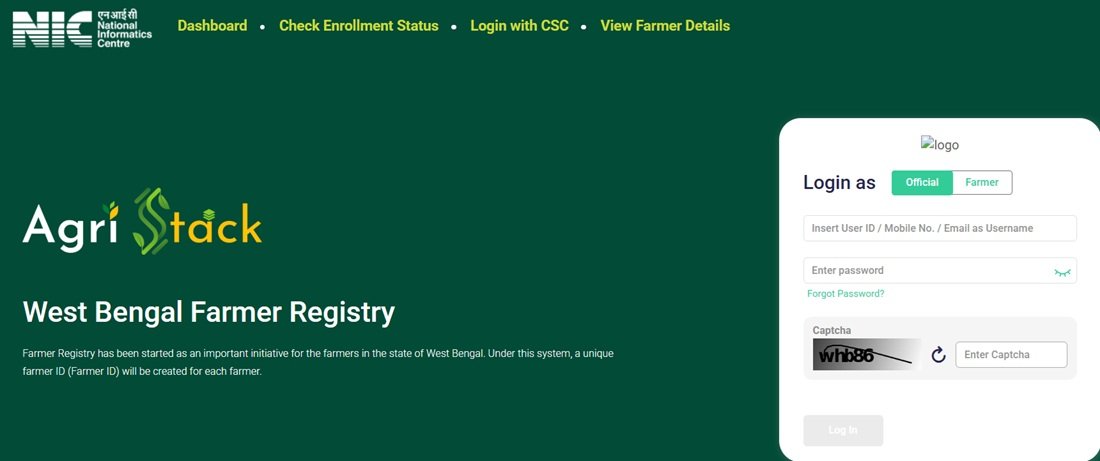
- Dashboard: Users can access the dedicated dashboard section of the Farmer Registry portal.
- Farmer Registration: The portal provides a registration facility for farmers to access the Farmer Registry enrollment process.
- Check Enrollment Status: Farmers can check their registration status using their Aadhaar Card or Farmer ID.
- View Farmer Details: Users can access the dedicated page to view their Farmer Registry details by providing their Aadhaar Card.
- Login with CSC: This option provides a separate access route for users accessing the system through Common Service Centres.
- Login as Farmer: Farmers can use this option to access the farmer login facility.
- Login as Official: Authorised officials can select this option to access the official login facility.
How to Access the WBFR Official Website?
Farmers can access the West Bengal Farmer Registry website through a mobile phone, laptop or desktop computer. Follow these steps to explore the available portal facilities:
Step 1: Open a web browser and visit the official WBFR AgriStack Portal.
Step 2: Once the homepage opens, review the available options, including Dashboard, Check Enrollment Status, Login with CSC and View Farmer Details.
Step 3: Select the facility you want to access. For example, choose the registration option if you want to proceed with Farmer Registry enrollment.
Step 4: To check your enrollment status, open the dedicated status-check page and use your Aadhaar Card or Farmer ID as required by the portal.
Step 5: If you want to view your Farmer Registry details, select View Farmer Details and provide your Aadhaar Card details.
Step 6: For account access, select Login as Farmer or Login as Official according to your user category.
Always verify the website address before entering personal information or login credentials.
How to Check WBFR Enrollment Status?
The West Bengal Farmer Registry portal provides a separate facility to check the enrollment status of farmers. Users can access this service using their Aadhaar Card or Farmer ID.
Follow these steps to check your AgriStack WB registration status:
Step 1: Visit the official WBFR Enrollment Status Page.
Step 2: Use the available Aadhaar Card or Farmer ID option to proceed.
Step 3: Enter the required details as requested on the portal.
Step 4: Complete the verification process, if displayed, and submit the information.
Step 5: Check the enrollment information displayed on the screen.
How to View Farmer Details on WBFR Portal?
Farmers can also access the View Farmer Details facility through the official West Bengal Farmer Registry website. This section requires the farmer’s Aadhaar Card details to access the relevant information.
To use this facility, open the View Farmer Details page and provide the Aadhaar Card details requested by the portal. Follow the displayed instructions to proceed.
Farmer and Official Login Facility
The WBFR portal provides separate login facilities for farmers and authorised officials. Users can select their relevant category to access the login interface.
The login page displays fields for a User ID, mobile number or email as the username, password and captcha verification. It also provides a Forgot Password option and a Create New User Account facility.
Important: Farmers whose registry was created through CSC or Camp Mode must first create a portal account before logging in. They can use the Create New User Account option to complete the one-time registration and activate Self-Login access.
Important Links Available on WBFR Portal
| WBFR Official Homepage | Visit Website |
| Dashboard | Open Dashboard |
| Check Enrollment Status | Check Status |
| View Farmer Details | View Details |
| AgriStack West Bengal Complete Guide | Read Complete Guide |
Note: The availability of individual services may depend on the portal’s current functioning and access permissions. Users should follow the latest instructions displayed on the official website.
Frequently Asked Questions (FAQs)
Ans. The WBFR portal is the official West Bengal Farmer Registry website available at wbfr.agristack.gov.in.
Ans. Visit https://wbfr.agristack.gov.in/farmer-registry-wb/ to access the official portal.
Ans. Farmers, authorised officials and users accessing the system through CSC can use the relevant portal facilities.
Ans. Yes. The portal provides a facility for farmers to access the Farmer Registry enrollment process.
Ans. Open the Check Enrollment Status page and use your Aadhaar Card or Farmer ID to check the available enrollment information.
Ans. Yes. The portal provides an Aadhaar-based option for checking enrollment status.
Ans. Yes. You can also use your Farmer ID through the enrollment status facility.
Ans. Open the View Farmer Details page and provide your Aadhaar Card details as requested by the portal.
Ans. Yes. Authorised officials can select the Login as Official option.
Ans. It provides a separate access route for users accessing the Farmer Registry system through Common Service Centres.
Ans. Open the login interface and select the Forgot Password option. Follow the instructions displayed by the portal.
Ans. Select Create New User Account on the login interface and follow the account creation instructions.
Ans. Yes. Farmers whose registry was created through CSC or Camp Mode must complete one-time account creation before using Self-Login.
Ans. Yes. You can open the official website through a mobile browser, subject to portal availability and device compatibility.
Ans. Read our AgriStack West Bengal Farmer ID Guide for detailed information about registration, eligibility, documents and related services.

Tabassum is a government schemes researcher and writer with 5 years of experience tracking Central and State welfare scheme programmes across India. She has covered 500+ schemes spanning agriculture, women welfare, education, and housing, helping lakhs of beneficiaries understand their entitlements in simple language.