AgriStack West Bengal, also known as the West Bengal Farmer Registry (WBFR), is the state-level farmer registration system under the Government of India’s AgriStack initiative. The official portal allows farmers and authorised users to access Farmer Registry services, including farmer login, enrollment status checking and viewing registered farmer details. The portal also provides separate login options for farmers, officials and Common Service Centre (CSC) operators.
Farmers can visit the official AgriStack West Bengal portal to access the available services. The Farmer Registry aims to create a unique digital identity, known as a Farmer ID, by linking farmer information with digitised land records. This digital identity can support the delivery of agricultural services and government benefits.
| AgriStack West Bengal (WBFR) – Quick Overview | |
|---|---|
| Portal Name | West Bengal Farmer Registry (WBFR) |
| Popular Name | AgriStack West Bengal, AgriStack WB, WB AgriStack |
| Initiative | AgriStack under the Digital Agriculture Mission |
| Implementing Authority | Government of West Bengal, with support from the Government of India |
| Primary Objective | Creation of a unique digital identity for farmers |
| Farmer Identity | 11-digit Farmer ID under the national Farmer Registry framework |
| Official Portal | wbfr.agristack.gov.in |
| Available Portal Services | Dashboard, Check Enrollment Status, Login with CSC and View Farmer Details |
| Login Options | Farmer Login and Official Login, with a separate CSC login option |
| Farmer Details | View Farmer Details |
| Enrollment Status | Check Enrollment Status |
| Official Operator App | Operator WB (Farmer Registry) |
| Registration Last Date | No official last date identified in the available portal information |
Latest Update on AgriStack West Bengal
The West Bengal Farmer Registry portal is available online. It displays options to check enrollment status, access the CSC login, log in as a farmer or official, and view farmer details.
West Bengal’s participation in the Digital Agriculture Mission received a major push in June 2026. During his visit to Tarakeswar in Hooghly district on 20 June 2026, the Prime Minister announced that West Bengal was joining the Digital Agriculture Mission and that the state would develop a farmer registry through AgriStack. The initiative also aims to make agricultural services such as fertiliser distribution, farmer credit, Direct Benefit Transfer (DBT) and Minimum Support Price (MSP)-based procurement easier for farmers.
On 7 August 2026, the Ministry of Agriculture and Farmers Welfare informed Parliament that more than 10.31 crore Farmer IDs had been created across India as of 3 August 2026. The Ministry also explained that AgriStack connects farmer information with digitised land records and supports the delivery of agricultural services.
Farmers in West Bengal can use the official WBFR portal to access the services currently displayed on the website. However, farmers should check the portal or contact their local agriculture office for the latest state-specific registration instructions.
Introduction of AgriStack West Bengal (WBFR): A Brief Insight
AgriStack is a digital public infrastructure initiative of the Government of India that aims to improve the delivery of agricultural services. Under this initiative, the Government is developing digital records that connect farmers, agricultural land and crop-related information. The system is designed to help government departments identify farmers and deliver relevant agricultural services more efficiently.
The AgriStack framework has three main components:
- Farmers’ Registry: Creates a unique digital identity, known as the Farmer ID, for farmers.
- Geo-Referenced Village Maps: Provides digital geographical information about village land parcels.
- Crop Sown Registry: Records crop-related information through the Digital Crop Survey.
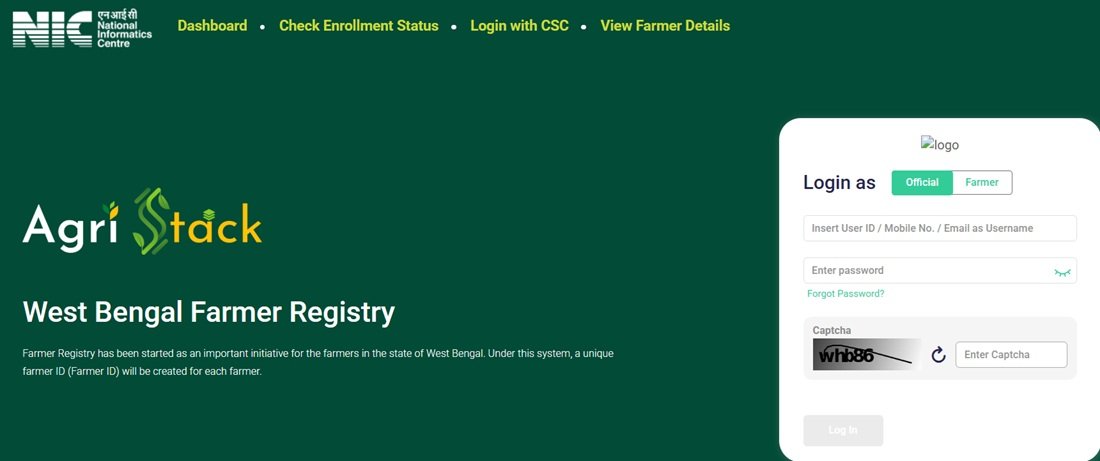
The West Bengal Farmer Registry (WBFR) is the state-level portal for implementing the Farmer Registry in West Bengal. Its official homepage states that the Farmer Registry has started as an important initiative for farmers in the state and that the system will create a unique Farmer ID for each farmer.
The national Farmer Registry framework uses an 11-digit Farmer ID as a unique digital identity. It connects the farmer’s identity with relevant land records and other agricultural information maintained by the concerned authorities. The final Farmer ID is different from the enrolment reference that a farmer may receive during the registration or land-claim process.
Farmers should also understand that AgriStack is not an income-support scheme. It does not independently provide a fixed amount of money to every registered farmer. Instead, it creates a digital identity and information framework that can help government departments deliver agricultural schemes and services.
For information about other agricultural assistance programmes in the state, farmers can also read our guides on the West Bengal Krishak Bandhu Scheme and West Bengal Mukhyamantri Kisan Samman Nidhi Yojana.
AgriStack West Bengal Official Portal – WBFR Website
The Government of West Bengal provides the Farmer Registry portal through the following official web address:
Official Website: https://wbfr.agristack.gov.in/farmer-registry-wb/#/
The portal uses the government domain agristack.gov.in and displays the title West Bengal Farmer Registry. Farmers can access the portal using a mobile phone, laptop or desktop computer.
The homepage currently displays the following services:
- Dashboard: Access the Farmer Registry dashboard.
- Check Enrollment Status: Open the page for checking the status of a Farmer Registry enrollment.
- Login with CSC: Access the separate login option for Common Service Centre operators.
- View Farmer Details: Open the page for viewing registered farmer details.
- Farmer Login: Log in to the portal as a registered farmer.
- Official Login: Access the portal through the official user login.
Farmers should use the official website instead of relying on unknown links shared through messages or social media. Before entering personal information, check the complete website address in the browser.
Direct Links to Important WBFR Portal Services
| Portal Service | Direct Link |
|---|---|
| West Bengal Farmer Registry Homepage | Open Portal |
| Dashboard | Open Dashboard |
| Check Enrollment Status | Check Status |
| View Farmer Details | View Details |
| Login with CSC | Open CSC Login |
How to Login to AgriStack West Bengal Portal?
The West Bengal Farmer Registry portal provides separate login options for farmers and officials. It also displays a separate Login with CSC option for Common Service Centre operators. Users should select the login option according to their role instead of using an official or operator account as a farmer.
Farmer Login Process
Farmers who already have an active portal account can follow these steps to access their WBFR account:
- Visit the official West Bengal Farmer Registry portal.
- Locate the login section on the homepage.
- Under the Login as option, select Farmer.
- Enter the registered User ID, mobile number or email address in the username field, as supported by the portal.
- Enter the account password.
- Type the displayed captcha code correctly.
- Click the Log In button to proceed.
After successful authentication, the portal will provide access to the services available for the farmer’s account. The available options may depend on the user’s registration and account status.
How to Create a New User Account on WBFR Portal?
The West Bengal Farmer Registry homepage displays a Create New User Account option. The portal also provides an important instruction for farmers whose Farmer Registry was created through CSC or Camp Mode.
According to the portal notice, such farmers must first create a portal account before logging in. They need to use the Create New User Account option to complete a one-time registration and activate Self-Login access.
Follow these steps if your registration was completed through a CSC or a registration camp:
- Open the West Bengal Farmer Registry portal.
- Find the Create New User Account option in the login section.
- Open the account creation page.
- Follow the instructions displayed on the screen and provide the information requested by the portal.
- Complete the required verification steps, if prompted.
- Submit the details to complete the one-time account creation process.
- After activating Self-Login access, return to the homepage and use the Farmer login option.
Important: The portal notice specifically mentions this requirement for registrations completed through CSC or Camp Mode. Farmers should follow the instructions displayed on the live account creation page because the exact fields and verification steps may change.
Login with CSC – For Common Service Centre Operators
The WBFR homepage provides a separate Login with CSC option. This login is intended for authorised Common Service Centre operators who provide registration-related assistance to farmers.
A farmer who wants to access personal Farmer Registry details should use the Farmer login option. The CSC login should not be confused with the normal farmer account.
Official Login – For Government Officials
The portal also displays an Official login option. It is intended for authorised government users who have been provided access to the Farmer Registry system according to their official responsibilities.
Government officials and authorised users should use their assigned credentials. Ordinary farmers should not select the Official login option to access their personal Farmer Registry information.
What to Do If You Cannot Login?
If you cannot access your WBFR account, check the following points:
- Make sure you have selected the correct login type.
- If your registration was completed through CSC or Camp Mode, create your portal account first.
- Check whether you have entered the correct username and password.
- Enter the captcha carefully.
- Use the Forgot Password option if you cannot remember your password.
- Check that you are using the official WBFR website.
Who Is Eligible for AgriStack West Bengal Farmer ID Registration?
The national Farmer Registry framework primarily covers landholding farmers. It also provides a mechanism for onboarding tenant and sharecropper cultivators, subject to the applicable state policy. West Bengal’s specific eligibility and onboarding conditions should be confirmed through the state authorities.
Farmers should generally keep the following points in mind:
- Applicants should have a valid farmer identity and relevant land or cultivation details.
- Land ownership information should match the applicable land records.
- Applicants should be able to complete the identity and consent verification required by the registration process.
- Tenant farmers and sharecroppers should confirm the state-specific registration procedure with the local agriculture office.
- Applicants with joint land ownership or inherited land should follow the official verification process.
The national framework does not mean that every cultivator will automatically receive a Farmer ID under identical conditions. The state government determines the applicable procedures for its Farmer Registry. Farmers who do not find their land details or who cultivate land owned by another person should contact the concerned agriculture office before submitting a claim.
Documents Required for West Bengal Farmer Registry
Farmers should keep the following information and documents ready before approaching the registration authority. The exact requirements may depend on the registration mode and the instructions issued by the state authorities.
- Aadhaar Card or other identity details requested by the official process.
- Mobile number for the required authentication process.
- Land Record of Rights (RoR) or relevant land ownership details.
- Banglarbhumi land details, where applicable.
- District, block, mouza, khatian and dag or plot details, as relevant to the land record.
- Additional documents requested by the authorised registration official.
Note: This is a practical preparation list, not a confirmed exhaustive West Bengal document checklist. Carry the documents requested by your registration centre or the concerned agriculture office.
How to Register Online for AgriStack West Bengal Farmer ID?
Farmers can visit the official WBFR portal to access the available Farmer Registry services. However, the portal homepage and its publicly accessible information do not provide a complete, verifiable sequence of fields for fresh self-registration. Therefore, farmers should not assume that creating a portal login account automatically completes their Farmer Registry enrollment.
The following steps explain how to start the process and use the official portal without confusing account creation with Farmer ID registration.
- Open the official website: Visit wbfr.agristack.gov.in using a mobile phone or computer.
- Check the available farmer services: Review the homepage and identify the Farmer login and other available registration-related options.
- Check whether you already have an enrollment: If your details were submitted earlier through a CSC or camp, visit the Check Enrollment Status page.
- Create a portal account if required: If your registry was created through CSC or Camp Mode, use the Create New User Account option as instructed by the portal.
- Follow the registration instructions: If the portal provides a fresh registration or land-claim facility for your account, enter the requested information and complete the verification and consent process displayed on the screen.
- Check your submitted details: Verify the farmer and land information before final submission. Incorrect land details or identity information may affect the verification process.
- Save the enrollment reference: If the system generates an Enrollment ID or acknowledgement, keep it safely for future reference.
- Check the enrollment status: Use the official status-check facility to follow the progress of your application.
Important distinction: The Create New User Account facility activates portal access for eligible users. It should not be treated as proof that a new Farmer ID has been generated. Farmers must complete the applicable Farmer Registry process and check the enrollment result separately.
If the portal does not display a fresh registration facility or you cannot complete the process independently, contact the local agriculture office or an authorised registration centre for the current West Bengal procedure.
How to Register for Farmer ID Through CSC or Registration Camps?
Farmers who need assistance with the Farmer Registry can enquire about registration through authorised Common Service Centres or government-supported registration activities in their area. The national AgriStack framework allows states to use assisted registration and village-level camps. However, farmers should confirm which registration centres and camp facilities are currently operating in their locality.
For assisted registration, follow these practical steps:
- Locate an authorised centre: Contact your nearest Common Service Centre (CSC), Tathya Mitra Kendra or the concerned Block Agriculture Office to confirm whether it provides West Bengal Farmer Registry assistance.
- Carry your documents: Take your identity details, mobile phone and relevant land records.
- Explain your registration requirement: Inform the operator whether you need a fresh Farmer Registry enrollment or assistance with an existing enrollment.
- Complete the required verification: Follow the official process for identity verification, land details and consent.
- Check the information before submission: Confirm that your name and land details match the relevant records.
- Collect the acknowledgement: If the system generates an Enrollment ID or acknowledgement, keep it for future status checks.
- Activate portal access if required: If the registration was completed through CSC or Camp Mode, use the Create New User Account option on the WBFR portal to activate Self-Login access.
Do not share your password or OTP with an unauthorised person. Before paying any service charge, ask the centre to explain the charge and provide a receipt. The available WBFR portal information does not specify a uniform official CSC service fee.
How to Check AgriStack West Bengal Farmer Registration Status?
Farmers who have already submitted their details can use the WBFR portal’s Check Enrollment Status facility to check the progress of their registration.
Follow these steps:
- Visit the official West Bengal Farmer Registry website.
- Click the Check Enrollment Status option in the main menu.
- You can also open the status page directly through this link: WBFR Check Enrollment Status.
- Enter the information requested on the status-check page.
- Complete any verification or captcha step displayed by the portal.
- Submit the details and review the result shown on the screen.
The exact search fields and status labels should be followed as displayed on the live page. Keep your enrollment acknowledgement or reference details ready because they may help the concerned office identify your application.
If your registration remains pending or the portal does not show your enrollment, contact the centre or official that handled your registration. You can also approach the concerned Block Agriculture Office for assistance.
How to View or Print West Bengal Farmer ID Details?
The West Bengal Farmer Registry website provides a separate View Farmer Details option. Farmers can use this facility to access the page intended for viewing registered farmer information.
To open the facility:
- Visit the official WBFR portal.
- Click View Farmer Details in the main menu.
- Alternatively, open the direct page: View Farmer Details.
- Follow the instructions and provide the details requested on the page.
- Complete the required verification, if displayed.
- Review the farmer information available through the facility.
The availability of specific view, print or download options may depend on the portal’s current functionality and the user’s registration status. Use the options actually displayed on the official page rather than relying on instructions from unofficial websites.
How to Download Farmer ID Card in West Bengal?
Farmers often search for a way to download or print their AgriStack Farmer ID card after completing registration. The WBFR portal provides a View Farmer Details page, but the publicly available homepage information does not confirm the exact card-download button or PDF format.
If your Farmer ID has been generated, follow these steps to check whether the portal provides a downloadable or printable record:
- Open the View Farmer Details page.
- Follow the instructions displayed on the page.
- Complete the required authentication, if prompted.
- Check whether your registered Farmer ID and details are available.
- If the page provides a print or download option, use that facility to save or print your details.
- If you cannot access the details, contact the registration centre or concerned agriculture office.
Note: Do not assume that an Enrollment ID is the final Farmer ID. The national AgriStack FAQ clearly distinguishes the enrollment reference from the final 11-digit Farmer ID. Also, do not use an unofficial website or mobile application to download a Farmer ID card.
Operator WB (Farmer Registry) Mobile App – For Officials
West Bengal also has a mobile application named Operator WB (Farmer Registry). The app is listed on Google Play and is intended for officials and authorised operators involved in the Farmer Registry process. It should not be confused with a general-purpose mobile application for farmers to complete self-registration.
Official App: Operator WB (Farmer Registry) on Google Play
What Is the Operator WB App?
Operator WB (Farmer Registry) is an operator-facing mobile application associated with the West Bengal Farmer Registry. Officials and authorised operators use it to support the verification work involved in the Farmer Registry process.
Who Can Use the Operator WB App?
The app is intended for authorised officials and operators who have the required access to carry out their assigned Farmer Registry responsibilities. Ordinary farmers should not assume that they can use the app to register themselves or check their personal Farmer ID status.
How Do Officials Use the App for Farmer Verification?
Authorised users can use the application according to the access and verification responsibilities assigned to them. The verification process helps officials examine farmer-related information submitted during the registration process.
Farmers who want to access their own registration details should use the WBFR official portal and its Farmer Login, Check Enrollment Status and View Farmer Details facilities.
Important: Download the app only from its Google Play listing, and use it only if you have been authorised to access the operator system.
Benefits of AgriStack Farmer ID for West Bengal Farmers
The Farmer Registry creates a digital identity framework that can support agricultural services and improve the delivery of government assistance.
- Provides a unique digital identity to registered farmers.
- Links farmer information with digitised land records.
- Supports more efficient identification and verification of farmers.
- Can reduce repeated documentation across integrated agricultural services.
- Supports the integration of farmer information with eligible DBT programmes.
- Can facilitate access to agricultural credit and crop insurance services.
- Supports MSP-based agricultural procurement and input distribution systems.
- Provides a foundation for better agricultural planning and digital crop information.
These are the intended uses of the national AgriStack framework. Actual access to a particular scheme or service depends on that scheme’s eligibility conditions and the relevant government’s implementation rules. A Farmer ID alone does not guarantee approval or payment under any scheme.
Difference Between Farmer ID, Krishak Bandhu, e-Paddy and PM-KISAN
Farmers in West Bengal may come across several registration systems while accessing agricultural benefits. However, the Farmer ID, Krishak Bandhu, e-Paddy and PM-KISAN serve different purposes. Registering on one platform does not automatically complete registration on the others.
| Service | Purpose | Official Website |
|---|---|---|
| AgriStack Farmer ID | Creates a unique digital identity for farmers and connects relevant farmer information with land records. | WBFR Portal |
| Krishak Bandhu | West Bengal’s farmer welfare scheme that provides financial assistance to eligible farmers and a death benefit under its applicable rules. | Krishak Bandhu Portal |
| e-Paddy | Supports the state’s paddy procurement-related farmer registration and services. | e-Paddy Portal |
| PM-KISAN | Provides income support to eligible farmer families under the Central Government scheme. | PM-KISAN Portal |
The Farmer ID is a digital identity under AgriStack, whereas Krishak Bandhu and PM-KISAN are financial assistance schemes. e-Paddy serves a separate paddy procurement-related purpose. Farmers should use the respective official portals for registration, status checks and scheme-related services.
For more information, read our detailed guides on the West Bengal Krishak Bandhu Scheme, Krishak Bandhu Portal and West Bengal Mukhyamantri Kisan Samman Nidhi Yojana.
Is AgriStack Farmer ID Mandatory in West Bengal?
The Farmer Registry is being developed as a foundational digital identity system for agricultural services. The Government of India is integrating Farmer IDs with different farmer-centric schemes and platforms, including agricultural credit, crop insurance and MSP-based procurement systems.
However, the availability of a Farmer ID and its mandatory requirement for a particular scheme are two different matters. A requirement may depend on the guidelines issued by the concerned department or the rules of an individual scheme.
As of 17 November 2026, the available WBFR portal information does not establish a blanket state-wide rule that every farmer must possess a Farmer ID to receive every agricultural benefit in West Bengal. Farmers should check the latest instructions issued by the concerned department before treating the Farmer ID as compulsory for a particular service.
AgriStack West Bengal Registration Last Date and Fee
What Is the Last Date for Farmer ID Registration?
The available information on the West Bengal Farmer Registry portal does not display a specific last date for Farmer ID registration. Farmers should check the official WBFR website and follow any fresh instructions or announcements issued by the state government.
Do not rely on an unofficial deadline unless it is supported by an official government notice.
Is There Any Registration Fee?
The WBFR homepage does not specify a uniform registration fee. If you register through an authorised CSC or another assisted facility, ask the operator about any applicable service charge before proceeding. Always request a receipt for any payment.
Common Problems in AgriStack West Bengal Registration and Their Solutions
Farmers may face difficulties while accessing the portal, completing their registration or checking their enrollment status. The following suggestions can help them identify the next step.
- Portal is not opening: Check your internet connection and try accessing the official website again after some time.
- Unable to log in: Select the correct login type and check your username and password.
- Registration completed through CSC but login is unavailable: Use Create New User Account to activate Self-Login access, as instructed by the portal.
- Password forgotten: Use the Forgot Password option displayed on the login page.
- Enrollment status is unavailable: Check the details entered on the status page and use the acknowledgement information provided during registration.
- Farmer details are incorrect: Contact the authority or centre that handled the enrollment and ask about the official correction procedure.
- Land details are not matching: Verify the relevant land record information and contact the concerned land or agriculture office if a correction is necessary.
- Unable to access Farmer Details: Follow the authentication instructions displayed on the official View Farmer Details page.
Land Records and Banglarbhumi: Common Issues During Registration
Land records play an important role in the Farmer Registry because the system links farmer information with digitised land records. Incorrect or outdated land details may create difficulties during the verification process.
Farmers should pay attention to the following points:
- Name mismatch: Check whether the name in the relevant land record matches the identity details used during registration.
- Incorrect plot details: Verify the district, block, mouza, khatian and dag or plot information against the official land record.
- Joint ownership: If the land has multiple recorded owners, follow the verification procedure applicable to the ownership record.
- Inherited land: If the land remains recorded in the name of a deceased family member, ask the concerned authority how the current record affects registration.
- Pending mutation: If ownership details have changed but the land record has not been updated, contact the relevant land and land reforms office.
Farmers can use the West Bengal government’s Banglarbhumi portal to access land and land-record-related services. If the land record contains an error, resolve it through the appropriate official process rather than entering incorrect information in the Farmer Registry.
Important Links for AgriStack West Bengal (WBFR)
Farmers can use the following direct links to access the official West Bengal Farmer Registry services and related government portals.
| Service / Portal | Direct Link |
|---|---|
| AgriStack West Bengal Official Portal | Click Here |
| WBFR Dashboard | Click Here |
| Farmer Registration Status Check | Click Here |
| View Farmer Details | Click Here |
| Operator WB (Farmer Registry) App | Click Here |
| National AgriStack Portal | Click Here |
| Banglarbhumi Land Records Portal | Click Here |
| West Bengal Krishak Bandhu Portal | Click Here |
| West Bengal e-Paddy Portal | Click Here |
| PM-KISAN Official Portal | Click Here |
| West Bengal Government Schemes | Click Here |
Contact Details for West Bengal Farmer Registry Assistance
Farmers who face problems during registration, verification or login can seek assistance from the concerned local authorities. The following offices and service points may help farmers identify the correct registration or grievance channel:
- Block Agriculture Office: Contact the agriculture office responsible for your block and ask about the Farmer Registry process.
- Krishi Prajukti Sahayak: Approach the concerned field-level agriculture functionary for guidance, where this service is available.
- Common Service Centre: Contact an authorised CSC to enquire about assisted Farmer Registry services.
- Tathya Mitra Kendra: Enquire about Farmer Registry assistance at the relevant centre, where the facility is available.
- Gram Panchayat: Ask the local office whether any Farmer Registry camp or registration assistance programme is operating in your area.
For a registration-related complaint, keep your Enrollment ID or acknowledgement, if available, and relevant land details ready. The WBFR homepage does not currently provide a verified dedicated public helpline number in the information available for this article. Therefore, farmers should use the official portal and local government offices instead of relying on unverified contact numbers.
Frequently Asked Questions (FAQs)
Ans. AgriStack West Bengal is the state-level Farmer Registry system, also known as the West Bengal Farmer Registry (WBFR). It aims to create a unique digital identity, called the Farmer ID, for farmers by linking relevant farmer information with digitised land records.
Ans. The official West Bengal Farmer Registry website is wbfr.agristack.gov.in.
Ans. WBFR stands for West Bengal Farmer Registry. It is the official portal that provides Farmer Registry-related facilities, including Farmer Login, Official Login, CSC Login, enrollment status checking and viewing farmer details.
Ans. A Farmer ID is a unique 11-digit digital identity created under the national Farmer Registry framework. It helps identify farmers and connect their information with relevant agricultural records and services.
Ans. No. The Enrollment ID is a registration or land-claim reference generated during the enrollment process. The final Farmer ID is a separate 11-digit identity created under the national Farmer Registry framework.
Ans. Visit the official WBFR portal, select Farmer under the Login as option, enter your registered username, mobile number or email address, provide your password and complete the captcha.
Ans. Open the official portal and select Create New User Account. The portal specifically instructs farmers whose registry was created through CSC or Camp Mode to complete this one-time account creation process before using Self-Login.
Ans. Open the Check Enrollment Status page on the official WBFR portal and enter the information requested by the system.
Ans. Visit the View Farmer Details page and follow the instructions displayed on the portal.
Ans. Farmers can check the View Farmer Details facility for available viewing, printing or downloading options. The exact download facility should be confirmed on the live portal.
Ans. Farmers should keep their identity details, mobile number and relevant land records ready. The registration centre or portal may request additional information according to the applicable process.
Ans. The national Farmer Registry framework provides a mechanism to onboard tenant and sharecropper cultivators. Their inclusion depends on the applicable state policy and registration procedure. Farmers should confirm the West Bengal-specific rules with the concerned agriculture office.
Ans. The Farmer ID supports the integration of agricultural services and schemes. However, whether it is compulsory for a particular scheme depends on that scheme’s official guidelines. Farmers should check the latest instructions issued by the concerned department.
Ans. The available WBFR portal information does not mention a specific registration deadline. Check the official website for any new government announcement.
Ans. The WBFR homepage does not specify a uniform registration fee. If you use an assisted service, ask the authorised centre about any applicable service charge and request a receipt.
Ans. Operator WB (Farmer Registry) is an operator-facing mobile application intended for authorised officials and operators involved in the West Bengal Farmer Registry process. It is not a general farmer self-registration app.
Ans. No. The app is intended for officials and authorised operators. Farmers should use the WBFR portal to access their own registration and Farmer Registry services.
Ans. No. Farmer ID is a digital identity under AgriStack, whereas Krishak Bandhu is a separate West Bengal farmer welfare scheme. Both serve different purposes and have separate registration systems.
Ans. Farmers should visit the separate West Bengal e-Paddy portal for paddy procurement-related registration and services. The e-Paddy portal is different from the WBFR Farmer Registry.
Ans. You can approach the concerned Block Agriculture Office, an authorised Common Service Centre or the relevant local agriculture functionary for assistance with the Farmer Registry process.

Tabassum is a government schemes researcher and writer with 5 years of experience tracking Central and State welfare scheme programmes across India. She has covered 500+ schemes spanning agriculture, women welfare, education, and housing, helping lakhs of beneficiaries understand their entitlements in simple language.