The Nagaland AgriStack Portal provides online access to farmer-related digital services in the state. Farmers and authorised users can visit the portal to check enrollment status, view farmer details, access login facilities and use other available services. This guide explains the portal’s main features, account access options and important official links.
Nagaland AgriStack Portal: An Overview
The Government of Nagaland is implementing AgriStack to build a digital database of farmers and connect farmer information with digitised land records. The initiative aims to improve the identification of farmers and support the delivery of agriculture-related government services.
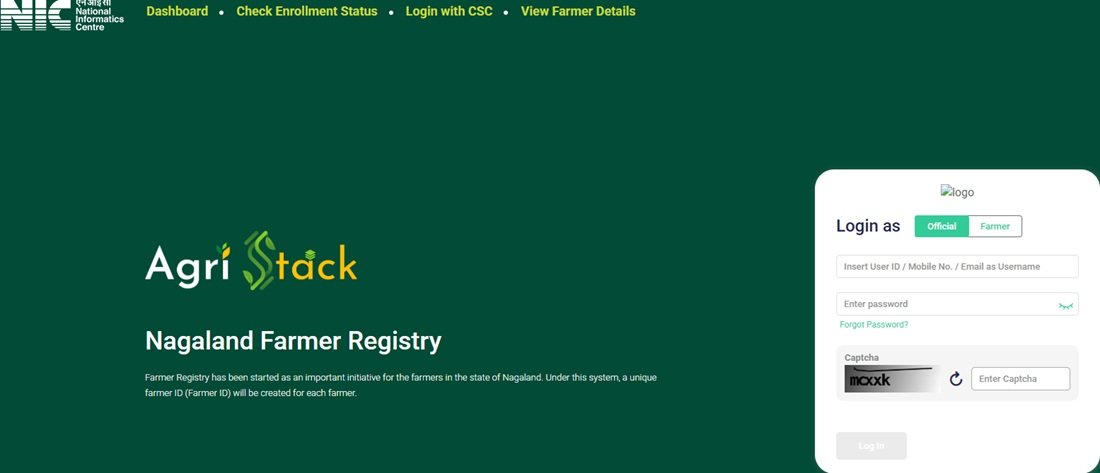
The state has launched a dedicated online platform for accessing its Farmer Registry services. The portal is available at ngfr.agristack.gov.in. It provides options such as Dashboard, Check Enrollment Status, Login with CSC and View Farmer Details.
The portal also provides separate login options for farmers and officials. Farmers whose registration was completed through a Common Service Centre (CSC) or a government camp can create a portal account to activate their Self-Login facility.
Nagaland’s AgriStack implementation has also progressed through district-level activities. According to the Department of Information and Public Relations, the state began implementation in 2022 and identified Wokha and Chümoukedima as pilot districts. The pilot phase started in June 2026, with full-scale implementation in these two districts planned from November 2026. The state update also mentions village-level activities, land surveys and coordination among district authorities, Agriculture Department offices and Village Councils.
Farmers can use the following official website to access the available facilities:
Official Portal: Nagaland AgriStack Portal
Farmers looking for a separate explanation of registration and Farmer ID services can also read our Nagaland Farmer Registry guide.
Services and Facilities Available on the Portal
The Nagaland AgriStack Portal displays several options on its homepage. Each option serves a different purpose, so users should select the relevant facility before proceeding.
| Portal Service | Purpose |
|---|---|
| Dashboard | Displays the portal’s dashboard and grievance redressal facility. |
| Check Enrollment Status | Allows users to check enrollment status using an Aadhaar number or Farmer ID. |
| Login with CSC | Provides a separate login option for CSC users. |
| Farmer and Official Login | Allows users to access the portal through the relevant login category. |
| Create New User Account | Allows eligible users to create an account for Self-Login access. |
| View Farmer Details | Provides an Aadhaar-based facility to retrieve farmer details after verification. |
| Check Jansamarth KCC Status | Provides access to the listed KCC status-check facility. |
| RoR Sync Dashboard | Provides access to the listed Record of Rights synchronization dashboard. |
The portal may update its services and interface over time. Users should follow the instructions displayed on the official website before submitting information or using a particular facility.
Portal Login for Farmers and Officials
The Nagaland AgriStack Portal provides separate login categories for farmers and officials. Users can find these options in the login section of the website.
The login page displays the following options:
- Login as Official: For authorised officials who have portal login credentials.
- Login as Farmer: For farmers who have created their portal accounts and activated Self-Login access.
- User ID / Mobile Number / Email: The username field accepts the login identifier requested by the portal.
- Password: Users must enter their account password.
- Captcha: The page requires users to enter the displayed captcha.
- Forgot Password: Users can select this option if they cannot remember their password.
Steps to access the portal login page
- Visit the Nagaland AgriStack Portal.
- Open the login section available on the homepage.
- Select the appropriate category, Farmer or Official.
- Enter your User ID, mobile number or email address in the username field, as applicable.
- Enter your password.
- Type the captcha displayed on the screen.
- Click the Log In option to continue.
The portal will process the login details and provide access according to the user’s account and permissions. Farmers who registered through CSC or Camp Mode but have not created their own portal account should complete the one-time account creation process first.
Forgot your password? Select the Forgot Password option on the login page and follow the instructions displayed by the portal. The exact recovery steps may depend on the verification options currently available on the website.
Creating a New User Account for Self-Login
Creating a portal account is an important step for farmers whose Farmer Registry enrollment was completed through CSC or Camp Mode. The Nagaland portal displays a notice explaining that these farmers must first create a new user account before they can use the Self-Login facility.
This means that completing enrollment through a CSC or registration camp and creating a personal portal login account are two separate steps. A farmer may already have a registry record but still need to activate personal login access.
Official account creation page: Create New User Account
Steps to start account creation
- Open the official Nagaland AgriStack website.
- Locate the login section on the homepage.
- Select the Create New User Account option.
- The portal will open its account creation page.
- Follow the verification and account creation instructions displayed on the screen.
- Complete the process and follow the portal’s instructions to activate your account.
- Return to the login page and use your newly created credentials to access the available farmer services.
The account creation page uses the route name FarmerSignupEkyc. However, the exact form fields and verification sequence may change. Farmers should therefore follow the live instructions instead of relying on an assumed list of details or steps.
Important: The one-time account creation notice specifically concerns farmers whose records were created through CSC or Camp Mode. It does not mean that every farmer must create a separate account before starting the initial enrollment process.
Farmer Enrollment Status Check Facility
Farmers who have already submitted their enrollment details can use the Check Enrollment Status facility on the Nagaland AgriStack Portal. The page allows users to search against an Aadhaar number or Farmer ID.
Official status-check page: Check Enrollment Status
The portal provides two search options:
- Aadhaar Number: Users can select this option and complete OTP verification. The portal sends the OTP to the mobile number linked with Aadhaar.
- Farmer ID: Users can select this option to check the enrollment record against their Farmer ID.
Steps to check enrollment status
- Visit the Nagaland AgriStack Portal.
- Click Check Enrollment Status on the homepage.
- Select Aadhaar Number or Farmer ID under the Check Status Against section.
- If you select Aadhaar Number, enter the required Aadhaar details.
- Complete OTP verification using the OTP sent to your Aadhaar-linked mobile number.
- If you select Farmer ID, enter the requested identification details.
- Submit the information and check the result displayed by the portal.
Keep access to your Aadhaar-linked mobile number if you choose the Aadhaar-based option. If you cannot complete verification or the portal does not retrieve your record, contact the concerned support channel for assistance.
Viewing Farmer Details Through the Portal
The Nagaland AgriStack Portal provides a separate View Farmer Details facility. Farmers can use this option to retrieve their available registry information through Aadhaar-based verification.
The page asks users to search by Farmer Aadhaar Number and complete OTP verification. This facility is separate from the enrollment status page, so users should select the correct option for their purpose.
Official page: View Farmer Details
Steps to access farmer details
- Open the official portal.
- Select View Farmer Details from the homepage.
- Enter the Aadhaar number in the search field.
- Request the OTP and complete the verification process using the Aadhaar-linked mobile number.
- Submit the verified request.
- Check the farmer information displayed by the portal.
The portal provides a facility to view farmer details. Its publicly visible page does not confirm a separate Farmer ID card download service. Farmers should use the available viewing facility and check the portal for any additional options introduced later.
CSC Login and Assisted Access
The Nagaland AgriStack Portal displays a separate Login with CSC option. This facility is distinct from the regular Farmer and Official login categories.
Common Service Centres provide assisted access to various digital government services. Farmers who need help with online processes can approach an authorised CSC operator and ask about the available Farmer Registry assistance.
Farmers should keep one point in mind: a CSC operator’s login and a farmer’s personal Self-Login account serve different purposes. If the operator or a registration camp has already created the farmer’s registry record, the farmer may still need to complete the one-time account creation process to access the portal independently.
Steps to access the CSC option
- Open the Nagaland AgriStack Portal.
- Select Login with CSC from the homepage.
- Follow the instructions displayed on the CSC login page.
- Use the authorised CSC login credentials to proceed.
The CSC login facility is intended for authorised users. Farmers should not use another person’s CSC credentials or share their personal OTP and password with an unauthorised person.
Grievance Redressal Facility
The Nagaland AgriStack Portal includes a Dashboard option that provides access to the Grievance Redressal facility. This gives users a portal-based route to the grievance section for issues related to the available services.
Official dashboard: Nagaland AgriStack Dashboard
Users can open the dashboard and check the grievance-related options available on the page. The exact complaint submission fields, tracking process and response timelines should be followed as displayed on the live portal.
If a user cannot access the online grievance facility, they can contact the Directorate of Agriculture, Nagaland, through its published contact details. While raising an issue, explain whether it relates to enrollment, login, Aadhaar verification, farmer details or another portal service.
PM-Kisan KCC Status and RoR Sync Dashboard
The Nagaland AgriStack Portal homepage also lists two additional facilities: Check Jansamarth KCC Status and RoR Sync Dashboard. These options appear separately from the regular farmer login and enrollment services.
Check Jansamarth KCC Status
The portal displays a Check Jansamarth KCC Status option. KCC stands for Kisan Credit Card, a credit facility designed to support eligible farmers with agricultural and related credit requirements.
Users can open the listed option and follow the instructions provided by the linked service. The portal’s homepage confirms the availability of this option, but it does not explain the complete status-check process or all the information required to use it.
Remember that access to a KCC status-check facility does not mean that a Farmer ID automatically approves a Kisan Credit Card. Banks and other concerned institutions follow their own eligibility, verification and lending rules.
RoR Sync Dashboard
RoR stands for Record of Rights. It refers to land and revenue records that contain details relating to land ownership and other recorded rights.
The Nagaland AgriStack Portal lists a RoR Sync Dashboard as a separate facility. Its name indicates a connection with the synchronization of Record of Rights information. However, the public-facing portal information does not provide enough detail to confirm its complete functions, access permissions or the actions available to ordinary farmers.
Users should open the official dashboard and follow the instructions provided there. They should not treat this option as a general land-record search or land ownership correction service unless the portal specifically provides such a facility.
Note: Both options are listed on the portal. Their detailed workflows should be confirmed through the live service rather than assumed from their names.
Important Links
Farmers and other users can access the main Nagaland AgriStack services through the official links below.
| Service | Official Link |
|---|---|
| Nagaland AgriStack Portal | Open Portal |
| Dashboard and Grievance Redressal | Open Dashboard |
| Check Enrollment Status | Check Status |
| Create New User Account | Create Account |
| View Farmer Details | View Details |
| Login with CSC | Open Portal |
| Department of Agriculture, Nagaland | Visit Website |
| Department Contact Details | View Contact Page |
Some services open through options on the portal homepage rather than through a separate public URL. In those cases, open the main website and select the relevant service.
Contact Details for Assistance
Farmers who face difficulties while accessing the Nagaland AgriStack Portal can approach the Directorate of Agriculture, Government of Nagaland. The department’s official website publishes the following contact information.
Directorate of Agriculture, Nagaland
- Address: New Secretariat Area, Kohima, Nagaland – 797001
- Phone: 0370-2243116
- Email: agrilan-ngl@gov.in
- Official Website: agriculture.nagaland.gov.in
- Contact Page: Department Contact Details
When contacting the department, clearly explain the issue you are facing. Mention whether you need help with account creation, login, enrollment status, Aadhaar OTP verification or access to farmer details. This will help the concerned office understand your query.
For security, do not share your password or OTP with unknown callers or unauthorised persons.
Frequently Asked Questions (FAQs)
Ans. The official website is ngfr.agristack.gov.in/farmer-registry-ng/. Users can access the dashboard, enrollment status, login and farmer details facilities through this portal.
Ans. The portal lists Dashboard, Check Enrollment Status, Login with CSC, Farmer and Official Login, Create New User Account, View Farmer Details, Check Jansamarth KCC Status and RoR Sync Dashboard.
Ans. Open the official portal, select the Farmer login option, enter the required username and password, complete the captcha and click Log In. Farmers who registered through CSC or Camp Mode may need to create a portal account first.
Ans. Farmers whose registry records were created through CSC or Camp Mode must complete the one-time account creation process before using the Self-Login facility.
Ans. Visit the official website, select Create New User Account and follow the verification and account creation instructions displayed on the portal.
Ans. Open the Check Enrollment Status page and select Aadhaar Number or Farmer ID. If you choose Aadhaar-based verification, complete the OTP process using your Aadhaar-linked mobile number.
Ans. Yes. The enrollment status page provides a Farmer ID option under the Check Status Against section.
Ans. Open the View Farmer Details page, enter your Aadhaar number and complete the OTP verification process to access the information available through the portal.
Ans. Yes. The homepage displays a Login with CSC option separately from the Farmer and Official login facilities.
Ans. The portal provides access to a grievance redressal section through its Dashboard. Users should open the dashboard and follow the complaint-related instructions available there.
Ans. It is a separate facility listed on the Nagaland AgriStack Portal for accessing the linked KCC status service. Users should follow the instructions displayed after opening the option.
Ans. RoR stands for Record of Rights. The portal lists a dashboard related to RoR synchronization, but its public-facing information does not explain all its functions or access permissions.
Ans. The publicly visible portal information confirms a View Farmer Details facility but does not confirm a separate Farmer ID card download option. Check the official website for any updated services.
Ans. Select Forgot Password on the login page and follow the recovery instructions displayed by the portal.
Ans. You can contact the Directorate of Agriculture, Nagaland, at 0370-2243116 or email agrilan-ngl@gov.in. The department is located at New Secretariat Area, Kohima, Nagaland – 797001.

Tabassum is a government schemes researcher and writer with 5 years of experience tracking Central and State welfare scheme programmes across India. She has covered 500+ schemes spanning agriculture, women welfare, education, and housing, helping lakhs of beneficiaries understand their entitlements in simple language.