The Delhi AgriStack Portal provides an online platform to access different farmer-related digital services, including enrollment status checking, CSC login, grievance redressal and farmer details. Farmers and authorised users can visit the portal to access the available facilities without searching through different websites. This article explains the portal’s main features, login options and important services in simple language.
Delhi AgriStack Portal 2026: Overview | |
|---|---|
| Portal Name | Delhi AgriStack Portal |
| Portal Department | Agriculture and Farmers Welfare framework |
| Portal URL | dlfr.agristack.gov.in |
| Main Purpose | Provide online access to farmer-related digital services |
| Login Options | Farmer, Official and CSC |
| Key Services | Enrollment Status, Grievance Redressal, Jansamarth KCC Status, RoR Sync Dashboard and View Farmer Details |
| Account Creation | Available through the portal |
| Mode | Online |
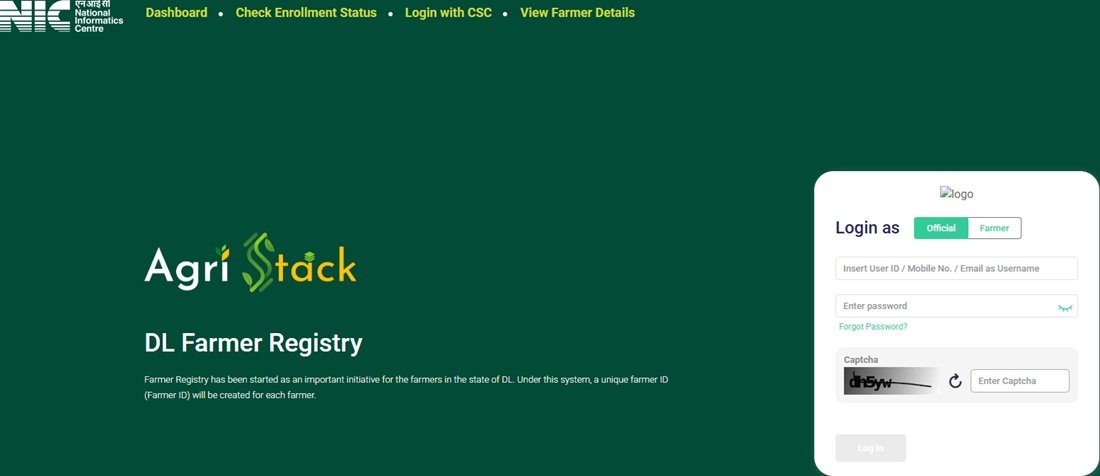
Delhi AgriStack Portal Official Website
The Delhi AgriStack Portal operates through the official AgriStack platform. Farmers and other authorised users can visit the website to access the services available for Delhi.
Official Portal: https://dlfr.agristack.gov.in/farmer-registry-dl/
The portal provides separate access options for farmers, officials and Common Service Centres (CSCs). It also displays links to different online facilities, including enrollment status checking and farmer details.
Users should always access the official website before entering their Aadhaar number, OTP or login credentials. Avoid sharing these details with unauthorised persons.
Services Available on the Delhi AgriStack Portal
The Delhi portal brings several farmer-related services together on one platform. Users can select the relevant option from the portal’s navigation menu according to their requirements.
| Service | Purpose |
|---|---|
| Dashboard | View enrollment-related information and statistics. |
| Check Enrollment Status | Check enrollment information using an Aadhaar number or Farmer ID. |
| Login with CSC | Access the portal through the CSC login option. |
| View Farmer Details | Search for farmer details through Aadhaar-based verification. |
| Jansamarth KCC Status | Access the option for checking Jansamarth KCC status. |
| RoR Sync Dashboard | Access the dashboard related to Record of Rights synchronisation. |
| Grievance Redressal | Access the grievance-related dashboard option. |
Not every service has the same access requirements. Some options may ask users to log in, while others may require Aadhaar-based OTP verification.
Delhi AgriStack Portal Dashboard
The Dashboard option provides an overview of farmer enrollment-related information. It displays different statistics that help users understand the enrollment position shown on the portal.
Based on the dashboard fields available on the Delhi portal, users may find information such as:
- Total PM-KISAN beneficiaries.
- Total farmer enrollments recorded up to the previous day.
- Enrollment percentage in comparison with PM-KISAN beneficiaries.
- Number of approved Farmer IDs.
- Farmer ID approval percentage.
- Enrollment cases pending for Farmer ID generation and approval.
- Today’s enrollment count.
- Enrollment information based on available modes and districts.
The dashboard also displays a data refresh notice. The portal information shared for this guide mentions a refresh interval of five minutes. However, the figures can change as the system receives new records.
Important: Dashboard figures represent the data available at the time of viewing. Do not treat previously displayed figures as the latest enrollment statistics. Visit the Delhi AgriStack Dashboard to check the current information.
Delhi AgriStack Portal Login
The Delhi portal provides separate login options for farmers and officials. Users should select the appropriate category before entering their credentials.
Follow these steps to access the login page:
- Visit the official Delhi AgriStack Portal.
- Open the login section displayed on the homepage.
- Select the Farmer or Official option, depending on your role.
- Enter your registered User ID, mobile number or email address as requested by the portal.
- Enter your password and the displayed captcha code.
- Click the Log In button to proceed.
If you cannot access your account, use the Forgot Password option available on the login screen. Follow the instructions displayed by the portal to recover access.
Farmers who have not created their portal account may need to complete the account creation process before using the self-login facility. The next section explains the account activation requirement for CSC and camp-registered farmers.
Grievance Redressal on Delhi AgriStack Portal
The Delhi portal includes a Dashboard option with the tooltip “Grievance Redressal”. This provides a grievance-related entry point within the portal.
Users who face an issue with enrollment or another portal-related service can check the available grievance option. However, the exact complaint submission procedure, tracking facility and resolution timeline should be confirmed from the live portal before relying on them.
To access this option:
- Open the Delhi AgriStack Portal.
- Select the Dashboard option from the navigation menu.
- Check the grievance-related facility displayed on the page.
- Follow the instructions available on the portal, if a complaint submission option appears.
Keep your enrollment details and relevant records available when raising a complaint. Do not submit incorrect information or share your OTP with anyone.
Check Enrollment Status on Delhi AgriStack Portal
Farmers can use the Check Enrollment Status facility to find information about their enrollment. The portal provides search options through an Aadhaar number or Farmer ID.
Official Status Check Link: Check Enrollment Status
Follow these steps:
- Open the official enrollment status page.
- Select the available search method, such as Aadhaar Number or Farmer ID.
- If you select Aadhaar Number, enter the required number in the given field.
- Complete the OTP verification process. The portal indicates that it sends the OTP to the mobile number linked with Aadhaar.
- Enter the OTP and proceed.
- Check the enrollment information displayed on the screen.
Keep the mobile number linked with your Aadhaar active so that you can receive the verification OTP.
If you have not completed your enrollment yet, first check the Delhi Farmer Registry guide for relevant information about the Farmer Registry process.
Login with CSC on Delhi AgriStack Portal
The Delhi AgriStack Portal also provides a separate Login with CSC option. Common Service Centre operators can use this facility to access the portal through the designated CSC login process.
To access the option:
- Visit the Delhi AgriStack Portal.
- Select Login with CSC from the available navigation options.
- Proceed through the login process displayed on the website.
- Enter the required credentials or complete the authentication requested by the portal.
The portal displays CSC login as a separate access option. Users should follow the instructions shown on the official website rather than using an unofficial login link.
Check Jansamarth KCC Status
The Delhi portal includes an option named Check Jansamarth KCC Status. It allows users to access the facility associated with checking their Jansamarth Kisan Credit Card status.
To find this option, visit the official Delhi AgriStack Portal and look for the Jansamarth KCC status facility in the available menu or service section.
For information about the wider credit-linked scheme platform, users can also visit the official JanSamarth Portal managed by the Department of Financial Services, Ministry of Finance.
The JanSamarth platform provides access to credit-linked government schemes, including Kisan Credit Card-related services. The actual application or status-check requirements depend on the service selected on the relevant platform.
Note: The Delhi portal displays the Jansamarth KCC Status option. Its exact verification fields and step-by-step process should be followed as shown on the live service page.
RoR Sync Dashboard: Land Record Synchronization Status
The Delhi AgriStack Portal lists a service named RoR Sync Dashboard. RoR generally refers to the Record of Rights, which contains land-record information maintained by the concerned revenue authority.
The presence of this option indicates that the portal provides access to a dashboard related to RoR synchronisation. However, users should not assume that it allows them to edit land records, correct ownership details or download a land-record certificate.
To access the facility, visit the official portal and select the RoR Sync Dashboard option. Check the information and instructions displayed on the page.
If you find an error in your land details, follow the applicable land-record correction process through the concerned revenue authority. The AgriStack dashboard should not be treated as a replacement for the official land-record correction procedure.
View Farmer Details on Delhi AgriStack Portal
The View Farmer Details facility allows users to search for farmer-related information through the portal. The page provided by Delhi includes an Aadhaar number field and OTP-based verification.
Direct Link: View Farmer Details
Follow these steps:
- Open the official View Farmer Details page.
- Enter the Aadhaar number in the required field.
- Complete the OTP verification process using the mobile number linked with Aadhaar.
- Enter the OTP and proceed.
- Check the farmer information displayed by the portal.
Use this facility only when you need to access your own information or have proper authorisation to check another farmer’s details.
The availability of a search facility does not automatically mean that the portal provides a downloadable Farmer ID card or certificate. Check the options displayed after verification before expecting a print or download facility.
Important Links
| Service | Direct Link |
|---|---|
| Delhi AgriStack Portal | Click Here |
| Portal Dashboard | Click Here |
| Check Enrollment Status | Click Here |
| Create New User Account | Click Here |
| View Farmer Details | Click Here |
| Delhi Farmer Registry Guide | Read More |
| National AgriStack Portal | Click Here |
| JanSamarth Portal | Click Here |
Frequently Asked Questions (FAQs)
Ans. The official Delhi AgriStack Portal is available at dlfr.agristack.gov.in.
Ans. The portal displays facilities such as Dashboard, Check Enrollment Status, Login with CSC, View Farmer Details, Jansamarth KCC Status and RoR Sync Dashboard.
Ans. Farmers can visit the official website, select the Farmer login option and enter the required login credentials and captcha.
Ans. Yes. The portal provides a Check Enrollment Status facility. Users can search using an Aadhaar number or Farmer ID and complete the required verification.
Ans. The enrollment status page indicates that the OTP is sent to the mobile number linked with the Aadhaar number used for verification.
Ans. Farmers whose Farmer Registry was created through CSC or Camp Mode must first create a portal account to activate Self-Login access, as instructed on the Delhi portal.
Ans. Users can open the Create New User Account option and follow the Aadhaar e-KYC consent and verification process displayed by the portal.
Ans. RoR refers to Record of Rights. The Delhi portal provides a dashboard option related to RoR synchronisation. Users should check the live dashboard for the exact information and facilities available.
Ans. Yes. The View Farmer Details page provides an Aadhaar number and OTP-based search facility.
Ans. The portal information covered in this guide confirms the View Farmer Details facility, but it does not establish a separate Farmer ID download facility. Check the options available after logging in or completing verification.
Ans. Users can visit the Dashboard section of the official Delhi AgriStack Portal to view the latest statistics displayed by the system.

Tabassum is a government schemes researcher and writer with 5 years of experience tracking Central and State welfare scheme programmes across India. She has covered 500+ schemes spanning agriculture, women welfare, education, and housing, helping lakhs of beneficiaries understand their entitlements in simple language.