The Odisha AgriStack Portal is an online platform that provides access to digital farmer registration services in the state. It operates under the national AgriStack initiative and allows farmers and authorised users to access different services through a single website.
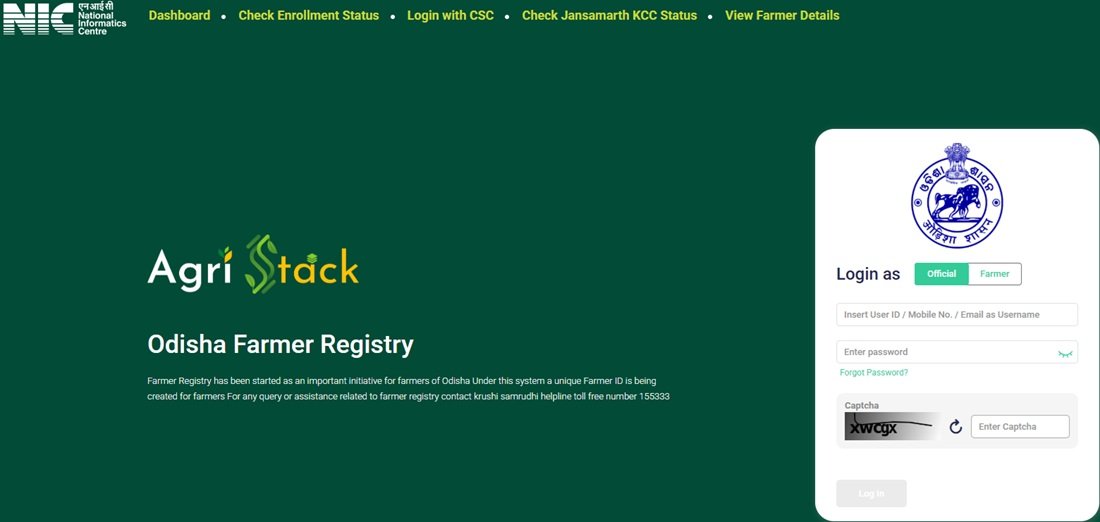
Farmers can use the portal to access their accounts, check enrollment status, view registered details and check their JanSamarth KCC status. The website also provides separate login options for farmers and officials, along with facilities to create a new user account and recover a forgotten password.
Farmers who have already completed their enrollment through a Common Service Centre (CSC) or a government camp can also create an online account to activate self-login access. This facility helps them access their registration-related information without repeating the enrollment process.
In this article, we explain the important features of the Odisha AgriStack Portal, its login options, account services, status-check facilities and direct links to different sections of the website. For the complete enrollment procedure, read our detailed guide on Farmer Registry Odisha.
Odisha AgriStack Portal Dashboard and Available Services
The portal dashboard provides an overview of farmer enrollment and approval activities in Odisha. It displays important figures related to enrollment, approved Farmer IDs and other registration-related activities.
Users can visit the Odisha AgriStack Dashboard to view the available statistics.
The dashboard may display the following information:
- PM-KISAN Beneficiaries: The total number of PM-KISAN beneficiaries recorded in the dashboard.
- Total Enrollment: The number of farmers enrolled in the state registry.
- Enrollment Percentage: The share of enrolled farmers compared with the PM-KISAN beneficiary count.
- Approved Farmer IDs: The number of Farmer IDs approved through the registration process.
- Pending Cases: Enrollment records awaiting Farmer ID generation or approval.
- Today’s Enrollment: The number of new enrollments recorded during the current day.
The dashboard also provides an overview of enrollment activities carried out through different processes, wherever the portal displays such information.
Dashboard data update: The portal displays a notice stating that dashboard data refreshes every five minutes. Therefore, the figures may change as new enrollment and approval records enter the system.
Important: Dashboard figures represent administrative progress. They do not confirm an individual farmer’s enrollment or guarantee approval of a Farmer ID. Farmers should use the dedicated status-check facility to verify their own records.
Farmer and Official Login Options
The Odisha AgriStack Portal provides separate login options for farmers and authorised officials. Users should select the appropriate option according to their role and the purpose of accessing the website.
Farmer Login
Farmers can use the farmer login facility to access their portal accounts and available self-service options. A farmer who has already enrolled through CSC or Camp Mode may need to create a user account before using this facility.
Official Login
The official login option is intended for authorised government users who perform assigned activities related to the registry. Farmers should not use this option for their personal account access.
Login Through CSC
The portal also provides a Login with CSC option. This facility is intended for authorised Common Service Centre users who assist farmers with portal-related services.
Always access the login facility through the official Odisha AgriStack website. Do not share your password or OTP with unauthorised persons.
Create a New User Account on the Portal
Farmers can use the Create New User Account option to set up their online access to the portal. This facility is particularly useful for farmers who have already completed their enrollment but do not yet have a self-login account.
The portal provides an Aadhaar e-KYC-based signup facility. Follow these steps to access the account creation page:
- Visit the official Odisha AgriStack Portal.
- Locate the Create New User Account option on the homepage.
- Open the Aadhaar e-KYC signup page.
- Read the consent information displayed on the screen before proceeding.
- Enter the required Aadhaar details and complete OTP verification using your Aadhaar-linked mobile number.
- Follow the remaining instructions displayed by the portal to complete the account creation process.
- After successful registration, use the available farmer login facility to access your account.
You can also open the Aadhaar e-KYC Signup Page directly.
Note: Creating a portal account and enrolling in the Farmer Registry are not the same activity. If you have already enrolled through an authorised CSC or camp, account creation activates your self-login access. It does not mean that you must submit a fresh enrollment.
Activate Self-Login Access for CSC and Camp Registered Farmers
Farmers who completed their enrollment through a Common Service Centre or an authorised registration camp may not automatically have access to a personal online account.
The Odisha AgriStack Portal displays a notice explaining that farmers registered through CSC or Camp Mode must first create a portal account to activate Self-Login access. The portal treats this as a one-time registration activity.
Follow these steps:
- Open the official Odisha AgriStack Portal.
- Select the Create New User Account option.
- Proceed to the Aadhaar e-KYC signup facility.
- Complete the Aadhaar verification process using the OTP sent to your registered mobile number.
- Follow the instructions shown on the screen to finish setting up your account.
- Return to the homepage and access the farmer login option.
This process provides online account access to previously enrolled farmers. It does not replace the original enrollment or approval process.
If the portal does not recognise your details, first check whether your enrollment has been recorded successfully. You can use the Enrollment Status facility for this purpose.
Forgot Password and Account Access
Farmers who cannot access their existing portal accounts can use the Forgot Password option available on the login page.
Follow these steps:
- Visit the Odisha AgriStack Portal.
- Open the farmer login section.
- Select the Forgot Password option.
- Enter the information requested by the portal.
- Complete the required verification process.
- Follow the on-screen instructions to reset your password.
- Return to the login page and try accessing your account with the updated credentials.
The exact verification steps depend on the options displayed by the portal. If you cannot reset your password, contact the official agriculture helpdesk or seek assistance from the concerned registration centre.
Security tip: Never share your OTP or password with another person. Use only the official website to recover your account.
Check Farmer Enrollment Status Online
The enrollment status facility helps farmers check the progress of their registration request. It is useful for applicants who have completed enrollment but are waiting for verification, approval or Farmer ID generation.
The portal allows users to search for enrollment details using an Aadhaar number or Farmer ID, as supported by the available options.
Steps to Check Enrollment Status
- Visit the Check Enrollment Status page.
- Select the available search option, such as Aadhaar Number or Farmer ID.
- Enter the required details in the appropriate field.
- Complete the verification process using the OTP sent to your Aadhaar-linked mobile number.
- Submit the details to view the available enrollment information.
- Check the status displayed on the screen and follow the instructions, if any.
The status page helps farmers understand whether their enrollment is under process or has moved to the next stage. If the record requires further verification, the farmer may need to contact the concerned authority.
For a detailed explanation of enrollment, pending cases and Farmer ID approval, refer to our guide on Odisha Farmer Registry and its status-check process.
View and Print Farmer Registration Details
The portal provides a separate View Farmer Details facility. Farmers can use this option to retrieve their registered information through Aadhaar-based verification.
Follow these steps:
- Open the View Farmer Details page.
- Enter your Aadhaar number in the required field.
- Request and enter the OTP sent to your Aadhaar-linked mobile number.
- Complete the verification process.
- Check the farmer information displayed by the portal.
- Use the available print or download option, if provided on the page.
Before using the details for any official purpose, carefully check the information displayed on the portal. If you notice an incorrect name, land detail or other discrepancy, contact the appropriate authority for correction.
This facility is different from the enrollment status page. The status page helps track an application, while the View Farmer Details page provides access to the available registered information.
Check JanSamarth KCC Application Status
The Odisha AgriStack Portal also provides a separate option to check JanSamarth KCC status. Farmers can use this facility to access the status information available through the portal.
Follow these steps:
- Visit the Check JanSamarth KCC Status page.
- Review the information requested on the page.
- Enter the required details in the appropriate fields.
- Complete any verification process displayed by the portal.
- Submit the information and check the status shown on the screen.
JanSamarth KCC status checking is a separate portal service. It should not be confused with checking Farmer Registry enrollment or Farmer ID approval.
If the portal does not display the required information, users should follow the instructions shown on the page or contact the concerned support channel.
Odisha AgriStack Dashboard Statistics and Enrollment Data
The dashboard helps users understand the overall progress of farmer enrollment in Odisha. It presents aggregated figures rather than individual farmer records.
Some important figures displayed on the dashboard include:
- Total PM-KISAN beneficiaries.
- Total farmer enrollment recorded in the system.
- Enrollment percentage against the PM-KISAN beneficiary count.
- Number of approved Farmer IDs.
- Cases pending for Farmer ID generation or approval.
- Daily enrollment figures.
These figures help users understand the progress of the digital registration exercise. However, they should not use the overall dashboard numbers to determine the status of an individual application.
Farmers should open the dedicated enrollment status page to check their own records. They can also use the View Farmer Details facility to access their available registered information.
Data freshness: Dashboard statistics can change as the system receives new records. Always check the live dashboard before quoting any figures in a report or article. Avoid relying on old screenshots or previously published enrollment numbers.
Common Portal Access and Login Issues
Users may sometimes face difficulties while opening the portal, creating an account or accessing their enrollment details. Many such issues relate to verification, incorrect information or incomplete account setup.
The following table explains some common situations and the appropriate next step.
| Problem | What You Can Do |
|---|---|
| OTP not received | Check whether your Aadhaar-linked mobile number is active and wait before requesting another OTP. |
| Unable to create a new account | Check the Aadhaar details and follow the verification instructions displayed on the signup page. |
| CSC or Camp enrollment not visible in login | Complete the one-time account creation process required to activate Self-Login access. |
| Forgotten password | Use the Forgot Password option on the login page. |
| Enrollment status not found | Check the Aadhaar number or Farmer ID entered and verify that the enrollment has been submitted. |
| Incorrect farmer or land details | Contact the appropriate agriculture or revenue authority, depending on the nature of the discrepancy. |
| Portal page not opening | Check your internet connection, refresh the page and try again later. |
If a problem continues after following these steps, contact the official helpdesk. Keep your enrollment acknowledgement or other relevant details available when seeking assistance.
For land ownership, RoR or mutation-related discrepancies, farmers may also need to approach the concerned Revenue Office. Portal login support cannot independently correct an underlying land record.
Important Links to Odisha AgriStack Services
Farmers can use the following direct links to access different services available on the Odisha AgriStack Portal.
| Service | Direct Link |
|---|---|
| Official Odisha AgriStack Portal | Click Here |
| Dashboard | Click Here |
| Farmer Login and Official Login | Visit Portal |
| Create New User Account | Click Here |
| Check Enrollment Status | Click Here |
| View Farmer Details | Click Here |
| Check JanSamarth KCC Status | Click Here |
| Farmer Registry Odisha Registration Guide | Read Full Guide |
| Odisha Agriculture Department | Click Here |
| Farmer Registry Official Information and SOP | Click Here |
Official Helpdesk and Contact Information
Farmers who face difficulties while accessing the portal or using agriculture-related services can contact the Odisha Agriculture Department through its official support channels.
- Krushi Samrudhi Helpline: 155333
- Department: Department of Agriculture and Farmers’ Empowerment, Government of Odisha
- Address: Krushi Bhavan, Bhubaneswar, Odisha, India, PIN 751001
- Department Office Phone: 0674-2391325
- Directorate of Agriculture and Food Production: 0674-2395532
- Official Website: Contact Us
The Krushi Samrudhi helpline provides assistance and information related to agriculture and government agriculture schemes. Farmers should explain their issue clearly and keep their enrollment details available when contacting the support team.
For issues involving land records, ownership or mutation, farmers should approach the concerned Revenue Office. For portal-related information, they can also refer to the official Farmer Registry information page of the Odisha Agriculture Department.
Frequently Asked Questions (FAQs)
Ans. The official Odisha AgriStack Portal is an online platform that provides access to farmer registration-related services, account facilities, enrollment status, farmer details and JanSamarth KCC status. Farmers can visit odfr.agristack.gov.in to access it.
Ans. Visit the official portal and select the Dashboard option. You can also open the dashboard directly to view enrollment and approval statistics.
Ans. Yes. Farmers can use the Create New User Account facility and complete the Aadhaar e-KYC-based signup process available on the portal.
Ans. Yes. The portal instructs farmers enrolled through CSC or Camp Mode to complete a one-time account creation process to activate Self-Login access.
Ans. Open the farmer login section and select Forgot Password. Follow the verification and password-reset instructions displayed by the portal.
Ans. Open the Check Enrollment Status page, enter your Aadhaar number or Farmer ID as applicable and complete OTP verification.
Ans. Yes. Open the View Farmer Details page, enter your Aadhaar number and complete OTP verification to access the information available in the system.
Ans. Yes. The portal provides a separate Check JanSamarth KCC Status option. Visit the dedicated page and follow the instructions displayed there.
Ans. The dashboard displays a notice stating that its data refreshes every five minutes. The figures may change as new records enter the system.
Ans. Check whether your Aadhaar-linked mobile number is active and whether you have entered the correct details. If the problem continues, contact the official support channel.
Ans. No. Login provides access to an existing portal account, while registration creates an enrollment record. Farmers who have already enrolled through CSC or Camp Mode may only need to create an account to activate Self-Login access. Read our detailed Farmer Registry Odisha guide for the enrollment process.
Ans. Farmers can contact the Krushi Samrudhi helpline at 155333 for agriculture-related assistance and queries. They can also visit the official Odisha Agriculture Department website for contact information.

Tabassum is a government schemes researcher and writer with 5 years of experience tracking Central and State welfare scheme programmes across India. She has covered 500+ schemes spanning agriculture, women welfare, education, and housing, helping lakhs of beneficiaries understand their entitlements in simple language.